







This topic describes how to call the open API of OCP by using HTTP. It also provides an example of the API call for the “query cluster list” interface.
Request structure
A complete HTTP request consists of request URI, Request Method, request headers, and request body.
Request URI
The request URI consists of the following components:
{scheme}://{endpoint}/{resource-path}?{query-string}
Field |
Description |
|---|---|
| scheme | The protocol for data transmission. It is generally http or https. |
| endpoint | The endpoint of OCP. For example, xxx.xxx.xxx.xxx:8080, which is determined by the specific deployment. |
| resource-path | The resource path of the interface. For more information, see the "Request Path" section in the corresponding interface documentation. For example, the resource path for "Query Cluster List" is /api/v2/ob/clusters. |
| query-string | The query parameters. This component is optional. It is in the a=10&b=hello format and contains several key-value pairs. The query-string and resource-path are separated with ?. |
A complete URI for the "Query Cluster List" request is as follows:
http://xxx.xxx.xxx.xxx:8080/api/v2/ob/clusters
Request method
The HTTP method, which includes GET, PUT, POST, and DELETE. The request method for each interface is described in detail in the corresponding interface documentation.
For example, the request path for the "Query Cluster List" request is GET /api/v2/ob/clusters. The request method for this interface is therefore "GET".
Request headers
The request headers contain additional information about the request, such as the language and authentication information.
Name |
Required |
Description |
Example |
|---|---|---|---|
| Content-Type | Yes | The type of the request body. OCP uses the application/json type for the request body. | application/json |
| Accept-Language | No | The languages supported by the client. OCP Open API supports internationalization. It returns content in the specified language based on the client's language settings. | en-US, en, q=0.9 zh-CN |
| Authorization | Yes | The authentication information. OCP Open API uses HTTP Basic authentication. The username and password are encoded in Base64. | Basic Zm9vOmJhcg== |
Request body
The request body is optional. It contains the business data sent to the server. OCP Open API uses the JSON format for the request body.
Authentication
Clients that access OCP APIs can use either the AK/SK or HTTP Basic authentication mode.
HTTP Basic authentication mode
When you call an API, you must specify the username and password in the
Authorizationheader of the request message by using Base64 encoding.For example, if the password of the foo user is bar, you must specify the
Authorizationheader in the request message when you use the foo user to call OCP APIs:Authorization: Basic Zm9vOmJhcg==Here,
Zm9vOmJhcg==is the Base64 encoding offoo:bar.Note
HTTP Basic authentication mode may cause the password to be leaked. We recommend that you use the AK/SK authentication mode instead.
AK/SK authentication mode
The AK/SK authentication mode prevents the password from being transmitted in plaintext over HTTP. It also allows you to grant access to others without sharing the password.
For more information, see AK/SK signature generation rules.
Return structure
The return data of OCP APIs uses a unified data structure (except for some special APIs). The basic return data structure is as follows:
Parameter |
Type |
Description |
|---|---|---|
| data | Object | The data of the single value, list, or paginated type. |
| ├─ contents | Array | ├─ The relationship with the preceding parameter. |
| successful | Boolean | Indicates whether the request is successful. |
| timestamp | Datetime | The timestamp when the server completes the request. |
| duration | Integer | The time that the server takes to process the request, in milliseconds. |
| status | Integer | The HTTP status code that conforms to the HTTP status code specification. |
| traceId | String | The trace ID of the request, which is used to troubleshoot issues. |
| server | String | The server identifier that responds to the request. |
Call example
curl
You can use the curl tool to call OCP APIs. In the following example, the username is admin and the password is hello. The URL of the OCP application is xxx.xxx.xxx.xxx, the port is 8080, and the API is to query the tenant list. Here, YWRtaW46aGVsbG8= is the Base64 encoding of admin:hello.
curl "http://xxx.xxx.xxx.xxx:8080/api/v2/ob/clusters/1/tenants"  \
  -H "Authorization: Basic YWRtaW46aGVsbG8="
curl also supports the use of plaintext passwords.
curl "http://xxx.xxx.xxx.xxx:8080/api/v2/ob/clusters/1/tenants"  \
  --user admin:hello
Note
Using plaintext passwords reduces security. Use this method with caution.
Internationalization support
OCP APIs support internationalization. The APIs return content in the language specified by the client. For more information, see the documentation of each API, which describes whether the attributes of the API support internationalization.
OCP APIs use the Accept-Language attribute in the request message header to indicate the language option of the client.
Traffic control
OCP provides traffic control to prevent users from accessing OCP too frequently. When you create a user, you can set traffic control policies for the user. Traffic control resources include global paths, which contain HTTP requests except for static resources, and fine-grained access control, which allows you to set access limits for different resource types in OCP. The traffic control window can be 10 seconds, 1 minute, 1 hour, or 1 day.
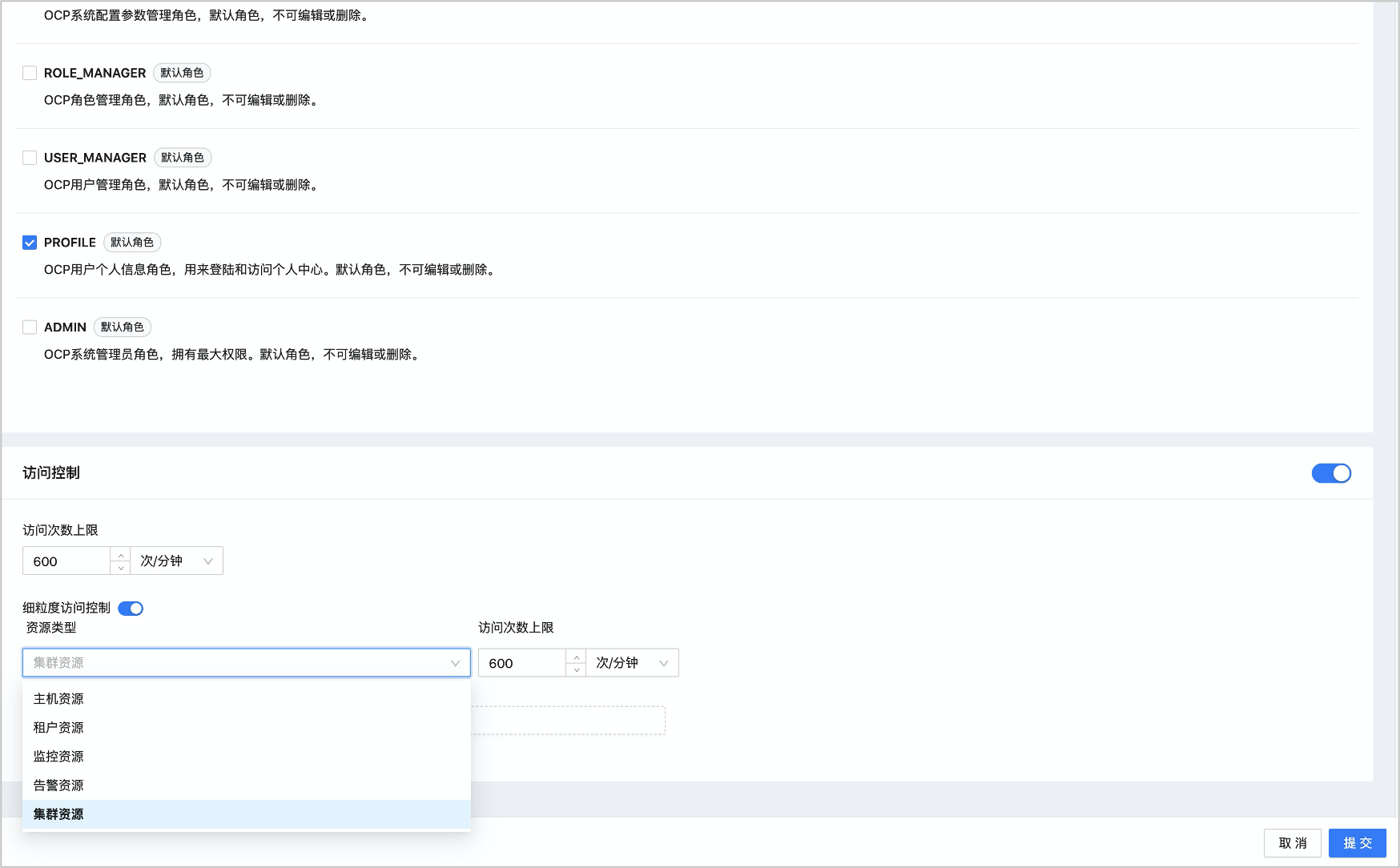
You can use the system parameter ocp.iam.rate-limit.enabled to enable or disable traffic control. By default, the value is true, which means traffic control is enabled.
When traffic control is enabled, the following headers are returned:
RateLimit-Limit: the maximum number of requests allowed in the current window, for example, "10".RateLimit-Remaining: the number of requests remaining in the current window, for example, "7".RateLimit-Reset: the time at which the current window resets, for example, "53".
When the frequency of requests to a resource interface exceeds the specified limit within a window, HTTP returns 429. The response is as follows:
{
    "duration":0,
    "error":{
        "code":0,
        "message":"Too many requests. You have exceeded the request limit within the current traffic control window."
    },
    "server": "a83ad33525",
    "status":429,
    "successful":false,
    "timestamp":"2020-12-03T09:38:24.194+08:00",
    "traceId":""
}