







This topic describes how to perform a failover between primary and standby OceanBase clusters for disaster recovery in a scenario with two IDCs.
Scenarios
When the IDC that hosts the primary OceanBase cluster fails due to, for example, power outage, you can convert a standby cluster in the other IDC to the primary cluster to provide services. This way, your business can be recovered soon.
Prerequisites
- The current cluster is a standby cluster and is in Running state.
- The primary cluster corresponding to the current cluster is stopped or unavailable, and all OBServer nodes of the primary cluster are inactive.
- The current cluster is in Maximum Performance mode.
- The version of the current cluster is OceanBase Database V2.2.76 or later and earlier than V4.0.
Procedure
Log on to the follower OceanBase Cloud Platform (OCP) cluster and click Clusters in the left-side navigation pane. On the Clusters page, click the name of a standby cluster.
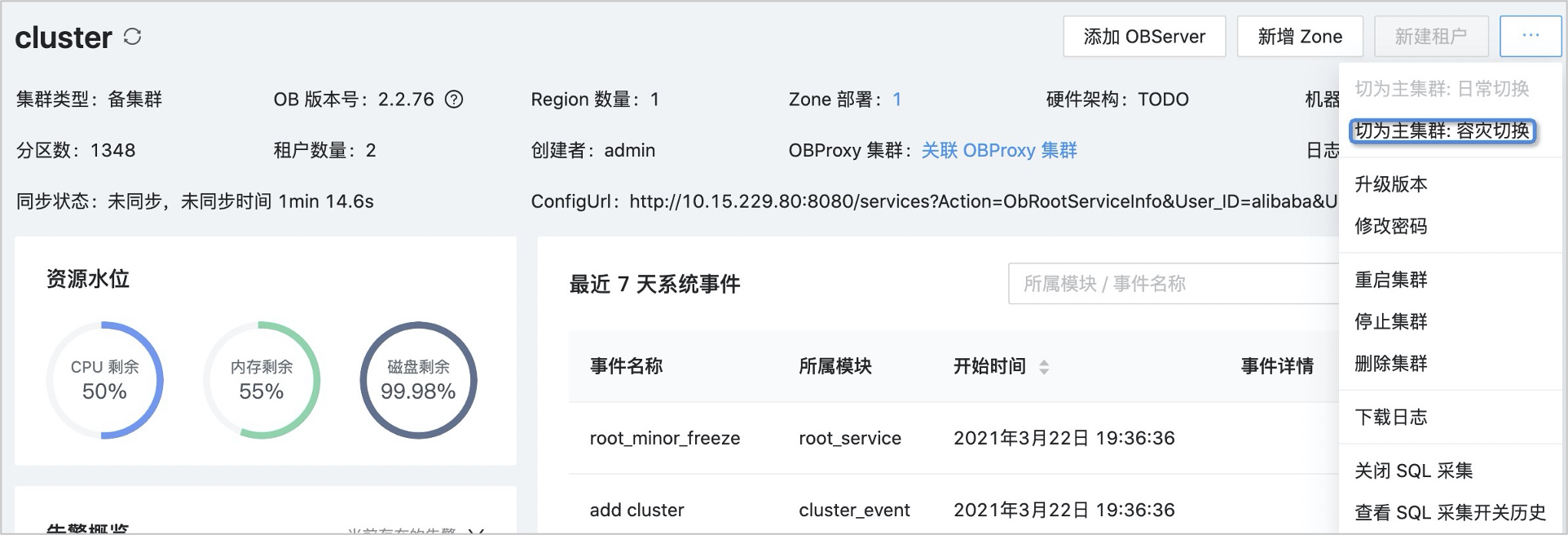
On the page that appears, click the More icon in the upper-right corner and select Switch to Primary Cluster: Disaster Recovery.
In the dialog box that appears, click Switching Disaster Recovery.

Wait for the
Failover ob clustertask to complete. Then, the standby cluster provides services as the new primary cluster.
Note
FAQ
What can I do if the disaster recovery failover fails and the error message prompts that an active OBServer node exists?
Before you perform a disaster recovery failover, check whether all OBServer nodes in the primary cluster are inactive. If not, stop the observer process on active OBServer nodes in the primary cluster.
What can I do to accelerate the failover of a standby cluster if I use OCP earlier than V3.3.0?
You can manually modify the following two hidden parameters and restore their original values after the failover is completed:
_mini_merge_concurrency: specifies the concurrency of a minor compaction. The default value is3. We recommend that you change it to16._ob_minor_merge_schedule_interval: specifies the interval for scheduling minor compactions. The default value is20s. We recommend that you change it to3s.
# View parameter values
SQL> SELECT NAME, VALUE FROM __ALL_VIRTUAL_SYS_PARAMETER_STAT WHERE NAME = '_mini_merge_concurrency';
+-------------------------+-------+
| NAME                    | VALUE |
+-------------------------+-------+
| _mini_merge_concurrency | 3     |
+-------------------------+-------+
1 row in set

SQL> SELECT NAME, VALUE FROM __ALL_VIRTUAL_SYS_PARAMETER_STAT WHERE NAME = '_ob_minor_merge_schedule_interval';
+-----------------------------------+-------+
| NAME                              | VALUE |
+-----------------------------------+-------+
| _ob_minor_merge_schedule_interval | 20s   |
+-----------------------------------+-------+
1 row in set
# Change parameter values
SQL> ALTER SYSTEM SET _mini_merge_concurrency = 16;
Query OK, 0 rows affected

SQL> ALTER SYSTEM SET _ob_minor_merge_schedule_interval = '3s';
Query OK, 0 rows affected
Note
OCP V3.3.0 and later automatically change the values of the preceding two parameters to accelerate the failover of a standby cluster.
How long does a failover last?
The speed of a failover is related to the number of zones, OBServer nodes in a zone, and partitions. In most cases, a failover takes 30 seconds to 25 minutes to complete.
After a failover, how long does it take for my business to connect to the new primary cluster by using OBProxy?
After OCP completes a failover task, it takes 20 seconds to 1 minute for your business to connect to the new primary cluster by using OBProxy.