This topic describes how to take over an arbitration service deployed on a host managed by an OceanBase Cloud Platform (OCP) cluster.
Applicability
This topic applies only to OCP Enterprise Edition. OCP Community Edition does not support this feature.
Prerequisites
No OceanBase cluster is deployed on the host where the arbitration service to be migrated is deployed.
Procedure
Log on to the OceanBase Cloud Platform (OCP) console.
In the left-side navigation pane, click Clusters.
Click the Arbitration Service tab to view the cluster arbitration service list.
On the arbitration service list page that appears, click Take Over Arbitration Service.
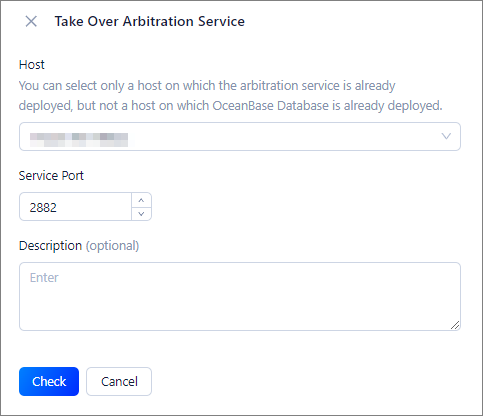
In the Take Over Arbitration Service panel, specify the basic information about the arbitration service.
ParameterDescriptionHost The host for deploying the arbitration service. You can deploy multiple arbitration service processes on the same host. You can search for hosts by IP address or click Add Host in the drop-down list to add an available host. Service Port The port of the arbitration service. By default, Port 2882 is used. You can use a custom port based on your business requirements. Make sure that the port is not occupied. Note The supplementary description of the arbitration service. This parameter is optional. Click Check to verify the specified information.
If the verification fails, you can perform troubleshooting or modify the parameters as prompted.
If the verification succeeds, you can confirm the arbitration service version, operating system user, software path, and associated OceanBase clusters and tenants.
Click OK.