








This topic describes how to replace a faulty or low-performance OBServer node with one that is healthy or provides higher performance.
Prerequisites
The logged-on user in the OceanBase Cloud Platform (OCP) console has the permission to update the target OceanBase cluster.
The target OceanBase cluster is managed in the current OCP cluster.
Otherwise, you need to use the current OCP cluster to take over the OceanBase cluster. For more information, see Take over a cluster.
We recommend that you replace an OBServer node only when your OceanBase cluster has at least three replicas.
Procedure
Log on to the OCP console.
In the left-side navigation pane, click Clusters to go to the Clusters page.
In the Clusters list on this page, find the target cluster and click its name to go to the Overview page of the cluster.
In the OBServers list, find the target OBServer node, and then click Replace in the Actions column.
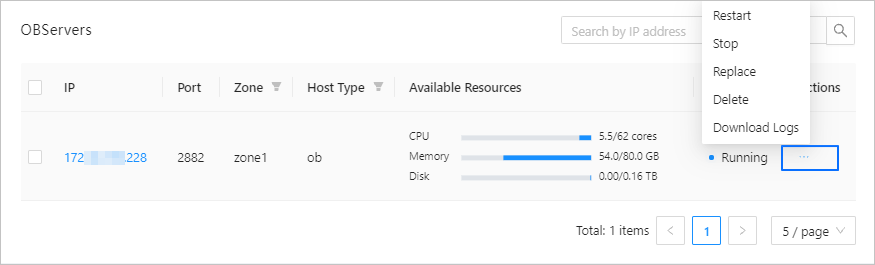
In the dialog box that appears, select a new host, set the startup parameters, and click Replace.
Note
- You can only select a host that matches the hardware architecture of the current cluster, and is in the same IDC as the OBServer node to be replaced.
- When the host is offline, the cleanup job cannot be executed. The cleanup job is skipped and you must manually clean up the host environment.
- In a production environment, we recommend that the size of the log disk be at least three times that of the memory size of the host. To avoid performance issues, we recommend that you do not create the data directory and the log directory on the same disk.
- For more information about the startup parameters of OBServer nodes, see [OceanBase Database parameters](https://www.oceanbase.com/docs/common-oceanbase-database-cn-1000000000218691).
In the dialog box that appears, you can click View Task to view the progress of replacement.
You can also choose System Management > Tasks to view the progress.
When the task enters the Completed state, and the status of the new OBServer node is displayed as Running in the OBServers list on the Overview page, the original OBServer node is replaced.