







The log transmission service synchronizes redo logs between the primary and standby tenants in real time for the physical standby database solution. Specifically, the primary tenant does not actively push logs to the standby tenant. Instead, the standby tenant pulls logs from the primary tenant.
The log transmission service automatically addresses the log location and handles high availability issues such as log lag and node failure in the cluster where the primary tenant is located. The standby tenant can obtain logs either through log archiving from the primary tenant or by directly connecting to the cluster where the primary tenant is located.
The log transmission service provides two different usage modes, which determine the deployment approach for the physical standby database: log archiving-based and network-based.
Log archiving-based physical standby database
In the log archiving-based physical standby database, the redo logs of the standby tenant come from log archiving of the primary tenant or other standby tenants, similar to Oracle database's Far Sync. The standby tenant only interacts with log archiving and does not have any other form of interaction with the upstream primary tenant or other standby tenants.
In this deployment mode, the standby tenant does not require network connectivity with the upstream tenant, but its synchronization performance and availability are affected by the log archiving medium.
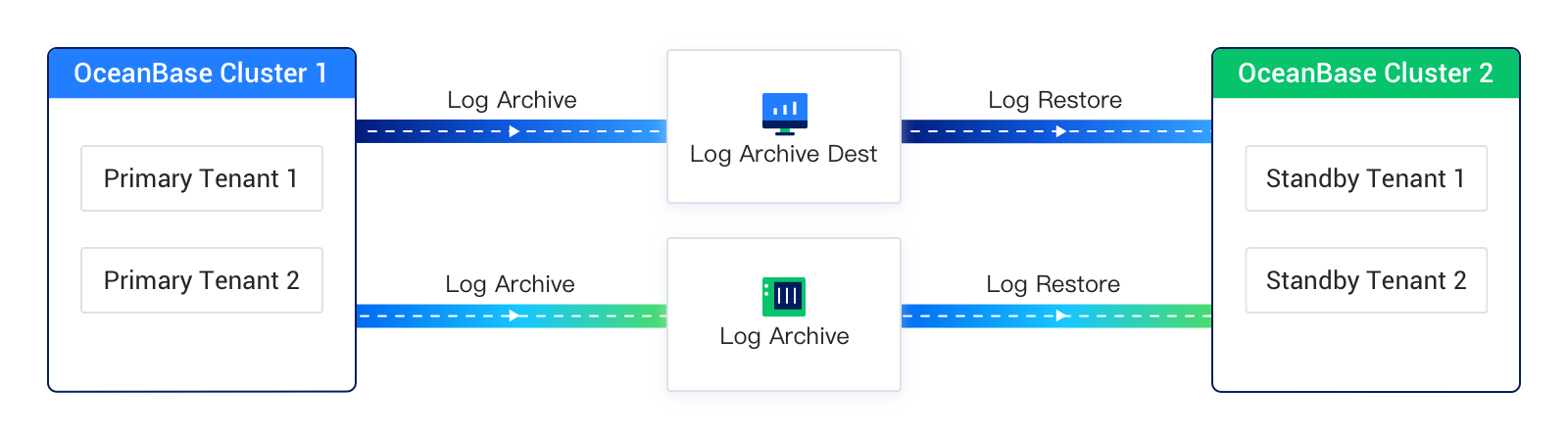
The following figure shows the deployment architecture of the log archiving-based physical standby database. In this figure, Log Archive, Log Archive Dest, and Log Restore collectively form the log transmission service in this deployment mode.
Network-based physical standby database
In a network-based physical standby database, the standby tenant reads logs directly from the primary tenant or other standby tenants over the network, similar to the replication feature in MySQL Database.
In this deployment mode, the standby tenant and the primary tenant must have a reachable network connection. The standby tenant sends RPC requests over the network to retrieve redo logs from the primary tenant's cluster. To ensure high availability in scenarios such as primary tenant node failures or log recycling, the standby tenant also requires minimal query privileges for certain system views on the primary tenant.
Notably, in this deployment mode, the standby tenant continuously requests logs from the primary tenant's log transfer service. The logs returned by the log transfer service can either be the primary tenant's online logs or archived logs (if the primary tenant has enabled log archiving mode). The log source automatically switches between the two, and this process is completely transparent to both the standby tenant and its users.
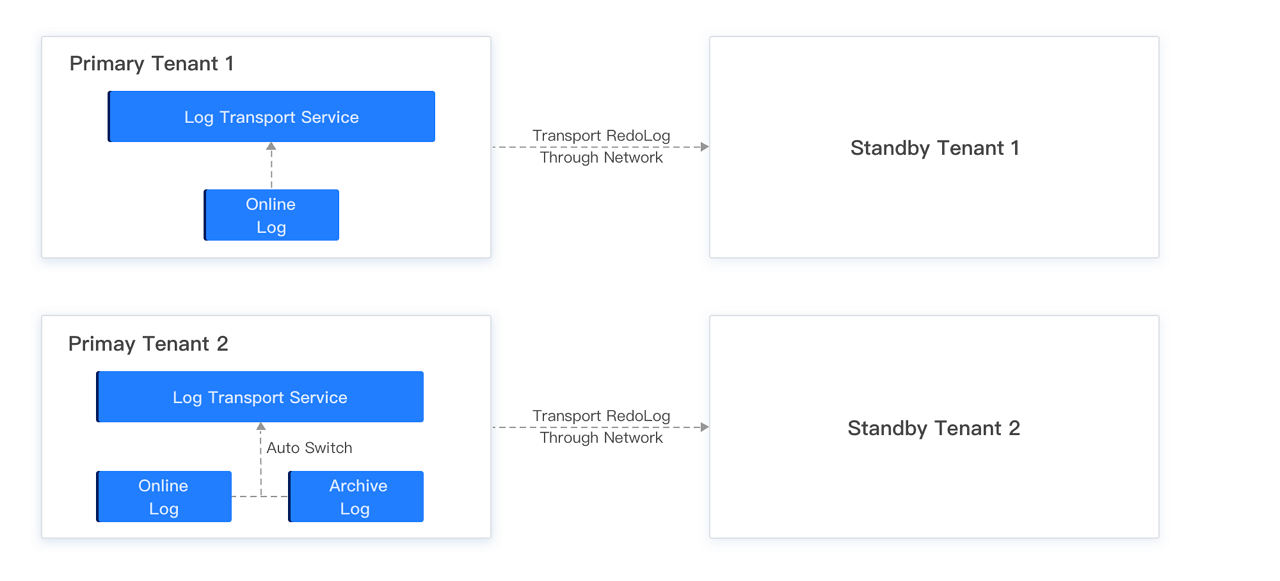
The following diagram illustrates the deployment architecture of the network-based physical standby mode. In the diagram, Primary Tenant 1 has not enabled log archiving, so Standby Tenant 1 can only synchronize Primary Tenant 1's online logs through the log transfer service. On the other hand, Primary Tenant 2 has enabled log archiving, allowing Standby Tenant 2 to synchronize Primary Tenant 2's online logs through the log transfer service. Once the online logs are recycled, the log transfer service automatically switches the log source to archived logs, enabling the standby tenant to continue synchronizing Primary Tenant 2's archived logs. This ensures that log synchronization remains uninterrupted as much as possible.
Comparison between the two deployment modes
The log archiving-based physical standby database and the network-based physical standby database have some differences in terms of feature usage, as shown in the following table.
Feature |
Log archiving-based physical standby database |
Network-based physical standby database |
|---|---|---|
| Switchover | Supported | Supported |
| Failover | Supported | Supported |
| Mapping between one primary tenant and multiple standby tenants | Supported | Supported |
| Cascading standby tenants | Supported | Supported |
| Asynchronous mode | Yes | Yes |
| Maximum availability or maximum protection mode | Not supported | Not supported |
| Standby tenant bandwidth limiting | Not supported | Supported, cluster-level limiting |
| Data source for standby tenant | Archived logs | Online logs or archived logs of primary tenant, supports automatic switching |
| Enabling log archiving for primary tenant | Required | Not required |
| Enabling log archiving for standby tenant | Required for switchover | Not required |
| Real-time performance | Seconds to minutes | Seconds |
| Storage medium supported by log archiving | OSS/NFS | N/A |