







A data partition is a logical object created based on a table creation statement. It is a mechanism for dividing and managing table data. Each tenant contains several units, and log streams are distributed on the units based on specific rules. This determines the distribution of data partitions belonging to the log streams on the units.
OceanBase Database supports non-partitioned tables, partitioned tables, and subpartitioned tables. A partitioned table contains one or more partitions. A non-partitioned table contains only one partition, and can be considered as a special partitioned table. OceanBase Database supports RANGE-based partitioning, LIST-based partitioning, HASH-based partitioning, and KEY-based partitioning.
Unit group
OceanBase Database adds additional restrictions on tenant management from V4.0, requiring that all zones of the same tenant have the same number of units. The system assigns an ID to each unit in a zone. Units with the same ID (UNIT_GROUP_ID) across different zones form a unit group. Unit groups have the following characteristics:
Each unit group is assigned a unique ID, which can be queried from the
UNIT_GROUP_IDcolumn in theoceanbase.DBA_OB_UNITSview in the sys tenant.One log stream belongs only to one unit group, and is distributed only on units in the unit group. Therefore, the same data partitions are distributed on all units in a unit group based on log streams, thus defining a group of data. In this case, all zones must have equivalent service capabilities.
In OceanBase Database V4.0 and later, you can no longer separately specify the number of units for each zone of a tenant. Instead, you can only adjust the number of units in a unit group. For example, if you want to horizontally scale out a tenant by increasing the number of units, you can only increase the number of units for all zones. Similarly, if you want to scale in a tenant, you can only decrease the number of units in the unit group. The unit group mechanism ensures homogeneous data distribution in different zones.
In the sys tenant, you can query all units and corresponding unit groups from the oceanbase.DBA_OB_UNITS view. Here is an example:
obclient> select UNIT_ID,TENANT_ID,UNIT_GROUP_ID,ZONE,SVR_IP,SVR_PORT from DBA_OB_UNITS where TENANT_ID = 1004;
The query result is as follows:
+---------+-----------+---------------+--------------+-------------+----------+
| UNIT_ID | TENANT_ID | UNIT_GROUP_ID | ZONE | SVR_IP | SVR_PORT |
+---------+-----------+---------------+--------------+-------------+----------+
| 1004 | 1004 | 1003 | sa128_obv4_1 | xx.xx.xx.47 | 2882 |
| 1005 | 1004 | 1003 | sa128_obv4_2 | xx.xx.xx.81 | 2882 |
| 1006 | 1004 | 1003 | sa128_obv4_3 | xx.xx.xx.19 | 2882 |
+---------+-----------+---------------+--------------+-------------+----------+
3 rows in set
Log stream group
The concept of log stream group is introduced to support the distribution of the primary zone across zones. When the primary zone contains a single zone, you need to create only one log stream in a unit group. When the primary zone contains multiple zones, you must create multiple log streams in a unit group for horizontal scaling of service capabilities. The log streams are distributed in the same way and form a log stream group. The number of log streams in the log stream group is equal to the number of zones contained in the primary zone.
Therefore, one log stream belongs to one log stream group, which cannot be modified. One log stream group corresponds to one unit group. All log streams in a log stream group are distributed in the corresponding unit group. Leaders of log streams are distributed in the primary zone.
The number of log streams in a log stream group dynamically changes with the primary zone setting of the tenant. The lifecycle of a log stream group is bound to that of the corresponding unit group.
In the sys tenant, you can query the log streams of all tenants in a cluster and corresponding log stream groups from the oceanbase.CDB_OB_LS view. Here is an example:
obclient> select TENANT_ID,LS_ID,STATUS,PRIMARY_ZONE,UNIT_GROUP_ID,LS_GROUP_ID from oceanbase.CDB_OB_LS where TENANT_ID=1004;
The query result is as follows:
+-----------+-------+--------+----------------------------------------+---------------+-------------+
| TENANT_ID | LS_ID | STATUS | PRIMARY_ZONE | UNIT_GROUP_ID | LS_GROUP_ID |
+-----------+-------+--------+----------------------------------------+---------------+-------------+
| 1004 | 1 | NORMAL | sa128_obv4_1;sa128_obv4_2,sa128_obv4_3 | 0 | 0 |
| 1004 | 1001 | NORMAL | sa128_obv4_1;sa128_obv4_2,sa128_obv4_3 | 1003 | 1001 |
+-----------+-------+--------+----------------------------------------+---------------+-------------+
2 rows in set
Summary
This section summarizes the concepts involved in this topic.
Units are abstracted from physical resources. Each unit occupies specific physical resources on an OBServer node, including CPU, memory, and storage resources. Resources are scheduled by unit. You can adjust the distribution of units across OBServer nodes in a zone to achieve load balancing and disaster recovery across OBServer nodes.
Each tenant contains several units. You can set the number of units and the primary zone for the tenant to define a series of unit sets for carrying business traffic. Each unit is deployed on an OBServer node to facilitate horizontal scaling of the tenant.
A log stream defines a group of data, including several data partitions and ordered redo log streams. Logs are synchronized across replicas based on the Paxos protocol to ensure data consistency between replicas and high availability of data. Transactions are committed by log stream. When a transaction is modified within a single log stream, you can atomically commit the transaction in one phase. When a transaction is modified across multiple log streams, you can atomically commit the transaction based on the optimized two-phase commit protocol of OceanBase Database. Log streams are participants of distributed transactions. A log stream has a location attribute and a role attribute. All data partitions in the log stream inherit its attributes.
The system assigns an ID to each unit in each zone. Units with the same ID form a unit group. A unit group corresponds to a set of log streams. The log streams are distributed only on units in the unit group.
One log stream group corresponds to one unit group. The number of log streams in a log stream group is determined by the number of zones contained in the primary zone. Therefore, each zone contained in the primary zone accommodates the leader of a log stream in the log stream group.
For example, if a tenant is configured with
unit_num = 2andprimary_zone = 'Z1,Z2,Z3', the tenant has two unit groups, two log stream groups, and six log streams, as shown in the following figure: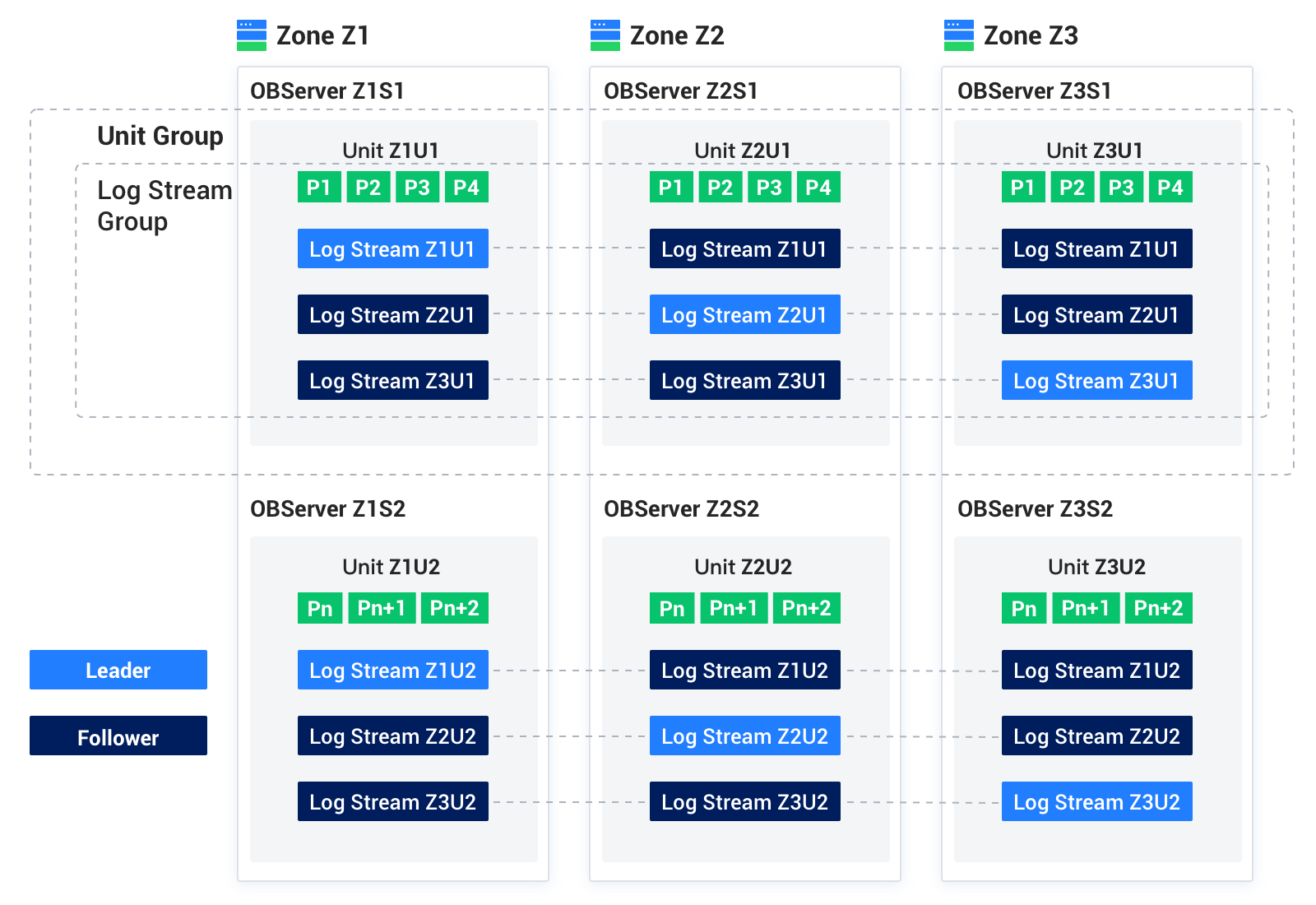
In OceanBase Database, data and traffic are flexibly distributed on multiple OBServer nodes in multiple dimensions. You can migrate units between OBServer nodes in a zone to achieve load balancing and disaster recovery across OBServer nodes.