







This topic describes how to use Alibaba Otter to implement remote active-active disaster recovery for OceanBase Database.
Project background
Alibaba Otter is an open-source database synchronization system that can be used for bi-directional data synchronization between MySQL databases. Alibaba Otter is the parent project of Alibaba Canal. In Alibaba Otter, Alibaba Canal runs as a dependency in the form of a built-in service to read incremental data.
Alibaba Otter consists of two parts: manager and node. The manager is a web management platform that manages clusters and tasks. The node processes data. That is, Alibaba Canal is integrated into the node. The manager and node are separately deployed and started. They communicate with each other through Dubbo RPC.
OceanBase Database comes with a feature that is developed based on Alibaba Canal 1.1.6 for obtaining incremental data from OceanBase Database. This feature can also be used in Alibaba Otter.
Application scenarios
Alibaba Otter can be used for unidirectional and bi-directional synchronization between OceanBase Database and MySQL Database. Bi-directional synchronization has two cases: general bi-directional synchronization without data crossover, and dual-active synchronization where the two databases may modify the same data record. For more information, see Configure the Otter manager.
Deployment framework:
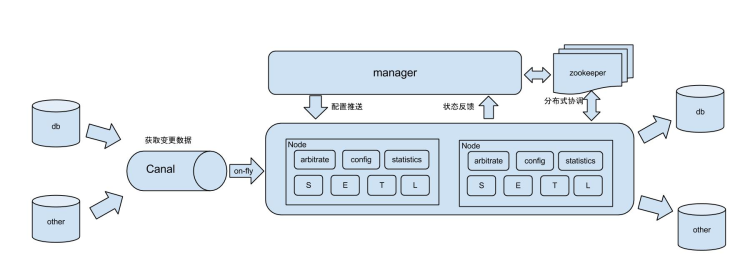
For more information about the deployment procedure, see Bidirectional synchronization with Otter.
Features
Server load
When you deploy services, you must consider the server load to avoid service instability. The oceanbase and oblogproxy services will consume massive memory resources. Therefore, we recommend that you do not deploy them on the same server.
High availability
Alibaba Otter implements high availability deployment for both the manager and node based on ZooKeeper. For more information, see High availability with Otter.
Load balancing
Data will undergo four phases on nodes: select, extract, transform, and load (SETL). When data flows to the next phase, the load balancing algorithm is used to determine the node on which the data will be processed in the phase. Alibaba Otter provides three load balancing strategies: round robin, random, and stick.
In the actual production environment, if the round robin or random strategy is used, data may be routed to a new node when it flows to the next phase. This process involves the RPC communication between the node and the manager, and the communication between the manager and ZooKeeper, which may increase the latency. If you demand high efficiency, you can choose the stick strategy.
Whitelist
The Alibaba Canal service built in the node is actually created and started only when the pipeline is started. The scope of tables listened to by Alibaba Canal comprises the table mappings in the tenant and pipeline. One Canal object can be used only for one channel. Therefore, you must configure different Canal objects for different channels, even if the channels use the same OceanBase Database and oblogproxy.