







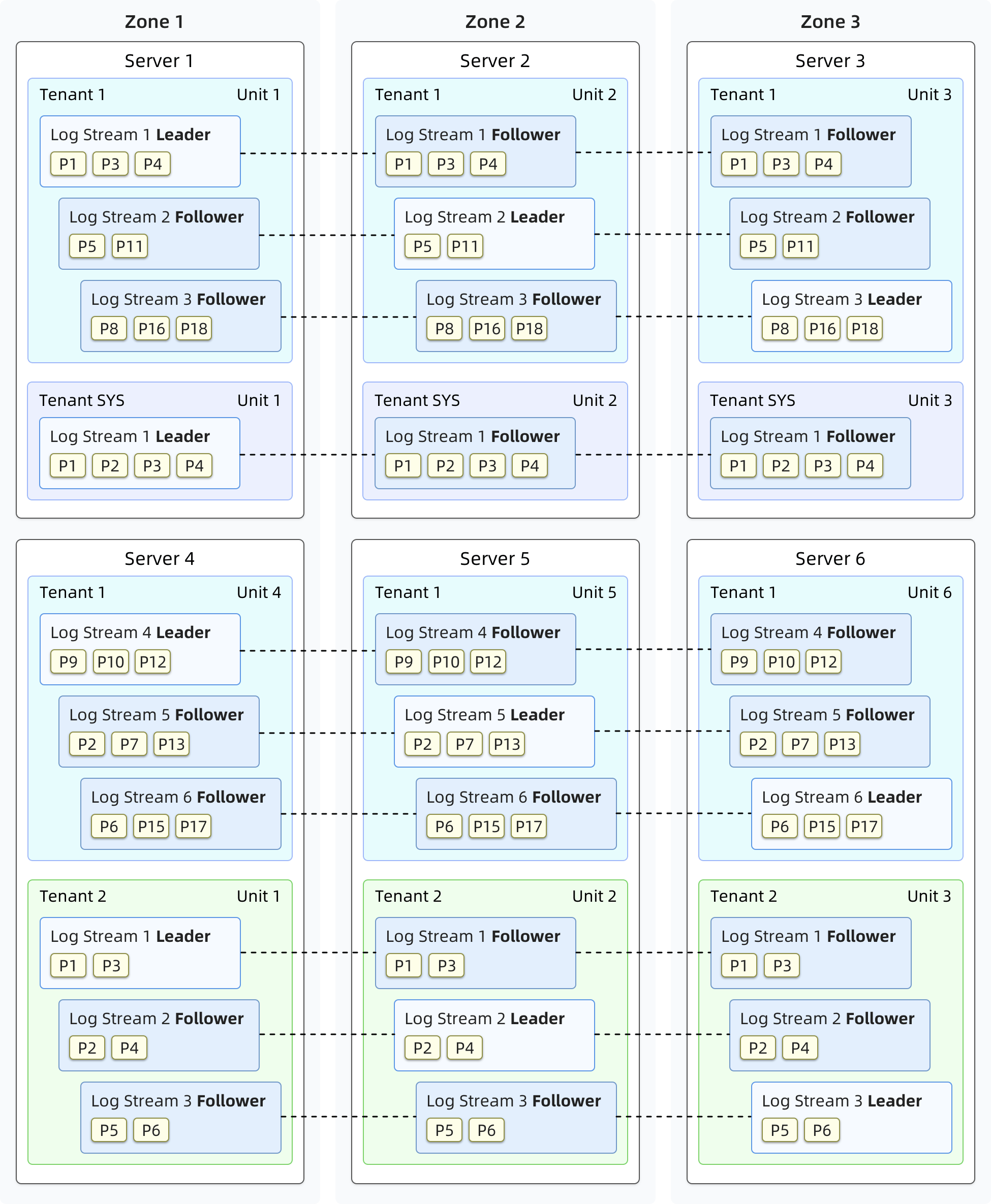
OceanBase Database can run on general server hardware and relies on local storage. Servers for distributed deployment are fully equivalent without special hardware requirements. The shared-nothing architecture of OceanBase Database allows the SQL execution engine to perform distributed execution in the database.
OceanBase Database runs an observer process, a single-process program, on each server to support the operation of database instances and stores data and redo logs of transactions in local files.
An OceanBase cluster is deployed across several zones and each zone consists of several servers. The term zone is a logical concept that represents a set of nodes with similar hardware availability in a cluster. It has different meanings in different deployment modes. For example, if a cluster is deployed in one IDC, nodes in a zone can belong to the same rack and the same switch. If a cluster is deployed across IDCs, each zone can correspond to one IDC.
User data stored in the distributed cluster is replicated for disaster recovery and reducing data read pressure. Each zone stores one data replica, and replicas of the same data are stored in different zones. A consensus protocol is used to ensure data consistency between replicas.
OceanBase Database is designed in a multitenancy architecture. Each tenant serves as a separate database. You can set a specific distributed deployment mode for a tenant. CPU, memory, and I/O resources of one tenant are isolated from those of other tenants.
The operation of an OceanBase database is supported by different components in the storage, replication, transaction, SQL, and access layers. These components collaborate with each other.
Storage layer
Stores the data of a table or a table partition.
Replication layer
Ensures data consistency between replicas of a partition based on consensus algorithms.
Transaction layer
Ensures the atomicity and isolation of the modifications to one or multiple partitions.
SQL layer
Translates user-initiated SQL queries into operations on the stored data.
Access layer
Forwards user queries to the appropriate OceanBase Database instances for processing.
Storage layer
The storage layer provides data storage and access based on tables or table partitions. Each partition stores a tablet of data. A user-defined non-partitioned table can also be considered as a tablet.
Data is stored in four layers in a tablet. Data related to DML operations, such as insert, update, and delete, is first written into a MemTable. After the size of the MemTable reaches the specified threshold, its data is compacted with the baseline data and stored in an L0 SSTable on the disk. When the number of L0 SSTables reaches the specified threshold, the L0 SSTables are merged into one L1 SSTable. During the specified daily off-peak hours, the system performs a major compaction to merge all MemTables, L0 SSTables, and L1 SSTables into one major SSTable.
An SSTable consists of macroblocks with a fixed length of 2 MB, and each macroblock consists of microblocks of variable lengths.
During the major compaction of major SSTable microblocks, OceanBase Database uses the dictionary, run-length, constant, or differential encoding method to encode data of each microblock by column. After compression of data in each column, OceanBase Database performs inter-column equivalence encoding or inter-column substring encoding for multiple columns. Encoding helps compress your data to a smaller size. In addition, the extracted in-column characteristic information can speed up subsequent queries.
After data is encoded, OceanBase Database allows you to compress data in a lossless manner by using general compression algorithms. This further increases the data compression ratio.
Replication layer
Multiple replicas are synchronized by using log streams at the replication layer. Each tablet corresponds to a log stream. The log stream stores persistent redo logs that are generated by writing data to the tablet through DML operations. Replicas of a log stream are distributed to different zones. The replication layer maintains a consensus algorithm for the replicas and selects one of the replicas as the leader. Other replicas of the log stream are followers. DML operations and strong-consistency queries on a tablet are performed only on the leader of its corresponding log stream.
When OceanBase Database is running without performing load balancing, each tenant maintains on each server only one leader of a log stream and possibly multiple followers of other log streams. The total number of log streams for a tenant depends on the values of the primary_zone and locality parameters.
The leader of the log stream persists the redo log on the local server based on the Paxos protocol and sends the redo log to the followers of the log stream over network. A follower will reply to the leader when it completes the persistence. After the leader confirms that the redo log is persisted on the majority of followers, it considers the redo log persisted. Then, the followers replay the redo log in real time to keep their state consistent with that of the leader.
When a log stream replica is elected as the leader, it gets a lease. A healthy leader will keep renewing the lease based on the election protocol during the lease period. The leader executes operations only when the lease is valid. The lease ensures the database capabilities to handle exceptions.
The replication layer automatically responds to server failures to guarantee the continuity of database services. When a fault occurs on servers where less than half of the followers are located, the database services are not affected because more than half of the replicas are working normally. If a fault occurs on the server that hosts the leader, the lease will not be renewed. After the lease expires, a new leader is elected from the followers based on the election protocol and granted a new lease. After that, the database services are resumed.
Load balancing layer
When you create a table or add a new partition, the system selects an appropriate log stream to create a tablet to balance the data and service load. When a tenant property changes, new resources are added, or tablets are not balanced across servers after a long period of use, the load balancing layer rebalances the data and service across servers by splitting and merging log streams, and migrating the log stream replicas.
For example, after you scale out a tenant to add a server, the load balancing layer splits the existing log streams in the tenant, and migrates to the new server an appropriate number of log streams obtained through splitting, to make full use of the added resources. When a tenant scales in, the load balancing layer migrates the log streams on the servers to be dropped to other servers and merges the migrated log streams with the existing log streams on those servers.
After a database runs for a long time, it may experience continuous table creation and deletion and host more data, which can break the load balance even if the number of servers do not change. A typical case is that after you have deleted some tables that are stored on a couple of servers, the number of tablets on these servers is less than that on other servers. As a result, the load balancing layer migrates tablets from the other servers to these servers to balance the load. To ensure the balance, the load balancing layer periodically generates balancing plans to split the log streams on servers with more tablets. The log streams obtained through splitting are used to carry tablets to be migrated, and then migrated to the destination servers and merged with the log streams on the destination servers.
Transaction layer
The transaction layer ensures the atomicity of committing DML operations on one or more partitions and the multi-version isolation among concurrent transactions.
Atomicity
The atomicity of committing a transaction is ensured by using the write-ahead log, which records the modifications to transactions on a partition. When the modification of a transaction involves multiple partitions, each partition generates and persists its own write-ahead log. The transaction layer uses the two-phase commit protocol to ensure the atomic commit of the transaction.
The transaction layer will select a partition modified in a transaction to generate the coordinator state machine. The coordinator communicates with all partitions modified in the transaction to determine whether the write-ahead log is persistent. When the log is persistent in all partitions, the transaction is committed. The coordinator will then drive all partitions to write the commit log (clog) for this transaction, indicating the final state of the transaction. When a follower replays clogs or the database restarts, OceanBase Database recovers the commit state of committed transactions on each partition based on the clogs.
When a server is down, it is possible that a transaction is in progress and the write-ahead log of the transaction is written before the server is down but no clog is generated. The write-ahead log of each partition contains a list of all partitions involved in the transaction. OceanBase Database uses this information to identify the coordinator partition. Then, the coordinator can be restored to drive the two-phase state machine again until the transaction is committed or aborted.
Isolation
Global Timestamp Service (GTS) generates constantly increasing timestamps in a tenant. It also guarantees the availability of database services based on multiple replicas by using the same replica synchronization mechanism of the replication layer, as described in the preceding section.
When a transaction is committed, GTS generates a timestamp. This timestamp serves as the transaction commit version number and is persisted in the write-ahead log of the partition. This timestamp is used as the label of all modified data in the transaction.
When OceanBase Database begins to read a statement (for the Read Committed isolation level) or a transaction starts (for Repeatable Read and Serializable isolation levels), GTS generates a timestamp as the read version number of the statement or transaction. When OceanBase Database reads data, it skips the data whose transaction version number is greater than the read version number. This provides a uniform global snapshot for data reads.
SQL layer
The SQL layer translates SQL queries of a user into operations on the data of one or more partitions.
Components at the SQL layer
A query is executed at the SQL layer in the following process: parser, resolver, transformer, optimizer, code generator, and executor.
The parser performs lexical and syntactic parsing. It divides a user-initiated SQL query into tokens, parses the query based on the predefined syntax rules, and converts the query into a syntax tree.
The resolver performs semantic parsing. It translates tokens of the SQL query into the corresponding objects such as libraries, tables, columns, and indexes based on the database metadata to generate a statement tree.
The transformer rewrites the SQL statements in equivalent but different formats based on internal rules or cost models, and then sends the equivalent statements to the optimizer. In this process, the transformer performs an equivalent transformation on the original statement tree, and the result of the transformation is still a statement tree.
The optimizer generates the best execution plan for the SQL query. It selects the access path, join order, and join algorithms, and determines whether to generate a distributed plan by taking into account various factors such as the semantics of the SQL query, characteristics of the objects, and physical distribution of the objects.
The code generator converts the execution plan into executable code but does not optimize the plan.
The executor initiates the SQL execution.
In addition to the standard SQL execution process, the SQL layer also provides the plan cache feature. A historical execution plan can be cached in memory and reused by subsequent executions. This avoids repeating the optimization process. Working with the fast-parser module, the SQL layer performs only lexical parsing to parameterize statement strings and obtains the parameterized statement and constant parameters. This way, SQL queries can directly hit the plan cache and the execution of frequently executed SQL queries is accelerated.
Multiple plan types
Execution plans at the SQL layer are divided into three types, namely local plans, remote plans, and distributed plans. A local execution plan involves only data access at the local server. A remote execution plan involves only data access on a server other than the local server. A distributed execution plan involves data access on more than one server and is divided into multiple sub-plans that are executed on multiple servers.
The SQL layer can divide an execution plan into multiple parts, which are executed in parallel by multiple worker threads based on scheduling rules. Parallel execution makes full use of the CPU and I/O resources and can reduce the response time of a single query. The parallel query technology applies to both distributed and local execution plans.
Access layer
OBProxies serve as the access layer of OceanBase Database. An OBProxy forwards user queries to the appropriate OceanBase Database instance for processing.
An OBProxy is independent of the OceanBase Database instance and runs as an independent process. It listens to network ports, is compatible with MySQL protocols, and supports the direct connection to OceanBase Database from MySQL-driven applications.
An OBProxy automatically discovers the data distribution information of an OceanBase cluster. It tries to identify the data to be accessed when it receives each SQL statement, and directly forwards the statement to the OceanBase Database instance of the server where the data exists.
An OBProxy can be deployed on each application server that needs to access OceanBase Database, or on an OBServer in each zone. In the first deployment mode, an application directly connects to the OBProxy deployed on the same server, and all queries are routed by the OBProxy to an appropriate OBServer. In the second deployment mode, a load balancing service is required to aggregate multiple OBProxies and provide a unified service IP address to applications.