OceanBase Connector/ODBC supports logging. This topic describes how to enable logging in Linux and Windows systems.
OceanBase Connector/ODBC supports limiting the size of log files. When a log file exceeds 100 MB, a large log file is split into multiple small files with each file not exceeding 100 MB.
Enable logging in Linux
You can add OPTION=4 to the odbc.ini configuration file to enable logging. Logs are stored in the /tmp/obodbc.log directory by default.
You can also run the command below to enable logging. (This command has a higher priority than the setting in odbc.ini. If there is no setting in the file, the setting in the driver manager will be used.)
export ODBC_LOG_ENABLE=true
After enabling logging, run the following command to set the log path:
export ODBC_LOG_DIR=/home
Then, add the following information to odbcinst.ini to configure data source name (DSN) logging:
[ODBC]
Trace=YES
TraceFile=/odbc.log
Enable logging in Windows
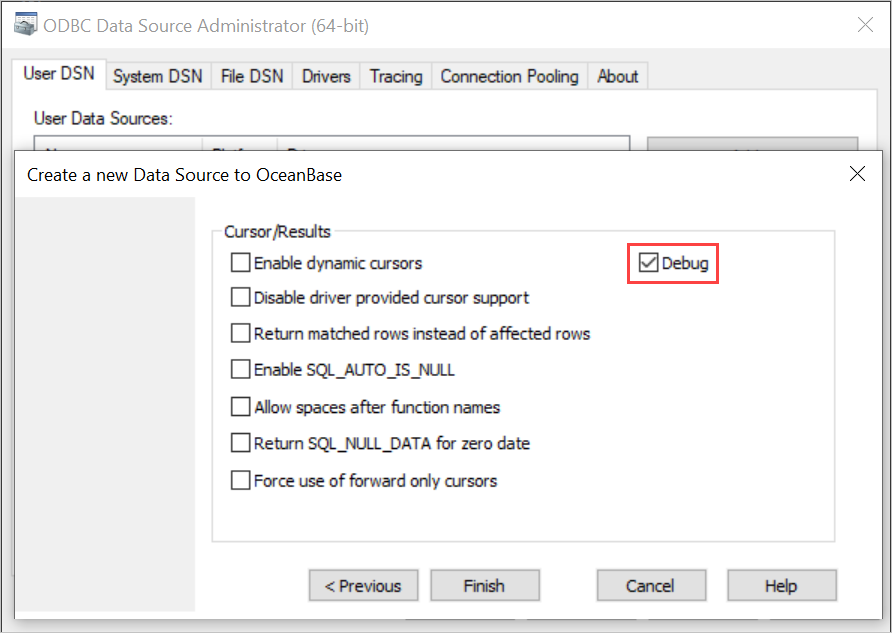
When you add a DSN on the ODBC Data Source Administrator page, select the Debug check box in the Cursor/Results area to enable logging. The obodbc.log file is stored in the temporary directory by default.
You can also set the ODBC_LOG_ENABLE environment variable to enable or disable logging. (This environment variable has a higher priority than the setting in the driver manager. If it is not specified, the setting in the driver manager will be used.)
ODBC_LOG_ENABLE=true
ODBC_LOG_ENABLE=false
After you enable logging by setting the environment variable, set ODBC_LOG_DIR to specify the log path.
ODBC_LOG_DIR=/home
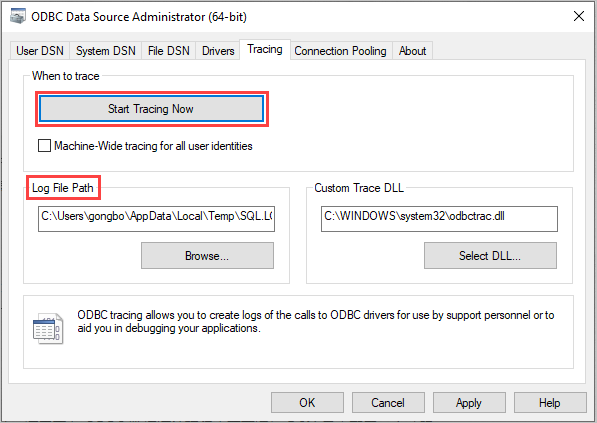
Then, configure DSN logging, start tracing, and set the log file path on the ODBC Data Source Administrator page.