







Install OceanBase Connector/ODBC
After you obtain the installation package for OceanBase Connector/ODBC for Windows, follow the steps below to install and configure it.
Configure a data source
Note
The installation package for OceanBase Connector/ODBC for Windows is a one-click deployment, and can be installed by following the default guidance steps.
Choose Control Panel > System and Security > Administrative Tools > ODBC Data Sources > Drivers. If the OceanBase Connector/ODBC driver has been successfully installed, it will be displayed on the Drivers tab, as shown in the following figure.

Choose User DSN > Add.
In the Create New Data Source dialog box, select the driver and click Finish.

In the dialog box that appears, specify Name and Description, and click Next.
Specify the database connection information, such as the initial statements, TLS, cursor, and results.
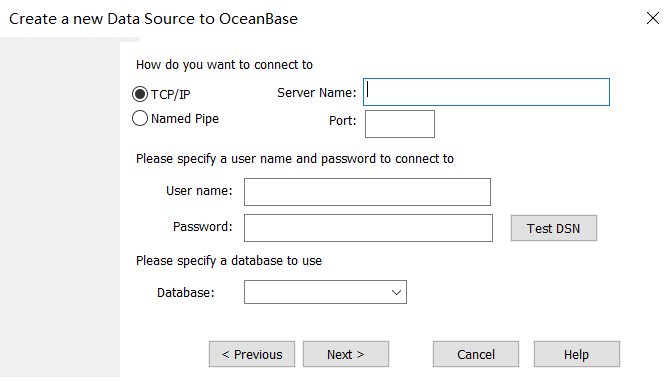
After finishing the setup, click Finish. The data source has been successfully added. Then, click OK.

Connection examples
Example 1: Add a data source (for OceanBase Database in Oracle mode)
#include<stdio.h>
#include<assert.h>
#include<windows.h>
#include<sql.h>
#include<sqlext.h>

static void odbc_print_error(SQLSMALLINT HandleType, SQLHANDLE Handle)
{
  SQLCHAR SQLState[6];
  SQLINTEGER NativeError;
  SQLCHAR SQLMessage[SQL_MAX_MESSAGE_LENGTH] = { 0 };
  SQLSMALLINT TextLengthPtr;

  SQLGetDiagRec(HandleType, Handle, 1, SQLState, &NativeError, SQLMessage, SQL_MAX_MESSAGE_LENGTH, &TextLengthPtr);
  fprintf(stdout, "[%s] (%d) %s\n", SQLState, NativeError, SQLMessage);
}

static void ASSERT_CHECK(SQLSMALLINT HandleType, SQLHANDLE Handle, SQLRETURN rcode)
{
  if(rcode != SQL_SUCCESS && rcode != SQL_SUCCESS_WITH_INFO){
    odbc_print_error(HandleType, Handle);
    assert(0);
  }
}

int main()
{
  HENV henv;
  SQLCHAR OutConnStr[255];
  SQLSMALLINT OutConnStrLen;

  // Request an environment handle
  SQLRETURN rcode = SQLAllocHandle(SQL_HANDLE_ENV, SQL_NULL_HANDLE, &henv);
  ASSERT_CHECK(SQL_HANDLE_ENV, henv, rcode);

  // Set the environment attributes for the ODBC version
  rcode = SQLSetEnvAttr(henv, SQL_ATTR_ODBC_VERSION, (void *)SQL_OV_ODBC3, 0);
  ASSERT_CHECK(SQL_HANDLE_ENV, henv, rcode);

  // Allocate a connection handle
  SQLHDBC hdbc; rcode = SQLAllocHandle(SQL_HANDLE_DBC, henv, &hdbc);
  ASSERT_CHECK(SQL_HANDLE_DBC, hdbc, rcode);

  // Connect to the data source
  //char* mydriver = (char*)"Driver={OceanBase ODBC 2.0 Driver};Server=xxx.xxx.xxx.xxx;Port=38884;Database=test;User=xxx@oracle;Password=xxx;Option=3;";
  //rcode = SQLDriverConnect(hdbc, NULL, (SQLCHAR*)mydriver, strlen((char*)mydriver) + 1, OutConnStr, 255, &OutConnStrLen, SQL_DRIVER_NOPROMPT);
  rcode = SQLConnect(hdbc, (SQLCHAR *)"oboracle", SQL_NTS, (SQLCHAR *)"test@oracle", SQL_NTS, (SQLCHAR *)"test", SQL_NTS);
  ASSERT_CHECK(SQL_HANDLE_DBC, hdbc, rcode);

  // Create an SQL statement handle
  SQLHSTMT stmt;
  rcode = SQLAllocHandle(SQL_HANDLE_STMT, hdbc, &stmt);
  ASSERT_CHECK(SQL_HANDLE_STMT, stmt, rcode);

  // Execute the SQL statement
  rcode = SQLExecDirect(stmt, (SQLCHAR*)"select 1, 'obodbc', 88 from dual", SQL_NTS);
  ASSERT_CHECK(SQL_HANDLE_STMT, stmt, rcode);

  // Bind and retrieve specific data items
  SQLINTEGER res = SQL_NTS;
  SQLCHAR name[128];
  SQLINTEGER age;
  SQLBindCol(stmt, 2, SQL_C_CHAR, name, sizeof(name), &res);
  SQLBindCol(stmt, 3, SQL_C_SLONG, &age, sizeof(age), &res);
  while ((rcode = SQLFetch(stmt)) != SQL_NO_DATA_FOUND)
  {
    if (rcode == SQL_ERROR) {
      printf("sql error!\n");
    } else {
      printf("name:%s, age:%ld\n", name, age);
    }
  }

  // Release specific resource handles for cleanup purposes
  SQLFreeHandle(SQL_HANDLE_STMT, stmt);
  SQLDisconnect(hdbc);
  SQLFreeHandle(SQL_HANDLE_DBC, hdbc);
  SQLFreeHandle(SQL_HANDLE_ENV, henv);
  return 0;
}
Example 2: Install OceanBase Connector/ODBC without a need to add data source (which will be specified in the code)
#include<stdio.h>
#include<assert.h>
#include<windows.h>
#include<sql.h>
#include<sqlext.h>

static void odbc_print_error(SQLSMALLINT HandleType, SQLHANDLE Handle)
{
  SQLCHAR SQLState[6];
  SQLINTEGER NativeError;
  SQLCHAR SQLMessage[SQL_MAX_MESSAGE_LENGTH] = { 0 };
  SQLSMALLINT TextLengthPtr;

  SQLGetDiagRec(HandleType, Handle, 1, SQLState, &NativeError, SQLMessage, SQL_MAX_MESSAGE_LENGTH, &TextLengthPtr);
  fprintf(stdout, "[%s] (%d) %s\n", SQLState, NativeError, SQLMessage);
}

static void ASSERT_CHECK(SQLSMALLINT HandleType, SQLHANDLE Handle, SQLRETURN rcode)
{
  if(rcode != SQL_SUCCESS && rcode != SQL_SUCCESS_WITH_INFO){
    odbc_print_error(HandleType, Handle);
    assert(0);
  }
}

int main()
{
  HENV henv;
  SQLCHAR OutConnStr[255];
  SQLSMALLINT OutConnStrLen;

  // Request an environment handle
  SQLRETURN rcode = SQLAllocHandle(SQL_HANDLE_ENV, SQL_NULL_HANDLE, &henv);
  ASSERT_CHECK(SQL_HANDLE_ENV, henv, rcode);

  // Set the environment attributes for the ODBC version
  rcode = SQLSetEnvAttr(henv, SQL_ATTR_ODBC_VERSION, (void *)SQL_OV_ODBC3, 0);
  ASSERT_CHECK(SQL_HANDLE_ENV, henv, rcode);

  // Allocate a connection handle
  SQLHDBC hdbc; rcode = SQLAllocHandle(SQL_HANDLE_DBC, henv, &hdbc);
  ASSERT_CHECK(SQL_HANDLE_DBC, hdbc, rcode);

  // Connect to the data source
  char* mydriver = (char*)"Driver={OceanBase ODBC 2.0 Driver};Server=xxx.xxx.xxx.xxx;Port=38884;Database=test;User=xxx@oracle;Password=xxx;Option=3;";
  rcode = SQLDriverConnect(hdbc, NULL, (SQLCHAR*)mydriver, strlen((char*)mydriver) + 1, OutConnStr, 255, &OutConnStrLen, SQL_DRIVER_NOPROMPT);
  //rcode = SQLConnect(hdbc, (SQLCHAR *)"oboracle", SQL_NTS, (SQLCHAR *)"test@oracle", SQL_NTS, (SQLCHAR *)"test", SQL_NTS);
  ASSERT_CHECK(SQL_HANDLE_DBC, hdbc, rcode);

  // Create an SQL statement handle
  SQLHSTMT stmt;
  rcode = SQLAllocHandle(SQL_HANDLE_STMT, hdbc, &stmt);
  ASSERT_CHECK(SQL_HANDLE_STMT, stmt, rcode);

  // Execute the SQL statement
  rcode = SQLExecDirect(stmt, (SQLCHAR*)"select 1, 'obodbc', 88 from dual", SQL_NTS);
  ASSERT_CHECK(SQL_HANDLE_STMT, stmt, rcode);

  // Bind and retrieve specific data items
  SQLINTEGER res = SQL_NTS;
  SQLCHAR name[128];
  SQLINTEGER age;
  SQLBindCol(stmt, 2, SQL_C_CHAR, name, sizeof(name), &res);
  SQLBindCol(stmt, 3, SQL_C_SLONG, &age, sizeof(age), &res);
  while ((rcode = SQLFetch(stmt)) != SQL_NO_DATA_FOUND)
  {
    if (rcode == SQL_ERROR) {
      printf("sql error!\n");
    } else {
      printf("name:%s, age:%ld\n", name, age);
    }
  }

  // Release specific resource handles for cleanup purposes
  SQLFreeHandle(SQL_HANDLE_STMT, stmt);
  SQLDisconnect(hdbc);
  SQLFreeHandle(SQL_HANDLE_DBC, hdbc);
  SQLFreeHandle(SQL_HANDLE_ENV, henv);
  return 0;
}