







This topic describes how to perform troubleshooting when a store does not have data of the timestamp requested by the downstream.
Symptom
When JDBCWriter pulls data from a store, any of the following errors is reported in error.log:
Store XXX without server idRefused connect attempt for requesting checkpointInvalid start time, shall within store's data keep time which normally is 24 hours
Possible causes
According to the data cleanup mechanism of Store, data in a store is cleaned up upon expiration against the current time. For a data synchronization project, the default data retention period is 24 hours. For a data migration project, the default data retention period is 120 hours. Once the retention period of the data expires, the data will be cleaned up and cannot be pulled by the downstream.
Troubleshooting procedure
Start a new store to pull back data.
Log on to the OceanBase Migration Service (OMS) console.
In the left-side navigation pane, click Data Migration.
In the Migration Projects list, click the name of the target project to go to its details page.
Click View Component Monitoring in the upper-right corner.
In the View Component Monitoring dialog box, find the corresponding store and copy the topic of the store.
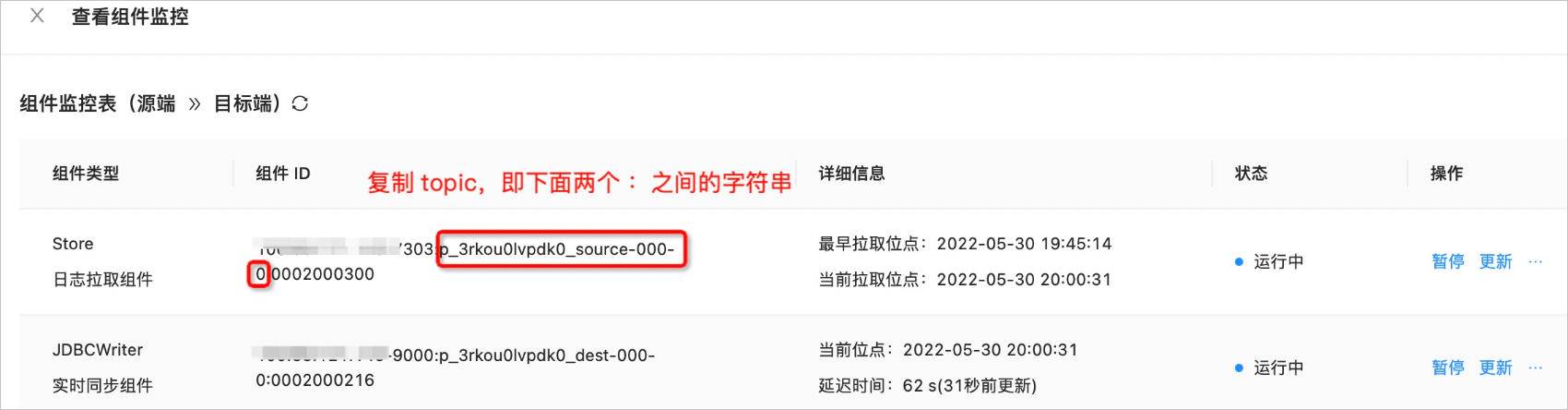
Start a new store for the topic.
In the left-side navigation pane, choose OPS & Monitoring > Component. The Store tab automatically appears.
Click Add in the upper-right corner of the page.
In the Add dialog box, configure the parameters.
ParameterDescriptionSubtopic Enter the copied topic. Node Select the server to start the store. Timestamp Select the start time for data pullback. This start time needs to cover the timestamp requested by the downstream. Click Add.
Return to the Data Migration Project page and modify the parameters.
Log on to the OMS console. In the left-side navigation pane, click Data Migration.
In the Migration Projects list, click the name of the target project to go to its details page.
Click View Component Monitoring in the upper-right corner.
On the View Component Monitoring page, click Update for the new store.
In the Update Configuration dialog box, hover the pointer over the incremental data retention period parameter
store.clearer.outdatedand click the Edit icon to modify the parameter.The Unit of this parameter is seconds. The data retention period must be able to cover the timestamp requested by the downstream. After you modify the parameters, check whether the project is restored after a period of time. If the downstream JDBCWriter is still abnormal, restart the JDBCWriter.
After you modify the YAML configuration as required, click Update.