







This topic describes the errors of OceanBase Migration Service (OMS) and corresponding solutions.
Error types
OMS errors are classified by component, including console errors, precheck errors, cluster management (CM) errors, and supervisor errors. For more information about OMS components, see Terms.
Error levels
The error levels of OMS include FATAL, ERROR, and WARNING. The following table describes these error levels.
Error level |
Description |
|---|---|
| FATAL | The system may be in disorder or unavailable. |
| ERROR | A general error. |
| WARNING | A warning. |
Console error codes
GHANA-OPEROR000001
Error level: ERROR
Error message: Checker status failed.
Cause: The Checker component failed.
Solution: Go to the container and check the logs of the corresponding Checker component. If the error cannot be cleared, contact the OMS service personnel and submit a ticket. Examples:
/home/ds/run/{Name of the checker}/logs/error.log/home/ds/run/{Name of the checker}/stdout.out
GHANA-OPERAT000101
Error level: ERROR
Error message: Access denied for user 'root'@'xxx.xxx.xxx.xxx'.
Cause: The account or password of the data source is incorrect.
Solution: Enter the correct user account and password of the data source.
GHANA-MIGRAT000201
Error level: ERROR
Error message: Schema, table or view migration failed.
Cause: Migration of a database, table, or view failed.
Solution: We recommend that you choose Migration Details > Schema Migration and view information on the database, table, and view tabs. Select View exceptions only to check for failed migration objects. If a migration object failed, check the error message. The error message usually indicates that the table already exists or that table B on which table A depends does not exist. If the problem remains unsolved, submit a ticket.
Precheck error codes
GHANA-PCHKNP000010
Error level: ERROR
Error message: The project failed the preckeck on {checkType}.
Cause: The {jdbcUrl} database failed the connectivity test. Diagnostic information:{message}.
Solution: Check whether the {endpointName} data source is accessible.
GHANA-PCHKNP001010
Error level: ERROR
Error message: The project failed the preckeck on {checkType}.
Cause: The {schemaName} database is a system database. You are not allowed to migrate or synchronize data to a system database.
Solution: If {schemaName} is a system database, exclude it from the source objects.
GHANA-PCHKNP001011
Error level: ERROR
Error message: The project failed the preckeck on {checkType}.
Cause: The {schemaName} database does not exist. Check whether the database name is correct and whether the database exists.
Cause: The {schemaName} database does not exist. Select another data source object.
GHANA-PCHKNP002010
Error level: ERROR
Error message: The project failed the preckeck on {checkType}.
Cause: The following table object was not found in the remote database: {tableNames}.
Cause: The {tableName} table does not exist. Reselect the data source objects.
GHANA-PCHKNP002020
Error level: ERROR
Error message: The project failed the preckeck on {checkType}.
Cause: The whitelist is too long.
Solution: Reduce the number of objects to be migrated or synchronized, or use matching rules to select objects for migration or synchronization.
GHANA-PCHKNP003010
Error level: ERROR
Error message: The project failed the preckeck on {checkType}.
Cause: A LOB field exists in the {table} table.
Solution: Exclude the {tableNames} table with LOB fields from the tables to be migrated.
CM error codes
CM-RESOIE000201
Error level: FATAL
Error message: No available store. SubTopic: [%s], checkpoint: [%s]
Cause: All Store processes have been stopped, or the data range of the current Store process does not meet the timestamp requirements of the Writer. For example, the Writer needs to pull data starting from 10 o'clock, but the data range in the store is 11 o'clock to 12 o'clock.
Solution:
Enterprise Edition:
Restart an existing store. In the upper-right corner of the page, click View Component Monitoring to view Store logs, and perform troubleshooting based on the logs or restart the existing store to restore it.
If the existing store cannot be restored, create a new one. Log on to the OMS console, choose OPS & Monitoring > Component > Store, and create a store based on the link topic information and the current timestamp of the Writer. Note: The start time of the store must be earlier than the current timestamp of the Writer. Example: If the timestamp of the Writer is 2022-08-01 10:05:00, the start time of the store must be 5 to 10 minutes earlier, for example, 2022-08-01 10:00:00.
ApsaraDB for OceanBase: Submit a ticket.
CM-RESOIE000202
Error level: FATAL Error message: No active stores under topic : subTopic.getName() Cause: No store has been created for the current project, or all existing store processes have exited. Solution:
Enterprise Edition:
Restart an existing store. In the upper-right corner of the page, click View Component Monitoring to view Store logs, and perform troubleshooting based on the logs or restart the existing store to restore it.
If the existing store cannot be restored, create a new one. Log on to the OMS console, choose OPS & Monitoring > Components > Store, and create a store based on the link topic information and the current timestamp of the Writer. Note: The start time of the store must be earlier than the current timestamp of the Writer. Example: If the timestamp of the Writer is 2022-08-01 10:05:00, the start time of the store must be 5 to 10 minutes earlier, for example, 2022-08-01 10:00:00.
ApsaraDB for OceanBase: Submit a ticket.
CM-RESOAT000011
Error level: FATAL
Error message: Supervisor does not report any result after CM Retry 60 seconds.
Cause: The OMS proxy service component Supervisor has not reported task execution results to the control component for a long time.
Solution:
Enterprise Edition:
Log on to the OMS container and run the
supervisorctl status oms_drc_supervisorcommand. If the status of Supervisor is notRUNNING, run thesupervisorctl restart oms_drc_supervisorcommand to restart it.Log on to the OMS console. Click View Component Monitoring in the upper-right corner of the current project page to view the component logs and check whether any error is reported.
If no error is reported in the component logs, click Restore in the upper-right corner of the current project page to restore the project.
If the problem remains unsolved, submit a ticket.
ApsaraDB for OceanBase: Submit a ticket.
CM-RESOAT000012
Error level: FATAL
Error message: Supervisor failed to execute command.
Cause: An unexpected exception occurred when the OMS proxy service component Supervisor was executing a command issued by the control component.
Solution:
Enterprise Edition: Click Restore on the page to restore the project. if the project is not restored, run supervisorctl status in the container to check whether all OMS components are in the RUNNING state. If a component is not in the RUNNING state, run supervisorctl restart $Component name to restart the component.
ApsaraDB for OceanBase: Submit a ticket.
CM-RESOAT000013
Error level: FATAL
Error message: The command output is displayed.
Cause: The OMS proxy service component Supervisor failed to execute a command issued by the control component.
Solution:
Enterprise Edition: Restore the project. If the project is not restored, go to the OMS container, view the logs in the error.log file in the /home/admin/logs/supervisor/ directory, and provide them to the OMS administrator.
ApsaraDB for OceanBase: Submit a ticket.
CM-SCHEOR000002
Error level: FATAL
Error message: Failed to operate all process. Failed: {$Failed}.
Cause: The O&M operations failed on all components involved.
Solution:
Enterprise Edition: Retry the O&M ticket. Alternatively, log on to the OMS console, choose OPS & Monitoring > Component. On the Component page that appears, click the tab of corresponding component, search for the names of failed component processes one by one, and then proceed with the corresponding O&M operations.
ApsaraDB for OceanBase: Submit a ticket.
CM-SCHEOR000003
Error level: FATAL
Error message: Failed to operate part of process. Failed: {$Failed}, Success: {$Success}
Cause: The O&M operations failed on some components.
Solution:
Enterprise Edition: Retry the O&M ticket. Alternatively, log on to the OMS console, choose OPS & Monitoring > Component. On the Component page that appears, click the tab of corresponding component, search for the names of failed component processes one by one, and then proceed with the corresponding O&M operations.
ApsaraDB for OceanBase: Submit a ticket.
CM-SCHEOR000203
Error level: FATAL
Error message: Failed to start crawler.
Cause: The incremental data pulling component Store failed to start.
Solution:
Enterprise Edition: Log on to the OMS console. Click View Component Monitoring in the upper-right corner of the current project page to view the Store logs and check whether any error is reported.
ApsaraDB for OceanBase: Submit a ticket.
CM-SCHEAT000001
Error level: FATAL
Error message: Failed to start checker.
Cause: The Checker component failed to start.
Solution:
Enterprise Edition: Submit a ticket. Log on to the OMS console. Click View Component Monitoring in the upper-right corner of the current project page to view the Checker logs and check whether any error is reported.
ApsaraDB for OceanBase: Submit a ticket.
CM-SCHEAT000102
Error level: FATAL
Error message: Failed to start writer.
Cause: The incremental data transmission component Connector failed to start.
Solution:
Enterprise Edition: Log on to the OMS console. Click View Component Monitoring in the upper-right corner of the current project page to view the Connector logs and check whether any error is reported.
ApsaraDB for OceanBase: Submit a ticket.
CM-RESONF000001
Error level: FATAL
Error message: No alive hosts in current region.
Cause: The OMS proxy service component Supervisor in the container has not reported heartbeats to the database for a long time.
Solution:
Enterprise Edition:
Log on to the OMS container and run the
supervisorctl statuscommand to query the component statuses. If an OMS component is not in theRUNNINGstate, run thesupervisorctl restart $Component namecommand to restart the component. Check whether the component is restarted.If the not, run
env | grep OMS_HOST_IPto check whether theOMS_HOST_IPparameter is correctly specified when you start the OMS container. If the parameter is not specified or is incorrectly specified, delete the current container. Specify the parameters correctly, and then redeploy the container.Log on to the database specified by the
drc_cm_dbparameter in theconfig.yamlconfiguration file, and query the host table for the server information. Check whether the IP address in the table is the same as the actual IP address of the server. If they are inconsistent, check whether thecm_nodesparameter in theconfig.yamlfile is correctly configured. If the parameter is incorrectly configured, delete the current container. Modify theconfig.yamlconfiguration file, and then redeploy the container.
ApsaraDB for OceanBase: Submit a ticket.
CM-RESONF000002
Error level: FATAL
Error message: No available machine in current region.
Cause: The OMS container is not initialized properly.
Solution:
Enterprise Edition: Go to the OMS container and run the sh /root/docker_init.sh command again. This operation is idempotent and can be executed repeatedly.
ApsaraDB for OceanBase: Submit a ticket.
CM-RESONF000003
Error level: FATAL
Error message: No enough machine resource for a $taskType task.
Cause: The values of some resource metrics of the servers in the OMS cluster have exceeded the system thresholds. The CPU utilization threshold is $(CPU), the memory usage threshold is $(Mem), and the disk usage threshold is $(Disk). The actual resource utilization of each server is {$Usage}.
Solution:
Enterprise Edition: You can stop or release projects that have not been used in a long time to reduce resource consumption on a server.
ApsaraDB for OceanBase: Submit a ticket.
CM-RESONF000021
Error level: FATAL
Error message: Machine group of region = ($Region) do not init.
Cause: The OMS container is not initialized properly.
Solution:
Enterprise Edition: Go to the OMS container and run the sh /root/docker_init.sh command. The execution process takes 3 to 5 minutes. This operation is idempotent and can be executed repeatedly.
ApsaraDB for OceanBase: Submit a ticket.
Connector error codes
CONNECTOR-SOOO04006210
Error level: FATAL
Error message: internal error code, arguments: -6210, Transaction is timeout
Cause: The execution of the transaction timed out on the source end.
Solution: execute SET @@global.ob_trx_timeout = A longer period in ms to increase the timeout period. You can execute SHOW VARIABLES LIKE '%ob_trx_timeout%' to view the timeout period.
CONNECTOR-SIOO0400600
Error level: FATAL
Error message: ORA-00600: internal error code, arguments: -6244, out of transaction threshold
Cause: The amount of data committed by a single transaction exceeded the threshold.
Solution: Execute the following statement to check the current threshold: SELECT * FROM __all_virtual_sys_parameter_stat WHERE name='_max_trx_size';
In the sys tenant of OceanBase Database, execute ALTER system SET _max_trx_size = Larger value to increase the threshold.
Notice:
In OceanBase Database V3.X, the limit on the amount of data committed by a single transaction is removed and does not need to be specified.
CONNECTOR-SOOO0400601
Error level: FATAL
Error message: ORA-00600: internal error code, arguments: -4258, Incorrect string value
Cause: A known issue in OceanBase V3.1.2.
Solution: In the sys tenant, execute the following statement: ALTER system SET _enable_static_typing_engine = false;.
CONNECTOR-SOOO0401555
Error level: FATAL
Error message: ORA-01555 snapshot too old
Cause: The snapshot of OceanBase Database is outdated.
Solution: In the sys tenant, execute the following statement to view the current snapshot timeout period: SHOW VARIABLES LIKE 'undo_retention'. You can execute SET global undo_retention=Greater value; to increase the snapshot timeout period.
CONNECTOR-SID201000104
Error level: FATAL
Error message: DB2 SQL ERROR: SQL CODE = -104, SQLSTATE = 42610, SQLERRORMC = 2003
Cause: The DB2 syntax is invalid.
Solution: This error is caused by DDL statement conversion issues of an OMS component. Locate the erroneous DDL statement in error.log and find the original DDL statement in ddl_msg.log based on the DDL statement. Then, evaluate the impact of skipping the DDL statement. If the DDL statement can be skipped, configure to skip the DDL statement and feed back the DDL statement conversion issue to the OMS administrator. If the DDL statement cannot be skipped, feed back the DDL statement conversion issue to the OMS administrator.
CONNECTOR-SIOR01003291
Error level: FATAL
Error message: SQL Error: ORA-03291: Invalid truncate option - missing STORAGE keyword
Cause: The Oracle syntax is invalid.
Solution: This error is caused by DDL statement conversion issues of an OMS component. Locate the erroneous DDL statement in error.log and find the original DDL statement in ddl_msg.log based on the DDL statement. Then, evaluate the impact of skipping the DDL statement. If the DDL statement can be skipped, configure to skip the DDL statement and feed back the DDL statement conversion issue to the OMS administrator. If the DDL statement cannot be skipped, feed back the DDL statement conversion issue to the OMS administrator.
CONNECTOR-SIOR01001861
Error level: FATAL
Error message: SQL Error: ORA-01861: literal does not match format string
Cause: The expression is invalid.
Solution: This error is caused by DDL statement conversion issues of an OMS component. Locate the erroneous DDL statement in error.log and find the original DDL statement in ddl_msg.log based on the DDL statement. Then, evaluate the impact of skipping the DDL statement. If the DDL statement can be skipped, configure to skip the DDL statement and feed back the DDL statement conversion issue to the OMS administrator. If the DDL statement cannot be skipped, feed back the DDL statement conversion issue to the OMS administrator.
CONNECTOR-SIOR01014054
Error level: FATAL
Error message: SQL Error: ORA-14054: invalid ALTER TABLE TRUNCATE PARTITION option
Cause: In the ALTER TABLE TRUNCATE PARTITION statement, an invalid option is specified after the partition name.
Solution: This error is caused by DDL statement conversion issues of an OMS component. Locate the erroneous DDL statement in error.log and find the original DDL statement in ddl_msg.log based on the DDL statement. Then, evaluate the impact of skipping the DDL statement. If the DDL statement can be skipped, configure to skip the DDL statement and feed back the DDL statement conversion issue to the OMS administrator. If the DDL statement cannot be skipped, feed back the DDL statement conversion issue to the OMS administrator.
CONNECTOR-SIOR01000907
Error level: FATAL
Error message: SQL Error: ORA-00907: missing right parenthesis
Cause: The Oracle syntax is invalid and the closing parenthesis is missing.
Solution: This error is caused by DDL statement conversion issues of an OMS component. Locate the erroneous DDL statement in error.log and find the original DDL statement in ddl_msg.log based on the DDL statement. Then, evaluate the impact of skipping the DDL statement. If the DDL statement can be skipped, configure to skip the DDL statement and feed back the DDL statement conversion issue to the OMS administrator. If the DDL statement cannot be skipped, feed back the DDL statement conversion issue to the OMS administrator.
CONNECTOR-SIOO01000900
Error level: FATAL
Error message: SQL Error: ORA-00900: You have an error in your SQL syntax
Cause: The syntax is invalid in the Oracle tenant of OceanBase Database.
Solution: This error is caused by DDL statement conversion issues of an OMS component. Locate the erroneous DDL statement in error.log and find the original DDL statement in ddl_msg.log based on the DDL statement. Then, evaluate the impact of skipping the DDL statement. If the DDL statement can be skipped, configure to skip the DDL statement and feed back the DDL statement conversion issue to the OMS administrator. If the DDL statement cannot be skipped, feed back the DDL statement conversion issue to the OMS administrator.
CONNECTOR-SIOO01001451
Error level: FATAL
Error message: SQL Error: ORA-01451: column to be modified to NULL cannot be modified to NULL
Cause: The current column is already NULL and cannot be changed to NULL again.
Solution: Filter the DDL statement.
CONNECTOR-SIMS01001064
Error level: FATAL
Error message: ERROR 1064 (42000): You have an error in your SQL syntax;
Cause: The MySQL syntax is incorrect.
Solution: This error is caused by DDL statement conversion issues of an OMS component. Locate the erroneous DDL statement in error.log and find the original DDL statement in ddl_msg.log based on the DDL statement. Then, evaluate the impact of skipping the DDL statement. If the DDL statement can be skipped, configure to skip the DDL statement and feed back the DDL statement conversion issue to the OMS administrator. If the DDL statement cannot be skipped, feed back the DDL statement conversion issue to the OMS administrator.
CONNECTOR-SIOM01001426
Error level: FATAL
Error message: ERROR 1426 (42000): Too big precision specified for column. Maximum is 65.
Cause: The field precision exceeds the limit.
Solution: This error is caused by DDL statement conversion issues of an OMS component. Locate the erroneous DDL statement in error.log and find the original DDL statement in ddl_msg.log based on the DDL statement. Then, evaluate the impact of skipping the DDL statement. If the DDL statement can be skipped, configure to skip the DDL statement and feed back the DDL statement conversion issue to the OMS administrator. If the DDL statement cannot be skipped, feed back the DDL statement conversion issue to the OMS administrator.
CONNECTOR-SIOM01001064
Error level: FATAL
Error message: ERROR 1064 (42000): You have an error in your SQL syntax;
Cause: The syntax is invalid in the MySQL tenant of OceanBase Database.
Solution: This error is caused by DDL statement conversion issues of an OMS component. Locate the erroneous DDL statement in error.log and find the original DDL statement in ddl_msg.log based on the DDL statement. Then, evaluate the impact of skipping the DDL statement. If the DDL statement can be skipped, configure to skip the DDL statement and feed back the DDL statement conversion issue to the OMS administrator. If the DDL statement cannot be skipped, feed back the DDL statement conversion issue to the OMS administrator.
CONNECTOR-SIDH-{type}-001004
Error level: ERROR
Error message: Exceed limit of bps
Cause: A single DataHub shard is throttled at 5 Mbit/s, and the OMS synchronization rate is too high.
Solution: Split the DataHub shard into more shards in the DataHub console.
CONNECTOR-SIDH-{type}-001005
Error level: FATAL
Error message: MalformedRecordException,Not Found Field
Cause: The schema is incorrect. This error is typically caused when DataHub is in Tuple mode and DDL statements were executed to add fields on the source end, but the corresponding fields were not added on the destination DataHub instance.
Solution:
Identify the missing DataHub schema fields by comparing the schema of the source with that of the destination.
Modify the DataHub schema.
CONNECTOR-SIDH-{type}-001006
Error level: FATAL
Error message: exceed max length: 2097152
Cause: The maximum length of a string field is 2 MB in DataHub.
Solution: Cancel the synchronization of this table. You can cancel the synchronization of this table by changing the synchronization objects in the OMS console.
CONNECTOR-SIOR00012899
Error level: FATAL
Error message: ORA-12899: The value in the "MOCK_DATABASE"."MOCK_ALLTYPE_OBORACLE_TABLE"."TCHAR" column is too great. The value is 13, while the maximum value allowed is 3.
Cause:
If incremental DDL statement synchronization is not enabled, check whether a column has been added to the source.
If incremental DDL statement synchronization is enabled, DDL statement conversion may have failed.
Solution:
If incremental DDL statement synchronization is not enabled: First, check the character sets on both sides. If the character sets on the two sides are different, for example, UTF8 on the source and GBK on the destination, change the column length on the destination to more than 1.5 times the column length on the source. If the character sets are the same on the two sides, change the column length on the destination to the same as that of the source. If the error persists, contact OMS Technical Support.
If incremental DDL statement synchronization is enabled, check the
ddl_msg.logfile, and search the corresponding column for the corresponding DDL statement. Then, contact OMS Technical Support.
CONNECTOR-SIOO00012899
Error level: FATAL
Error message: (conn=1055676) ORA-12899: value too large for column "MOCK_DATABASE"."MOCK_ALLTYPE_OBORACLE_TABLE"."TCHAR" (actual: 19, maximum: 1)
Cause:
If incremental DDL statement synchronization is not enabled, a column may have been added to the source.
If incremental DDL statement synchronization is enabled, DDL statement conversion may have failed.
Solution:
If incremental DDL statement synchronization is not enabled, check the character sets on both sides. If the character sets on the two sides are different, for example, UTF8 on the source and GBK on the destination, change the column length on the destination to more than 1.5 times the column length on the source. If the character sets are the same on the two sides, change the column length on the destination to the same as that of the source. If the error persists, contact OMS Technical Support.
If incremental DDL statement synchronization is enabled, check the
ddl_msg.logfile, and search the corresponding column for the corresponding DDL statement. Then, contact OMS Technical Support.
CONNECTOR-SIOO00014400
Error level: FATAL
Error message: Lack of a partition on the destination side. (conn=2719331) ORA-14400: inserted partition key does not map to any partition,${db}.${table}
Cause:
If incremental DDL statement synchronization is not enabled, a partition may have been added to the source.
If incremental DDL statement synchronization is enabled, when the automatic partition generation syntax is specified for table creation on the source, the DDL statements for automatically generating partitions will not be pulled by the Store component. That is, the DDL statements for automatically adding partitions will not be synchronized to the destination.
If incremental DDL statement synchronization is enabled and the automatic partition generation syntax is configured for table creation on the source, check the
ddl_msg.logfie and search the corresponding table for the DDL statement for adding partitions. Then, contact OMS Technical Support.
Solution: Compare the schemas on the two sides and create missing partitions on the destination.
CONNECTOR-SIOO00000942
Error level: FATAL
Error message: The destination table does not exist. table not existed, table:MOCK_ALLTYPE_OBORACLE_TABLE,db:oms_oracle.MOCK_DATABASE
Cause:
If incremental DDL statement synchronization is not enabled, a table may have been created on the source.
If incremental DDL statement synchronization is enabled, DDL statement conversion may have failed.
Solution:
If incremental DDL statement synchronization is not enabled, create the table on the destination.
If incremental DDL statement synchronization is enabled, check
ddl_msg.log. Search for the corresponding table and find the DDL statement for creating the table. Then, contact the OMS technical support personnel.
CONNECTOR-SIOO00000060
Error level: FATAL
Error message: Execution on the destination is deadlocked. (conn=2356749) ORA-00060: deadlock detected while waiting for resource,${db}.${table}
Cause: The lock on the destination end has escalated to a block lock. Consequently, a deadlock is triggered by concurrent executions.
Solution:
Log on to the OMS console.
In the left-side navigation pane, click Data Migration.
On the Data Migration page, click the name of the target data migration project to go to its details page.
Click View Component Monitoring in the upper-right corner.
Click Update. Find the
worker_numparameter and change its value to1.Wait for the link to run for a period of time. After the timestamp normally advances, change the value of
worker_numback to the initial one.
CONNECTOR-SIAL00000001
Error level: FATAL
Error message: A field in the source table does not exist in the destination table. handleColumnsOnlyInSource: Field${field} in ${sourceTable} not found in target table ${targetTable}
Cause:
If incremental DDL statement synchronization is not enabled, check whether a column has been added to the source.
If incremental DDL statement synchronization is enabled, DDL statement conversion may have failed.
Solution:
If incremental DDL statement synchronization is not enabled, create the missing column on the destination.
If incremental DDL statement synchronization is enabled, check the
ddl_msg.logfile and search the corresponding column for the DDL statement for adding columns. Then, contact OMS Technical Support.
CONNECTOR-ALAL00000500
Error level: FATAL
Error message: uncertain
Cause: An unknown error occurred.
Solution: Contact OMS Technical Support.
CONNECTOR-SIKA-{type}-001101
Error level: ERROR
Error message: TimeoutException
Cause:
The error may be caused by network connectivity issues between OMS and Kafka Server. You use the
pingandtelnetcommands to test the connectivity.The error may alternatively be caused by the high network latency between OMS and Kafka Server. In this case, you can modify Kafka parameters.
Solution:
Check the status of Kafka Server and test the network connectivity. For example, assume that Kafka Sever is set to
127.0.0.1:9092in thesink.jsonconfiguration file. You can run thetelnet 127.0.0.1 9092command to test the network connectivity. If the network connectivity is sound without errors, but the network latency is large, proceed to step 2 to modify the timeout parameter. If the network connectivity is problematic, handle the network connectivity issue first.If you are sure that Kafka Server is sound without errors, you can modify the parameters of Connector.
"properties": {"request.timeout.ms": Expected timeout period in ms}
Modify the parameters. In the OMS console, select the corresponding connector and click Update.
If the
propertiesparameter already exists in thesinksection, add the precedingrequest.timeout.msparameter in the JSON format.If the
propertiesparameter is not found in thesinksection, hover the pointer over the + button aftersinkto add the parameter.
Change the value of
request.timeout.msto6000, and then click ✅, as shown in the following figure.
Click Update at the bottom of the page.
CONNECTOR-SIKA-{type}-001205
Error level: FATAL
Error message: No entry found for connection
Cause: The Connector cannot connect to Kafka.
If Kafka is installed by using Docker, the local domain name obtained is not an IP address, but a network address. In this case, an error occurs when Kafka registers the network address to ZooKeeper.
If Kafka has multiple replicas and the server uses a domain name for connection, the domain name may be less connected in OMS.
Solution:
Set the parameters of the Kafka Server.
advertised.listeners=PLAINTEXT://{kafkaIp}:9092listeners=PLAINTEXT://{kafkaIp}:9092
Restart Kafka Server.
Solution verification: On the OMS server, use the producer script provided by Kafka to test whether messages can be successfully written to Kafka Server.
./kafka-console-producer.sh --topic Test topic --bootstrap-server Kafka Server connected
In the dialog box that appears, check whether the test messages are output.
CONNECTOR-SIKA-{type}-001301
Error level: FATAL
Error message: RecordTooLargeException
Cause: The request size exceeds the limit of Kafka Server.
Solution:
Restart Kafka Server after you modify the parameters.
The default request size limit for the client is 1 GB. The size is seldom exceeded. If it is exceeded, modify
max.request.size, in bytes. Then, restart Connector.You must configure the
message.max.bytesparameter for Kafka Server, in bytes. If you do not configure this parameter, the default value 1M is used. Restart Kafka Server for the configuration to take effect.The suitable parameter value depends on the maximum data amount of a row of the table to be synchronized. We recommend that you set the parameter to a value two times of the maximum data amount of a row. The UPDATE operation updates the pre-image and post-image, which is twice of the normal row size.
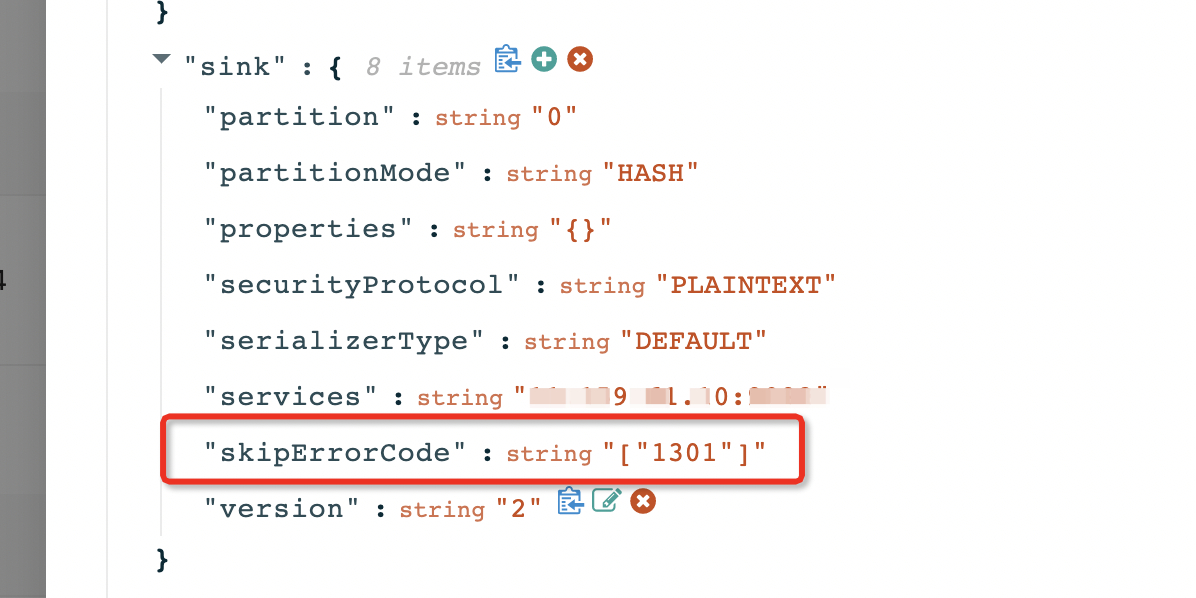
To skip the error, add the skipErrorCode parameter. This feature is supported only in OMS V4.0.0-CE.
CONNECTOR-SIMS00000000
Error level: FATAL
Error message: The execution on the database client timed out. The last packet sent successfully to the server was 0 milliseconds ago. The driver has not received any packets from the server.
Cause: The execution of a DML statement timed out on the client. The default timeout threshold is 50000 ms. If the execution time of an SQL statement exceeds 50000 ms, the client terminates its execution. |
Solution:
Log on to the OMS console.
In the left-side navigation pane, click Data Migration.
On the Data Migration page, click the name of the target data migration project to go to its details page.
Click View Component Monitoring in the upper-right corner.
Click Update, find the
config_urlparameter, and increase the value of thesocketTimeoutparameter.
CONNECTOR-SIMS01000000
Error level: FATAL
Error message: The execution on the database client timed out. The last packet sent successfully to the server was 0 milliseconds ago. The driver has not received any packets from the server.
Cause: The execution of a DDL statement timed out on the client. The default timeout threshold is 50000 ms. If the execution time of an SQL statement exceeds 50000 ms, the client terminates its execution.
Solution:
ApsaraDB for OceanBase:
Log on to the OceanBase Cloud console.
In the left-side navigation pane, choose OceanBase Migration Service > Data Migration.
On the Data Migration page, click the name of the target data migration project to go to its details page.
Click View Component Monitoring in the upper-right corner.
Click Update, find the
config_urlparameter, and increase the value of thesocketTimeoutparameter.
CONNECTOR-SIOM00000000
Error level: FATAL
Error message: The execution on the database client timed out. The last packet sent successfully to the server was 0 milliseconds ago. The driver has not received any packets from the server.
Cause: DML execution timed out on the client. The default timeout threshold is 50000ms. If the execution time of an SQL statement exceeds 50000ms, the client terminates its execution.
Solution:
Log on to the OMS console.
In the left-side navigation pane, click Data Migration.
On the Data Migration page, click the name of the target data migration project to go to its details page.
Click View Component Monitoring in the upper-right corner.
Click Update, find the
config_urlparameter, and increase the value of thesocketTimeoutparameter.
CONNECTOR-SIOM01000000
Error level: FATAL
Error message: The execution on the database client timed out. The last packet sent successfully to the server was 0 milliseconds ago. The driver has not received any packets from the server.
Cause: The execution of a DDL statement timed out on the client. The default timeout threshold is 50000 ms. If the execution time of an SQL statement exceeds 50000 ms, the client terminates its execution.
Solution:
Log on to the OMS console.
In the left-side navigation pane, click Data Migration.
On the Data Migration page, click the name of the target data migration project to go to its details page.
Click View Component Monitoring in the upper-right corner.
Click Update, find the
config_urlparameter, and increase the value of thesocketTimeoutparameter.
Supervisor error codes
SUPERVISOR-CMADIE020101
Error level: ERROR
Error message: ShellCommand execute command: {command} Timeout.
Cause: The script execution timed out.
Solution: Contact OMS Technical Support.
SUPERVISOR-CMADIE020102
Error level: ERROR
Error message: ShellCommand execute failed, Ret: {exitCode}.
Cause: The script execution failed.
Solution: Contact OMS Technical Support.
SUPERVISOR-CMADIE020201
Error level: ERROR
Error message: ReadFileCommand execute failed, Ret: {exception message}.
Cause: File reading failed.
Solution: Contact OMS Technical Support.
SUPERVISOR-CMADIE020202
Error level: ERROR
Error message: WriteFileCommand execute failed, Ret: {exception message}
Cause: File writing failed.
Solution: Contact OMS Technical Support.
SUPERVISOR-CMADIE020203
Error level: ERROR
Error message: Illegal Path: {path}
Cause: The directory that you attempted to write a file to does not allow data writing.
Solution: Contact OMS Technical Support.
SUPERVISOR-CMADIE020204
Error level: ERROR
Error message: Null or empty DYNAMIC_PORT args
Cause: The DYNAMIC_PORT placeholder parameter is empty.
Solution: Contact OMS Technical Support.
SUPERVISOR-CMADIE020205
Error level: ERROR
Error message: Failed, Unsupported Placeholder: {placeholder}
Cause: The type of the placeholder is not supported.
Solution: Contact OMS Technical Support.
SUPERVISOR-CMADIE020206
Error level: ERROR
Error message: Failed to allocate dynamic port
Cause: No available dynamic port is obtained.
Solution: Contact OMS Technical Support.
SUPERVISOR-CMADIE020207
Error level: ERROR
Error message: Unsupported file syntax
Cause: The file type is not supported.
Solution: Contact OMS Technical Support.
SUPERVISOR-CMADIE020208
Error level: ERROR
Error message: Null or empty Json parser args
Cause: The JSON parsing parameter is empty.
Solution: Contact OMS Technical Support.
SUPERVISOR-CMADIE020208
Error level: ERROR
Error message: Invoke DeleteFileCmd, delete file: {file fullname} failed
Cause: File deletion failed.
Solution: Contact OMS Technical Support.
SUPERVISOR-CMADIE020301
Error level: ERROR
Error message: SqlCommand execute failed with sql: {sqls} and exception: {exception message}
Cause: The execution of the SQL statement failed.
Solution: Contact OMS Technical Support.
SUPERVISOR-CMADIE020401
Error level: ERROR
Error message: Empty tables or views
Cause: The table or view parameter requested by DBCat is empty.
Solution: Contact OMS Technical Support.
SUPERVISOR-CMADIE020403
Error level: ERROR
Error message: Invalid byteUsedType: {byteUsedType} / None requireFields
Cause: The DBCat command parameter is invalid.
Solution: Contact OMS Technical Support.
SUPERVISOR-CMADIE020404
Error level: ERROR
Error message: Dbcat fetch DDL failed, with exception {exception message}
Cause: An error occurred when DBCat tries to obtain the DDL statement.
Solution: Contact OMS Technical Support.
SUPERVISOR-CMADIE020405
Error level: ERROR
Error message: Dbcat query dependency failed, with exception {exception message}
Cause: An error occurred when DBCat queries the dependency metadata of migration objects.
Solution: Contact OMS Technical Support.
SUPERVISOR-CMADIE020501
Error level: ERROR
Error message: Invalid input key
Cause: The input key is invalid.
Solution: Contact OMS Technical Support.
SUPERVISOR-CMADIE020503
Error level: ERROR
Error message: Unsupported report type
Cause: The reporting method is not supported.
Solution: Contact OMS Technical Support.
SUPERVISOR-CMADIE020601
Error level: ERROR
Error message: InvokeFuncCommand failed with exception {exception message}.
Cause: Function execution failed.
Solution: Contact OMS Technical Support.
SUPERVISOR-CMADIE020602
Error level: ERROR
Error message: InvokeFuncCommand unsupported func: {func name}
Cause: The function type is not supported.
Solution: Contact OMS Technical Support.
SUPERVISOR-CMADIE020603
Error level: ERROR
Error message: InvokeFuncCommand timeout with exception: {exception message}
Cause: The function execution timed out.
Solution: Contact OMS Technical Support.
SUPERVISOR-CMADIE020605
Error level: ERROR
Error message: InvokeFuncCommand fetch message fail with exception: {exception message}
Cause: Failed to obtain the message.
Solution: Contact OMS Technical Support.
SUPERVISOR-CMADIE020606
Error level: ERROR
Error message: InvokeFuncCommand failed to init datahub client with exception: {exception message}
Cause: Failed to initialize the DataHub client.
Solution: Contact OMS Technical Support.
SUPERVISOR-CMADIE020701
Error level: ERROR
Error message: Failed to get process alive job
Cause: Failed to pull the heartbeat data.
Solution: Contact OMS Technical Support.
SUPERVISOR-CMADIE020702
Error level: ERROR
Error message: Failed to fetch result of task: {taskId}
Cause: Failed to pull the task result. |
Solution: Contact OMS Technical Support.
SUPERVISOR-CMADIE020703
Error level: ERROR
Error message: Failed to fetch errors of task: {taskId}
Cause: Failed to pull the error information.
Solution: Contact OMS Technical Support.
SUPERVISOR-CMADIE020704
Error level: ERROR
Error message: There is no error message to fetch now for task: {taskId}
Cause: The task does not have any error messages.
Solution: Contact OMS Technical Support.
SUPERVISOR-CMADIE020705
Error level: ERROR
Error message: FetchReportCommand unsupported report type: {report type}
Cause: The pull method is not supported. You can pull only heartbeat, task, and error information.
Solution: Contact OMS Technical Support.