







Description
OceanBase Cloud Platform (OCP) needs to manage OceanBase clusters in multiple virtual private clouds (VPCs) in multi-VPC mode. OCP accesses the services in these VPCs through secure channels established by IC-Servers and IC-Agents. An IC-Server provides a virtual IP (VIP) address for OCP and functions as the proxy for OCP to access other VPCs.
This alert is triggered when the IC-Server cannot be connected.
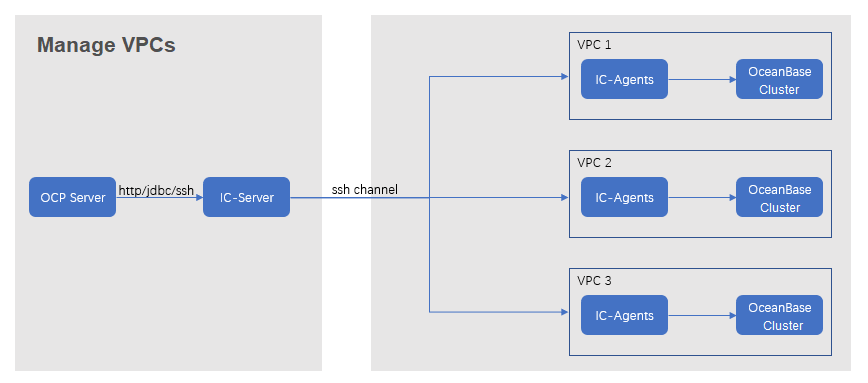
Principle
The following table describes the key parameters that are involved in the monitoring and alerting logic.
Parameter |
Value |
|---|---|
| Metric | ic_server_health
Note |
| Source | The interface for health check on an IC-Server. The URL of the interface is in the format of http:// IP :8088/ok. Replace IP with the IP address of the monitored host. |
| Collected metric | ic_server_health |
| Metric expression | min(ic_server_health{@LABELS}) by (@GBLABELS) |
| Collection cycle | 1 minute |
Alert rule
Metric |
Default threshold |
Duration |
Alert cycle |
Elimination cycle |
|---|---|---|---|---|
| ic_server_health | 0 | 0 seconds | 60 seconds | 5 minutes |
Alert information
Trigger method |
Alert level |
Scope |
|---|---|---|
| Based on the expression of the metric | Critical | Server |
Alert templates
Overview: ${alarm_target} ${alarm_name}
Details: OCP node ${ocp_address} cannot connect to IC-Server ${ic_server_address}.
Overview example: xxx.xxx.xxx.xxx IC-Server connection failed
Details example: OCP node xxx.xxx.xxx.xxx cannot connect to IC-Server xxx.xxx.xxx.xxx.
Impact on the system
You cannot manage OceanBase clusters and resources of other VPCs in the OCP console.
Possible causes
An error occurs on the host where an IC-Server is installed. As a result, the IC-Server cannot be connected.
OCP cannot connect to specific IC-Servers due to network issues.
Suggested solutions
Log on to the host where the disconnected IC-Server is installed to check whether the process related to the IC-Server is normal and whether errors are printed in the logs.
Log on to the IC-Server host.
If you fail to log on to the host, troubleshoot and fix the errors until the logon succeeds.
If you can log on to the host, go to the next step.
Run the following command to check whether the ic-server process is normal.
ps -ef|grep ic-serverIf the process is not started, run the
supervisord restart ic-servercommand to restart the command.If the process is started, go to the next step.
Run the following command to check whether errors are printed in the log file
~/logs/ic-server/server.logof the IC-Server.grep -r "error" ~/logs/ic-server/server.logReplace
~with the actual deployment path of the IC-Server.If error logs are printed, perform troubleshooting based on the errors.
If no error logs are printed, go to the next step.
Check whether OCP cannot connect to specific IC-Servers due to network issues.
For more information, see Network troubleshooting.
Contact technical support for troubleshooting if the alert is not eliminated after all the preceding measures are taken.