







This topic introduces how to build an application by using a Proxool connection pool, OceanBase Connector/J, and OceanBase Database. It also covers the use of the application for fundamental database operations, including table creation, data insertion, data deletion, data updating, and data query.
 Download the proxool-oceanbase-client sample project
 Prerequisites
You have installed OceanBase Database and created an Oracle tenant.
You have installed Java Development Kit (JDK) 1.8 and Maven.
You have installed IntelliJ IDEA.
Note
The tool used to run the sample code in this topic is IntelliJ IDEA 2021.3.2 (Community Edition), but you can also choose a tool that suits your personal preference to run the code.
Procedure
Note
The steps outlined in this topic are for the Windows environment. If you are using a different operating system or compiler, the steps may vary slightly.
- Import the
proxool-oceanbase-clientproject into IntelliJ IDEA. - Obtain the URL of OceanBase Database.
- Modify the database connection information in the
proxool-oceanbase-clientproject. - Run the
proxool-oceanbase-clientproject.
Step 1: Import the proxool-oceanbase-client project into IntelliJ IDEA
Start IntelliJ IDEA.
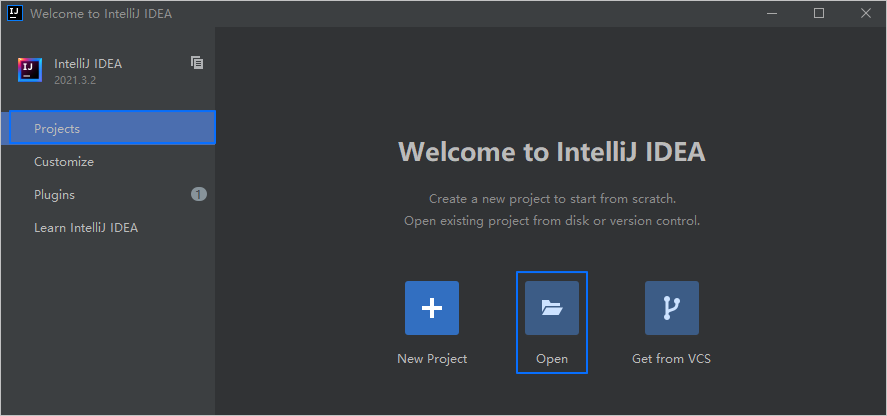
On the welcome page, click Open, navigate to the directory where the project is located, select the root directory of the project, and click OK.
IntelliJ IDEA automatically detects the project type and loads the project.
Note
When you import a Maven project using IntelliJ IDEA, it will automatically detect the
pom.xmlfile in the project, download the required dependency libraries based on the described dependencies in the file, and add them to the project.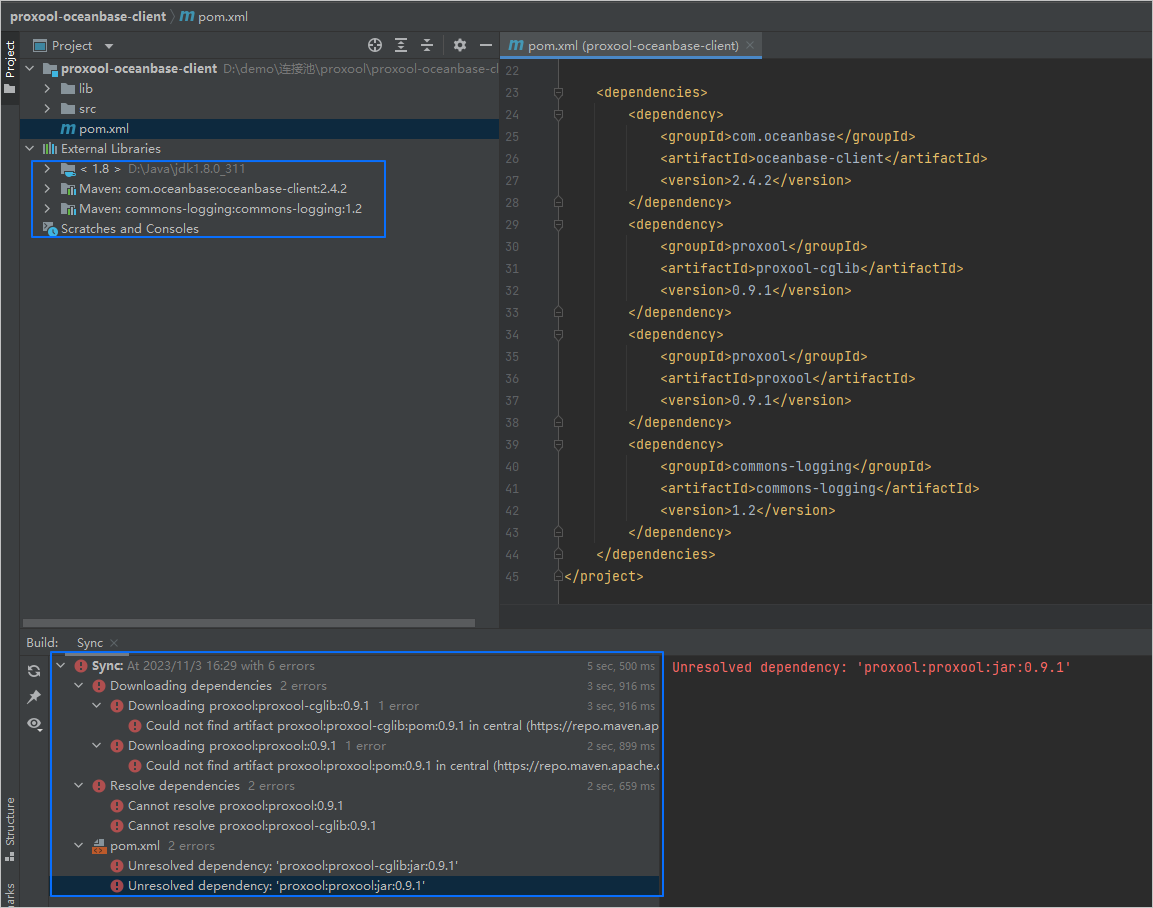
(Optional) Manually import the unparsed dependencies.
If the dependencies in the
pom.xmlfile are automatically imported to the project, ignore this step.The information in the Sync pane of IntelliJ IDEA shows that the
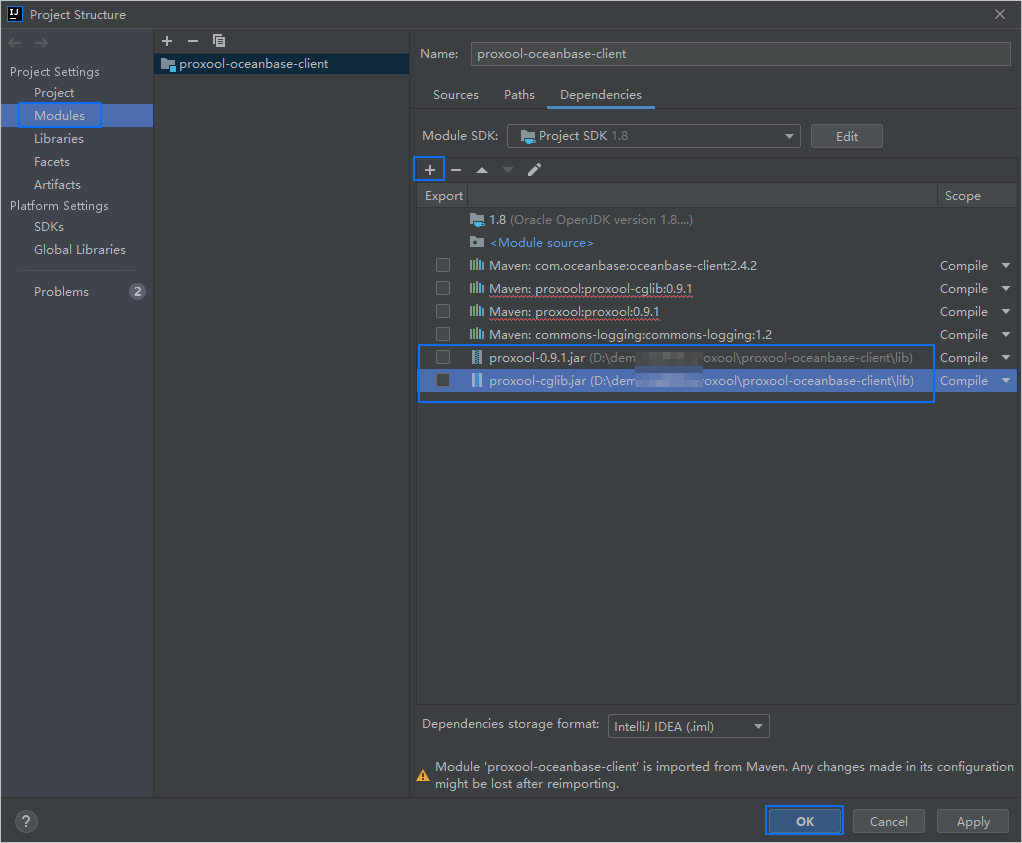
proxool-cglibandproxooldependencies are not parsed. The.jarfiles of theproxool-cglibandproxooldependencies are located in thelibfolder of the root directory of theproxool-oceanbase-clientproject. Perform the following steps to add these files to the project:- In IntelliJ IDEA, choose File > Project Structure.
- In the left-side pane, click Modules.
- In the right-side pane, click the Dependencies tab. On this tab, click the plus sign (+) and choose JARs or directories.
- In the dialog box that appears, navigate to the
libdirectory where the.jarfiles are stored, select the.jarfiles, and click OK. - The added
.jarfiles appear in the list on the Dependencies tab. - Click Apply or OK to save the changes.
Step 2: Obtain the URL of OceanBase Database
Contact the deployment personnel or administrator of OceanBase Database to obtain the connection string.
Here is an example:
obclient -hxxx.xxx.xxx.xxx -P2881 -utest_user001@oracel001 -p******For more information about the connection string, see Connect to an OceanBase tenant by using OBClient.
Fill in the URL below based on the OceanBase Database connection string.
jdbc:oceanbase://$host:$port/$schema_name?user=$user_name&password=$passwordwhere:
$hostspecifies the IP address for connecting to OceanBase Database. For connection through OceanBase Database Proxy (ODP), use the IP address of an ODP. For direct connection, use the IP address of an OBServer node.$portspecifies the port for connecting to OceanBase Database. For connection through ODP, the default value is2883, which can be customized when ODP is deployed. For direct connection, the default value is2881, which can be customized when OceanBase Database is deployed.$schema_namespecifies the name of the schema to be accessed.Notice
The user used to connect to the tenant must have the
CREATE SESSIONprivilege and theCREATE TABLE,INSERT,DELETE,UPDATE, andSELECTprivileges on this schema. For more information about user privileges, see Privilege types in Oracle mode.$user_namespecifies the tenant account. For connection through ODP, the tenant account can be in theusername@tenant name#cluster nameorcluster name:tenant name:usernameformat. For direct connection, the tenant account is in theusername@tenant nameformat.$passwordspecifies the password of the account.
For more information about URL parameters in OceanBase Connector/J, see Database URL.
Here is an example:
jdbc:oceanbase://xxx.xxx.xxx.xxx:2881/test_schema001?user=test_user001@oracel001&password=******
Step 3: Modify the database connection information in the proxool-oceanbase-client project
Modify the database connection information in the proxool-oceanbase-client/src/main/resources/db.properties file based on the information obtained in Step 2.
Here is an example:
- The IP address of the OBServer node is
xxx.xxx.xxx.xxx. - The port is
2881. - The name of the schema to be accessed is
test_schema001. - The tenant account is
test_user001@oracle001, whereoracle001is an Oracle user tenant created in OceanBase Database, andtest_user001is the username of theoracle001tenant. - The password is
******.
The sample code is as follows:
...
jdbc-1.proxool.driver-url=jdbc:oceanbase://xxx.xxx.xxx.xxx:2881/test_schema001
jdbc-1.user=test_user001@oracle001
jdbc-1.password=******
...
Step 4: Run the proxool-oceanbase-client project
In the navigation pane of the project, locate and expand the src/main/java/com.example directory.
Right-click the Main file and choose Run 'Main.main()'.
IntelliJ IDEA automatically compiles and runs this project and displays the output results on the running panel.
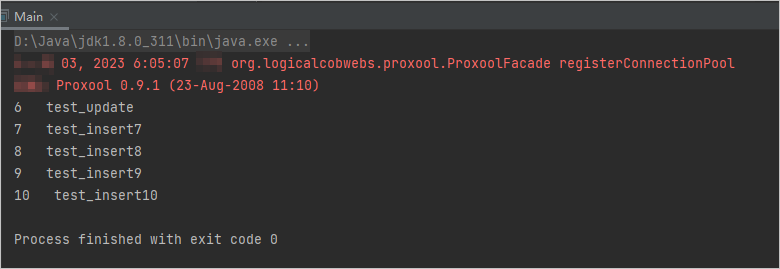
You can also execute the following SQL statement in OceanBase Client (OBClient) to view the results:
obclient [TEST_USER001]> SELECT * FROM test_schema001.test_proxool;The return result is as follows:
+------+---------------+
| C1   | C2            |
+------+---------------+
|    6 | test_update   |
|    7 | test_insert7  |
|    8 | test_insert8  |
|    9 | test_insert9  |
|   10 | test_insert10 |
+------+---------------+
5 rows in set
Project code introduction
Click proxool-oceanbase-client to download the project code, which is a compressed file named proxool-oceanbase-client.zip.
After decompressing it, you will find a folder named proxool-oceanbase-client. The directory structure is as follows:
proxool-oceanbase-client
├── lib
│    ├── proxool-0.9.1.jar
│    └── proxool-cglib.jar
├── src
│   └── main
│       ├── java
│       │   └── com
│       │       └── example
│       │           └── Main.java
│       └── resources
│           └── db.properties
└── pom.xml
Here is a breakdown of the files and directories:
lib: the directory for storing the dependency libraries required by the project.proxool-0.9.1.jar: library files of the Proxool connection pool.proxool-cglib.jar: CGLib files for the Proxool connection pool.src: the root directory for storing the source code.main: the directory for storing the main code, including the major logic of the application.java: the directory for storing the Java source code.com: the directory for storing the Java package.example: the directory for storing the packages of the sample project.Main.java: a sample file of the main class that contains logic for table creation, data insertion, data deletion, data modification, and data query.resources: the directory for storing resource files, including configuration files.db.properties: the configuration file of the connection pool, which contains relevant database connection parameters.pom.xml: the configuration file of the Maven project, which is used to manage project dependencies and build settings.
Code in the pom.xml file
The pom.xml file is a configuration file for Maven projects, which defines the dependencies, plug-ins, and build rules of the projects. Maven is a Java project management tool that can automatically download dependencies, compile, and package the projects.
To configure the pom.xml file, perform the following steps:
Declare the file.
Declare the file to be an XML file that uses XML standard
1.0and character encodingUTF-8.The sample code is as follows:
<?xml version="1.0" encoding="UTF-8"?>Configure the namespaces and the POM model version.
xmlns: the default XML namespace, which is set tohttp://maven.apache.org/POM/4.0.0.xmlns:xsi: the namespace for XML elements prefixed withxsi, which is set tohttp://www.w3.org/2001/XMLSchema-instance.xsi:schemaLocation: the mapping between the XML namespace and its corresponding XML schema definition (XSD) file. The value typically consists of paired strings separated by spaces. Each pair consists of a default XML namespace (http://maven.apache.org/POM/4.0.0) in the first part, and the URI of the corresponding XSD file (http://maven.apache.org/xsd/maven-4.0.0.xsd) in the second part.<modelVersion>: the POM model version used by the POM file, which is set to4.0.0.
The sample code is as follows:
<project xmlns="http://maven.apache.org/POM/4.0.0"
         xmlns:xsi="http://www.w3.org/2001/XMLSchema-instance"
         xsi:schemaLocation="http://maven.apache.org/POM/4.0.0 http://maven.apache.org/xsd/maven-4.0.0.xsd">
  <modelVersion>4.0.0</modelVersion>

 <! -- Other configurations -->

</project>
Configure basic information.
<groupId>: the ID of the group to which the project belongs, which is set tocom.example.<artifactId>: the name of the project, which is set toproxool-oceanbase-client.<version>: the project version, which is set to1.0-SNAPSHOT.
The sample code is as follows:
    <groupId>com.example</groupId>
    <artifactId>proxool-oceanbase-client</artifactId>
    <version>1.0-SNAPSHOT</version>
Configure the properties of the project's source file.
Specify the Maven compiler plug-in as
maven-compiler-plugin, and set both the source code and target Java versions to 8. This means that the project's source code is written using Java 8, and the compiled bytecode will also be compatible with the Java 8 runtime environment. This setup ensures that the project can correctly handle the syntax and features of Java 8 during compilation and runtime.Note
Java 1.8 and Java 8 are different names for the same version.
The sample code is as follows:
    <build>
        <plugins>
            <plugin>
                <groupId>org.apache.maven.plugins</groupId>
                <artifactId>maven-compiler-plugin</artifactId>
                <configuration>
                    <source>8</source>
                    <target>8</target>
                </configuration>
            </plugin>
        </plugins>
    </build>
Configure the components on which the project depends.
Add the
oceanbase-clientlibrary for connecting to and operating the database and configure the following parameters:<groupId>: the ID of the group to which the dependency belongs, which is set tocom.oceanbase.<artifactId>: the name of the dependency, which is set tooceanbase-client.<version>: the version of the dependency, which is set to2.4.2.
Note
The following code defines that the project depends on OceanBase Connector/J V2.4.2. For more information about other versions, see OceanBase Connector/J.
The sample code is as follows:
        <dependency>
            <groupId>com.oceanbase</groupId>
            <artifactId>oceanbase-client</artifactId>
            <version>2.4.2</version>
        </dependency>
Add the
proxool-cglibdependency library, which is a CGLib library for the Proxool connection pool, and configure the following parameters:<groupId>: the ID of the group to which the dependency belongs, which is set toproxool.<artifactId>: the name of the dependency, which is set toproxool-cglib.<version>: the version of the dependency, which is set to0.9.1.
The sample code is as follows:
        <dependency>
            <groupId>proxool</groupId>
            <artifactId>proxool-cglib</artifactId>
            <version>0.9.1</version>
        </dependency>
Add the
proxooldependency library, which is the core library of the Proxool connection pool, and configure the following parameters:<groupId>: the ID of the group to which the dependency belongs, which is set toproxool.<artifactId>: the name of the dependency, which is set toproxool.<version>: the version of the dependency, which is set to0.9.1.
The sample code is as follows:
        <dependency>
            <groupId>proxool</groupId>
            <artifactId>proxool</artifactId>
            <version>0.9.1</version>
        </dependency>
Add the
commons-loggingdependency library, which is a general log library for recording logs in the application, and configure the following parameters:<groupId>: the ID of the group to which the dependency belongs, which is set tocommons-logging.<artifactId>: the name of the dependency, which is set tocommons-logging.<version>: the version of the dependency, which is set to1.2.
The sample code is as follows:
        <dependency>
            <groupId>commons-logging</groupId>
            <artifactId>commons-logging</artifactId>
            <version>1.2</version>
        </dependency>
Code in the db.properties file
db.properties is a sample configuration file for the connection pool, containing the configuration properties for the connection pool.
Note
When you use the .properties file to configure the Proxool connection pool, observe the following rules:
- Each connection pool is identified by a unique custom name prefixed with
jdbc. - Proxool properties are prefixed with
proxool.. You can configure the Proxool connection pool based on these properties. - Properties that are not prefixed with
jdbcwill be ignored and not used by the Proxool connection pool. - Properties that are not prefixed with
proxool.are passed to actual database connections, namely, the database driver.
The db.properties file in this topic is a sample configuration file used to configure the connection pool properties of a data source named jdbc-1. Perform the following steps to configure the db.properties file:
Set the alias of the data source to
TEST.The sample code is as follows:
jdbc-1.proxool.alias=TESTConfigure database connection parameters.
- Specify the class name of the driver, which is set to the class name
com.oceanbase.jdbc.Driverof OceanBase Connector/J. - Specify the URL for connecting to the database, including the host IP address, port number, and schema to be accessed.
- Specify the username for connecting to the database.
- Specify the password for connecting to the database.
The sample code is as follows:
jdbc-1.proxool.driver-class=com.oceanbase.jdbc.Driver
jdbc-1.proxool.driver-url=jdbc:oceanbase://$host:$port/$schema_name
jdbc-1.user=$user_name
jdbc-1.password=$password
where:
$hostspecifies the IP address for connecting to OceanBase Database. For connection through ODP, use the IP address of an ODP. For direct connection, use the IP address of an OBServer node.$portspecifies the port for connecting to OceanBase Database. For connection through ODP, the default value is2883, which can be customized when ODP is deployed. For direct connection, the default value is2881, which can be customized when OceanBase Database is deployed.$schema_namespecifies the name of the schema to be accessed.$user_namespecifies the tenant account. For connection through ODP, the tenant account can be in theusername@tenant name#cluster nameorcluster name:tenant name:usernameformat. For direct connection, the tenant account is in theusername@tenant nameformat.$passwordspecifies the password of the account.
- Specify the class name of the driver, which is set to the class name
Configure other parameters of the Proxool connection pool.
- Set the maximum number of connections in the connection pool to 8.
- Set the minimum number of connections in the connection pool to 5.
- Set the number of available connections in the connection pool to 4.
- Enable the Verbose mode to show more log information.
- Set the statistics collection cycles of the connection pool to 10s, 1 minute, and 1 day.
- Set the log level of the statistics to
ERROR.
The sample code is as follows:
jdbc-1.proxool.maximum-connection-count=8
jdbc-1.proxool.minimum-connection-count=5
jdbc-1.proxool.prototype-count=4
jdbc-1.proxool.verbose=true
jdbc-1.proxool.statistics=10s,1m,1d
jdbc-1.proxool.statistics-log-level=error
Notice
The actual parameter configurations depend on the project requirements and database characteristics. We recommend that you adjust and configure the parameters based on the actual situation. For more information about parameters of the Proxool connection pool, see Properties.
The following table describes the general parameters.
Parameter |
Default value |
Description |
|---|---|---|
| alias | N/A | The alias of the connection pool. You can identify a connection pool by using an alias. This is helpful when multiple connection pools exist. |
| driver-class | N/A | The class name of the database driver. |
| driver-url | N/A | The URL for connecting to the database, including the host IP address, port number, schema to be accessed, and optional database driver parameters. |
| username | N/A | The username for connecting to the database. |
| password | N/A | The password for connecting to the database. |
| maximum-connection-count | 15 | The maximum number of connections in the connection pool. The default value is 15, which indicates that at most 15 connections can be created in the connection pool. |
| minimum-connection-count | 5 | The minimum number of connections in the connection pool. The default value is 5, which indicates that the connection pool contains at least five connections. |
| prototype-count | 0 | The number of prototype connections in the connection pool. The default value is 0, which indicates that the connection pool will not actively create extra connections. Unlike minimum-connection-count, prototype-count takes into account the current number of active connections. If the number of available connections is less than the value of prototype-count, the connection pool will create more connections if the total number of connections does not reach the upper limit. For example, if the connection pool has three active connections and two available connections but the value of prototype-count is 4, the connection pool will try to create two more connections. The purpose of the prototype-count parameter is to maintain a specific number of backup connections based on the current active connections. These backup connections can prevent connection requests from being blocked due to a shortage of available connections in the connection pool during periods of high demand. By creating more connections, the connection pool can better handle concurrent requests, thereby enhancing the performance and response speed of the application. When you modify this parameter, you must consider the concurrency requirements of the application and the database configurations. If a large number of concurrent requests are expected in the application, you can increase the value of prototype-count. If a small number of concurrent requests are expected, you can set the value to 0 to reduce resource consumption. |
| verbose | false | Specifies whether to enable the Verbose mode for the connection pool. The default value is false, which indicates the Quiet mode. When verbose is set to true, the connection pool returns more detailed information to facilitate debugging and monitoring for developers. The information can include the status of the connection pool, the creation and release of connections, and the usage of connections. Enabling the Verbose mode can help developers better understand the running status of the connection pool and check whether connections are properly allocated and recycled. This is very helpful in troubleshooting connection leaks and performance issues, as well as in system tuning. In a production environment, we recommend that you do not set verbose to true. This is because in Verbose mode, a large mount of information is generated, which can compromise system performance and affect the log file size. Typically, we recommend that you set verbose to false, and enable it temporarily only when needed for debugging and monitoring purposes. |
| statistics | null | Configures the sampling cycle for statistical information about the usage of the connection pool. The sampling cycle can be set as a comma-separated list of time units. For example, 10s,15m indicates that statistics are sampled every 10 seconds and every 15 minutes. Supported units are s (seconds), m (minutes), h (hours), and d (days). The default value is null, indicating that no statistical information is collected. When the statistics parameter is specified, statistics of the connection pool, such as the number of active connections, idle connections, and connection requests, are periodically collected. The sampling cycle determines the granularity and frequency of the statistical information. |
| statistics-log-level | null | Specifies the log level for statistical information, namely, the trace type of log statistics. Supported log levels are DEBUG, INFO, WARN, ERROR, and FATAL. The default value is null, indicating that no statistical information logs are recorded. When the statistics-log-level parameter is specified, the connection pool records generated statistical information at the specified log level. The statistical information can include the status of the connection pool, the creation and release of connections, and the usage of connections. |
| test-after-use | N/A | Specifies whether to verify a connection after it is closed. If you set the value to true and specify house-keeping-test-sql, each connection is verified when it is closed, namely returned to the connection pool. A connection that fails the verification will be discarded. Connections in the connection pool are typically returned to the pool for reuse after being used. The purpose of the test-after-use parameter is to verify the connection after it is returned to the pool to ensure its availability and effectiveness. Generally, connections are verified by using the SQL statement specified by house-keeping-test-sql. After the test-after-use feature is enabled, unavailable connections can be detected and removed from the connection pool in a timely manner, thereby preventing the application from obtaining an invalid connection. This can also improve the stability and reliability of the application. To use the test-after-use feature, you must configure the house-keeping-test-sql parameter in advance to specify the SQL statement used for connection verification. This way, the connection pool can verify connections based on the rule defined in house-keeping-test-sql. |
| house-keeping-test-sql | N/A | Configures the SQL statement for verifying idle connections in the connection pool. When the housekeeping thread of the connection pool detects idle connections, it executes this SQL statement to verify these connections. The verification SQL statement will quickly execute, such as checking the current date. If this parameter is not specified, connection verification will not be performed. In the MySQL mode, you can use the SELECT CURRENT_DATE or SELECT 1 statement. In the Oracle mode, you can use the SELECT sysdate FROM DUAL or SELECT 1 FROM DUAL statement. |
| trace | false | Specifies whether to record log information for each SQL call. If set to true, each SQL call will be logged at the DEBUG level, and the execution time will be displayed. This information can also be obtained by registering a ConnectionListener. For more information, see ProxoolFacade. The default value is false. After the trace feature is enabled, a large number of logs can be generated, especially in cases of high concurrency and frequent SQL calls. It is recommended to use this feature cautiously in a production environment to avoid generating excessive logs and compromising system performance. |
| maximum-connection-lifetime | 4 hours | Specifies the maximum lifetime of a connection, namely the longest time for which a connection can exist before it is destroyed, in ms. The default value is 4 hours. The lifetime of a connection refers to the period from the creation to the destruction of a connection. You can configure the maximum-connection-lifetime parameter to limit the longest time a connection can exist in the connection pool, avoiding situations where connections remain unused for a long time and resource leaks occur. |
| maximum-active-time | 5 minutes | Specifies the maximum active period of a thread. When the housekeeping thread of the connection pool detects a thread whose active period exceeds the specified value, it will terminate the thread. Therefore, you must specify a value greater than the expected longest response time. The default value is 5 minutes. The housekeeping thread will terminate excess available connections, including those that are not in use and have been active for a period of time longer than the specified value of this parameter. The number of retained connections must be equal to or greater than the value of minimum-connection-count. The housekeeping thread periodically checks connections at an interval specified by house-keeping-sleep-time. |
| maximum-new-connections | N/A | Specifies the maximum number of new connections that can be simultaneously established in the connection pool. This parameter has been deprecated. We recommend that you use the simultaneous-build-throttle parameter instead. |
| simultaneous-build-throttle | 10 | Specifies the maximum number of connections that can be simultaneously established in the connection pool at any time. In other words, it sets an upper limit on the number of new connections about to be established but not yet available. Establishing connections can involve multiple threads (for example, when a connection is established as needed) and takes time for an established connection to become available. Therefore, a mechanism is required to prevent a large number of threads from deciding to establish connections at the same time. The purpose of the simultaneous-build-throttle parameter is to limit the number of new connections that can be simultaneously established in the connection pool, so as to control the concurrency of the connection pool. When the maximum number of concurrent connections is reached, further requests for new connections from threads will be blocked until either a connection is available or a specified timeout is exceeded. You can configure the simultaneous-build-throttle parameter to balance the concurrency of the connection pool and the consumption of resources. The default value is 10, which indicates that at most 10 connections can be simultaneously established in the connection pool. |
| overload-without-refusal-lifetime | 60 | Determines the status of the connection pool. If connection requests are refused within the specified time threshold (in ms), the connection pool is overloaded. The default value is 60 seconds. |
| test-before-use | N/A | Specifies whether to verify each connection before it is provided. If set to true, each connection is verified by using the SQL statement specified by house-keeping-test-sql before being provided to the application. If a connection fails the verification, it will be discarded, and the connection pool will select another available connection. If all connections fail the verification, a new connection will be created. If the new connection fails the verification, an SQLException will be thrown. For a MySQL database, the autoReconnect parameter must be added to the connection parameters and be set to true. Otherwise, reconnection is not supported even if test-before-use is set to true. |
| fatal-sql-exception | null | Specifies how to detect and handle SQL exceptions. It is a comma-separated list of message fragments. When a SQLException occurs, its message is compared against these message segments. If the message of the exception contains any specified message segment (case-sensitive), the exception is considered fatal. The connection is discarded. No matter what the case, the SQLException is thrown again so that the user knows what happens. You can also configure another exception to be thrown. For more information, see the description of the fatal-sql-exception-wrapper-class parameter. The default value is null. If the fatal-sql-exception-wrapper-class parameter is specified, you can configure a substitute exception class to be thrown. This allows you to define the methods for handling SQLExceptions. |
| fatal-sql-exception-wrapper-class | null | Configures the wrapper class for fatal SQL exceptions. If the fatal-sql-exception parameter is specified, the default behavior is to discard the exception that caused the fatal SQLException and to directly throw the original exception to the user. By using the fatal-sql-exception-wrapper-class parameter, you can wrap the SQLException in any exception inherited from SQLException or RuntimeException. If you do not want to build an exception class, you can use the FatalSQLException or FatalRuntimeException class provided by Proxool. To use these classes, you must set fatal-sql-exception-wrapper-class to org.logicalcobwebs.proxool.FatalSQLException or org.logicalcobwebs.proxool.FatalRuntimeException. The default value is null, which indicates that fatal SQLExceptions are not wrapped. The wrapper class must be a subclass of SQLException or RuntimeException. |
| house-keeping-sleep-time | 30 seconds | Specifies the sleeping time of the housekeeping thread of the connection pool. The housekeeping thread checks the status of all connections and determines whether to destroy or create connections. The default value is 30s, which indicates that the housekeeping thread executes the maintenance task every 30s. |
| injectable-connection-interface | N/A | Allows Proxool to implement the methods defined in the delegate Connection object. |
| injectable-statement-interface | N/A | Allows Proxool to implement the methods defined in the delegate Statement object. |
| injectable-prepared-statement-interface | N/A | Allows Proxool to implement the methods defined in the delegate PreparedStatement object. |
| injectable-callable-statement-interface | N/A | Allows Proxool to implement the methods defined in the delegate CallableStatement object. |
| jndi-name | N/A | The registered name of the connection pool in Java Naming and Directory Interface (JNDI). |
Code in the Main.java file
The Main.java file is a part of the sample application, demonstrating how to obtain a database connection through the Proxool connection pool and perform a series of database operations. These operations include creating a table, inserting data, deleting data, updating data, querying data, and printing the query results.
To configure the Main.java file, perform the following steps:
Import the required classes and interfaces.
Define the package where the code resides and import relevant Proxool and JDBC classes. These classes are used to configure and manage the database connection pool and execute SQL statements. The Proxool connection pool can improve the database performance and reliability. The specific steps are as follows:
- Define the package where the code resides as
com.example. This package stores the current Java classes. - Import the Proxool configuration class
org.logicalcobwebs.proxool.configuration.PropertyConfigurator. - Import the input stream class
java.io.InputStreamfor reading configuration files. - Import the JDBC Connection class
java.sql.Connection. - Import the JDBC DriverManager class
java.sql.DriverManager. - Import the JDBC ResultSet class
java.sql.ResultSet. - Import the JDBC Statement class
java.sql.Statement. - Import the Properties class
java.util.Propertiesfor loading configuration files.
The sample code is as follows:
package com.example; import org.logicalcobwebs.proxool.configuration.PropertyConfigurator; import java.io.InputStream; import java.sql.Connection; import java.sql.DriverManager; import java.sql.ResultSet; import java.sql.Statement; import java.util.Properties;- Define the package where the code resides as
Define class names and methods.
Define an entry method for Java applications. Obtain the database connection information from the configuration file. After establishing a database connection by using the Proxool driver, call the defined methods in sequence to execute DDL, DML, and query statements. Capture possible exceptions and record stack information of the exceptions. This code segment aims to execute database operations and record logs by using the log recorder. The specific steps are as follows:
Define a public class named
Main.Define a private static constant named
DB_PROPERTIES_FILEto indicate the path where the database configuration file is located. This constant can be referenced in code to load and read the configuration file.Define a public static method named
main, which is used as the execution start point of the application.Capture code blocks with possible exceptions.
- Create a
Propertiesobject for reading property values from the configuration file. - Use the class loader of the
Mainclass to obtain the input stream of the configuration file. - Use the input stream to load the properties in the configuration file to the
Propertiesobject. - Configure the connection pool based on the loaded property values.
- Dynamically load the Proxool database driver.
- Establish a database connection by using the Proxool driver.
- Create a
Statementobject. - Call the defined method
executeDDLStatements()to execute a DDL statement to create a table. - Call the defined method
executeDMLStatements()to execute DML statements to insert, update, and delete data. - Call the defined method
executeQueryStatements()to execute a query statement to obtain data.
- Create a
Capture and return possible exceptions.
Define methods for creating tables, executing DML statements, and querying data.
The sample code is as follows:
public class Main {
    private static final String DB_PROPERTIES_FILE = "/db.properties";

    public static void main(String[] args) {
        try {
            Properties properties = new Properties();
            InputStream is = Main.class.getResourceAsStream(DB_PROPERTIES_FILE);
            properties.load(is);
            PropertyConfigurator.configure(properties);

            Class.forName("org.logicalcobwebs.proxool.ProxoolDriver");
            try (Connection conn = DriverManager.getConnection("proxool.TEST");
                Statement stmt = conn.createStatement()) {
                executeDDLStatements(stmt);
                executeDMLStatements(stmt);
                executeQueryStatements(stmt);
            }
        } catch (Exception e) {
            e.printStackTrace();
        }
    }

    // Define a method for creating tables.
    // Define a method for executing DML statements.
    // Define a method for querying data.
}
Define a method for creating tables.
Define a private static method
executeDDLStatements()for executing DDL statements, including table creation statements. The specific steps are as follows:- Define a private static method
executeDDLStatements(). The method receives aStatementobject as a parameter and can throw anException. - Call the
execute()method to execute an SQL statement to create a table namedtest_proxool. The table has two columns:c1andc2, which are respectively of theNUMBERandVARCHAR2(32)types.
The sample code is as follows:
private static void executeDDLStatements(Statement stmt) throws Exception { stmt.execute("CREATE TABLE test_proxool (c1 NUMBER, c2 VARCHAR2(32))"); }- Define a private static method
Define a method for executing DML statements.
Define a private static method
executeDMLStatements()for executing DML statements to insert, delete, and update data. The specific steps are as follows:- Define a private static method
executeDMLStatements(). The method receives aStatementobject as a parameter. If an exception occurs during the execution, the method throws anException. - Use the
FORloop to perform 10 rounds of iterations. In the loop, call theexecute()method to execute anINSERTstatement to insert theivariable and relevant string values into thetest_proxooltable. - Execute a
DELETEstatement to delete rows whosec1column values are smaller than or equal to5from thetest_proxooltable. - Execute an
UPDATEstatement to update thec2column values of the rows in thetest_proxooltable whosec1column values are6totest_update.
The sample code is as follows:
private static void executeDMLStatements(Statement stmt) throws Exception { for (int i = 1; i <= 10; i++) { stmt.execute("INSERT INTO test_proxool VALUES (" + i + ",'test_insert" + i + "')"); } stmt.execute("DELETE FROM test_proxool WHERE c1 <= 5"); stmt.execute("UPDATE test_proxool SET c2 = 'test_update' WHERE c1 = 6"); }- Define a private static method
Define a method for querying data.
Define a private static method
executeQueryStatements()for executing theSELECTstatement and processing the result. The specific steps are as follows:- Define a private static method
executeQueryStatements(). The method receives aStatementobject as a parameter. If an exception occurs during the execution, the method throws anException. - Call the
executeQuery()method to execute aSELECTstatement and store the result in aResultSetobject namedrs. Here, all data in thetest_proxooltable is returned for the query. Execute thetry-with-resourcesblock and make sure that theResultSetobject is automatically closed after being used. - Use the
WHILEloop and thenext()method to iterate through each row of data in theResultSetobject namedrs. In each iteration, thers.next()method moves the pointer to the next row of the result set. If there is another row of data available, the method returnstrue; otherwise, it returnsfalse. In theWHILEloop, as long asrs.next()returnstrue, it indicates that more rows of data are available. The code within the loop will then execute and handle the data of the current row. When all rows of data have been processed,rs.next()will returnfalse, and the loop will end. - Call the
getInt()andgetString()methods to obtain the values of specified columns in the current row and return the values to the console. Here, the values of thec1andc2columns are returned. Call thegetInt()method to obtain integer values and call thegetString()method to obtain string values.
The sample code is as follows:
private static void executeQueryStatements(Statement stmt) throws Exception { try (ResultSet rs = stmt.executeQuery("SELECT * FROM test_proxool")) { while (rs.next()) { System.out.println(rs.getInt("c1") + " " + rs.getString("c2")); } } }- Define a private static method
Complete code
<?xml version="1.0" encoding="UTF-8"?>
<project xmlns="http://maven.apache.org/POM/4.0.0"
         xmlns:xsi="http://www.w3.org/2001/XMLSchema-instance"
         xsi:schemaLocation="http://maven.apache.org/POM/4.0.0 http://maven.apache.org/xsd/maven-4.0.0.xsd">
    <modelVersion>4.0.0</modelVersion>

    <groupId>com.oceanbase</groupId>
    <artifactId>proxool-oceanbase-client</artifactId>
    <version>1.0-SNAPSHOT</version>
    <build>
        <plugins>
            <plugin>
                <groupId>org.apache.maven.plugins</groupId>
                <artifactId>maven-compiler-plugin</artifactId>
                <configuration>
                    <source>8</source>
                    <target>8</target>
                </configuration>
            </plugin>
        </plugins>
    </build>

    <dependencies>
        <dependency>
            <groupId>com.oceanbase</groupId>
            <artifactId>oceanbase-client</artifactId>
            <version>2.4.2</version>
        </dependency>
        <dependency>
            <groupId>proxool</groupId>
            <artifactId>proxool-cglib</artifactId>
            <version>0.9.1</version>
        </dependency>
        <dependency>
            <groupId>proxool</groupId>
            <artifactId>proxool</artifactId>
            <version>0.9.1</version>
        </dependency>
        <dependency>
            <groupId>commons-logging</groupId>
            <artifactId>commons-logging</artifactId>
            <version>1.2</version>
        </dependency>
    </dependencies>
</project>
#alias: the alias of the data source
jdbc-1.proxool.alias=TEST
#driver-class: driver name
jdbc-1.proxool.driver-class=com.oceanbase.jdbc.Driver
#driver-url: url connection string, username and password must be determined
jdbc-1.proxool.driver-url=jdbc:oceanbase://$host:$port/$schema_name
jdbc-1.user=$user_name
jdbc-1.password=$password
#The maximum number of database connections. The default is 15
jdbc-1.proxool.maximum-connection-count=8
#The minimum number of database connections, defaults to 5
jdbc-1.proxool.minimum-connection-count=5
#The number of available connections in the Connection pool. If the number of connections in the current Connection pool is less than this value, new connections will be established (assuming that the maximum number of available connections is not exceeded). For example, if we have three active connections and two available connections, and our prototype count is 4, the database Connection pool will try to establish another two connections. This is different from the minimum connection count Minimum connection count also counts active connections. Prototype count is the number of spare connections
jdbc-1.proxool.prototype-count=4
#verbose: detailed information settings. Parameter bool value
jdbc-1.proxool.verbose=true
#statistics: connection pool usage statistics. Parameter "10s, 1m, 1d"
jdbc-1.proxool.statistics=10s,1m,1d
#statistics-log-level:  log statistics tracking type. Parameter 'ERROR' or 'INFO'
jdbc-1.proxool.statistics-log-level=error
package com.example;

import org.logicalcobwebs.proxool.configuration.PropertyConfigurator;
import java.io.InputStream;
import java.sql.Connection;
import java.sql.DriverManager;
import java.sql.ResultSet;
import java.sql.Statement;
import java.util.Properties;

public class Main {
    private static final String DB_PROPERTIES_FILE = "/db.properties";

    public static void main(String[] args) {
        try {
            Properties properties = new Properties();
            InputStream is = Main.class.getResourceAsStream(DB_PROPERTIES_FILE);
            properties.load(is);
            PropertyConfigurator.configure(properties);

            Class.forName("org.logicalcobwebs.proxool.ProxoolDriver");
            try (Connection conn = DriverManager.getConnection("proxool.TEST");
                Statement stmt = conn.createStatement()) {
                executeDDLStatements(stmt);
                executeDMLStatements(stmt);
                executeQueryStatements(stmt);
            }
        } catch (Exception e) {
            e.printStackTrace();
        }
    }

    private static void executeDDLStatements(Statement stmt) throws Exception {
        stmt.execute("CREATE TABLE test_proxool (c1 NUMBER, c2 VARCHAR2(32))");
    }

    private static void executeDMLStatements(Statement stmt) throws Exception {
        for (int i = 1; i <= 10; i++) {
            stmt.execute("INSERT INTO test_proxool VALUES ("+ i +",'test_insert" + i + "')");
        }
        stmt.execute("DELETE FROM test_proxool WHERE c1 <= 5");
        stmt.execute("UPDATE test_proxool SET c2 = 'test_update' WHERE c1 = 6");
    }

    private static void executeQueryStatements(Statement stmt) throws Exception {
        try (ResultSet rs = stmt.executeQuery("SELECT * FROM test_proxool")) {
            while (rs.next()) {
                System.out.println(rs.getInt("c1") + "   " + rs.getString("c2"));
            }
        }
    }
}
References
- For more information about OceanBase Connector/J, see OceanBase Connector/J.
- For more information about the Proxool connection pool, see Introduction for Users.