







This topic introduces the concept of tenant in OceanBase Database and related concepts such as resource unit, resource unit configuration, resource pool. Tenant is a logical concept built upon clusters are created within a cluster. OceanBase Database is built based on a multi-tenant architecture. The multi-tenant architecture applies to scenarios such as resource consolidation and SaaS services and simplifies O&M.
A cluster is a physical concept in the deployment layer and is a collection of zones and nodes. Zones and nodes have attributes such as region. A tenant is a logical concept in the resource layer and is a resource unit defined on a physical node. You can specify the specifications for a resource unit, such as the CPU, memory, log disk space, and input/output operations per second (IOPS).
A tenant is similar to a database instance in a conventional database. A tenant is associated with resources by using a resource pool and thereby exclusively occupies a resource quota. The resource quota can be dynamically adjusted. You can create database objects such as databases, tables, and users in a tenant.
The concepts of unit config, resource unit, and resource pool are the basis for understanding the concept of tenant. You can query the DBA_OB_Unit_CONFIGS view for unit configs, DBA_OB_RESOURCE_POOLS for resource pools, DBA_OB_UnitS for resource units, and DBA_OB_TENANTS for tenants.
Unit config
A unit config defines the sizes of general physical resource items, such as the CPU, memory, disk space, and IOPS. When you create a resource pool, you must specify its unit config and then create resource units based on the unit config.
Resource unit
Resource unit is a very important concept in tenant management. OceanBase Database manages physical resources based on resource units. A resource unit is a collection of physical resources such as CPU, memory, disk space, and IOPS. A resource unit is also the basic unit for resource scheduling. It has location attributes such as node, zone, and region. A node is the abstraction of a server and a zone is the abstraction of an IDC. You can modify the deployment mode of a tenant by modifying the location attributes of its resource units.
Resource pool
Each resource unit belongs to a resource pool. A resource pool consists of multiple resource units. A resource pool is the basic unit in resource allocation. Resource units in the same resource pool have the same unit config. In other words, the sizes of physical resources are the same for all resource units in the resource pool.
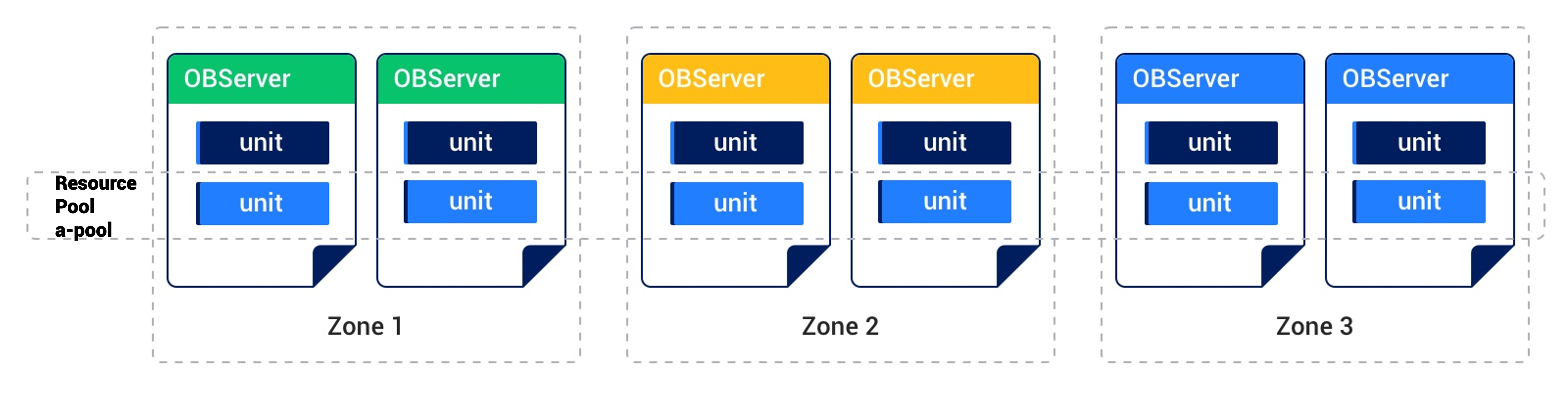
The preceding figure shows a resource pool named a_pool that consists of six resource units. The resource pool has the following attributes:
ZONE_LIST: Indicates the distribution of resource units in zones, which isZONE_LIST='zone1,zone2,zone3'in this example.Unit_NUM: Indicates the number of resource units in each zone specified byZONE_LIST, which is 2 in this example.Unit_CONFIG_ID: Indicates the ID of the unit config associated with the resource pool. The unit config defines the sizes of physical resources in each resource unit, such as the CPU, memory, log disk space, and IOPS.
The physical concepts and logical concepts are associated based on resource units in OceanBase Database. Each tenant has multiple resource units distributed on multiple nodes in multiple zones. The resource units on each node belong to different tenants. To be short, a cluster consists of nodes and a node is the container of resource units. A tenant consists of resource units and a resource unit is the container of database objects.
When you create a tenant, you can set RESOURCE_POOL_LIST to specify the resource pool associated with the tenant. The resource units in this resource pool are intended for this tenant. For example, set RESOURCE_POOL_LIST to a_pool for tenant a. The following figure shows the deployment.
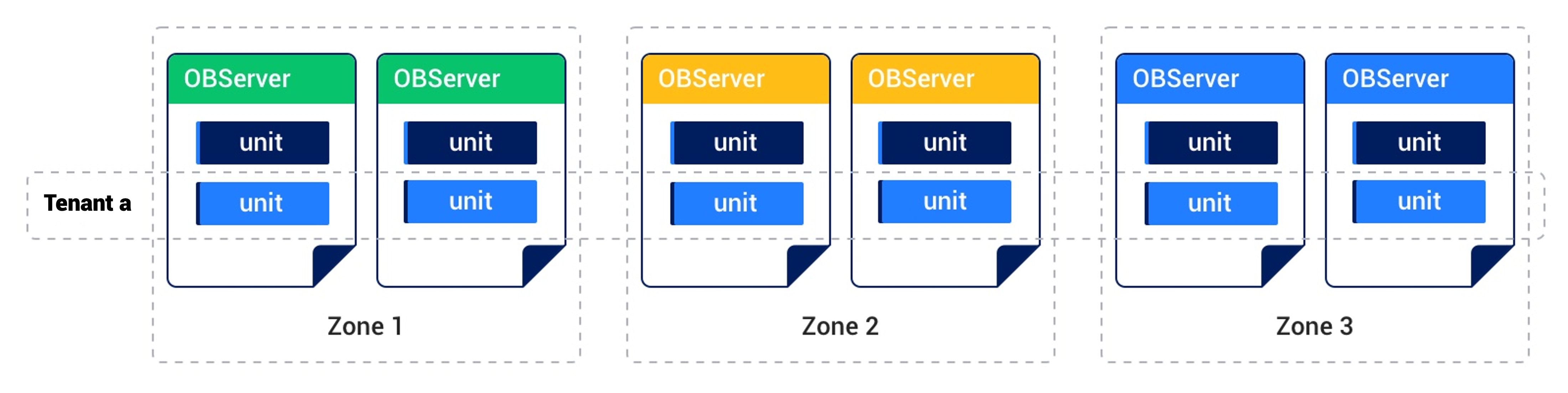
This tenant is deployed across three zones and each zone has two resource units. You can modify the Unit_CONFIG_ID parameter for the a_pool resource pool to dynamically adjust the physical resources for this tenant.
You can also modify the distribution of resource units on different nodes in the same zone, which is called resource unit migration, to achieve load balancing among the nodes. When a node fails, you can migrate the resource units on it to other nodes in the same zone to implement disaster recovery. You can modify the distribution of resource units in different zones, namely, modify the locality of the tenant, to adjust the deployment mode of the tenant, thereby achieving different disaster recovery levels. General deployment modes include three IDCs in the same city, three IDCs across two regions, and five IDCs across three regions.