







This topic introduces how to build an application by using a Druid connection pool, OceanBase Connector/J, and OceanBase Database. It also covers the use of the application for fundamental database operations, including table creation, data insertion, data deletion, data updating, and data query.
 Download the druid-oceanbase-client sample project
 Prerequisites
You have installed OceanBase Database and created an Oracle tenant.
You have installed Java Development Kit (JDK) 1.8 and Maven.
You have installed Eclipse.
Note
The tool used to run the sample code in this topic is Eclipse IDE for Java Developers (2022-03), but you can also choose a tool that suits your personal preference to run the code.
Procedure
Note
The steps outlined in this topic are for the Windows environment. If you are using a different operating system or compiler, the steps may vary slightly.
- Import the
druid-oceanbase-clientproject into Eclipse. - Obtain the URL of OceanBase Database.
- Modify the database connection information in the
druid-oceanbase-clientproject. - Run the
druid-oceanbase-clientproject.
Step 1: Import the druid-oceanbase-client project into Eclipse
Start Eclipse and choose File > Open Projects from File System.
In the dialog box that appears, click Directory to browse and select the project, and then click Finish.
Note
When you import a Maven project using Eclipse, it will automatically detect the
pom.xmlfile in the project, download the required dependency libraries based on the described dependencies in the file, and add them to the project.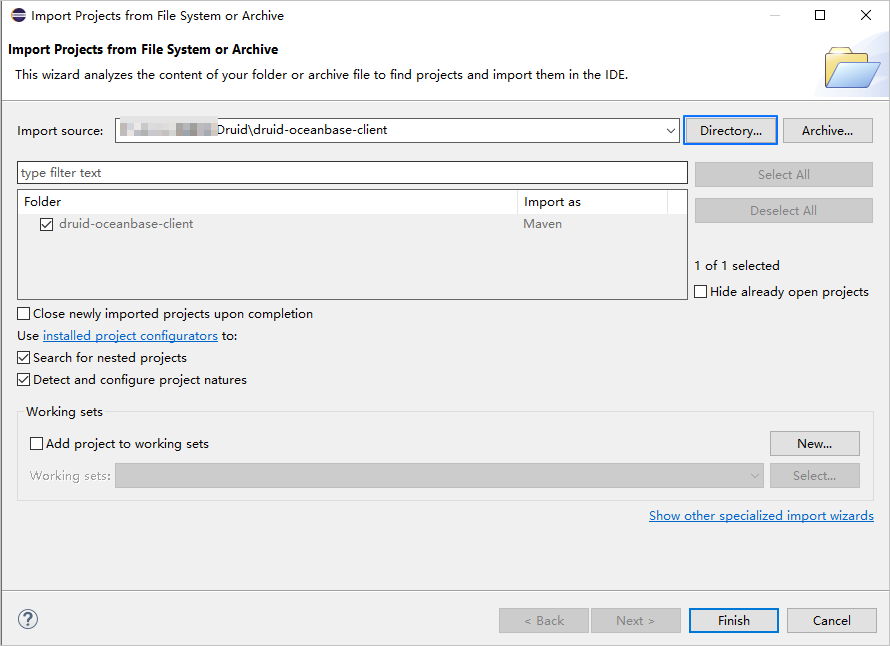
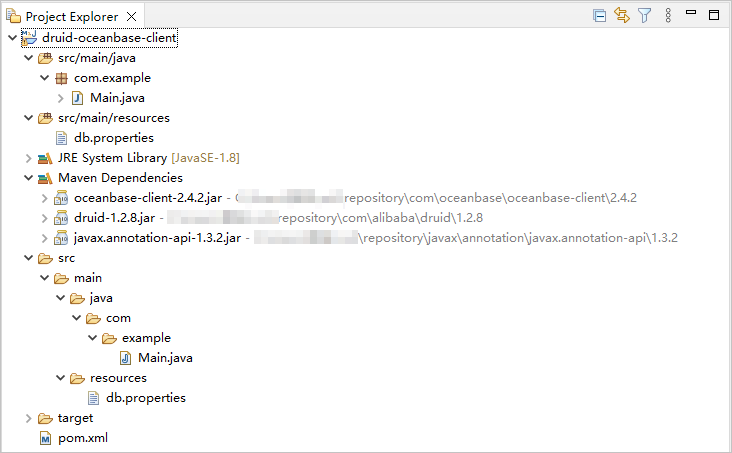
View the project.
Step 2: Obtain the URL of OceanBase Database
Contact the deployment personnel or administrator of OceanBase Database to obtain the connection string.
Here is an example:
obclient -hxxx.xxx.xxx.xxx -P2881 -utest_user001@oracel001 -p******For more information about the connection string, see Connect to an OceanBase tenant by using OBClient.
Enter the URL of OceanBase Database.
jdbc:oceanbase://$host:$port/$schema_name?user=$user_name&password=$passwordwhere
$hostspecifies the IP address for connecting to OceanBase Database. For connection through OceanBase Database Proxy (ODP), use the IP address of an ODP. For direct connection, use the IP address of an OBServer node.$portspecifies the port for connecting to OceanBase Database. For connection through ODP, the default value is2883, which can be customized when ODP is deployed. For direct connection, the default value is2881, which can be customized when OceanBase Database is deployed.$schema_namespecifies the name of the schema to be accessed.Notice
The user used to connect to the tenant must have the
CREATE SESSIONprivilege and theCREATE TABLE,DROP TABLE,INSERT,DELETE,UPDATE, andSELECTprivileges on this schema. For more information about user privileges, see Privilege types in Oracle mode.$user_namespecifies the tenant account. For connection through ODP, two account formats are supported:username@tenant name#cluster nameandcluster name:tenant name:username. For direct connection, theusername@tenant nameformat is supported.$passwordspecifies the password of the account.
For more information about URL parameters in OceanBase Connector/J, see Database URL.
Here is an example:
jdbc:oceanbase://xxx.xxx.xxx.xxx:2881/test_schema001?user=test_user001@oracel001&password=******
Step 3: Modify the database connection information in the druid-oceanbase-client project
Modify the database connection information in the db.properties file in the druid-oceanbase-client/src/main/resources/ directory based on the information obtained in Step 2: Obtain the URL of OceanBase Database.
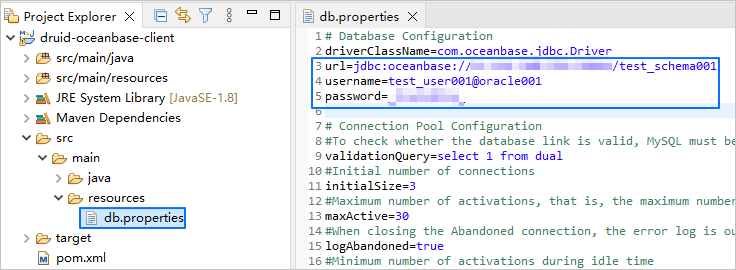
Here is an example:
- The IP address of the OBServer node is
xxx.xxx.xxx.xxx. - The access port is 2881.
- The name of the schema to be accessed is
test_schema001. - The tenant account is
test_user001@oracle001.oracle001is an Oracle user tenant created in OceanBase Database, andtest_user001is the username of a user in theoracle001tenant. - The password is
******.
Here is the sample code:
...
url=jdbc:oceanbase://xxx.xxx.xxx.xxx:2881/test_schema001
username=test_user001@oracle001
password=******
...
Step 4: Run the druid-oceanbase-client project
In the project navigation view, locate and expand the druid-oceanbase-client/src/main/java directory.
Right-click the Main.java file and choose Run As > Java Application.
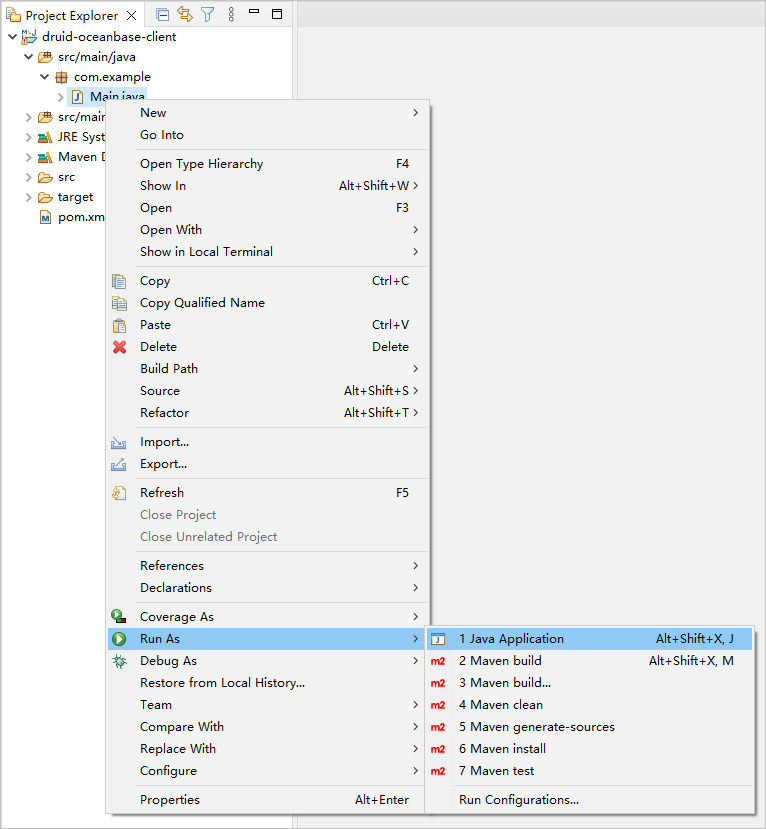
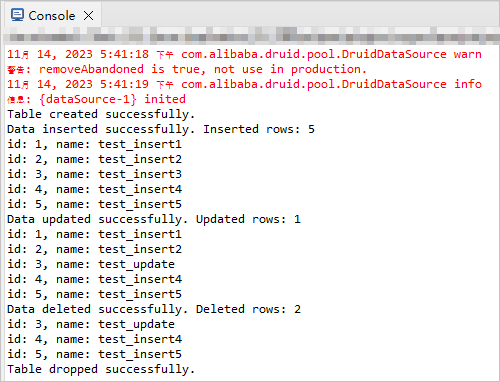
In the console window of Eclipse, view the output results.
Project code
Click here to download the project code, which is a package named druid-oceanbase-client.zip.
Decompress the package to obtain a folder named druid-oceanbase-client. The directory structure is as follows:
druid-oceanbase-client
├── src
│   └── main
│       ├── java
│       │   └── com
│       │       └── example
│       │           └── Main.java
│       └── resources
│           └── db.properties
└── pom.xml
Here is a breakdown of the files and directories:
src: the root directory for storing the source code.main: the directory for storing the main code, including the major logic of the application.java: the directory for storing the Java source code.com: the directory for storing the Java package.example: the directory for storing the packages of the sample project.Main.java: a sample file of the main class that contains logic for table creation, data insertion, data deletion, data modification, and data query.resources: the directory for storing resource files, including configuration files.db.properties: the configuration file of the connection pool, which contains relevant database connection parameters.pom.xml: the configuration file of the Maven project, which is used to manage project dependencies and build settings.
Code in pom.xml
The pom.xml file is a configuration file for Maven projects, which defines the dependencies, plug-ins, and build rules of the projects. Maven is a Java project management tool that can automatically download dependencies, compile, and package the projects.
To configure the pom.xml file, perform the following steps:
Declare the file.
Declare the file to be an XML file that uses XML standard
1.0and character encodingUTF-8.Here is the sample code:
<?xml version="1.0" encoding="UTF-8"?>Configure namespaces and the POM version.
xmlns: the default XML namespace for the POM, which is set tohttp://maven.apache.org/POM/4.0.0.xmlns:xsi: the XML namespace for XML elements prefixed withxsi, which is set tohttp://www.w3.org/2001/XMLSchema-instance.xsi:schemaLocation: the location of an XML schema definition (XSD) file. The value consists of two parts: the default XML namespace(http://maven.apache.org/POM/4.0.0)and the URI of the XSD file (http://maven.apache.org/xsd/maven-4.0.0.xsd).<modelVersion>: the POM version used by the POM file, which is set to4.0.0.
Here is the sample code:
<project xmlns="http://maven.apache.org/POM/4.0.0"
         xmlns:xsi="http://www.w3.org/2001/XMLSchema-instance"
         xsi:schemaLocation="http://maven.apache.org/POM/4.0.0 http://maven.apache.org/xsd/maven-4.0.0.xsd">
  <modelVersion>4.0.0</modelVersion>

 <!-- Other configurations -->

</project>
Configure basic information.
<groupId>: the ID of the group to which the project belongs, which is set tocom.example.<artifactId>: the name of the project, which is set todruid-oceanbase-client.<version>: the project version, which is set to1.0-SNAPSHOT.
Here is the sample code:
    <groupId>com.example</groupId>
    <artifactId>druid-oceanbase-client</artifactId>
    <version>1.0-SNAPSHOT</version>
Configure the attributes of the project source file.
Specify
maven-compiler-pluginas the compiler plug-in of Maven, and set the source code version and target code version of the compiler to Java 8. This means that the project source code is compiled by using Java 8 and the compiled bytecode is compatible with the Java 8 runtime environment. This ensures that Java 8 syntax and characteristics can be correctly processed during the compilation and running of the project.Note
Java 1.8 and Java 8 are different names for the same version.
Here is the sample code:
    <build>
        <plugins>
            <plugin>
                <groupId>org.apache.maven.plugins</groupId>
                <artifactId>maven-compiler-plugin</artifactId>
                <configuration>
                    <source>8</source>
                    <target>8</target>
                </configuration>
            </plugin>
        </plugins>
    </build>
Configure the components on which the project depends.
Add the
oceanbase-clientdependency library for interactions with the database, and configure the following parameters:<groupId>: the ID of the group to which the dependency belongs, which is set tocom.oceanbase.<artifactId>: the name of the dependency, which is set tooceanbase-client.<version>: the version of the dependency, which is set to2.4.2.
Note
The following code defines that the project depends on OceanBase Connector/J V2.4.2. For more information about other versions, see OceanBase Connector/J.
Here is the sample code:
        <dependency>
            <groupId>com.oceanbase</groupId>
            <artifactId>oceanbase-client</artifactId>
            <version>2.4.2</version>
        </dependency>
Add the
druiddependency library and configure the following parameters:<groupId>: the ID of the group to which the dependency belongs, which is set tocom.alibaba.<artifactId>: the name of the dependency, which is set todruid.<version>: the version of the dependency, which is set to1.2.8.
Here is the sample code:
        <dependency>
            <groupId>com.alibaba</groupId>
            <artifactId>druid</artifactId>
            <version>1.2.8</version>
        </dependency>
Code in db.properties
db.properties is a sample configuration file of the connection pool. The configuration file contains the URL, username, and password for connecting to the database, and other optional parameters of the connection pool.
To configure the db.properties file, perform the following steps:
Configure database connection parameters.
- Specify the class name of the database driver as
com.oceanbase.jdbc.Driver. - Specify the URL for connecting to the database, including the host IP address, port number, and schema to be accessed.
- Specify the username for connecting to the database.
- Specify the password for connecting to the database.
Here is the sample code:
driverClassName=com.oceanbase.jdbc.Driver
url=jdbc:oceanbase://$host:$port/$schema_name
username=$user_name
password=$password
where:
$hostspecifies the IP address for connecting to OceanBase Database. For connection through ODP, use the IP address of an ODP. For direct connection, use the IP address of an OBServer node.$portspecifies the port for connecting to OceanBase Database. For connection through ODP, the default value is2883, which can be customized when ODP is deployed. For direct connection, the default value is2881, which can be customized when OceanBase Database is deployed.$schema_namespecifies the name of the schema to be accessed.$user_namespecifies the tenant account. For connection through ODP, two account formats are supported:username@tenant name#cluster nameandcluster name:tenant name:username. For direct connection, theusername@tenant nameformat is supported.$passwordspecifies the password of the account.
- Specify the class name of the database driver as
Configure other connection pool parameters.
- Specify
select 1 from dualas the SQL statement for connection verification. - Set the number of initial connections in the connection pool to 3. When the connection pool is started, three initial connections are created.
- Set the maximum number of active connections allowed in the connection pool to 30.
- Set the value of the parameter that specifies whether to record logs for abandoned connections to
true. This way, when an abandoned connection is recycled, an error log is recorded. We recommend that you set the value totruein a test environment and tofalsein an online environment to avoid compromising the performance. - Set the minimum number of idle connections in the connection pool to 5. When the number of idle connections is less than 5, the connection pool automatically creates connections.
- Set the maximum wait time for requesting a connection to 1,000 ms. When the application requests a connection from the connection pool, if all connections are occupied, a timeout exception is thrown when the specified wait time expires.
- Set the minimum duration for which a connection can remain idle in the connection pool to 300,000 ms. A connection that has been idle for 300,000 ms (5 minutes) will be recycled.
- Set the value of the parameter that specifies whether to recycle abandoned connections to
true. An abandoned connection is recycled after the time specified byremoveAbandonedTimeoutelapses. - Set the timeout value of an abandoned connection to 300s. An abandoned connection that has not been used in 300s (5 minutes) will be recycled.
- Set the interval for scheduling the idle connection recycling thread to 10,000 ms. In other words, the idle connection recycling thread is scheduled every 10,000 ms (10s) to recycle idle connections.
- Set the value of the parameter that specifies whether to verify a connection when it is requested to
false. This can improve the performance. However, the obtained connection may be unavailable. - Set the value of the parameter that specifies whether to verify a connection when it is returned to the connection pool to
false. This can improve the performance. However, the connection returned to the connection pool may be unavailable. - Set the value of the parameter that specifies whether to verify idle connections to
true. When the value is set totrue, the connection pool periodically executes the statement specified byvalidationQueryto verify the availability of connections. - Set the value of the parameter that specifies whether to enable connection keepalive to
false. The valuefalsespecifies to disable connection keepalive. - Set the maximum idle period of connections to 60,000 ms. If the idle period of a connection exceeds 60,000 ms (1 minute), the connection keepalive mechanism will check the connection to ensure its availability. If any operation is performed in the connection during the idle period, the idle period is recounted.
Here is the sample code:
validationQuery=select 1 from dual initialSize=3 maxActive=30 logAbandoned=true minIdle=5 maxWait=1000 minEvictableIdleTimeMillis=300000 removeAbandoned=true removeAbandonedTimeout=300 timeBetweenEvictionRunsMillis=10000 testOnBorrow=false testOnReturn=false testWhileIdle=true keepAlive=false keepAliveBetweenTimeMillis=60000- Specify
Notice
The actual parameter configurations depend on the project requirements and database characteristics. We recommend that you adjust and configure the parameters based on the actual situation.
The following table describes the general parameters of a Druid connection pool.
Parameter |
Description |
|---|---|
| url | The URL for connecting to the database. The value contains the database type, host name, port number, and database name. |
| username | The username for connecting to the database. |
| password | The password for connecting to the database. |
| driverClassName | The class name of the database driver. If the driverClassName parameter is not explicitly configured, Druid automatically identifies the database type (dbType) based on the value of url and selects the corresponding driverClassName. The automatic identification mechanism can reduce the configuration workload and simplify the configuration process. However, if url cannot be correctly parsed or a nonstandard database driver is required, the driverClassName parameter must be explicitly configured to ensure that the correct driver class is loaded. |
| initialSize | The number of connections created during the initialization of the connection pool. When the application is started, the connection pool will create the specified number of connections. |
| maxActive | The maximum number of active connections allowed in the connection pool. When the specified value is reached, subsequent connection requests have to wait until a connection is released. |
| maxIdle | The maximum number of idle connections allowed in the connection pool. This parameter has been deprecated. When the specified value is reached, excess connections are closed. |
| minIdle | The minimum number of idle connections retained in the connection pool. When the number of idle connections in the connection pool is less than the specified value, the connection pool will create connections. |
| maxWait | The maximum wait time for requesting a connection, in ms. If you specify a positive value, it indicates the amount of time to wait. An exception is thrown if no connection is obtained when the specified time expires. |
| poolPreparedStatements | Specifies whether to enable the PreparedStatement Cache (PSCache) mechanism. If you set the value to true, PreparedStatement objects are cached to improve performance. Pay attention that the memory usage of ODP may constantly increase. In such a scenario, you need to properly configure memory parameters and monitor the memory usage to avoid memory leak or overflow. |
| validationQuery | The SQL query statement for verifying connections. When a connection is obtained from the connection pool, this query statement is executed to verify its validity. |
| timeBetweenEvictionRunsMillis | The interval for detecting idle connections in the connection pool, in ms. A connection that has been idle for a period of time exceeding the value specified by timeBetweenEvictionRunsMillis will be closed. |
| minEvictableIdleTimeMillis | The minimum duration for which a connection can remain idle in the connection pool, in ms. A connection that has been idle for a period of time exceeding the specified value will be recycled. If you specify a negative value, idle connections will not be recycled. |
| testWhileIdle | Specifies whether to verify idle connections. If you set the value to true, the statement specified by validationQuery is executed to verify idle connections. |
| testOnBorrow | Specifies whether to verify a connection when it is obtained. If you set the value to true, the statement specified by validationQuery is executed to verify connections when connections are requested. |
| testOnReturn | Specifies whether to verify a connection when it is returned to the connection pool. If you set the value to true, the statement specified by validationQuery is executed to verify connections when connections are returned. |
| filters | A series of predefined filters in the connection pool. These filters can be used to preprocess and postprocess connections based on a specific order to provide extra features and enhance the performance of the connection pool. General filters are described as follows:
filters parameter, the connection pool applies them based on the specified order. You can separate filter names with commas (,), for example, filters=stat,wall,log4j. |
Code in Main.java
The Main.java file is the main program of the sample application in this topic. It demonstrates how to use the data source, connection objects, and various database operation methods to interact with the database.
To configure the Main.java file, perform the following steps:
Import the required classes and interfaces.
- Declare the name of the package to which the current code belongs as
com.example. - Import the Java class
IOExceptionfor handling input/output exceptions. - Import the Java class
InputStreamfor obtaining input streams from files or other sources. - Import the Java interface
Connectionfor representing connections with the database. - Import the Java interface
ResultSetfor representing datasets of database query results. - Import the Java class
SQLExceptionfor handling SQL exceptions. - Import the Java interface
Statementfor executing SQL statements. - Import the Java interface
PreparedStatementfor representing precompiled SQL statements. - Import the Java class
Propertiesfor processing the configuration file. - Import the Java interface
DataSourcefor managing database connections. - Import the
DruidDataSourceFactoryclass of Alibaba Druid for creating Druid data sources.
Here is the sample code:
package com.example; import java.io.IOException; import java.io.InputStream; import java.sql.Connection; import java.sql.ResultSet; import java.sql.SQLException; import java.sql.Statement; import java.sql.PreparedStatement; import java.util.Properties; import javax.sql.DataSource; import com.alibaba.druid.pool.DruidDataSourceFactory;- Declare the name of the package to which the current code belongs as
Create a
Mainclass and define amainmethod.Define a
Mainclass and amainmethod. Themainmethod demonstrates how to use the connection pool to execute a series of operations in the database. To do this, perform the following steps:Define a public class named
Mainas the entry to the application. The class name must be the same as the file name.Define a public static method
mainas the entry to the application to receive command-line options.Capture and handle possible exceptions by using the exception handling mechanism.
Call the
loadPropertiesFilemethod to load the configuration file and return aPropertiesobject.Call the
createDataSource()method to create a data source object based on the configuration file.Use the
try-with-resourcesblock to obtain a database connection and automatically close the connection after use.- Call the
createTable()method to create a table. - Call the
insertData()method to insert data. - Call the
selectData()method to query data. - Call the
updateData()method to update data. - Call the
selectData()method again to query the updated data. - Call the
deleteData()method to delete data. - Call the
selectData()method again to query data after the deletion. - Call the
dropTable()method to drop the table.
- Call the
Here is the sample code:
public class Main {

    public static void main(String[] args) {
        try {
            Properties properties = loadPropertiesFile();
            DataSource dataSource = createDataSource(properties);
            try (Connection conn = dataSource.getConnection()) {
                // Create table
                createTable(conn);
                // Insert data
                insertData(conn);
                // Query data
                selectData(conn);

                // Update data
                updateData(conn);
                // Query the updated data
                selectData(conn);

                // Delete data
                deleteData(conn);
                // Query the data after deletion
                selectData(conn);

                // Drop table
                dropTable(conn);
            }
        } catch (Exception e) {
            e.printStackTrace();
        }
    }

    // Define a method for obtaining and using configurations in the configuration file.
    // Define a method for obtaining a data source object.
    // Define a method for creating tables.
    // Define a method for inserting data.
    // Define a method for updating data.
    // Define a method for deleting data.
    // Define a method for querying data.
    // Define a method for dropping tables.
}
Define a method for obtaining and using configurations in the configuration file.
Define a private static method
loadPropertiesFile()for loading the configuration file and returning aPropertiesobject. To do this, perform the following steps:- Define a private static method
loadPropertiesFile()that returns aPropertiesobject, and declare that the method can throw anIOException. - Create a
Propertiesobject for storing key-value pairs in the configuration file. - Use the
try-with-resourcesblock to obtain the input streamisof thedb.propertiesconfiguration file by using the class loader. - Call the
loadmethod to load attributes in the input stream to thePropertiesobject. - Return the
Propertiesobject.
Here is the sample code:
private static Properties loadPropertiesFile() throws IOException { Properties properties = new Properties(); try (InputStream is = Main.class.getClassLoader().getResourceAsStream("db.properties")) { properties.load(is); } return properties; }- Define a private static method
Define a method for obtaining a data source object.
Define a private static method
createDataSource()for creating aDataSourceobject based on the configuration file. The object is used to manage and obtain database connections. To do this, perform the following steps:- Define a private static method
createDataSource()that receives aPropertiesobject as parameters, and declare that the method can throw an exception. - Call the
createDataSource()method of theDruidDataSourceFactoryclass, pass in thePropertiesobject as parameters, and return aDataSourceobject.
Here is the sample code:
private static DataSource createDataSource(Properties properties) throws Exception { return DruidDataSourceFactory.createDataSource(properties); }- Define a private static method
Define a method for creating tables.
Define a private static method
createTable()for creating tables in the database. To do this, perform the following steps:- Define a private static method
createTable()that receives aConnectionobject as parameters, and declare that the method can throw anSQLException. - Call the
createStatement()method of theConnectionobjectconnand thetry-with-resourcesblock to create aStatementobject namedstmt. - Define a string variable
sqlfor storing the table creation statement. - Call the
executeUpdate()method to execute the SQL statement to create a data table. - Return a message indicating that the table is created.
Here is the sample code:
private static void createTable(Connection conn) throws SQLException { try (Statement stmt = conn.createStatement()) { String sql = "CREATE TABLE test_druid (id NUMBER, name VARCHAR2(20))"; stmt.executeUpdate(sql); System.out.println("Table created successfully."); } }- Define a private static method
Define a method for inserting data.
Define a private static method
insertData()for inserting data into the database. To do this, perform the following steps:Define a private static method
insertData()that receives aConnectionobject as parameters, and declare that the method can throw anSQLException.Define a string variable
insertDataSqlfor storing the data insertion statement.Define an integer variable
insertedRowswith the initial value0, which is used to record the number of inserted rows.Use the
prepareStatement()method of theConnectionobjectconnand the data insertion statement in thetry-with-resourcesblock to create aPreparedStatementobject namedinsertDataStmt.Use the
FORloop statement to perform five rounds of iterations to insert five data records.- Call the
setInt()method to set the value of the first parameter to the value of the loop variablei. - Call the
setString()method to set the value of the second parameter to the value of thetest_insertstring combined with the value of the loop variablei. - Call the
executeUpdate()method to execute the data insertion statement and add the number of operated rows to the value of theinsertedRowsvariable.
- Call the
Return a message indicating that the data is inserted, with the total number of inserted rows displayed.
Return the total number of inserted rows.
Here is the sample code:
    private static int insertData(Connection conn) throws SQLException {
        String insertDataSql = "INSERT INTO test_druid (id, name) VALUES (?, ?)";
        int insertedRows = 0;
        try (PreparedStatement insertDataStmt = conn.prepareStatement(insertDataSql)) {
            for (int i = 1; i < 6; i++) {
                insertDataStmt.setInt(1, i);
                insertDataStmt.setString(2, "test_insert" + i);
                insertedRows += insertDataStmt.executeUpdate();
            }
            System.out.println("Data inserted successfully. Inserted rows: " + insertedRows);
        }
        return insertedRows;
    }
Define a method for updating data.
Define a private static method
updateData()for updating data in the database. To do this, perform the following steps:- Define a private static method
updateData()that receives aConnectionobject as parameters, and declare that the method can throw anSQLException. - Use the
prepareStatement()method of theConnectionobjectconnand the data update statement in thetry-with-resourcesblock to create aPreparedStatementobject namedpstmt. - Call the
setString()method to set the value of the first parameter totest_update. - Call the
setInt()method to set the value of the second parameter to3. - Call the
executeUpdate()method to execute the data update statement and assign the number of operated rows to theupdatedRowsvariable. - Return a message indicating that the data is updated, with the total number of updated rows displayed.
Here is the sample code:
private static void updateData(Connection conn) throws SQLException { try (PreparedStatement pstmt = conn.prepareStatement("UPDATE test_druid SET name = ? WHERE id = ?")) { pstmt.setString(1, "test_update"); pstmt.setInt(2, 3); int updatedRows = pstmt.executeUpdate(); System.out.println("Data updated successfully. Updated rows: " + updatedRows); } }- Define a private static method
Define a method for deleting data.
Define a private static method
deleteData()for deleting data from the database. To do this, perform the following steps:- Define a private static method
deleteData()that receives aConnectionobject as parameters, and declare that the method can throw anSQLException. - Use the
prepareStatement()method of theConnectionobjectconnand the data deletion statement in thetry-with-resourcesblock to create aPreparedStatementobject namedpstmt. - Call the
setInt()method to set the value of the first parameter to3. - Call the
executeUpdate()method to execute the data deletion statement and assign the number of operated rows to thedeletedRowsvariable. - Return a message indicating that the data is deleted, with the total number of deleted rows displayed.
Here is the sample code:
private static void deleteData(Connection conn) throws SQLException { try (PreparedStatement pstmt = conn.prepareStatement("DELETE FROM test_druid WHERE id < ?")) { pstmt.setInt(1, 3); int deletedRows = pstmt.executeUpdate(); System.out.println("Data deleted successfully. Deleted rows: " + deletedRows); } }- Define a private static method
Define a method for querying data.
Define a private static method
selectData()for querying data from the database. To do this, perform the following steps:Define a private static method
selectData()that receives aConnectionobject as parameters, and declare that the method can throw anSQLException.Call the
createStatement()method of theConnectionobjectconnand thetry-with-resourcesblock to create aStatementobject namedstmt.Define a string variable
sqlfor storing the data query statement.Call the
executeQuery()method to execute the data query statement and assign the returned result set to theresultSetvariable.Use the
WHILEloop statement to traverse each row in the result set.- Call the
getInt()method to obtain the integer value of theidfield in the current row and assign the obtained value to theidvariable. - Call the
getString()method to obtain the string value of thenamefield in the current row and assign the obtained value to thenamevariable. - Return the values of the
idandnamefields in the current row.
- Call the
Here is the sample code:
    private static void selectData(Connection conn) throws SQLException {
        try (Statement stmt = conn.createStatement()) {
            String sql = "SELECT * FROM test_druid";
            ResultSet resultSet = stmt.executeQuery(sql);
            while (resultSet.next()) {
                int id = resultSet.getInt("id");
                String name = resultSet.getString("name");
                System.out.println("id: " + id + ", name: " + name);
            }
        }
    }
Define a method for dropping tables.
Define a private static method
dropTable()for dropping a table from the database. To do this, perform the following steps:- Define a private static method
dropTable()that receives aConnectionobject as parameters, and declare that the method can throw anSQLException. - Call the
createStatement()method of theConnectionobjectconnand thetry-with-resourcesblock to create aStatementobject namedstmt. - Define a string variable
sqlfor storing the table dropping statement. - Call the
executeUpdate()method to execute the table dropping statement. - Return a message indicating that the table is dropped.
Here is the sample code:
private static void dropTable(Connection conn) throws SQLException { try (Statement stmt = conn.createStatement()) { String sql = "DROP TABLE test_druid"; stmt.executeUpdate(sql); System.out.println("Table dropped successfully."); } }- Define a private static method
Complete code
<?xml version="1.0" encoding="UTF-8"?>
<project xmlns="http://maven.apache.org/POM/4.0.0"
         xmlns:xsi="http://www.w3.org/2001/XMLSchema-instance"
         xsi:schemaLocation="http://maven.apache.org/POM/4.0.0 http://maven.apache.org/xsd/maven-4.0.0.xsd">
    <modelVersion>4.0.0</modelVersion>

    <groupId>com.example</groupId>
    <artifactId>druid-oceanbase-client</artifactId>
    <version>1.0-SNAPSHOT</version>
    <build>
        <plugins>
            <plugin>
                <groupId>org.apache.maven.plugins</groupId>
                <artifactId>maven-compiler-plugin</artifactId>
                <configuration>
                    <source>8</source>
                    <target>8</target>
                </configuration>
            </plugin>
        </plugins>
    </build>

    <dependencies>
        <dependency>
            <groupId>com.oceanbase</groupId>
            <artifactId>oceanbase-client</artifactId>
            <version>2.4.2</version>
        </dependency>
        <dependency>
            <groupId>com.alibaba</groupId>
            <artifactId>druid</artifactId>
            <version>1.2.8</version>
        </dependency>
    </dependencies>
</project>
# Database Configuration
driverClassName=com.oceanbase.jdbc.Driver
url=jdbc:oceanbase://$host:$port/$schema_name
username=$user_name
password=$password

# Connection Pool Configuration
#To check whether the database link is valid, MySQL must be configured to select 1; Oracle is select 1 from dual
validationQuery=select 1 from dual
#Initial number of connections
initialSize=3
#Maximum number of activations, that is, the maximum number of Connection pool
maxActive=30
#When closing the Abandoned connection, the error log is output. When the link is recycled, the console prints information. The test environment can add true, while the online environment is false. Will affect performance.
logAbandoned=true
#Minimum number of activations during idle time
minIdle=5
#The maximum waiting time for a connection, in milliseconds
maxWait=1000
#The maximum time to start the eviction thread is the survival time of a link (previous value: 25200000, the converted result of this time is: 2520000/1000/60/60=7 hours)
minEvictableIdleTimeMillis=300000
#Whether to recycle after exceeding the time limit
removeAbandoned=true
#Exceeding the time limit (in seconds), currently 5 minutes. If any business processing time exceeds 5 minutes, it can be adjusted appropriately.
removeAbandonedTimeout=300
# Run the idle connection collector Destroy thread every 10 seconds to detect the interval time between connections, based on the judgment of testWhileIdle
timeBetweenEvictionRunsMillis=10000
#When obtaining a link, not verifying its availability can affect performance.
testOnBorrow=false
#Check whether the link is available when returning the link to the Connection pool.
testOnReturn=false
#This configuration can be set to true, without affecting performance and ensuring security. The meaning is: Detect when applying for a connection. If the idle time is greater than timeBetweenEviceRunsMillis, execute validationQuery to check if the connection is valid.
testWhileIdle=true
#Default false, if configured as true, connection detection will be performed in the DestroyConnectionThread thread (timeBetweenEvaluation once)
keepAlive=false
#If keepAlive rule takes effect and the idle time of the connection exceeds it, the connection will only be detected
keepAliveBetweenTimeMillis=60000
package com.example;

import java.io.IOException;
import java.io.InputStream;
import java.sql.Connection;
import java.sql.ResultSet;
import java.sql.SQLException;
import java.sql.Statement;
import java.sql.PreparedStatement;
import java.util.Properties;
import javax.sql.DataSource;
import com.alibaba.druid.pool.DruidDataSourceFactory;

public class Main {

    public static void main(String[] args) {
        try {
            Properties properties = loadPropertiesFile();
            DataSource dataSource = createDataSource(properties);
            try (Connection conn = dataSource.getConnection()) {
                // Create table
                createTable(conn);
                // Insert data
                insertData(conn);
                // Query data
                selectData(conn);

                // Update data
                updateData(conn);
                // Query the updated data
                selectData(conn);

                // Delete data
                deleteData(conn);
                // Query the data after deletion
                selectData(conn);

                // Drop table
                dropTable(conn);
            }
        } catch (Exception e) {
            e.printStackTrace();
        }
    }

    private static Properties loadPropertiesFile() throws IOException {
        Properties properties = new Properties();
        try (InputStream is = Main.class.getClassLoader().getResourceAsStream("db.properties")) {
            properties.load(is);
        }
        return properties;
    }

    private static DataSource createDataSource(Properties properties) throws Exception {
        return DruidDataSourceFactory.createDataSource(properties);
    }

    private static void createTable(Connection conn) throws SQLException {
        try (Statement stmt = conn.createStatement()) {
            String sql = "CREATE TABLE test_druid (id NUMBER, name VARCHAR2(20))";
            stmt.executeUpdate(sql);
            System.out.println("Table created successfully.");
        }
    }

    private static int insertData(Connection conn) throws SQLException {
        String insertDataSql = "INSERT INTO test_druid (id, name) VALUES (?, ?)";
        int insertedRows = 0;
        try (PreparedStatement insertDataStmt = conn.prepareStatement(insertDataSql)) {
            for (int i = 1; i < 6; i++) {
                insertDataStmt.setInt(1, i);
                insertDataStmt.setString(2, "test_insert" + i);
                insertedRows += insertDataStmt.executeUpdate();
            }
            System.out.println("Data inserted successfully. Inserted rows: " + insertedRows);
        }
        return insertedRows;
    }

    private static void updateData(Connection conn) throws SQLException {
        try (PreparedStatement pstmt = conn.prepareStatement("UPDATE test_druid SET name = ? WHERE id = ?")) {
            pstmt.setString(1, "test_update");
            pstmt.setInt(2, 3);
            int updatedRows = pstmt.executeUpdate();
            System.out.println("Data updated successfully. Updated rows: " + updatedRows);
        }
    }

    private static void deleteData(Connection conn) throws SQLException {
        try (PreparedStatement pstmt = conn.prepareStatement("DELETE FROM test_druid WHERE id < ?")) {
            pstmt.setInt(1, 3);
            int deletedRows = pstmt.executeUpdate();
            System.out.println("Data deleted successfully. Deleted rows: " + deletedRows);
        }
    }

    private static void selectData(Connection conn) throws SQLException {
        try (Statement stmt = conn.createStatement()) {
            String sql = "SELECT * FROM test_druid";
            ResultSet resultSet = stmt.executeQuery(sql);
            while (resultSet.next()) {
                int id = resultSet.getInt("id");
                String name = resultSet.getString("name");
                System.out.println("id: " + id + ", name: " + name);
            }
        }
    }

    private static void dropTable(Connection conn) throws SQLException {
        try (Statement stmt = conn.createStatement()) {
            String sql = "DROP TABLE test_druid";
            stmt.executeUpdate(sql);
            System.out.println("Table dropped successfully.");
        }
    }
}
References
For more information about OceanBase Connector/J, see OceanBase Connector/J.