







OceanBase Database distributes data across different partitions of a partitioned table, and the data in different partitions can be distributed across different servers. OceanBase Database controls the proximity of data between different tables by using table groups.
Partitions
OceanBase Database can divide the data of a normal table into different partitions based on specific rules. Data in the same partition is stored together in physical storage. This type of table is called a partitioned table. Each partition is called a partition. In MySQL mode, the maximum number of partitions supported for a single table is determined by the tenant-level parameter max_partition_num, which defaults to 8192.
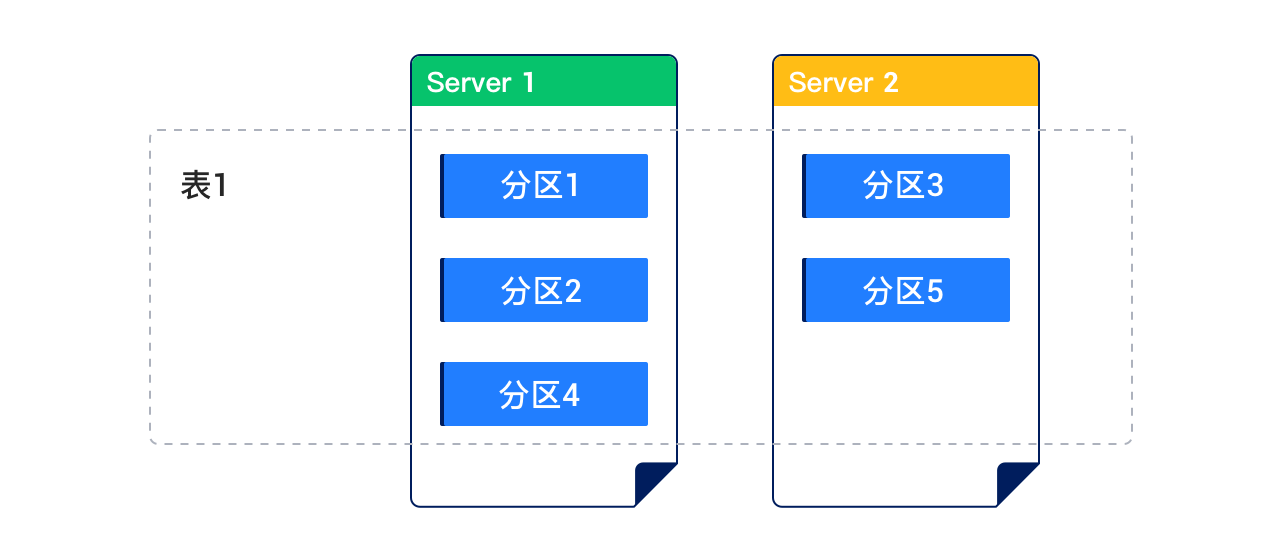
The following figure shows a table divided into five partitions, distributed across two servers:
Each partition in the partitioned table can be further divided into multiple subpartitions based on specific rules. This type of table is called a subpartitioned table.
The set of columns in each row that determines which partition the row belongs to is called the partitioning key. The expression that uses the partitioning key to determine which partition the row belongs to is called the partitioning expression.
- In MySQL mode, the partitioning key must be a subset of either the primary key or the unique key. If a primary key exists, the partitioning key must be a subset of the primary key.
- In Oracle mode, if a primary key exists, the partitioning key must be a subset of the primary key.
OceanBase Database in MySQL mode supports the following partition types:
RANGE partitioning
RANGE COLUMNS partitioning
LIST partitioning
LIST COLUMNS partitioning
HASH partitioning
KEY partitioning
Composite partitioning
RANGE partitioning
RANGE partitioning is a common partitioning method that maps data to partitions based on the partitioning key value ranges defined in the partitioning table. It is often used with date types. For example, you can partition a business log table by day, week, or month.
For RANGE partitioning, the partitioning key must be an integer or YEAR type. If you want to partition a date field of another type, you must use a function to convert it. The partitioning key of RANGE partitioning supports only one column.
RANGE COLUMNS partitioning
RANGE COLUMNS partitioning is similar to RANGE partitioning. The main difference is that:
The results of the partitioning key for RANGE COLUMNS partitioning do not necessarily need to be integers. They can be the following data types:
All integer types, including
TINYINT,SMALLINT,MEDIUMINT,INT(INTEGER), andBIGINTFloating-point types, including
DOUBLE,FLOAT, andDECIMALdata types. Specifically, the following types are supported:DECIMALandDECIMAL[(M[,D])]DEC,NUMERIC, andFIXEDFLOAT[(M,D)]andFLOAT(p)DOUBLEandDOUBLE[(M,D)]DOUBLE PRECISIONandREAL
Time types
DATE,DATETIME, andTIMESTAMPColumns of other date or time data types cannot be used as the partitioning key.
Character types CHAR, VARCHAR, BINARY, and VARBINARY
TEXT and BLOB columns cannot be used as the partitioning key.
Expressions cannot be used as the partitioning key.
The partitioning key can contain multiple columns (column vectors).
LIST partitioning
LIST partitioning allows you to explicitly control how record rows are mapped to partitions by specifying a list of discrete values for the partitioning key for each partition. This is different from RANGE and HASH partitioning. The advantage of LIST partitioning is that it allows you to easily partition unordered or unrelated datasets.
For LIST partitioning, the partitioning key can be a column name or an expression. The partitioning key must be an integer or YEAR type.
LIST COLUMNS partitioning
LIST COLUMNS partitioning is similar to LIST partitioning. The main difference is that:
The partitioning key does not necessarily need to be an integer. It can be the following data types:
All integer types, including TINYINT, SMALLINT, MEDIUMINT, INT (INTEGER), and BIGINT
Columns of other numeric data types, such as DECIMAL or FLOAT, cannot be used as the partitioning key.
Time types DATE and DATETIME
Columns of other date or time data types cannot be used as the partitioning key.
Character types CHAR, VARCHAR, BINARY, and VARBINARY
TEXT and BLOB columns cannot be used as the partitioning key.
Expressions cannot be used as the partitioning key.
LIST COLUMNS partitioning supports multiple partitioning keys, while LIST partitioning supports only a single partitioning key.
HASH partitioning
HASH partitioning is suitable for scenarios where RANGE partitioning and LIST partitioning cannot be used. It is simple to implement by distributing records to different partitions based on the hash values of the partitioning key. HASH partitioning is a good choice if your data meets the following conditions:
You cannot specify the characteristics of the partitioning key.
The sizes of data in different ranges are very different and it is difficult to manually adjust them.
RANGE partitioning causes the data to be clustered.
Performance features such as parallel DML, partition pruning, and partition-wise joins are important.
For HASH partitioning, the partitioning key must be an integer or YEAR type and can be an expression.
KEY partitioning
KEY partitioning is similar to HASH partitioning. It determines which partition the data belongs to by taking the modulus of the integer value obtained from applying a hash algorithm to the partitioning key.
KEY partitioning has the following characteristics:
The partitioning key does not necessarily need to be an integer. It can be any data type except TEXT and BLOB.
Expressions cannot be used as the partitioning key.
The partitioning key supports column vectors.
If no columns are specified in the partitioning key, the partitioning key is the primary key.
Example:
obclient> CREATE TABLE tbl1 (col1 INT PRIMARY KEY, col2 INT)
       PARTITION BY KEY()
       PARTITIONS 5;
Query OK, 0 rows affected
Composite partitioning
Composite partitioning involves using one partitioning strategy for the partition and another for the subpartitions. This is particularly useful when dealing with very large volumes of data in business tables. It allows you to leverage the advantages of multiple partitioning strategies.
Considerations
When using an auto-increment column as the partitioning key in MySQL mode, keep the following in mind:
In OceanBase Database, auto-increment values are globally unique but not guaranteed to be incremental within a partition.
Compared to other partitioning methods, inserting data into a partitioned table using an auto-increment column as the key may result in cross-machine transactions due to inefficient routing, which can impact performance.
Partition management
For more information about partition management, see Partition management (MySQL mode) and Partition management (Oracle mode).
Table groups
A table group is a logical concept that represents a collection of tables. By default, data of different tables is randomly distributed and has no direct relationship. By defining table groups, you can control the physical proximity of a group of tables.
In V3.x, a table group is a partitioned table group. Tables added to a table group must have the same partitioning method as the table group. This imposes strict limitations on tables that can be added to a table group. Starting from V4.2.0, table groups do not support the partitioning concept. You can define only the SHARDING attribute to flexibly add tables with different partitioning methods to a table group. If you want to prevent certain tables from being added to a table group, you can modify the attribute of the table group. This makes table group management more flexible.
For table groups with the SHARDING attribute, they can be classified based on the values of the attribute:
Table groups with
SHARDING = NONE: All partitions of all tables in such a table group are aggregated on the same server. The partitioning method of tables in the table group is not limited.Table groups with
SHARDINGvalues other thanNONE: The data of each table in such a table group is distributed across multiple servers. To ensure consistent data distribution across all tables in the table group, all tables in the table group must have the same partition definition, including the partitioning method, number of partitions, and partition values. The system schedules partitions with the same partition attribute to be aggregated on the same server to implement partition-wise join.Table groups with
SHARDINGvalues other thanNONEcan be further classified as follows:Table groups with
SHARDING = PARTITION: The data of each table in such a table group is scattered based on the partition. If the table is a subpartitioned table, all subpartitions under the partition are aggregated together.Partition requirements: All tables in the table group must have the same partition definition. If the tables are subpartitioned tables, the partition definition is also the same. Therefore, partitioned tables and subpartitioned tables can coexist in the table group, provided that they have the same partition definition.
Partition alignment rules: Partitions with the same partition value are aggregated together, including the partitions of partitioned tables and all subpartitions of the corresponding partitions in subpartitioned tables.
Table groups with
SHARDING = ADAPTIVE: The data of each table in such a table group is adaptively scattered. Specifically, if the tables in the table group are partitioned tables, they are scattered based on the partition. If the tables in the table group are subpartitioned tables, they are scattered based on the subpartitions under each partition.For tables in such table groups, the partition requirements and partition alignment rules are as follows:
Partition requirements: All tables in the table group are partitioned tables or all are subpartitioned tables. If they are partitioned tables, they must have the same partition definition. If they are subpartitioned tables, they must have the same partition definition and subpartition definition.
Partition alignment rules: If all tables in the table group are partitioned tables, partitions with the same partition value are aggregated together. If all tables in the table group are subpartitioned tables, subpartitions with the same partition value and subpartition value are aggregated together.
For more information about table groups, see: