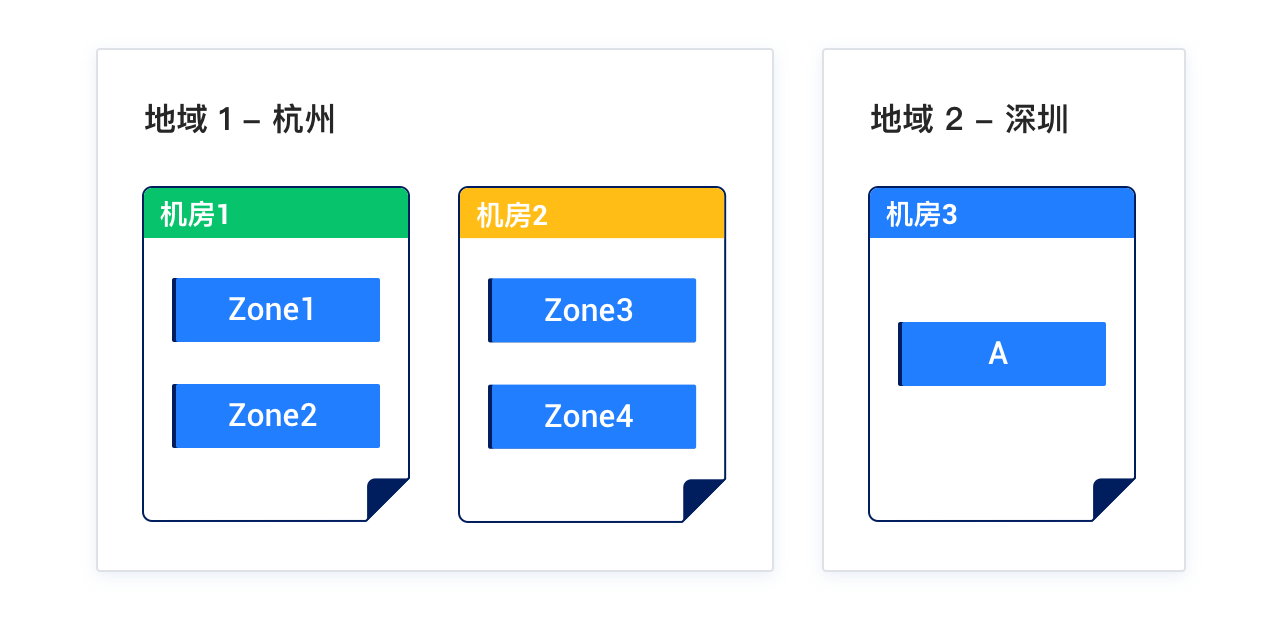
OceanBase Database adopts a shared-nothing architecture with multiple replicas to ensure zero single point of failure and system continuity. OceanBase supports high availability and disaster recovery (HA/DR) at the IDC (deploying an OceanBase cluster in multiple IDCs in the same region), region (deploying OceanBase clusters in multiple IDCs in different regions), and multi-region (deploying OceanBase clusters across regions) levels. You can deploy OceanBase in a single IDC, in two IDCs in the same region, in two IDCs across regions, or in three IDCs across regions, and deploy the arbitration service to reduce costs.
Deployment solutions
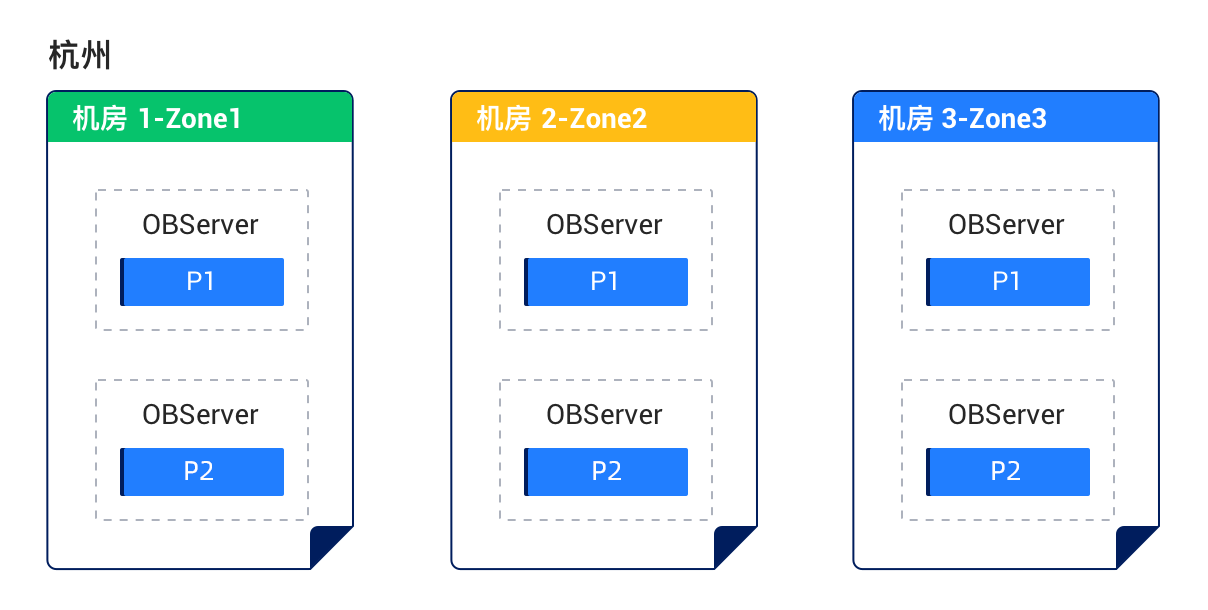
Solution 1: Deploy three replicas across three IDCs in the same region
Characteristics:
- The three IDCs form a cluster (each IDC is a zone), with network latency between IDCs ranging from 0.5 to 2 ms.
- In the case of a disaster at one IDC, the remaining two replicas are still in the majority and can synchronize redo logs to ensure RPO=0.
- The solution cannot protect against disasters at the region level.
Deployment diagram:
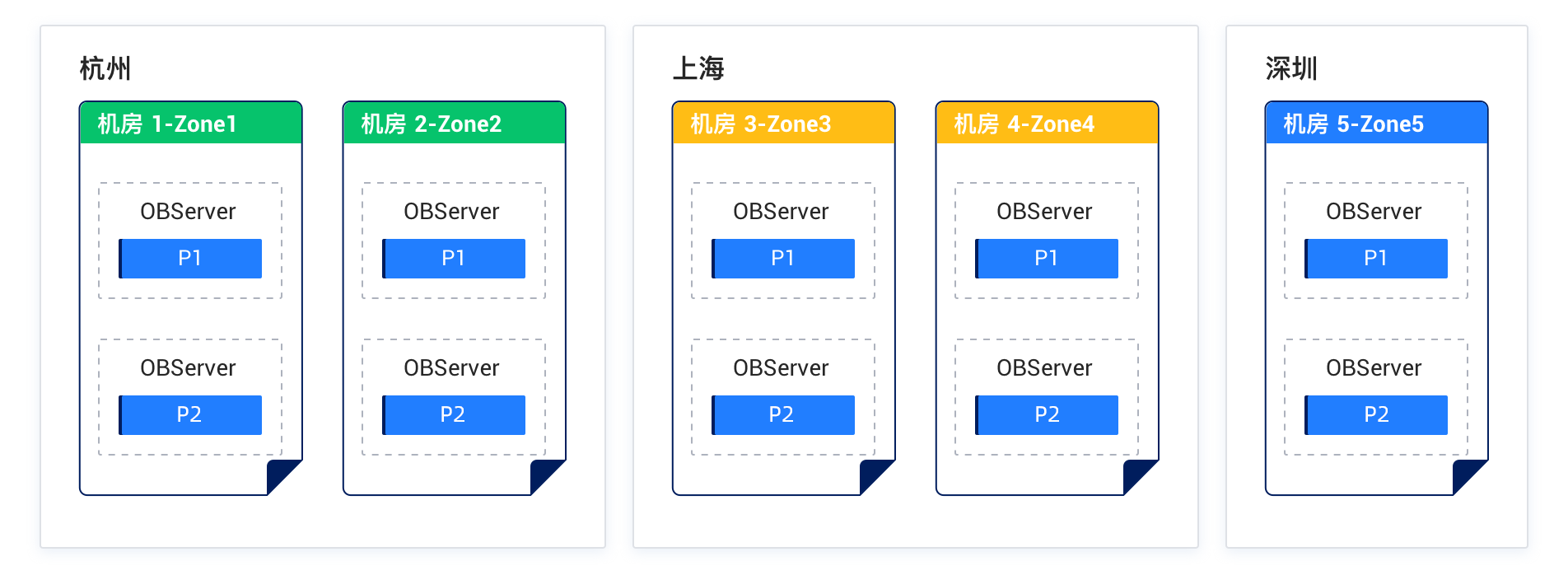
Solution 2: Deploy five replicas across three IDCs in three regions
Characteristics:
- The five replicas form a cluster across three regions.
- A disaster in any IDC or region does not affect the majority, ensuring RPO=0.
- More than three replicas are required to form a majority. Therefore, to reduce latency, IDC 1 and IDC 2, which are located in the same region, should be as close as possible to expedite the synchronization of redo logs.
Deployment diagram:
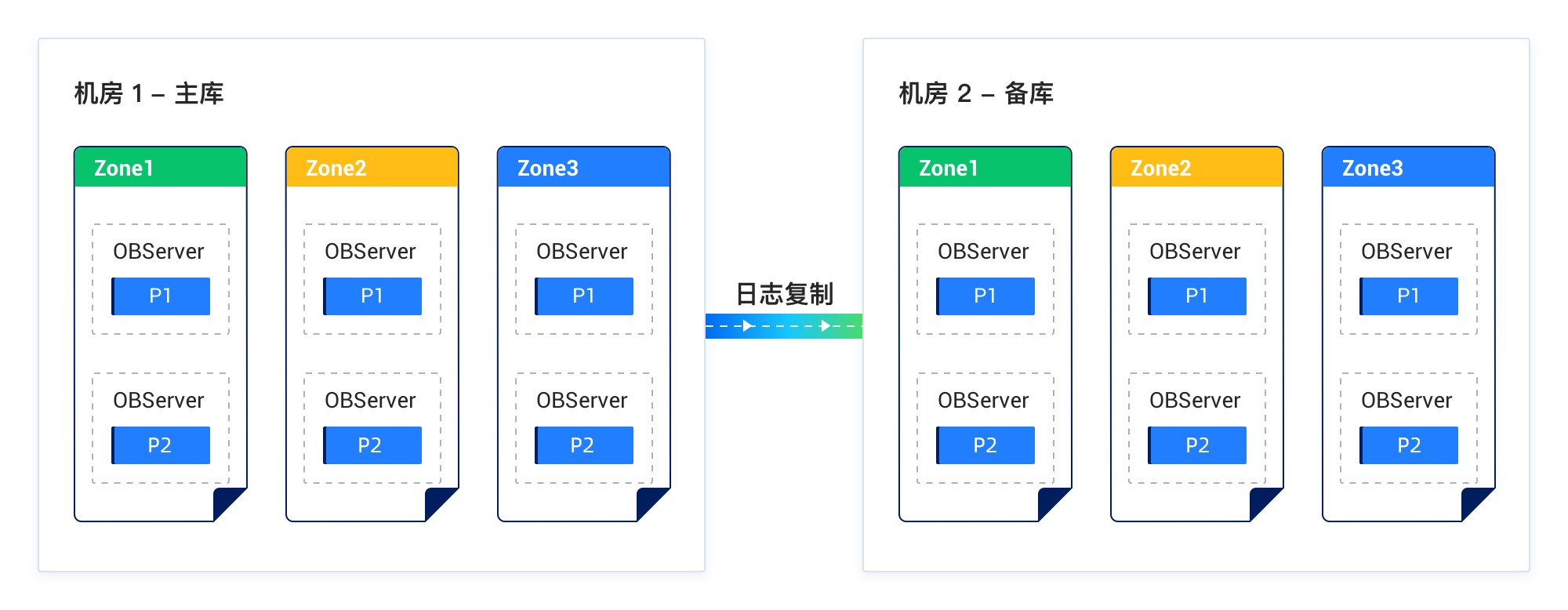
Solution 3: Deploy two OceanBase clusters in the same region in a "primary/standby" configuration
Characteristics:
- An OceanBase cluster is deployed in each IDC. The clusters are independent of each other and provide multi-replica consistency.
- Data is synchronized between clusters through redo logs. This setup is similar to the conventional "primary/standby" replication mode in database, where data is asynchronously synchronized from the primary database to the standby database. This is similar to the "maximum performance" mode in Oracle Data Guard.
Deployment diagram:
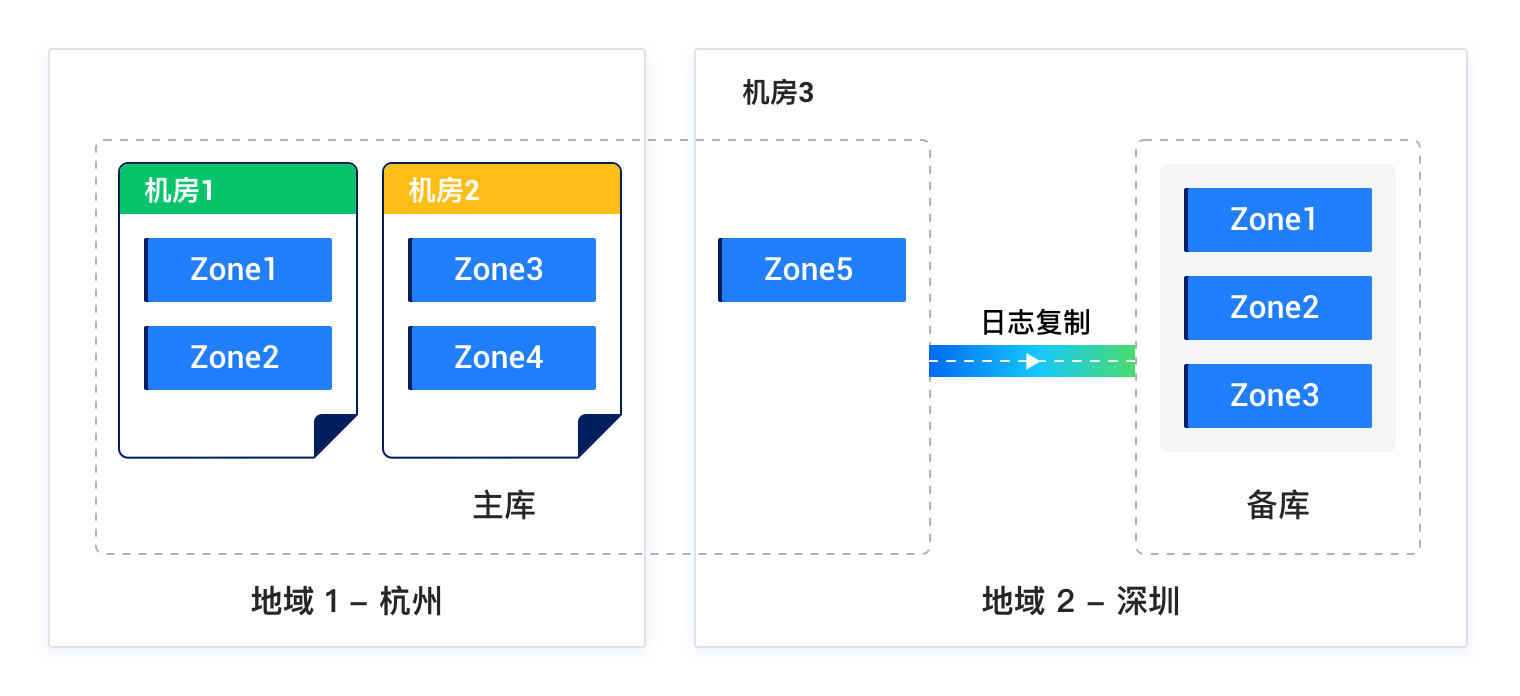
Solution 4: Deploy three IDCs in two regions in a "primary/standby" configuration
Characteristics:
- The five IDCs form a cluster across two regions. A disaster in the IDCs of the primary region will result in the loss of at most two replicas. The remaining three replicas are still in the majority.
- The standby region builds a separate three-replica cluster that serves as a standby database. The primary database asynchronously synchronizes data to the standby database.
- If the primary region encounters a disaster, the standby region will take over the business.
Deployment diagram:
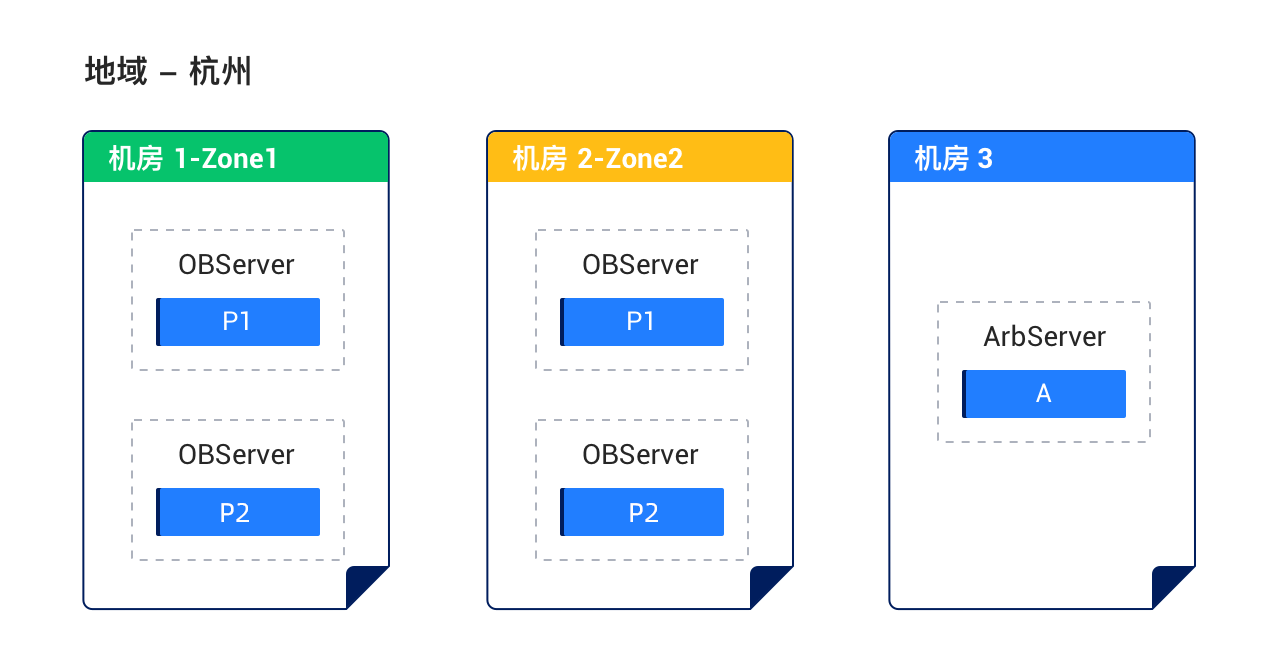
Solution 5: Deploy the arbitration service in the same region
Characteristics:
- The three IDCs form a cluster. The network latency between IDCs ranges from 0.5 to 2 ms. Two IDCs host full-featured replicas and serve as zones. To reduce costs, the third IDC hosts only the arbitration service (without synchronizing logs).
- In the case of a disaster at one IDC, the replicas in the remaining IDCs can compete for the leadership and then run in arbitration mode to ensure RPO=0.
- The solution cannot protect against disasters at the region level.
For more information about the arbitration service, see Overview.
Deployment diagram:
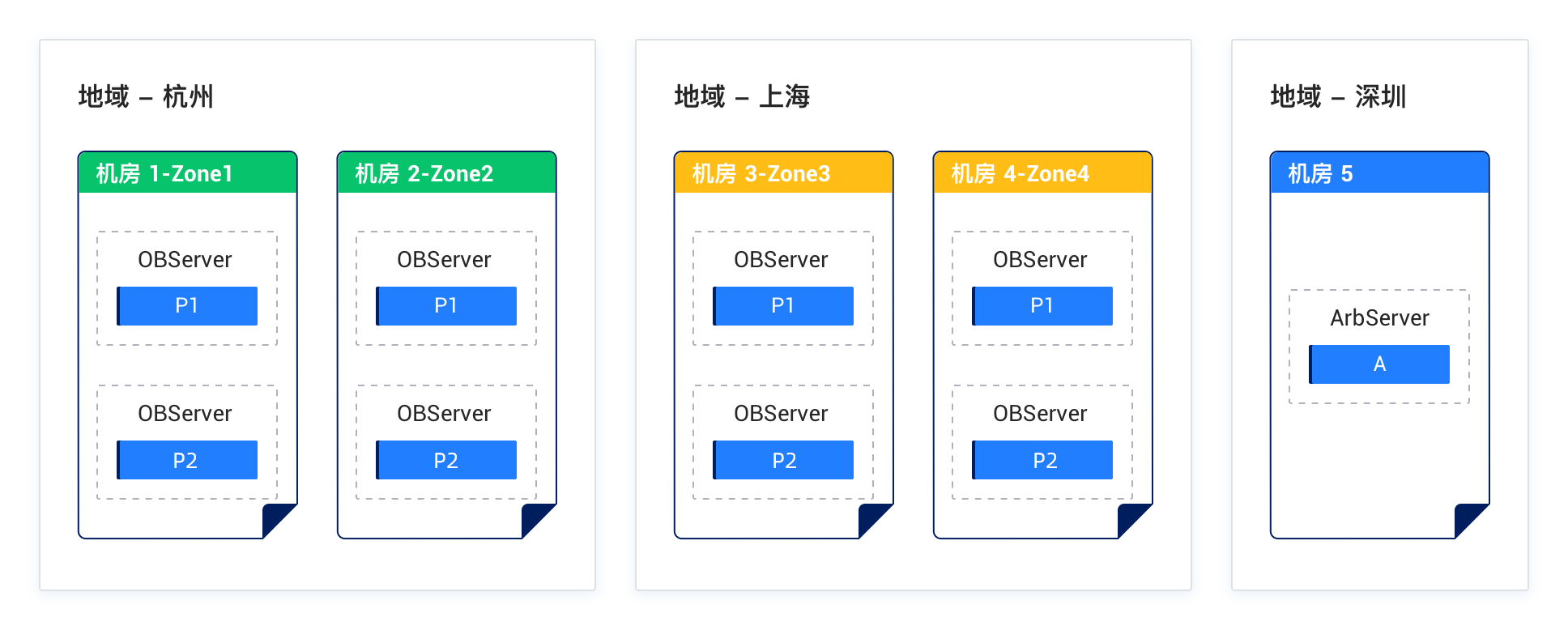
Solution 6: Deploy the arbitration service across three regions
Characteristics:
- The five IDCs across three regions. IDC 1 and IDC 2, which are located in the same region, are deployed with full-featured replicas to reduce latency. IDC 3 is deployed with only the arbitration service (without synchronizing logs) to reduce costs.
- If any IDC fails, the remaining full-featured replicas still account for at least 3/4 of the replicas in majority, ensuring RPO=0.
- If any two IDCs fail or a disaster strikes one region where all the replicas are located, the two full-featured replicas remaining can run in arbitration mode to restore services (downgrading the two failed replicas to Learner replicas) and ensure RPO=0.
- More than three replicas are required to form a majority. Therefore, to reduce latency, IDC 1 and IDC 2, which are located in the same region, should be as close as possible to expedite the synchronization of redo logs.
Deployment diagram:
Solution 7: Deploy the arbitration service across two IDCs in one region
Characteristics:
- The primary region has two IDCs, each of which contains two zones for deploying full-featured replicas.
- The standby region has one IDC for deploying the arbitration service, which can reduce deployment costs and cross-region bandwidth overheads.
- If an IDC in the primary region fails, at most two replicas are lost. In this case, the remaining replicas might not form a majority (2/4). The arbitration service can trigger a downgrade and restore operations to ensure RPO=0.
- A disaster in the primary region cannot be addressed, but a disaster in the standby region does not have any impact.
Deployment diagram: