







Create a materialized view
Materialized views are an important tool for database optimization. They store query results in physical storage to speed up data retrieval. When you create a materialized view, a schema corresponding to the query that defines the view is first generated. The schema is then used to build an SQL statement for creating a table that stores data of the materialized view. After the table is created, the query that defines the view is executed, and the result set is inserted into the table.
Materialized views support two update strategies: full update and incremental update.
Full update
A full update clears all existing data in a materialized view and inserts the latest query result set into the view.
In this process, a combination operation of TRUNCATE TABLE and INSERT INTO SELECT is performed. OceanBase Database uses the DDL framework to implement full updates.
Incremental update
An incremental update calculates the difference between a materialized view and its base tables based on data that has changed since the last update and applies the difference to the materialized view. This strategy is more efficient.
Incremental data changes, including old and new values of all modified rows, are recorded in materialized view logs.
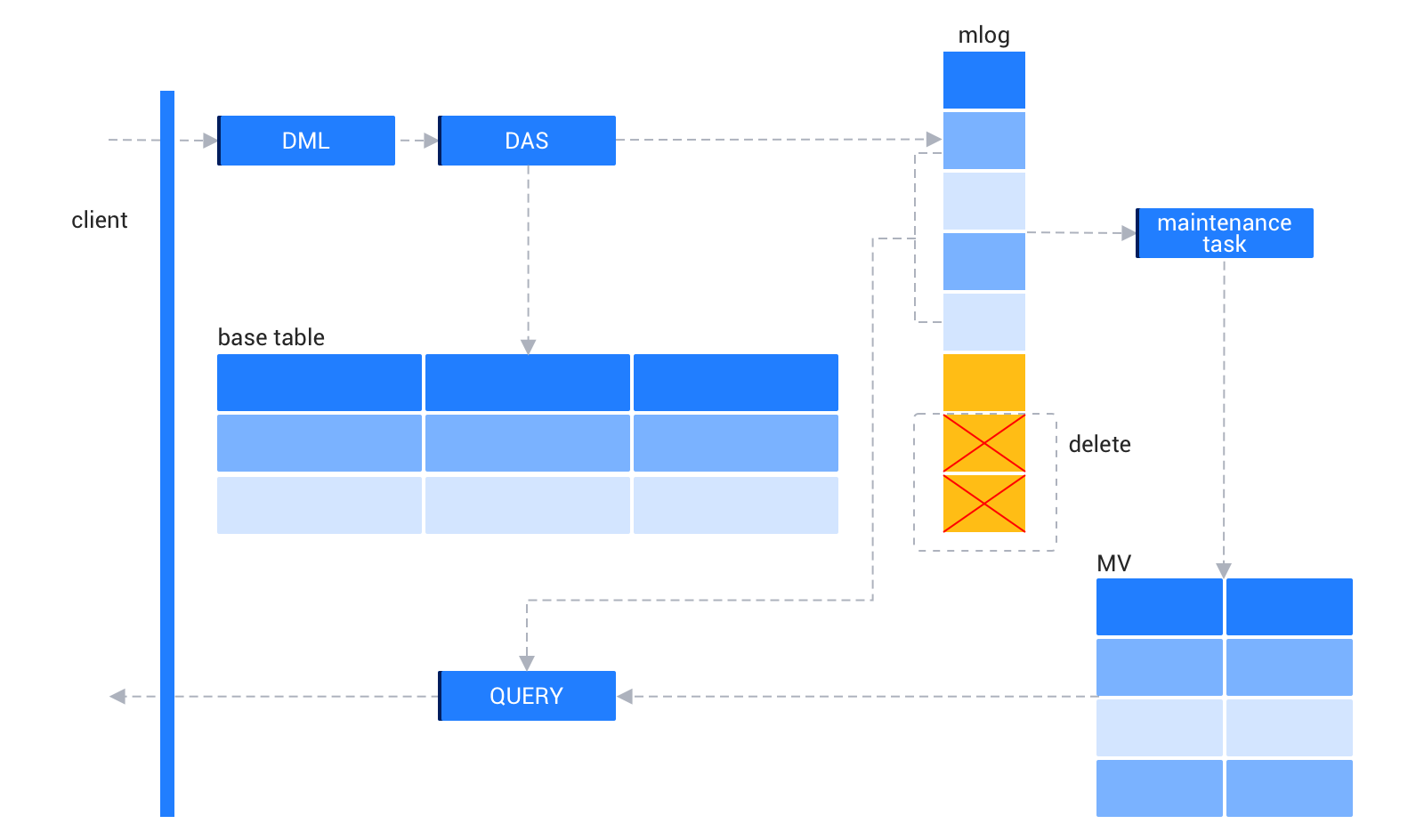
As shown in the preceding figure, when DML operations such as INSERT and UPDATE are performed on base tables, the database activity streams (DAS) mechanism ensures that base tables and materialized view logs are simultaneously updated. Background maintenance tasks regularly apply the incremental changes in materialized view logs to the materialized view. When data in materialized view logs is refreshed to the materialized view, the deletion module will clear the data from the logs. In this case, a query operation will access both the materialized view and data in materialized view logs that has not been refreshed, combine the data, and return the latest result set.
Example
The table and view definitions, as well as the update sequence are as follows:
CREATE TABLE t1 (c1 INT PRIMARY KEY, c2 INT);
CREATE MATERIALIZED VIEW m1 AS SELECT COUNT(c1) FROM t1;

-- Update sequence
INSERT INTO t1 VALUES(3,4);
INSERT INTO t1 VALUES(5,6);
INSERT INTO t1 VALUES(8,3);
UPDATE t1 SET c1 = 7 WHERE c1 = 8;
The corresponding mlog table is mlog$_t1. The value N of the old field indicates a new value, and the value Y indicates an old value. You can obtain the incremental update value in the m1 view by using the following query:
(SELECT COUNT(c1) FROM mlog WHERE old = 'N') - (SELECT COUNT(c1) FROM mlog WHERE old = 'Y')