







This topic introduces how to build an application by using the SpringDataJPA framework and OceanBase Database. It also covers the use of the application for fundamental database operations, including table creation, data insertion, data query, and other basic operations.
 Click to download the java-oceanbase-springdatajpa sample project
 Prerequisites
- You have installed OceanBase Database.
- You have installed JDK 1.8 and Maven.
- You have installed IntelliJ IDEA.
Note
The tool used to run the sample code in this topic is IntelliJ IDEA 2021.3.2 (Community Edition). You can also choose a tool of your preference to run the sample code.
Procedure
Note
The steps outlined in this topic are for the Windows environment. If you are using a different operating system or compiler, the steps may vary slightly.
- Obtain the connection string of OceanBase Database.
- Import the
java-oceanbase-springdatajpaproject into IntelliJ IDEA. - Modify the database connection information in the
java-oceanbase-springdatajpaproject. - Run the
java-oceanbase-springdatajpaproject.
Step 1: Obtain the connection string of OceanBase Database
Contact the deployment personnel or administrator of OceanBase Database to obtain the corresponding database connection string.
obclient -hxx.xx.xx.xx -P2883 -uroot@sys#cluster -p**** -AFill in the URL below based on the OceanBase Database connection.
Note
The URL is required in the
application.ymlfile.jdbc:oceanbase://host:port/schema_name?user=$user_name&password=$password&characterEncoding=utf-8&useSSL=false&serverTimezone=GMT%2B8Parameter description:
host: the IP address for connecting to OceanBase Database. For connection through ODP, use the IP address of an ODP. For direct connection, use the IP address of an OBServer node.port: the port for connecting to OceanBase Database. For connection through ODP, the default value is2883, which can be customized when ODP is deployed. For direct connection, the default value is2881, which can be customized when OceanBase Database is deployed.schema_name: the name of the schema to be accessed.user_name: the username specified by the-uparameter, in the format of username@tenant name#cluster name or username@SERVICE:service name. When you use the username@tenant name#cluster name format, the default tenant issysand the default administrator isroot. When you connect to the database directly, you can omit the cluster name. However, when you connect to the database through ODP, you must specify the cluster name.password: the account password.characterEncoding=utf-8&useSSL=false&serverTimezone=GMT%2B8: the additional connection properties.characterEncoding: the character encoding supported by the URL option. The default value isutf8.useSSL: specifies whether to useSSL/TLSfor mandatory connections. The default value isfalse.serverTimezone: the server time zone. The default value is China Standard Time.
For more information about URL parameters, see Database URL.
Step 2: Import the java-oceanbase-springdatajpa project into IntelliJ IDEA
Start IntelliJ IDEA and choose File > Open....

In the Open File or Project window, select the project files and click OK to import the files.
IntelliJ IDEA automatically recognizes the files and displays the directory structure, file list, module list, dependency relationships, and other details of the project in the Project window. The Project window is typically positioned on the left side of the IntelliJ IDEA interface and is generally open by default. If the Project window is closed, you can reopen it by choosing View > Tool Windows > Project in the menu bar or by using the shortcut Alt + 1.
Note
When you import a project using IntelliJ IDEA, it will automatically detect the pom.xml file in the project, download the required dependency libraries based on the described dependencies in the file, and add them to the project.
View the project.
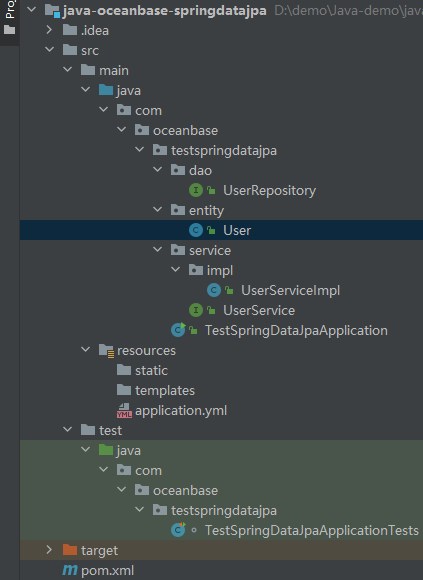
Step 3: Modify the database connection information in the java-oceanbase-springdatajpa project
Modify the database connection information in the application.yml file based on the information obtained in Step 1: Obtain the connection string of OceanBase Database.
Here is an example:
- The name of the database driver is:
com.mysql.cj.jdbc.Driver. - The IP address of the OBServer node is
10.10.10.1. - The port is 2881.
- The name of the database to be accessed is
test. - The tenant account is
root@mysql001, wheremysql001is a MySQL user tenant created in OceanBase Database, androotis the username of themysql001tenant. - The password is
******.
Sample code:
spring:
  datasource:
    driver-class-name: com.mysql.cj.jdbc.Driver
    url: jdbc:mysql://10.10.10.1:2881/test?characterEncoding=utf-8&useSSL=false&serverTimezone=GMT%2B8
    username: root@mysql001
    password: ******
    type: com.alibaba.druid.pool.DruidDataSource
Step 4: Run the java-oceanbase-springdatajpa project
Running path
- In the project structure, locate the
TestSpringDataJpaApplicationTests.javafile under src > test > java. - From the menu bar, choose Run > Run... > TestSpringDataJpaApplicationTests.contextLoads or simply click the green triangle in the upper right corner to start running.
- In the console of IntelliJ IDEA, view the project logs and output results.
Running result
User{id=1, username='insert1'}
User{id=2, username='update'}
User{id=3, username='insert3'}
User{id=4, username='insert4'}
User{id=5, username='insert5'}
Project code introduction
Click java-oceanbase-springdatajpa to download the project code, which is a compressed package named java-oceanbase-springdatajpa.
After decompressing it, you will find a folder named java-oceanbase-springdatajpa. The directory structure is as follows:
│--pom.xml
│
├─.idea
│
├─src
│  ├─main
│  │  ├─java
│  │  │  └─com
│  │  │      └─oceanbase
│  │  │          └─testspringdatajpa
│  │  │              │--TestSpringDataJpaApplication.java
│  │  │              │
│  │  │              ├─dao
│  │  │              │   └─UserRepository.java
│  │  │              │
│  │  │              ├─entity
│  │  │              │   └─User.java
│  │  │              │
│  │  │              └─service
│  │  │                  │--UserService.java
│  │  │                  │
│  │  │                  └─impl
│  │  │                      └─--UserServiceImpl.java
│  │  │
│  │  └─resources
│  │      │--application.yml
│  │      │
│  │      ├─static
│  │      └─templates
│  └─test
│      └─java
│          └─com
│              └─oceanbase
│                  └─testspringdatajpa
│                      └─--TestSpringDataJpaApplicationTests.java
│
└─target
File description:
pom.xml: the configuration file of the Maven project, which contains the dependencies, plugins, and build details of the project..idea: the directory used by the Integrated Development Environment (IDE) to store project-related configuration information.src: a directory that is generally used to store the source code of a project.main: a directory that stores the main source code and resource files.java: a directory that stores the Java source code.com: the root directory that stores the Java package.oceanbase: the root directory that stores the project.testspringdatajpa: the root directory of the Java package, which contains all the Java classes of the project.TestSpringDataJpaApplication.java: the entry class of the Spring Boot application.dao: a directory that stores the Data Access Object (DAO) package for accessing databases or other data storage services.UserRepository.java: the user data access interface that defines the CRUD operations on user data.entity: a directory that stores the entity classes, which are the Java classes corresponding to the database tables.User.java: the user persistent object that maps to the fields of the user data table.service: a directory that stores the service interfaces.UserService.java: the user service interface that defines the methods for operating on user data.impl: a directory that stores the implementation classes of the business logic.UserServiceImpl.java: the implementation class of the user service that implements the methods defined in the UserService interface.resources: a directory that stores the resource files, such as configuration files and SQL files.application.yml: the configuration file of the application, which is used to configure database connection information.static: a directory that stores static files such as CSS and JavaScript.templates: a directory that stores template files such as HTML templates.test: a directory that stores the test code and resource files.TestSpringDataJpaApplicationTests.java: a class that is used to execute and verify the features related to Spring Data JPA.target: a directory that stores compiled class files and .jar packages.
Introduction to pom.xml
Note
If you just want to verify the sample, please use the default code and no modification is needed. You can also modify the pom.xml file based on your needs.
The content of the pom.xml configuration file is as follows:
Declaration statement.
Declare this file to be an XML file that uses XML standard
1.0and character encodingUTF-8.Sample code:
<?xml version="1.0" encoding="UTF-8"?>Configure namespaces and the POM model version.
- Use
xmlnsto specify the POM namespace ashttp://maven.apache.org/POM/4.0.0. - Use
xmlns:xsito specify the XML namespace ashttp://www.w3.org/2001/XMLSchema-instance. - Use
xsi:schemaLocationto specify the POM namespace ashttp://maven.apache.org/POM/4.0.0, and the location of the corresponding POM XSD file ashttps://maven.apache.org/xsd/maven-4.0.0.xsd. - Use
<modelVersion>to specify the POM model version used by the POM file as4.0.0.
Sample code:
<project xmlns="http://maven.apache.org/POM/4.0.0" xmlns:xsi="http://www.w3.org/2001/XMLSchema-instance" xsi:schemaLocation="http://maven.apache.org/POM/4.0.0 https://maven.apache.org/xsd/maven-4.0.0.xsd"> <modelVersion>4.0.0</modelVersion>- Use
Configure parent information.
- Use
<groupId>to specify the parent group ID asorg.springframework.boot. - Use
<artifactId>to specify the parent artifact ID asspring-boot-starter-parent. - Use
<version>to specify the parent version as2.7.0. - Use
relativePathto indicate that the parent path is empty.
Sample code:
<parent> <groupId>org.springframework.boot</groupId> <artifactId>spring-boot-starter-parent</artifactId> <version>2.7.0</version> <relativePath/> </parent>- Use
Configure basic information.
- Use
<groupId>to specify the project group ID ascom.oceanbase. - Use
<artifactId>to specify the project artifact ID asjava-oceanbase-springdatajpa. - Use
<version>to specify the project version as0.0.1-SNAPSHOT. - Use
descriptionto describe the project asDemo project for Spring Boot.
Sample code:
<groupId>com.oceanbase</groupId> <artifactId>java-oceanbase-springdatajpa</artifactId> <version>0.0.1-SNAPSHOT</version> <name>java-oceanbase-springdatajpa</name> <description>Demo project for Spring Boot</description>- Use
Configure the Java version.
Specify the Java version used by the project as 1.8.
Sample code:
  <properties>
      <java.version>1.8</java.version>
  </properties>
Configure core dependencies.
Specify the dependency group as
org.springframework.bootand the dependency name asspring-boot-starter-data-jpa. This dependency library contains the necessary dependencies and configurations for data access using JPA. Spring Boot Starter Data JPA is a Spring Boot starter.Sample code:
<dependency>
    <groupId>org.springframework.boot</groupId>
    <artifactId>spring-boot-starter-data-jpa</artifactId>
</dependency>
Specify the dependency group as
org.springframework.bootand the dependency name asspring-boot-starter-web. This dependency library contains the dependencies and configurations required for Web development using Spring Boot, and it is a Spring Boot starter.Sample code:
<dependency>
    <groupId>org.springframework.boot</groupId>
    <artifactId>spring-boot-starter-web</artifactId>
</dependency>
Specify the dependency group as
org.springframework.boot, the dependency name asspring-boot-starter-test, and the scope astest. With this dependency, you can use the testing framework and tools provided by Spring Boot, such as JUnit, Mockito, and Hamcrest.Sample code:
<dependency>
    <groupId>org.springframework.boot</groupId>
    <artifactId>spring-boot-starter-test</artifactId>
    <scope>test</scope>
</dependency>
Specify the dependency group as
com.alibaba, the dependency name asdruid, and the version as1.2.8. With this dependency, you can use the Druid library to manage and optimize the acquisition and release of database connections.Sample code:
<dependency>
    <groupId>com.alibaba</groupId>
    <artifactId>druid</artifactId>
    <version>1.2.8</version>
</dependency>
Specify the dependency group as
com.oceanbase, the dependency name asoceanbase-client, and the version as2.4.2. With this dependency, you can use the client features provided by OceanBase Database, such as connection, query, and transaction.Sample code:
    <dependencies>
    <dependency>
        <groupId>com.oceanbase</groupId>
        <artifactId>oceanbase-client</artifactId>
        <version>2.4.2</version>
    </dependency>
    </dependencies>
Configure the Maven plugin.
Specify the plugin group as
org.springframework.bootand the plugin name asspring-boot-maven-plugin. This plugin is used to package a Spring Boot application into an executable JAR or WAR file. To avoid conflicts with other plugins or tools, the Lombok dependency is excluded during the build process.Sample code:
 <build>
     <plugins>
         <plugin>
             <groupId>org.springframework.boot</groupId>
             <artifactId>spring-boot-maven-plugin</artifactId>
             <configuration>
                 <excludes>
                     <exclude>
                         <groupId>org.projectlombok</groupId>
                         <artifactId>lombok</artifactId>
                     </exclude>
                 </excludes>
             </configuration>
         </plugin>
     </plugins>
 </build>
application.yml code
The application.yml file is a configuration file for a Spring Boot application and contains some key configurations. It configures the base context path, port number, database connection information, and JPA-related properties of the application.
The application.yml file contains the following sections:
Serversectionservlet: the section for configuring the Servlet-related properties.context-path: the section for specifying the application's base context path astestspringdatajpa.port: the section for specifying the port number for the application to listen to, which is 8890.
Sample code:
server: servlet: context-path: /testspringdatajpa port: 8890Springsectiondatasource: the section for configuring the data source-related properties, namely, the database connection information.driver-class-name: the section for specifying the database driver class name ascom.mysql.cj.jdbc.Driver.url: the section for specifying the database connection URL, which includes the database address, port number, and database name.username: the section for specifying the username for connecting to the database.password: the section for specifying the password for connecting to the database.type: the section for specifying the Druid connection pool as the data source.
Sample code:
spring: datasource: driver-class-name: com.mysql.cj.jdbc.Driver url: jdbc:mysql://host:port/schema_name?characterEncoding=utf-8&useSSL=false&serverTimezone=GMT%2B8 username: user_name password: ****** type: com.alibaba.druid.pool.DruidDataSourceJPAsectionhibernate: the section for configuring the Hibernate-related properties.ddl-auto: the section for specifying Hibernate to automatically update the database schema toupdateupon startup.show-sql: the section for specifying whether to print SQL statements in the console, with a value oftrue.format-sql: the section for specifying whether to format the printed SQL statements, with a value oftrue.
open-in-view: the section for specifying whether to enable theOpen-in-Viewmode, with a value offalse.
Sample code:
jpa:
    hibernate:
    ddl-auto: update
    show-sql: true
    format-sql: true
    open-in-view: false
userRepository.java code
The userRepository.java file defines methods for database operations on user entities (users) by using a DAO interface. It contains custom update and query methods and uses SQL and HQL statements for operations.
The userRepository.java file contains the following sections:
Reference other classes and interfaces.
Declare the following interfaces and classes in the current file:
Userclass: used to operate and process user objects in the service layer.JpaRepositoryinterface: used to inherit and obtain the basic CRUD methods.Modifyingannotation: used to mark the modification methods.Queryannotation: used to define the custom query methods.Paramannotation: used to map the method parameters to the parameters in the query statements.Repositoryannotation: used to mark the DAO interface as a Spring repository component.
Sample code:
import com.oceanbase.testspringdatajpa.entity.User;
import org.springframework.data.jpa.repository.JpaRepository;
import org.springframework.data.jpa.repository.Modifying;
import org.springframework.data.jpa.repository.Query;
import org.springframework.data.repository.query.Param;
import org.springframework.stereotype.Repository;
Define the
UserRepositoryinterface.The
UserRepositoryinterface is used to access user data. It is marked as a SpringRepositorycomponent and thebeanname is set touserRepository.- Use the
@Queryannotation to specify the SQL statement and setnativeQuery = trueto use native SQL statements. - Use the
@Modifyingannotation to mark the custom update method and perform update operations using native SQL statements. - Use the
@Queryannotation to specify the Hibernate Query Language (HQL) statement and use the@Paramannotation to map the method parameters to the parameters in the HQL statement.
Sample code:
@Repository("userRepository") public interface UserRepository extends JpaRepository<User, Integer> { @Query(value = "update test_springdatajpa_2 set username=?1 where id=?2", nativeQuery = true) @Modifying int updateById(String name, String id); @Query("SELECT u FROM User u WHERE u.username = :username") User findUser(@Param("username") String username); }- Use the
Introduction to User.java
The User.java file defines the User class to represent user objects.
The code in the User.java file mainly consists of the following parts:
Import other classes.
javax.persistence.*: This line of code imports all classes in thejavax.persistencepackage.javax.persistenceis a standard package in Java Persistence API (JPA), providing a set of interfaces and annotations for object-relational mapping (ORM).Sample code:
import javax.persistence.*;Define the
Userobject. Use JPA annotations to identify the mapping relationship between the entity class and the table, including the table name, primary key, and field names. Mark the class with the@Entityannotation to indicate that it is an entity class. Use the@Tableannotation to specify the corresponding database table name. Use the@Idannotation to mark the primary key of the entity class. Use the@GeneratedValueannotation to specify the primary key generation strategy. Use the@Columnannotation to specify the field name and constraint conditions. The class hasidandusernameattributes, which respectively represent the unique identifier and username of a user. It also provides a default constructor for creating emptyUserobjects.Sample code:
@Entity
@Table(name = "test_springdatajpa_2")
public class User {
    @Id
    @GeneratedValue(strategy = GenerationType.TABLE)
    @Column(name = "id", nullable = false)
    private Integer id;

    @Column(name = "username")
    private String username;

    public User() {
    }
}
Get and set the
idandnamevalues. The entity class provides a parameterized constructor for creating entity class objects and initializing theidandusernameattributes. Define four methods for getting and setting the values of theidandnameattributes.- The
getIdmethod is used to get theidvalue. - The
setIdmethod is used to set theidvalue. - The
getNamemethod is used to get the value of the usernamename. - The
setNamemethod is used to set the usernamename.
Sample code:
public User(Integer id, String username) { this.id = id; this.username = username; } public Integer getId() { return id; } public void setId(Integer id) { this.id = id; } public String getUsername() { return username; } public void setUsername(String username) { this.username = username; }- The
Return the string representation of the
Userobject.Rewrite the
toStringmethod in theUserclass for returning the string representation of theUserobject. Define the@Overrideannotation to override the same-named method in the parent class. Define thetoStringmethod for returning the string representation of theUserobject. Concatenating strings, format the values of theidandnameattributes into a string, and return it to the callerUser.Sample code:
@Override
public String toString() {
    return "User{" +
            "id=" + id +
            ", username='" + username + '\'' +
            '}';
}
Introduction to UserServiceImpl.java
The UserServiceImpl.java file performs CRUD operations on user data in the database by using JPA.
The code in the UserServiceImpl.java file consists of the following sections:
Reference other classes and interfaces.
Declare that the current file contains the following interfaces and classes:
UserRepository: a class used to inject and call the methods defined in the data access object (DAO).User: a class used to operate and process user objects in the service class.UserService: a class used to inject and call the methods defined in the service class in other classes.@Autowired: an annotation used to automatically inject dependency objects.Page: a class used to encapsulate the paging query results.PageRequest: a class used to create a paging request object.Pageable: an interface used to define paging requests.Sort: a class used to define the sorting rules.Service: an annotation used to mark the class as a service class.Transactional: an annotation used to mark transactional methods.Iterator: a class used to traverse collections.Optional: a class used to handle objects that may be null.
Sample code:
import com.oceanbase.testspringdatajpa.dao.UserRepository;
import com.oceanbase.testspringdatajpa.entity.User;
import com.oceanbase.testspringdatajpa.service.UserService;
import org.springframework.beans.factory.annotation.Autowired;
import org.springframework.data.domain.Page;
import org.springframework.data.domain.PageRequest;
import org.springframework.data.domain.Pageable;
import org.springframework.data.domain.Sort;
import org.springframework.stereotype.Service;
import org.springframework.transaction.annotation.Transactional;

import java.util.Iterator;
import java.util.Optional;
The
UserServiceImplclass implements the methods declared in theUserServiceinterface.The
UserServiceImplclass accesses the database by using dependency injection of theUserRepository. The class implements methods for inserting, deleting, updating, and querying user data, and supports paging queries. The class is marked with the@Transactionalannotation to enable transaction support, ensuring that database operations are performed within a transaction.Construct the
UserRepositoryattribute. Define a privateUserRepositoryattribute and use the@Autowiredannotation to perform dependency injection on the constructor. Traverse the collection by using theUserRepositorydependency, and access and operate user data by using theuserRepositoryattribute.Sample code:
private final UserRepository userRepository;

@Autowired
public UserServiceImpl(UserRepository userRepository) {
    this.userRepository = userRepository;
}
Insert user data. The
insertUsermethod accepts aUserobject as a parameter. The method calls thesavemethod ofUserRepositoryto save the user object to the database.Sample code:
@Override
public void insertUser(User user) { userRepository.save(user); }
Delete user data. The
deleteUsermethod calls theexistsByIdmethod ofUserRepositoryto check whether a user with the specified ID exists. If the user exists, the user is deleted. If the user does not exist, the method simply returns.Sample code:
@Override
public void deleteUser(Integer id) {
    if (!userRepository.existsById(id)) {
        return;
    }
}
Modify user data. The
updateUsermethod calls thesavemethod ofUserRepositoryto save the user object to the database, thereby implementing the update operation. The method returns the integer value1, indicating that the update operation was successful. The method for updating user data based on the username andidalso calls theupdateByIdmethod ofUserRepositoryto implement the update operation and returns the update result.Sample code:
@Override
public int updateUser(User user) {
    userRepository.save(user);
    return 1;
}

//update based on name and id
@Override
public int updateUserById(String name, String id) {
    return userRepository.updateById(name, id);
}
Query user data.
- Query user data by
ID. TheselectUserByIdmethod calls thefindByIdmethod ofUserRepositoryto query user data, encapsulates the result in anOptionalobject, and then calls theorElsemethod ofOptionalto obtain the value in theOptionalobject and assign it to theuservariable. Finally, the method returns the queried user object. - Query user data by username. The
selectUserByNamemethod calls thefindUsermethod ofUserRepositoryto query user data based on the username, and directly returns the queried user object.
Sample code:
@Override public User selectUserById(Integer id) { Optional<User> optional = userRepository.findById(id); User user = optional.orElse(null); return user; } @Override public User selectUserByName(String username) { return userRepository.findUser(username); }- Query user data by
Perform a paging query for all user data. The
selectUserAllmethod creates aSortobject to specify the sorting rules, creates aPageableobject to specify the paging parameters, calls thefindAllmethod ofUserRepositoryto query user data, and returns aPageobject. Then, the method calls theiteratormethod of thePageobject to obtain an iterator for user data. Finally, the method returns the user data iterator.Sample code:
@Override
public Iterator<User> selectUserAll(Integer pageNum, Integer pageSize) {
    Sort sort = Sort.by(Sort.Direction.ASC, "id");
    Pageable pageable = PageRequest.of(pageNum, pageSize, sort);
    Page<User> users = userRepository.findAll(pageable);
    Iterator<User> userIterator = users.iterator();
    return userIterator;
}
Introduction to UserService.java
The UserService.java file uses JPA to perform CRUD operations on user data in the database.
The code in the UserService.java file consists of the following sections:
Reference other classes and interfaces.
Declare the classes contained in the current file:
Userclass: used to operate and process user objects in the service class.Iteratorclass: used to traverse collections.
Sample code:
import com.oceanbase.testspringdatajpa.entity.User;

import java.util.Iterator;
Define the
UserServiceinterface. Use theUserServiceinterface to insert, delete, update, and query user data. The interface contains the following methods and classes:insertUsermethod: used to insert user data.deleteUsermethod: used to delete user data.updateUsermethod: used to update user data.updateUserByIdmethod: used to modify thenameof a user based on theid.selectUserByIdmethod: used to query user data based on theid.selectUserByNamemethod: used to query user data based on the username.selectUserAllmethod: used to query all user data in paginated mode.Userclass: used to operate and process user objects in the service class.Iteratorclass: used to traverse collections.
Sample code:
public interface UserService {
    void insertUser(User user);

    void deleteUser(Integer id);

    int updateUser(User user);

    int updateUserById(String name, String id);

    User selectUserById(Integer id);

    User selectUserByName(String username);
    Iterator<User> selectUserAll(Integer pageNum, Integer pageSize);
}
Introduction to TestSpringDataJpaApplication.java
The TestSpringDataJpaApplication.java file is used to start and configure the Spring Boot application.
The code in the TestSpringDataJpaApplication.java file consists of the following sections:
Define classes and interfaces. Declare the classes contained in the current file:
SpringApplicationclass: used to start the Spring Boot application.@SpringBootApplicationannotation: used to mark the entry class of the Spring Boot application.
Sample code:
import org.springframework.boot.SpringApplication;
import org.springframework.boot.autoconfigure.SpringBootApplication;
Define the
TestSpringDataJpaApplicationclass. Use the@SpringBootApplicationannotation to mark the entry class of the Spring Boot application and call theSpringApplication.runmethod in themainmethod to start the application.Sample code:
@SpringBootApplication
public class TestSpringDataJpaApplication {

    public static void main(String[] args) {
        SpringApplication.run(TestSpringDataJpaApplication.class, args);
    }
}
Introduction to TestSpringDataJpaApplicationTests.java
The TestSpringDataJpaApplicationTests.java file is used to start and configure the Spring Boot application.
The code in the TestSpringDataJpaApplicationTests.java file consists of the following sections:
Reference other classes and interfaces. Declare the classes contained in the current file as follows:
User: a class used to operate and process user objects in the service class.UserService: a class used to inject and call the methods defined in the service class in other classes.@Test: a test method annotation.@Autowired: an annotation used for automatic dependency injection.@SpringBootTest: an annotation used for testing Spring Boot applications.Iterator: a class used to traverse collections.
Sample code:
import com.oceanbase.testspringdatajpa.entity.User;
import com.oceanbase.testspringdatajpa.service.UserService;
import org.junit.jupiter.api.Test;
import org.springframework.beans.factory.annotation.Autowired;
import org.springframework.boot.test.context.SpringBootTest;

import java.util.Iterator;
Define the
UserServicemethods. The methods are used to test the corresponding methods ofUserServicein the Spring Boot application. It injects theUserServicedependency, calls the methods for testing the functionalities of inserting, deleting, updating, and querying user data, and prints the related results.Use the
@Autowiredannotation. Automatically inject the implementation class of theUserServiceinterface into theuserServicevariable.Sample code:
@Autowired
private UserService userService;
Use the
contextLoadsmethod to test the functionalities.Insert user data. Use a
forloop to call theinsertUsermethod ofuserServiceto insert 10 user data.Sample code:
for (int i = 1; i <= 10; i++) {
    userService.insertUser(new User(i, "insert" + i));
}
Delete user data. Call the
deleteUsermethod ofuserServiceto delete the user data whose id is 1.Sample code:
userService.deleteUser(1);Modify user data. Call the
updateUsermethod ofuserServiceto update the user data whose id is 2.Sample code:
userService.updateUser(new User(2, "update"));Query user data.
- Call the
selectUserByIdmethod ofuserServiceto query user data by id, assign the query result to theuservariable, and print theuserobject. - Call the
selectUserByNamemethod ofuserServiceto query user data by username, assign the query result to theuserByNamevariable, and print theuserByNameobject.
Sample code:
User user = userService.selectUserById(2); System.out.println("user = " + user); User userByName = userService.selectUserByName("insert"); System.out.println("userByName = " + userByName);- Call the
Perform a paged query for user data. Call the
selectUserAllmethod ofuserServiceto perform a paged query for all user data, assign the query result to theuserIteratorvariable, and traverse theuserIteratorby using theforEachRemainingmethod to print each user object.Sample code:
Iterator<User> userIterator = userService.selectUserAll(0, 5);
userIterator.forEachRemaining(System.out::println);
Complete code
<?xml version="1.0" encoding="UTF-8"?>
<project xmlns="http://maven.apache.org/POM/4.0.0" xmlns:xsi="http://www.w3.org/2001/XMLSchema-instance"
         xsi:schemaLocation="http://maven.apache.org/POM/4.0.0 https://maven.apache.org/xsd/maven-4.0.0.xsd">
    <modelVersion>4.0.0</modelVersion>
    <parent>
        <groupId>org.springframework.boot</groupId>
        <artifactId>spring-boot-starter-parent</artifactId>
        <version>2.7.0</version>
        <relativePath/> <!-- lookup parent from repository -->
    </parent>
    <groupId>com.oceanbase</groupId>
    <artifactId>java-oceanbase-springdatajpa</artifactId>
    <version>0.0.1-SNAPSHOT</version>
    <name>java-oceanbase-springdatajpa</name>
    <description>Demo project for Spring Boot</description>
    <properties>
        <java.version>1.8</java.version>
    </properties>
    <dependencies>
        <dependency>
            <groupId>org.springframework.boot</groupId>
            <artifactId>spring-boot-starter-data-jpa</artifactId>
        </dependency>
        <dependency>
            <groupId>org.springframework.boot</groupId>
            <artifactId>spring-boot-starter-web</artifactId>
        </dependency>

        <dependency>
            <groupId>com.alibaba</groupId>
            <artifactId>druid</artifactId>
            <version>1.2.8</version>
        </dependency>

        <dependency>
            <groupId>com.oceanbase</groupId>
            <artifactId>oceanbase-client</artifactId>
            <version>2.4.2</version>
        </dependency>
        <dependency>
            <groupId>org.springframework.boot</groupId>
            <artifactId>spring-boot-starter-test</artifactId>
            <scope>test</scope>
        </dependency>
    </dependencies>

    <build>
        <plugins>
            <plugin>
                <groupId>org.springframework.boot</groupId>
                <artifactId>spring-boot-maven-plugin</artifactId>
                <configuration>
                    <excludes>
                        <exclude>
                            <groupId>org.projectlombok</groupId>
                            <artifactId>lombok</artifactId>
                        </exclude>
                    </excludes>
                </configuration>
            </plugin>
        </plugins>
    </build>

</project>
server:
  servlet:
    context-path: /testspringdatajpa
  port: 8890

spring:
  datasource:
    driver-class-name: com.mysql.cj.jdbc.Driver
    url: jdbc:oceanbase://host:port/schema_name?characterEncoding=utf-8&useSSL=false&serverTimezone=GMT%2B8
    username: user_name
    password: ******
    type: com.alibaba.druid.pool.DruidDataSource
  jpa:
    hibernate:
      ddl-auto: update
    show-sql: true
    format-sql: true
    open-in-view: false
package com.oceanbase.testspringdatajpa.dao;

import com.oceanbase.testspringdatajpa.entity.User;
import org.springframework.data.jpa.repository.JpaRepository;
import org.springframework.data.jpa.repository.Modifying;
import org.springframework.data.jpa.repository.Query;
import org.springframework.data.repository.query.Param;
import org.springframework.stereotype.Repository;


@Repository("userRepository")
public interface UserRepository extends JpaRepository<User, Integer> {
    //Custom repository handwritten SQL, placeholder value transfer form
    @Query(value = "update test_springdatajpa_2 set username=?1 where id=?2", nativeQuery = true)
    @Modifying
    int updateById(String name, String id);

    //SPEL expression, hql syntax
    @Query("SELECT u FROM User u WHERE u.username = :username")
    User findUser(@Param("username") String username);//Mapping parameter username to database field username
}
package com.oceanbase.testspringdatajpa.entity;

import javax.persistence.*;

@Entity
@Table(name = "test_springdatajpa_2")
public class User {
    @Id
    @GeneratedValue(strategy = GenerationType.TABLE)

    @Column(name = "id", nullable = false)
    private Integer id;

    @Column(name = "username")
    private String username;

    public User() {
    }

    public User(Integer id, String username) {
        this.id = id;
        this.username = username;
    }

    public Integer getId() {
        return id;
    }

    public void setId(Integer id) {
        this.id = id;
    }

    public String getUsername() {
        return username;
    }

    public void setUsername(String username) {
        this.username = username;
    }

    @Override
    public String toString() {
        return "User{" +
                "id=" + id +
                ", username='" + username + '\'' +
                '}';
    }
}
package com.oceanbase.testspringdatajpa.service.impl;

import com.oceanbase.testspringdatajpa.dao.UserRepository;
import com.oceanbase.testspringdatajpa.entity.User;
import com.oceanbase.testspringdatajpa.service.UserService;
import org.springframework.beans.factory.annotation.Autowired;
import org.springframework.data.domain.Page;
import org.springframework.data.domain.PageRequest;
import org.springframework.data.domain.Pageable;
import org.springframework.data.domain.Sort;
import org.springframework.stereotype.Service;
import org.springframework.transaction.annotation.Transactional;

import java.util.Iterator;
import java.util.Optional;


@Transactional
@Service("userService")
public class UserServiceImpl implements UserService {
    private final UserRepository userRepository;

    @Autowired
    public UserServiceImpl(UserRepository userRepository) {
        this.userRepository = userRepository;
    }


    //insert
    @Override
    public void insertUser(User user) { userRepository.save(user); }

    //delete
    @Override
    public void deleteUser(Integer id) {
        if (!userRepository.existsById(id)) {
            return;
        }
    }

    //update
    @Override
    public int updateUser(User user) {
        userRepository.save(user);
        return 1;
    }

    //update based on name and id
    @Override
    public int updateUserById(String name, String id) {
        return userRepository.updateById(name, id);
    }

    // select one user
    @Override
    public User selectUserById(Integer id) {
        Optional<User> optional = userRepository.findById(id);
        User user = optional.orElse(null);
        return user;
    }

    //query user based on username
    @Override
    public User selectUserByName(String username) {
        return userRepository.findUser(username);
    }


    @Override
    public Iterator<User> selectUserAll(Integer pageNum, Integer pageSize) {
        //By passing parameters to this method, physical pagination can be achieved, which is very simple.
        Sort sort = Sort.by(Sort.Direction.ASC, "id");
        Pageable pageable = PageRequest.of(pageNum, pageSize, sort);
        Page<User> users = userRepository.findAll(pageable);
        Iterator<User> userIterator = users.iterator();
        return userIterator;
    }
}
package com.oceanbase.testspringdatajpa.service;

import com.oceanbase.testspringdatajpa.entity.User;

import java.util.Iterator;


public interface UserService {
    //insert
    void insertUser(User user);

    //delete
    void deleteUser(Integer id);

    //update
    int updateUser(User user);

    //customize SQL and modify name based on id
    int updateUserById(String name, String id);

    //select one user
    User selectUserById(Integer id);

    //customize SQL to query users based on username
    User selectUserByName(String username);

    //query all users
    Iterator<User> selectUserAll(Integer pageNum, Integer pageSize);
}
package com.oceanbase.testspringdatajpa;

import org.springframework.boot.SpringApplication;
import org.springframework.boot.autoconfigure.SpringBootApplication;


@SpringBootApplication
public class TestSpringDataJpaApplication {

    public static void main(String[] args) {
        SpringApplication.run(TestSpringDataJpaApplication.class, args);
    }

}
package com.oceanbase.testspringdatajpa;

import com.oceanbase.testspringdatajpa.entity.User;
import com.oceanbase.testspringdatajpa.service.UserService;
import org.junit.jupiter.api.Test;
import org.springframework.beans.factory.annotation.Autowired;
import org.springframework.boot.test.context.SpringBootTest;

import java.util.Iterator;


@SpringBootTest
class TestSpringDataJpaApplicationTests {
    @Autowired
    private UserService userService;

    @Test
    void contextLoads() {
        //insert
        for (int i = 1; i <= 10; i++) {
            userService.insertUser(new User(i, "insert" + i));
        }
        //delete
        userService.deleteUser(1);
        //update
        userService.updateUser(new User(2, "update"));
        //selectUserById
        User user = userService.selectUserById(2);
        System.out.println("user = " + user);
        //selectUserByName
        User userByName = userService.selectUserByName("insert");
        System.out.println("userByName = " + userByName);
        //query all users
        Iterator<User> userIterator = userService.selectUserAll(0, 5);
        userIterator.forEachRemaining(System.out::println);
    }
}
References
For more information about OceanBase Connector/J, see OceanBase Connector/J.