







In OceanBase Database V3.x, replicas are distributed on multiple nodes at the partition granularity. The load balancing module can implement partition balancing within a tenant by performing a partition leader/follower switchover or migrating partition replicas. OceanBase Database V4.x adopts the standalone log stream (LS) architecture, where replicas are distributed at the LS granularity and each LS serves a large number of partitions. Therefore, the load balancing module in OceanBase Database V4.2.x cannot directly control the partition distribution. Instead, the module needs to balance partitions based on LS distribution after achieving LS quantity balancing and LS leader balancing.
Notice
Partition balancing applies only to user tables.
LS balancing and partition balancing are in the following priority order:
LS balancing > Partition balancing
LS balancing
LS quantity balancing
When you modify the UNIT_NUM parameter, change the priority of zones in PRIMARY_ZONE, or modify the locality (which affects PRIMARY_ZONE) for a tenant, the background thread of the load balancing module will immediately change the LS quantity and location through LS splitting, merging, regrouping, or other actions to achieve the desired tenant status. That is, after the balancing is complete, each tenant unit has a LS group, the number of LSs in a LS group is equal to the number of top priority zones in PRIMARY_ZONE, and leaders in a LS group are evenly distributed to primary zones of the top priority.
Note
- LS group is an attribute of a LS. A set of LSs with the same LS group ID are gathered together.
- In OceanBase Database V4.0.0 and later, all zones of a tenant must have the same number of units. To facilitate unit management across zones, the system introduces the unit group mechanism. Units with the same group ID (UNIT_GROUP_ID) in different zones belong to the same unit group. All units in the same unit group have exactly the same data distribution and the same LS replicas, and serve the same partition data. Unit groups are used for data grouping in a resource container. Each group of data is served by one or more LSs. The read and write service capabilities can be extended to multiple units in the unit group.
- One LS group corresponds to one unit group. That is, all LSs with the same LS group ID are distributed in the same unit group.
The LS quantity is calculated by using the following formula:
LS quantity = UNIT_NUM * first_level_primary_zone_num
The following table describes sample scenarios where LS quantity balancing is triggered.
Sample scenario |
Condition for triggering balancing |
Balancing algorithm |
LS balancing strategy |
|---|---|---|---|
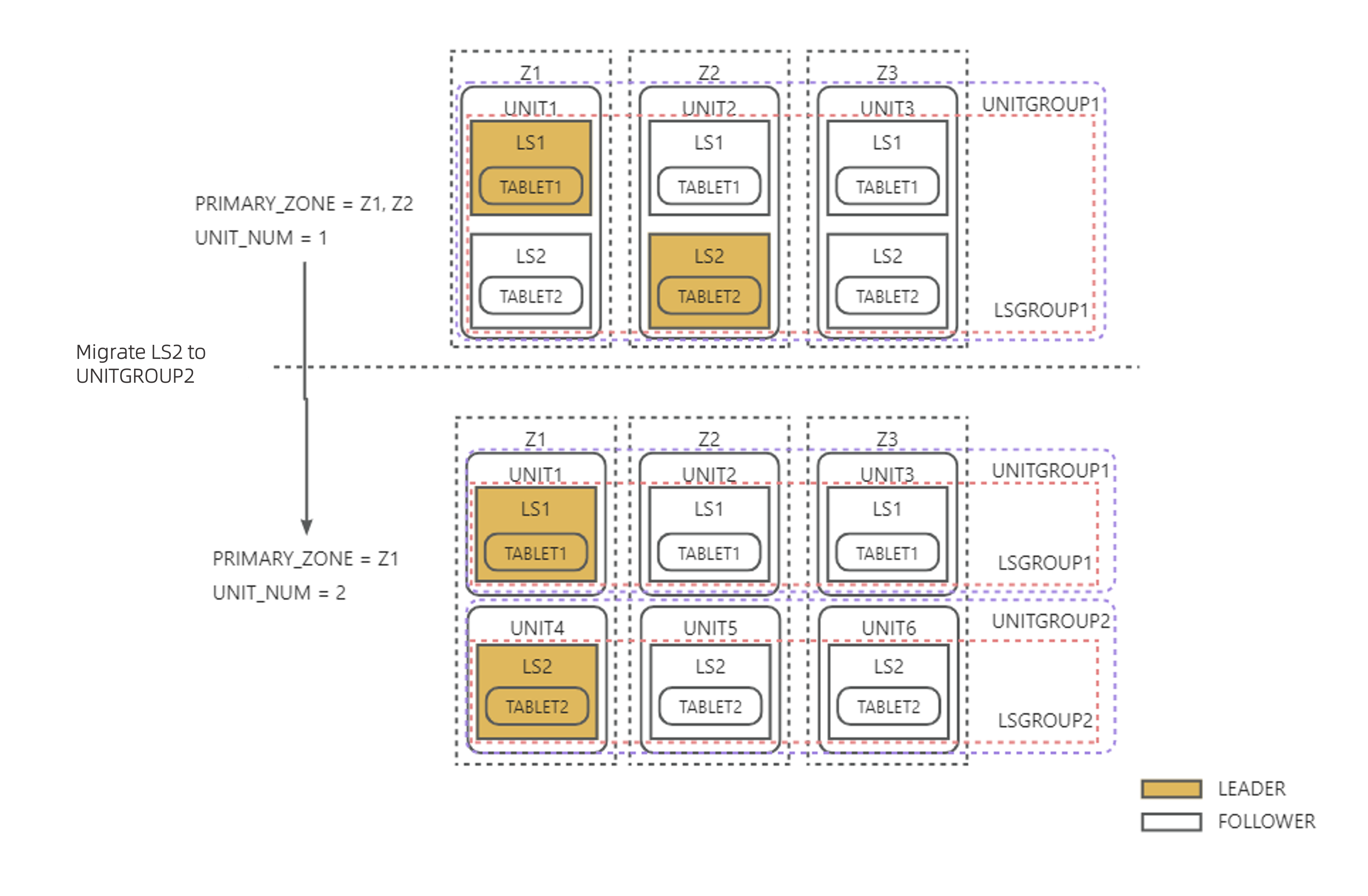
Top priority zones in PRIMARY_ZONE are changed from Z1,Z2 to Z1while UNIT_NUM is changed from 1 to 2 |
Some LS groups are short of LSs and some have redundant LSs, but the total number of LSs meets final status requirements. | Migrate redundant LSs to LS groups with insufficient LSs. | LS_BALANCE_BY_MIGRATE |
Top priority zones in PRIMARY_ZONE are changed from Z1 to Z1,Z2 or UNIT_NUM is changed from 2 to 3 |
Only some LS groups are short of LSs. | Assume that the LS quantity is changed from M to N (M < N) after the scale-out. Each new LS is assigned with M/N of the tablets originally served by the M LSs. |
LS_BALANCE_BY_EXPAND |
Top priority zones in PRIMARY_ZONE are changed from Z1,Z2 to Z1 or UNIT_NUM is changed from 3 to 2 |
Only some LS groups have redundant LSs. | Assume that the LS quantity is changed from M to N (M > N) after the scale-in. Each of the N remaining LSs is assigned with (M-N)/N of the tablets originally served by the reduced LSs. |
LS_BALANCE_BY_SHRINK |
Example 1: As shown in the figure below, top priority zones in PRIMARY_ZONE are changed from Z1,Z2 to Z1 and UNIT_NUM is changed from 1 to 2. The total LS quantity remains unchanged. Each LS2 is migrated to a new unit, and the leader role is switched to the LS2 in Z1 based on the change of PRIMARY_ZONE, thus achieving LS balancing.
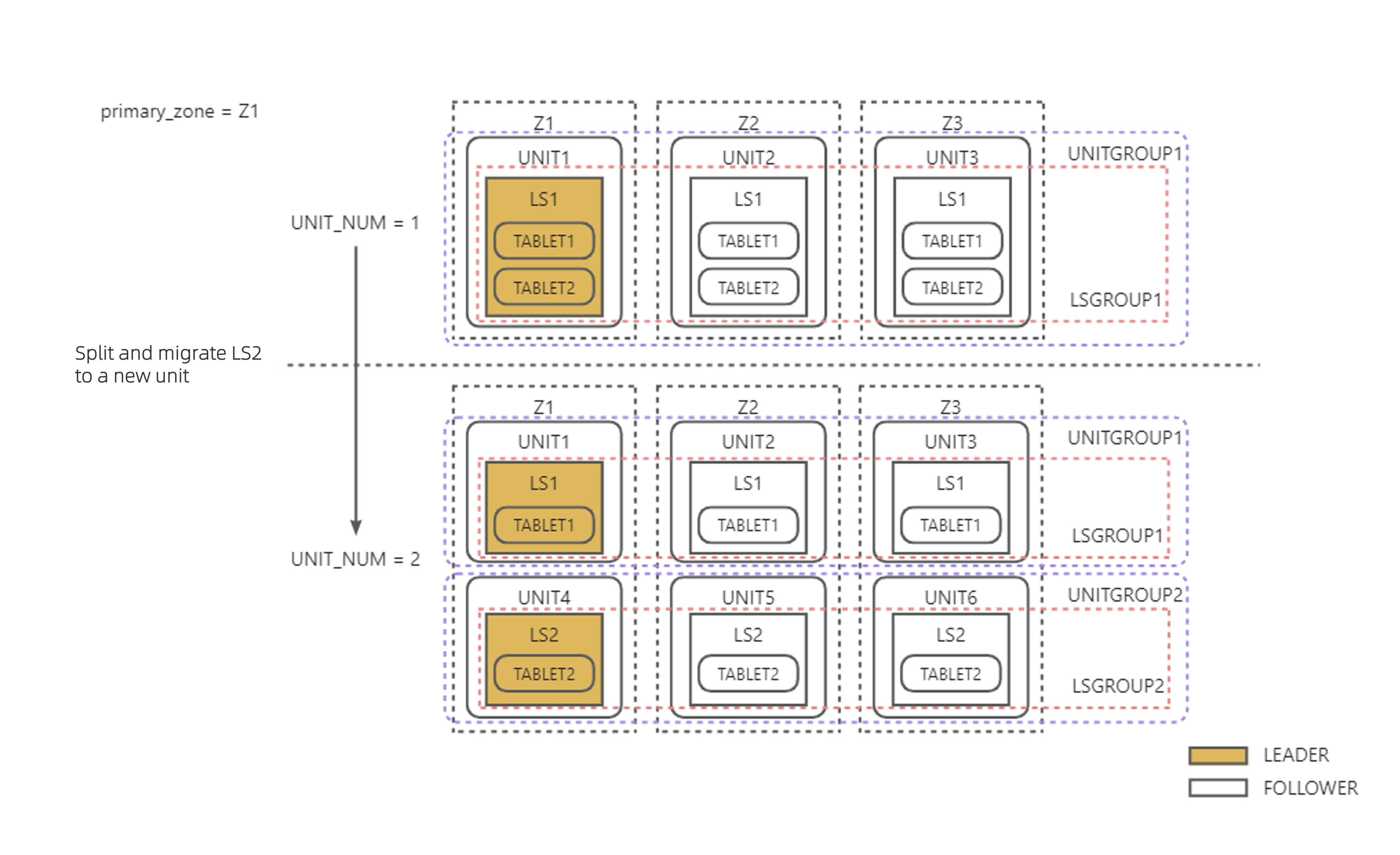
Example 2: As shown in the figure below, PRIMARY_ZONE = Z1 is configured, and UNIT_NUM is changed from 1 to 2. To ensure that every unit has a LS, LS2 is created through LS splitting and 1/2 of the tablets originally served by LS1 are transferred to LS2. Each LS2 is migrated to a new unit.
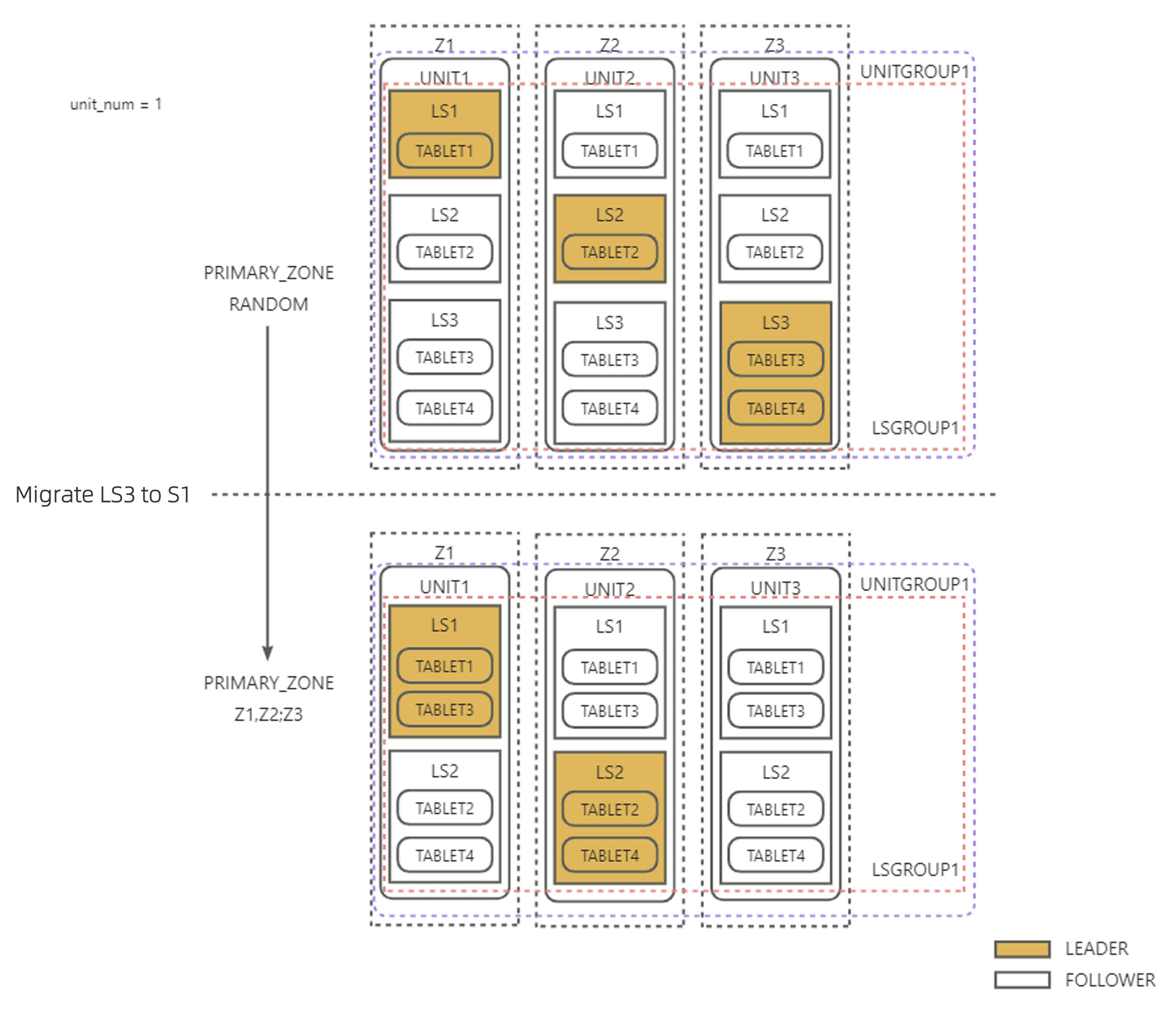
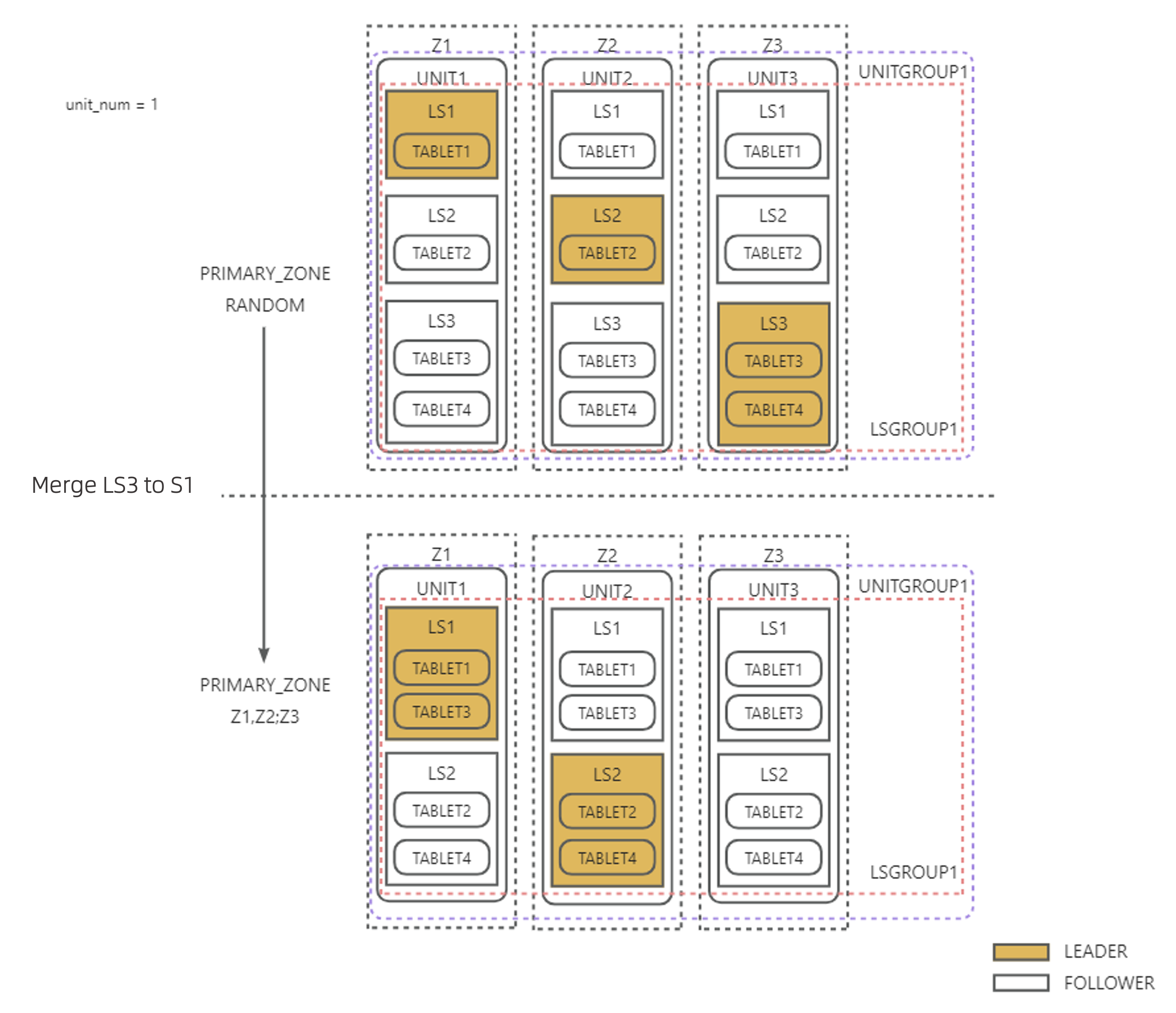
Example 3: As shown in the figure below, UNIT_NUM = 1 is configured, and top priority zones in PRIMARY_ZONE are changed from RANDOM to Z1,Z2. After the balancing is complete, leaders must be only in top priority zones in PRIMARY_ZONE and the tablets must be evenly distributed to LSs. Because LS3 is in the same LS group as LS1 and LS2, you can directly transfer 1/2 of the tablets from LS3 to LS1, and then merge LS3 into LS2. Then, the remaining 1/2 of the tablets will be served by LS2. In this case, tablet distribution remains balanced even though the LS quantity is reduced.
LS leader balancing
LS leader balancing ensures that LS leaders are evenly distributed to primary zones of the top priority on the premise of LS quantity balancing. For example, if you modify PRIMARY_ZONE for a tenant, the load balancing background thread dynamically adjusts the LS quantity based on the priority settings in PRIMARY_ZONE and switches the leader to ensure that each primary zone of the top priority has only one LS leader.
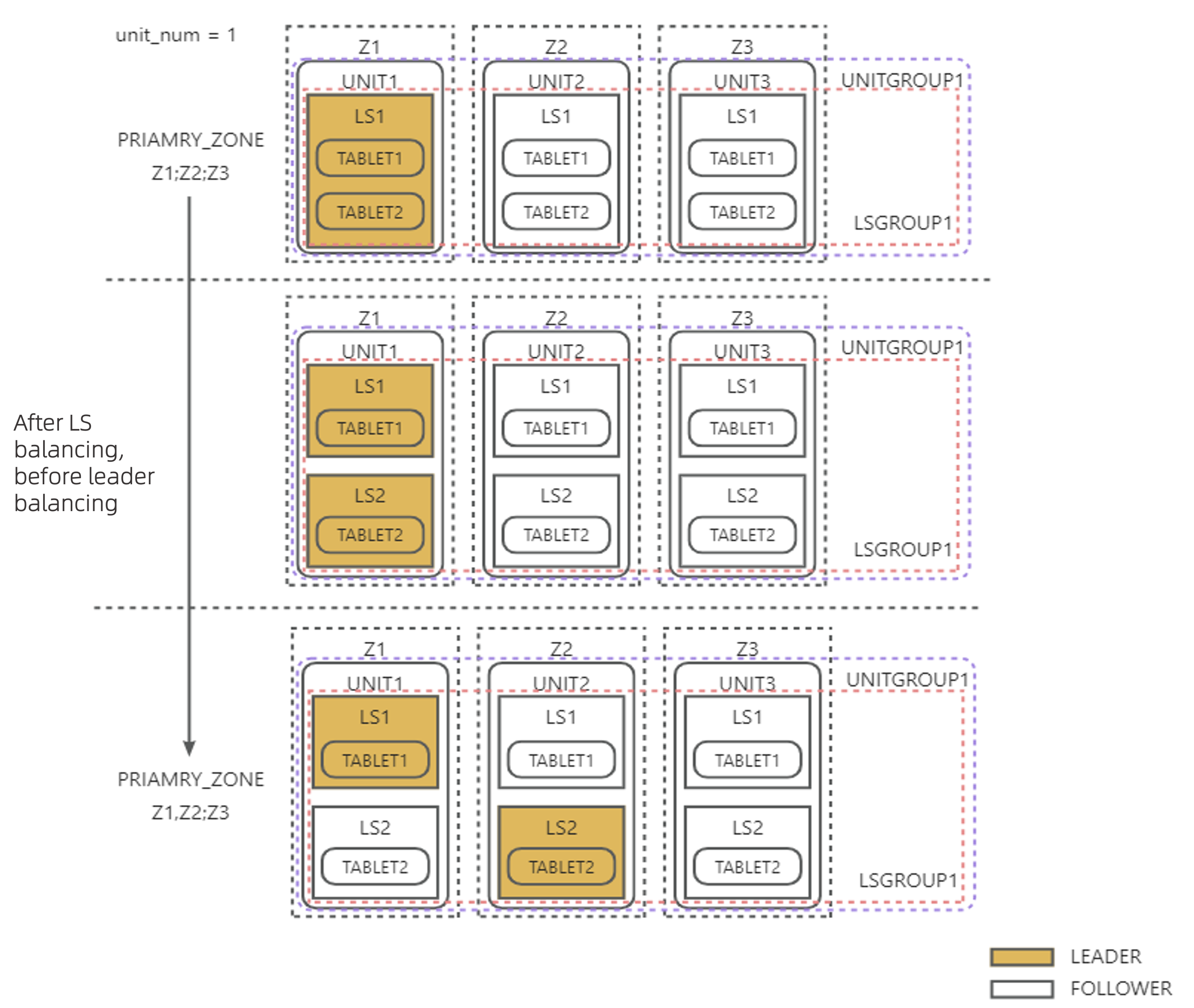
Example 1: As shown in the figure below, UNIT_NUM = 1 is configured, and top priority zones in PRIMARY_ZONE are changed from Z1 to Z1,Z2. To ensure that each top priority zone in PRIMARY_ZONE has a leader, a new LS is created in each unit by splitting the original LS in the same unit, and the new LS leader role is switched to the new LS in Z2.
Example 2: As shown in the figure below, UNIT_NUM = 1 is configured, and top priority zones in PRIMARY_ZONE are changed from RANDOM to Z1,Z2. After LS3 is merged into another LS to realize LS quantity balancing, LS leaders are naturally evenly distributed in Z1 and Z2 without any additional LS leader balancing actions.
Partition distribution during table creation
When you create a user table, OceanBase Database scatters and aggregates partitions to LSs based on a set of balancing distribution strategies to ensure relative balance of partitions among LSs.
User tables of a specified table group
You can specify a table group to flexibly configure partition aggregation and scattering rules for different tables. If you specify a table group with the corresponding sharding attribute when you create a user table, the partitions of the new table are distributed to LSs of the corresponding user based on the alignment rules of the table group. The following table describes the rules.
Sharding attribute of a table group |
Description |
Partitioning method requirement |
Alignment rule |
|---|---|---|---|
| NONE | All partitions of all tables are aggregated to the same server. | Unlimited | All partitions are aggregated to the same LS as the partitions of the table with the smallest table_id in the table group. |
| PARTITION | Scattering is performed at the partition granularity. All subpartitions under the same partition in a subpartitioned table are aggregated. | All tables use the same partitioning method. For a subpartitioned table, only its partitioning method is verified. Therefore, a table group with this sharding attribute may contain both partitioned and subpartitioned tables, as long as their partitioning methods are the same. | Partitions with the same partitioning value are aggregated, including partitions of partitioned tables and all subpartitions under corresponding partitions of subpartitioned tables. |
| ADAPTIVE | Scattering is performed in an adaptive way. If the tables in a table group with this sharding attribute are partitioned tables, scattering is performed at the partition granularity. If the tables are subpartitioned tables, scattering is performed at the subpartition granularity. |
|
|
Notice
If you create a table and specify a table group with existing user tables, the distribution of partitions and subpartitions of the new table are aligned to that of the table with the smallest table_id in the table group.
For more information about table groups, see Overview.
Normal user tables
If you create a normal user table without specifying the table group, OceanBase Database scatters the partitions of the new table to all LSs of the user by default. The specific rules are as follows:
For non-partitioned tables, the new partitions are distributed to the LS with the least partitions.
For partitioned tables, the partitions are evenly distributed in sequence to all LSs of the user.
For subpartitioned tables, all subpartitions under each partition are evenly distributed in sequence to all LSs of the user.
Here are some examples:
Example 1: In a MySQL tenant, create non-partitioned tables named
tt1,tt2,tt3, andtt4.obclient [test]> CREATE TABLE tt1(c1 int);obclient [test]> CREATE TABLE tt2(c1 int);obclient [test]> CREATE TABLE tt3(c1 int);obclient [test]> CREATE TABLE tt4(c1 int);Query the partition distribution of the four tables.
obclient [test]> SELECT table_name,partition_name,subpartition_name,ls_id,zone FROM oceanbase.DBA_OB_TABLE_LOCATIONS WHERE table_name in('tt1','tt2','tt3','tt4') AND role='LEADER';The query result is as follows:
+------------+----------------+-------------------+-------+------+
| table_name | partition_name | subpartition_name | ls_id | zone |
+------------+----------------+-------------------+-------+------+
| tt1        | NULL           | NULL              |  1001 | z1   |
| tt2        | NULL           | NULL              |  1002 | z2   |
| tt3        | NULL           | NULL              |  1003 | z3   |
| tt4        | NULL           | NULL              |  1001 | z1   |
+------------+----------------+-------------------+-------+------+
4 rows in set
Example 2: Create a partitioned table named
tt5.obclient [test]> CREATE TABLE tt5(c1 int) PARTITION BY HASH(c1) PARTITIONS 6;Query the partition distribution of the
tt5table.obclient [test]> SELECT table_name,partition_name,subpartition_name,ls_id,zone FROM oceanbase.DBA_OB_TABLE_LOCATIONS WHERE table_name ='tt5' AND role='LEADER';The query result is as follows. The partitions of the table are evenly distributed to the
1001,1002, and1003LSs.+------------+----------------+-------------------+-------+------+ | table_name | partition_name | subpartition_name | ls_id | zone | +------------+----------------+-------------------+-------+------+ | tt5 | p0 | NULL | 1002 | z2 | | tt5 | p1 | NULL | 1002 | z2 | | tt5 | p2 | NULL | 1003 | z3 | | tt5 | p3 | NULL | 1003 | z3 | | tt5 | p4 | NULL | 1001 | z1 | | tt5 | p5 | NULL | 1001 | z1 | +------------+----------------+-------------------+-------+------+ 6 rows in setExample 3: Create a subpartitioned table named
tt8.obclient [test]> CREATE TABLE tt8 (c1 int, c2 int, PRIMARY KEY(c1, c2)) PARTITION BY HASH(c1) SUBPARTITION BY RANGE(c2) SUBPARTITION TEMPLATE (SUBPARTITION p0 VALUES LESS THAN (1990), SUBPARTITION p1 VALUES LESS THAN (2000), SUBPARTITION p2 VALUES LESS THAN (3000), SUBPARTITION p3 VALUES LESS THAN (4000), SUBPARTITION p4 VALUES LESS THAN (5000), SUBPARTITION p5 VALUES LESS THAN (MAXVALUE)) PARTITIONS 2;Query the partition distribution of the
tt8table.obclient [test]> SELECT table_name,partition_name,subpartition_name,ls_id,zone FROM oceanbase.DBA_OB_TABLE_LOCATIONS WHERE table_name ='tt8' AND role='LEADER';The query result is as follows:
+------------+----------------+-------------------+-------+------+
| table_name | partition_name | subpartition_name | ls_id | zone |
+------------+----------------+-------------------+-------+------+
| tt8        | p0             | p0sp0             |  1003 | z3   |
| tt8        | p0             | p0sp1             |  1003 | z3   |
| tt8        | p0             | p0sp2             |  1001 | z1   |
| tt8        | p0             | p0sp3             |  1001 | z1   |
| tt8        | p0             | p0sp4             |  1002 | z2   |
| tt8        | p0             | p0sp5             |  1002 | z2   |
| tt8        | p1             | p1sp0             |  1001 | z1   |
| tt8        | p1             | p1sp1             |  1001 | z1   |
| tt8        | p1             | p1sp2             |  1002 | z2   |
| tt8        | p1             | p1sp3             |  1002 | z2   |
| tt8        | p1             | p1sp4             |  1003 | z3   |
| tt8        | p1             | p1sp5             |  1003 | z3   |
+------------+----------------+-------------------+-------+------+
12 rows in set
Special user tables
For special user tables, such as local index tables, global index tables, and replicated tables, OceanBase Database distributes their partitions to LSs based on the following special rules:
For local index tables, the partitions are distributed based on the same rules as primary user tables. Each partition is bound to the partition distribution of the primary user table.
Global index tables are non-partitioned tables by default. Partitions in such tables are distributed to the LS with the least partitions during table creation.
Replicated tables exist only on broadcast LSs.
Partition balancing
On the basis of LS balancing, the load balancing module uses the transfer feature to scatter and aggregate partition tablets to LSs, thus achieving partition balancing within a tenant. You can use the tenant-level parameter partition_balance_schedule_interval to specify the partition balancing interval. The default value is 2h. Only one partition balancing strategy is executed each time. If the partition_balance_schedule_interval parameter is set to 0s, partition balancing is not performed.
The partition balancing strategies are in the following priority order:
Partition attribute alignment > Partition quantity balancing > Partition disk balancing
Partition attribute alignment
Table group alignment
When you use an SQL statement to modify the table group attribute of a table or the sharding attribute of a table group, the partitions are redistributed as expected until partition balancing is completed in the background. You can change the value of partition_balance_schedule_interval to a smaller one for quick alignment.
For more information about the partition distribution rules of tables in a table group, see User tables of a specified table group in this topic.
For more information about table groups, see Overview.
Partition quantity balancing
Partition quantity balancing aims to evenly distribute the partitions of the primary user tables to all LSs of the user, with a partition quantity deviation no greater than 1 between each two LSs.
OceanBase Database uses the concept of balancing group to describe the relationship between partitions to be scattered. Such partitions are divided into balancing groups to achieve partition quantity balancing based on intra-group balancing and inter-group balancing.
The following table describes the balancing group division rules in scenarios where no table group exists.
Table type |
Balancing group division rule |
Distribution method |
|---|---|---|
| Non-partitioned tables | All non-partitioned tables under a tenant are in one balancing group. | All non-partitioned tables under a tenant are evenly distributed to all LSs of the user, with a quantity deviation no greater than 1. |
| Partitioned tables | All partitions of a single table are in one balancing group. | Partitions of a single table are evenly distributed to all LSs of the user. |
| Subpartitioned tables | All subpartitions under each partition of a single table are in one balancing group. | All subpartitions under each partition of a single table are evenly distributed to all LSs of the user. |
In the balancing stage, the system first evenly distributes partitions for each balancing group to achieve intra-group balancing, and then transfers partitions from the LS with the most partitions to achieve inter-group balancing, thus achieving partition quantity balancing.
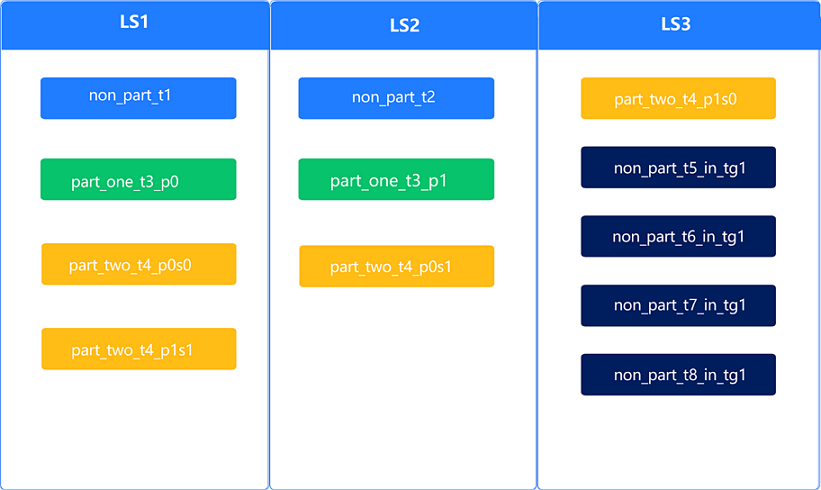
Assume that all partitions of four tables are in LS1. The partitions are divided into three balancing groups:
Balancing group 1: non-partitioned tables
non_part_t1andnon_part_t2Balancing group 2: partitions
part_one_t3_p0andpart_one_t3_p1of a partitioned tableBalancing group 3: subpartitions
part_two_t4_p0s0,part_two_t4_p0s1,part_two_t4_p1s0, andpart_two_t4_p1s1of a subpartitioned table
The initial distribution of partitions is 8-0-0.
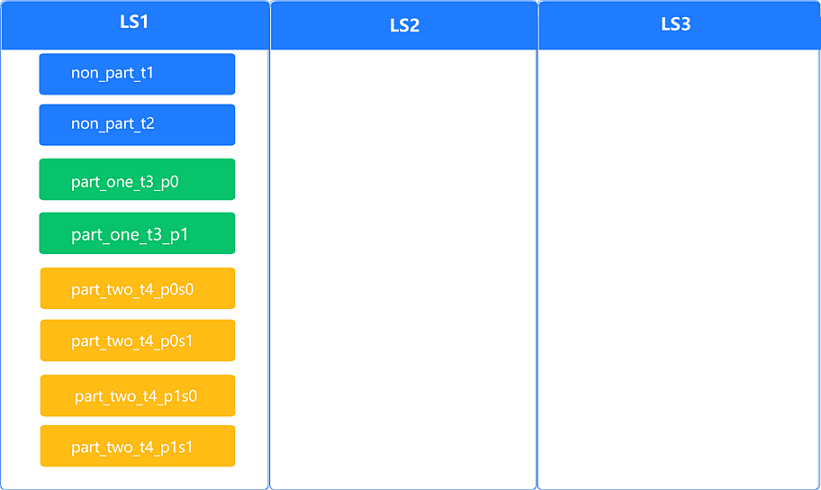
Upon intra-group balancing, the distribution of partitions is 4-3-1. Overall balancing is not achieved.
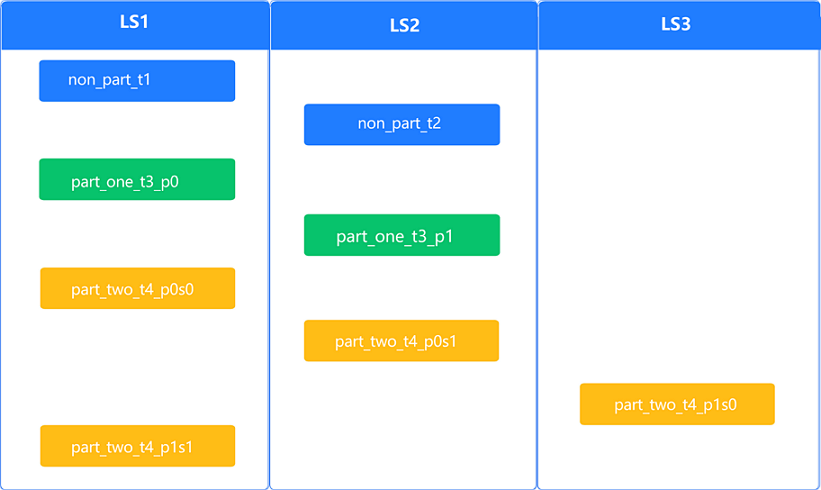
One partition is transferred from LS1, which has the most partitions, to LS3 to achieve intra-group balancing. The distribution of partitions is now 3-3-2, which means that overall balancing is achieved.
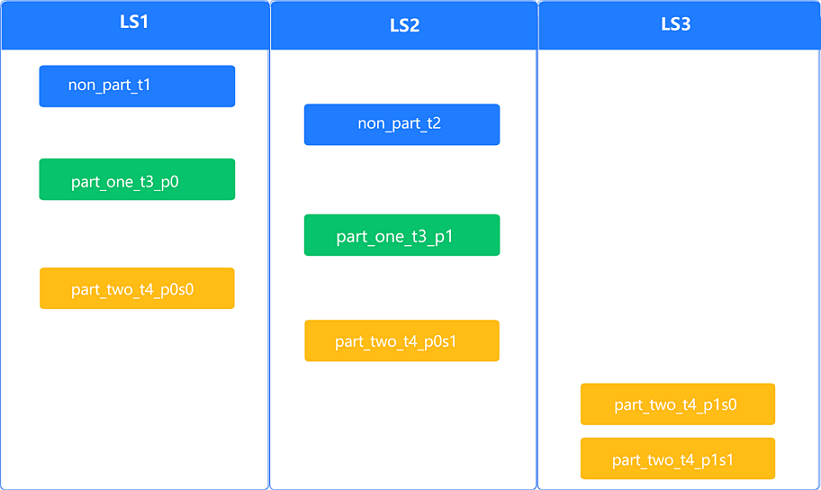
When table groups exist, each table group is an independent balancing group. The system binds the partitions to be aggregated in a table group and takes them as one partition. Then the system adopts the same intra-group balancing and inter-group balancing methods to achieve partition quantity balancing. When table groups exist, partition quantity balancing may not be fully achieved in a tenant.
The following table describes the balancing group division rules in scenarios where table groups exist.
Table type |
Balancing group division rule |
Distribution method |
|---|---|---|
Tables in a table group with the sharding attribute NONE |
All tables in a table group are in one balancing group. | All partitions in a table group are distributed to the same LS. |
Partitioned tables in a table group with the sharding attribute PARTITION or ADAPTIVE |
Partitions of all tables in a table group are in one balancing group. | Partitions of the first table are evenly scattered to all LSs, and each partition of subsequent tables is aggregated to the same LS as the corresponding partition in the first table. |
Subpartitioned tables in a table group with the sharding attribute ADAPTIVE |
All subpartitions under each partition of all tables in a table group are in one balancing group. | Subpartitions of the first table are evenly scattered to all LSs, and each subpartition of subsequent tables is aggregated to the same LS as the corresponding subpartition in the first table. |
Assume that you add a table group named tg1 with the sharding = 'NONE' configuration after the preceding balancing is achieved. The table group contains non-partitioned tables non_part_t5_in_tg1, non_part_t6_in_tg1, non_part_t7_in_tg1, and non_part_t8_in_tg1. Because all tables in the tg1 table group must be bound together, the partition distribution is 4-3-5 even after balancing is completed.
Partition disk balancing
On the basis of partition quantity balancing, the load balancing module exchanges partitions between LSs to control the disk usage difference among each two LSs within the value specified by server_balance_disk_tolerance_percent. If a single partition occupies a large amount of disk space, disk usage may not be balanced.
To avoid frequent balancing actions in scenarios with a small data volume, the threshold for triggering partition disk balancing is set to 50 GB in the current version. If the disk usage of a single LS is less than this threshold, disk balancing will not be triggered.
Partition balancing judgement
Partition balancing refers to the balancing for primary user tables. You need to specify table_type = 'USER TABLE' in the query. You can query the data_size column in the CDB_OB_TABLET_REPLICAS view to judge whether partition disk balancing is achieved.
Query statement for judging partition quantity balancing
obclient [test]> SELECT svr_ip,svr_port,ls_id,count(*) FROM oceanbase.CDB_OB_TABLE_LOCATIONS WHERE tenant_id=xxx AND role='leader' AND table_type='USER TABLE' GROUP BY svr_ip,svr_port,ls_id;Query statement for judging partition disk balancing
obclient [test]> SELECT a.svr_ip,a.svr_port,b.ls_id,sum(data_size)/1024/1024/1024 as total_data_size FROM oceanbase.CDB_OB_TABLET_REPLICAS a, oceanbase.CDB_OB_TABLE_LOCATIONS b WHERE a.tenant_id=b.tenant_id AND a.svr_ip=b.svr_ip AND a.svr_port=b.svr_port AND a.tablet_id=b.tablet_id AND b.role='leader' AND b.table_type='USER TABLE' AND a.tenant_id=xxxx GROUP BY svr_ip,svr_port,ls_id;