







This topic describes the timing of integrity constraint checking and the constraint states.
Timing of integrity constraint checking
Knowing when OceanBase Database checks constraints helps identify the types of operations that can be performed when various constraints exist. The following examples illustrate when OceanBase Database checks constraints.
In the following figure, the EMP table is created. A self-referential constraint is defined on the EMP table so that the values of the MGR column depend on the values of the EMPNO column. For simplicity, the following content addresses only the EMPNO (employee_id) and MGR (manager_id) columns of the EMP table.
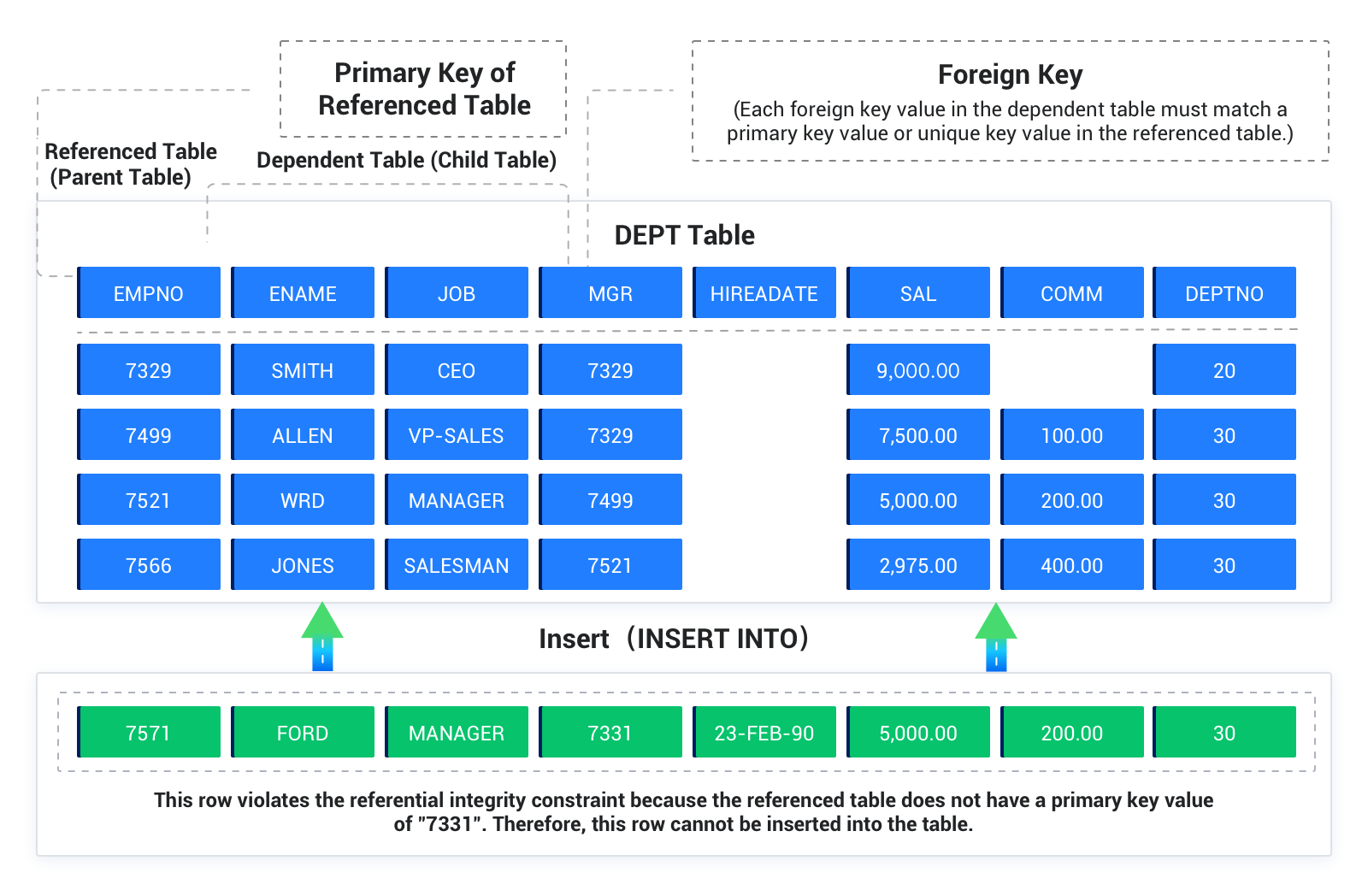
This example concerns the insertion of the first row into the EMP table. The value in the MGR column cannot reference any existing value in the EMPNO column because no data exists in the table. In this case, you can insert a row as described in the following scenarios:
If no
NOT NULLconstraint is defined on theMGRcolumn, you can insert a null value into theMGRcolumn in the first row. This row can be inserted into the table becauseFOREIGN KEYconstraints allow null values.You can insert the same values into the
EMPNOandMGRcolumns in the first row. In this case, OceanBase Database checks constraints after the statement is executed. To insert the first row with the same value in the parent key and the foreign key, OceanBase Database must first execute theINSERTstatement to insert the first row and then check whether any row in the table has anEMPNOcolumn value that corresponds to theMGRcolumn value of the first row.Execute a multiple row
INSERTstatement, such as anINSERTstatement with nestedSELECTstatements to insert multiple rows that reference one another. For example, the first row may have 200 for theEMPNOcolumn and 300 for theMGRcolumn, whereas the second row may have 300 for theEMPNOcolumn and 200 for theMGRcolumn.
In this case, constraint checking is deferred until the complete execution of the INSERT statement. OceanBase Database first inserts all rows and then checks for constraint violations row by row.
The following example illustrates when OceanBase Database checks a self-referential constraint for an UPDATE statement. Assume that the company is acquired and all employee numbers must be increased by 5000 to be consistent with the employee numbers of the new company. Manager numbers must also be increased by 5000 because they are also employee numbers. The following figure shows the EMP table before the update. This table contains the EMPNO and MGR columns. The EMPNO column has three values: 210, 211, and 212. The MGR column has two values: 210 and 211.
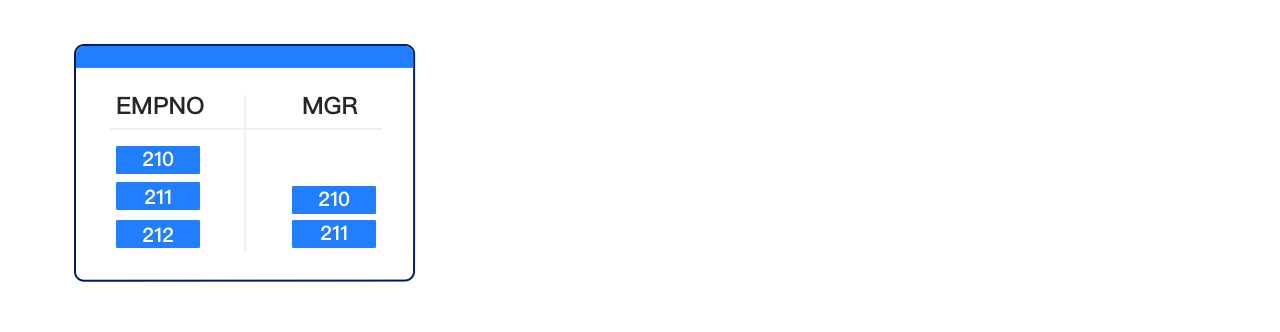
Execute the following SQL statement on the EMP table:
UPDATE EMP
SET empno = empno + 5000,
mgr = mgr + 5000;
Although the constraint defined on the EMP table requires that each MGR column value must correspond to an EMPNO column value, the preceding statement can still be executed because OceanBase Database checks the constraint after the statement is executed. The following figure shows that OceanBase Database checks the constraint after all operations of the SQL statement are performed.
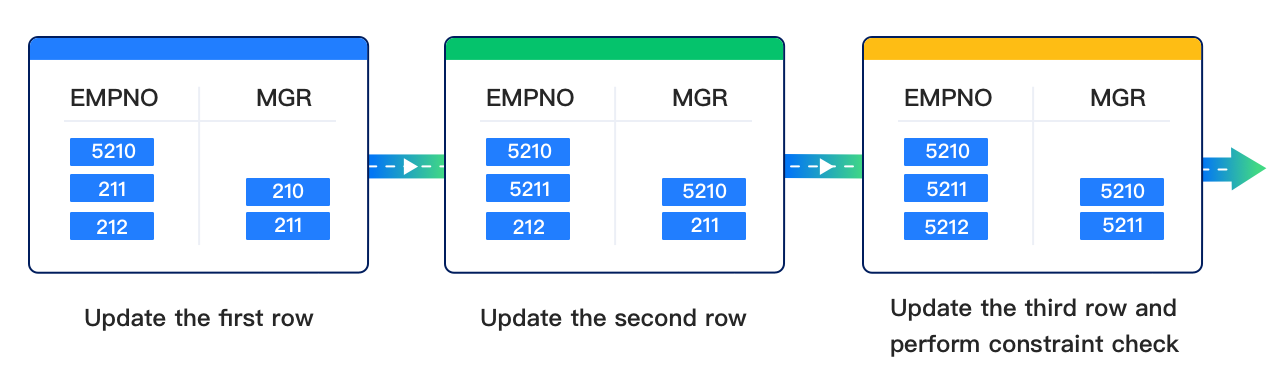
First, 5000 is added to each employee number and then each manager number. In Step 1, 210 in the EMPNO column is updated to 5210. In Step 2, 211 in the EMPNO column is updated to 5211, and 210 in the MGR column is updated to 5210. In Step 3, 212 in the EMPNO column is updated to 5212, and 211 in the MGR column is updated to 5211. Finally, OceanBase Database checks the constraint.
The examples in this section describe the constraint checking mechanism for INSERT and UPDATE statements. In fact, the constraint checking mechanism is the same for all types of DML statements, including UPDATE, INSERT, and DELETE statements.
Constraint states
In the Oracle mode of OceanBase Database, FOREIGN KEY constraints, CHECK constraints, and NOT NULL constraints all support two types of states: ENABLE or DISABLE and VALIDATE or NOVALIDATE. ENABLE or DISABLE specifies whether to check whether new data inserted or updated by executing DML statements on the table conforms to the constraint. VALIDATE or NOVALIDATE indicates whether all existing data in the table conforms to the constraint.
Default constraint states
When you create a constraint, its default state for ENABLE or DISABLE is ENABLE.
If the state for ENABLE or DISABLE is ENABLE, the default state for VALIDATE or NOVALIDATE is VALIDATE.
If the state for ENABLE or DISABLE is DISABLE, the default state for VALIDATE or NOVALIDATE is NOVALIDATE.
Constraint state combinations
ENABLE VALIDATE: OceanBase Database checks the validity of new data and existing data in the table. If the existing data violates the constraint, you cannot modify the constraint states toENABLE VALIDATEor create a constraint whose states areENABLE VALIDATE.ENABLE NOVALIDATE: OceanBase Database does not check the validity of existing data. It checks only the validity of new data in the table.DISABLE VALIDATE: DML operations cannot be performed on the table.DISABLE NOVALIDATE: The constraint is invalid. OceanBase Database does not check the validity of the existing data or new data in the table.
Sample SQL syntax for constraint states
obclient> CREATE TABLE t1(c1 INT, c2 INT);
Query OK, 0 rows affected

obclient> INSERT INTO t1 VALUES(0, 1);
Query OK, 1 row affected

obclient> ALTER TABLE t1 ADD CONSTRAINT cst CHECK(c1 = c2) ENABLE VALIDATE;
ORA-02293: cannot validate (TEST.CST) - check constraint violated

obclient> ALTER TABLE t1 ADD CONSTRAINT cst CHECK(c1 = c2) DISABLE VALIDATE;
ORA-02293: cannot validate (TEST.CST) - check constraint violated

obclient> ALTER TABLE t1 ADD CONSTRAINT cst CHECK(c1 = c2) ENABLE NOVALIDATE;
Query OK, 0 rows affected

obclient> INSERT INTO t1 VALUES(0, 1);
ORA-02290: check constraint violated

obclient> INSERT INTO t1 VALUES(1, 1);
Query OK, 1 row affected

obclient> ALTER TABLE t1 MODIFY CONSTRAINT cst DISABLE NOVALIDATE;
Query OK, 0 rows affected

obclient> INSERT INTO t1 VALUES(0, 1);
Query OK, 1 row affected

obclient> DELETE FROM t1 WHERE c1 != c2;
Query OK, 2 rows affected

obclient> ALTER TABLE t1 MODIFY CONSTRAINT cst DISABLE VALIDATE;
Query OK, 0 rows affected

obclient> INSERT INTO t1 VALUES(1, 1);
ORA-25128: No insert/update/delete on table with constraint (TEST.CST) disabled and validated

obclient> ALTER TABLE t1 MODIFY CONSTRAINT cst ENABLE VALIDATE;
Query OK, 0 rows affected

obclient> INSERT INTO t1 VALUES(0, 1);
ORA-02290: check constraint violated

obclient> INSERT INTO t1 VALUES(1, 1);
Query OK, 1 row affected