







OceanBase Embedded SQL in C (ECOB) supports the following cursor-related statements: DECLARE CURSOR, OPEN, FETCH, CLOSE, and ALLOCATE.
DECLARE CURSOR
You can execute the DECLARE CURSOR statement to declare a cursor variable. Cursor variables support only query statements.
Syntax:
EXEC SQL DECLARE <cur_name> [SCROLL] CURSOR [WITH HOLD] FOR (select_stat | :host_variable | prepare_id)

The SCROLL parameter specifies the cursor as a scroll cursor. If the MODE parameter is set to ANSI (By default, the MODE parameter is set to Oracle), the cursor will be closed when the COMMIT statement is executed. You can use the WITH HOLD keyword in the command to prevent the cursor from being closed when the COMMIT statement is executed.
Sample statements:
char * sql_stat = "select c1,c2 from t1";
EXEC SQL PREPARE stat from :sql_stat;
EXEC SQL DECLARE cur CURSOR for stat;
OPEN
You can execute the OPEN statement to open a cursor variable.
Syntax:
EXEC SQL OPEN <cur_name> [ USING :host_variable ]

Sample statements:
int c2val = 0;
char * sql_stat = "select c1,c2 from t1";
EXEC SQL PREPARE stat from :sql_stat;
EXEC SQL DECLARE cur CURSOR for stat;
EXEC SQL OPEN cur;
EXEC SQL DECLARE cur1 SCROLL CURSOR for select c1 from t1 where c2 > :c2;
EXEC SQL OPEN cur1 USING :c2val;
FETCH
You can execute the FETCH statement to get the result set stored by the cursor variable. For a scroll cursor, you can specify the position to fetch the scroll cursor.
Syntax:
EXEC SQL FETCH [ ABSOLUTE | RELATIVE (:host_variable | n )] [FIRST | PRIOR | NEXT|LAST| CURRENT] <cur_name> INTO :host_variables [ [INDICATOR] :indicator_variable]
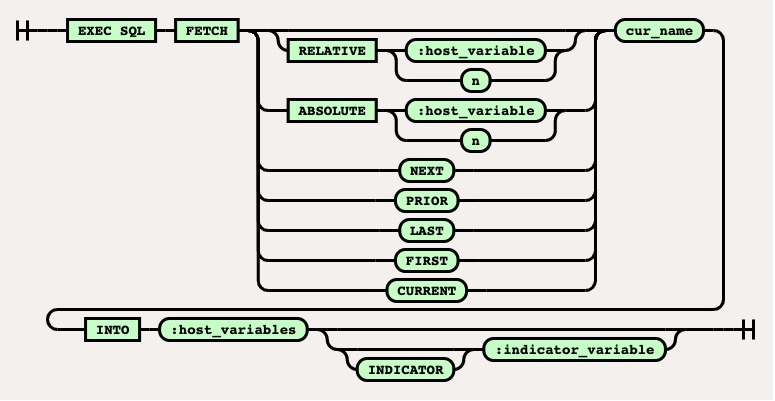
The ABSOLUTE parameter specifies the cursor position and can be followed by a host variable or numeric constant. You can use the NEXT keyword to push a cursor backward. At present, you can push a cursor backward, but not forward.
Sample statements:
int c2val = 0;
int c1val = 0;
int pos = 2;
short ind;
EXEC SQL DECLARE cur1 SCROLL CURSOR for select c1 from t1 where c2 > :c2;
EXEC SQL OPEN cur1 USING :c2val;
EXEC SQL FETCH FIRST cur1 INTO :c1val:ind;
EXEC SQL FETCH PRIOR cur1 INTO :c1val:ind;
EXEC SQL FETCH LAST cur1 INTO :c1val:ind;
EXEC SQL FETCH NEXT cur1 INTO :c1val:ind;
EXEC SQL FETCH ABSOLUTE :pos INTO :c1val:ind;
EXEC SQL FETCH ABSOLUTE 3 INTO :c1val;
EXEC SQL FETCH RELATIVE :pos INTO :c1val:ind;
EXEC SQL FETCH RELATIVE 4 INTO :c1val;
EXEC SQL CLOSE cur1;
CLOSE
The CLOSE statement is used to close a cursor variable.
Syntax:
EXEC SQL CLOSE <cur_name>

Sample statements:
int c1val;
EXEC SQL CREATE TABLE t1 (c1 int);
EXEC SQL INSERT INTO t1 VALUES(1);
EXEC SQL COMMIT WORK;
EXEC SQL DECLARE cur CURSOR FOR select c1 from t1;
EXEC SQL OPEN cur;
EXEC SQL WHENEVER NOT FOUND DO BREAK;
for(;;){
EXEC SQL FETCH cur into :c1val;
}
EXEC SQL CLOSE cur;
ALLOCATE statement
The ALLOCATE statement is used to allocate a cursor variable.
Syntax:
EXEC SQL ALLOCATE :sql_cursor;

When a cursor variable is allocated, the server does not need to be called during precompilation or running. If the ALLOCATE statement contains errors, such as an undeclared host variable, ECOB will return a precompilation error. The stack memory is used when a cursor variable is allocated. Therefore, you can release a cursor variable during a loop of the program.
Sample statement:
SQL_CURSOR sql_cursor;
char col2[100]={0};
EXEC SQL ALLOCATE :sql_cursor;
EXEC SQL OPEN :sql_cursor FOR SELECT col2 FROM test;
EXEC SQL FETCH :sql_cursor INTO :col2;
EXEC SQL CLOSE :sql_cursor;
EXEC SQL FREE :sql_cursor;