







The log query feature allows you to view the logs of OBServer nodes, the arbitration service, OBProxies, binlog servers, binlog instances, hosts, and OceanBase Cloud Platform (OCP) Agent by object scope, log type, log level, and time range. In addition, OCP allows you to specify keywords to perform general matching or regular expression matching for logs.
You can view error logs of selected objects and components with status exceptions, and perform log analysis.
Prerequisites
You have the read-only privilege on the log query objects.
Procedure
Log in to the OCP console.
In the left-side navigation pane, choose System Management > Log service.
The Log service page automatically appears. Alternatively, you can go to this page from the following entries:
Note
If you go to the Log service page from the following entries, the system automatically sets the Object Scope and Log Type parameters based on the entry.
In the upper-right corner of the Overview page of a cluster, click ... and select Download Logs.
In the OBServer node list on the Overview page of a cluster, click ... in the Actions column of the target OBServer node and select Download Logs.
In the left-side navigation pane, click Hosts. In the host list, select multiple IP addresses. Click Batch Download Logs in the lower-right corner of the page.
In the upper-right corner of the Overview page of an OBProxy cluster, click ... and select Download All Logs.
In the OBProxy list on the Overview page of an OBProxy cluster, click Download Logs in the Actions column of the target OBProxy.
On the Log Search page, set the search criteria described in the following table.
 CriteriaDescription
Object Scope The scope for log query. You must specify this parameter. - Select an OceanBase cluster, an arbitration service, an OBProxy cluster, a binlog server, a binlog instance, or a host from the left-side drop-down list to specify the log query object.
- Select one or more servers of the specified object from the right-side drop-down list. If you query logs by host, the selected servers are displayed and grouped by cluster.
Log Type The log type and files. You must specify this parameter. For more information, see the Log types section. - Select OceanBase Database Logs, Arbitration Service Logs, OBProxy Logs, Binlog Server Logs, Binlog Instance Logs, Host Logs, or OCP Agent Logs from the left-side drop-down list to specify the log type.
- Select one or more log files of the specified type from the right-side drop-down list.
Log Level The log level. Valid values: ERROR, WARN, INFO, WDIAG, EDIAG, TRACE, and DEBUG. You can select multiple levels. Time Range The default time range is last 1 hour. You can select a time range of last 5, 10, 15, or 30 minutes, last 1, 3, 6, 12, or 24 hours, or last 7 days from the left-side drop-down list, or specify a custom time range in the right-side box. Keywords The keywords that the logs to query contain. Regular expression matching and general matching of multiple keywords are supported. Excluding The keywords that the logs to query cannot contain. Multiple keywords can be excluded. Click Query.
The query results are displayed in the lower part of the page.
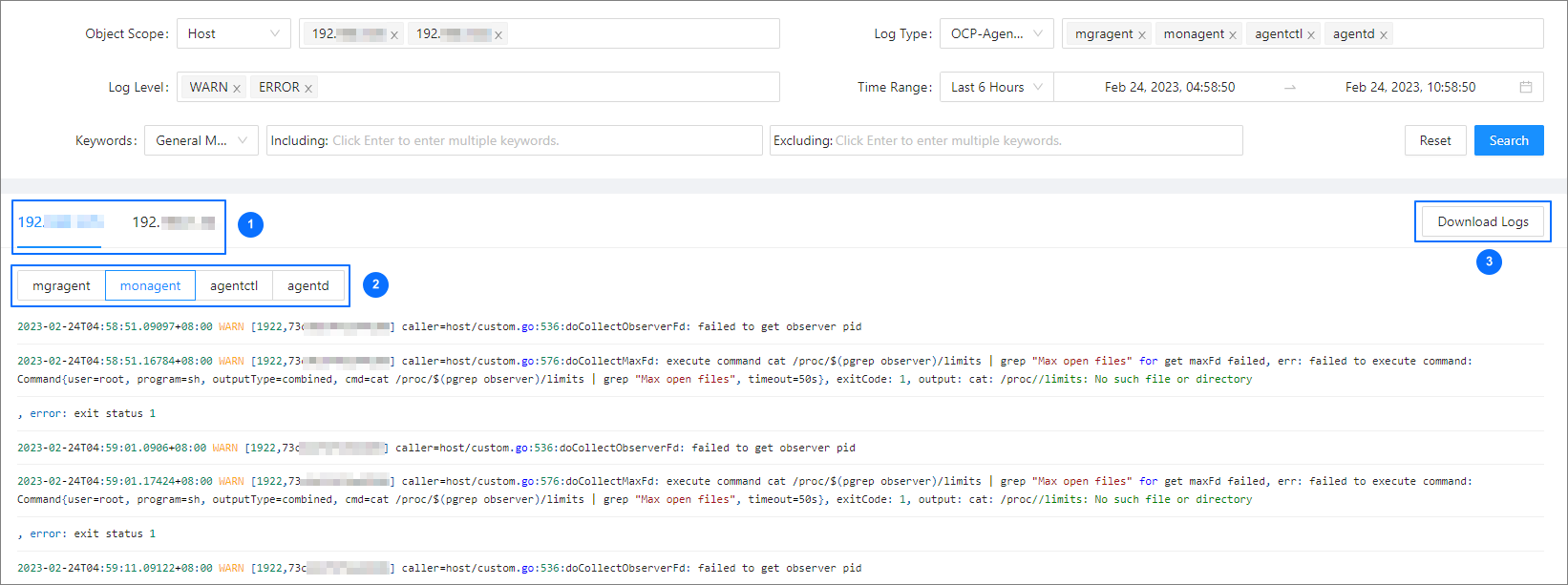
In section ①, you can switch between severs to view their logs.
In section ②, you can switch between log files.
In section ③, click Download Logs.
You can download all logs meeting the specified criteria on the server.
Log types
The following table describes the log types.
Log type |
Description |
|---|---|
| OceanBase Database logs | All logs in the /log/ directory of the OceanBase cluster installation path, subdivided into four types: observer, rootservice, election, and alert. The log clearing strategy is determined by the value you specified for the ocp.agent.ob-cleaner.config parameter:
|
| Arbitration service logs | All logs in the /log/ directory of the arbitration service installation path, subdivided into three types: arbitration_observer, arbitration_rootservice, and arbitration_election. |
| OBProxy logs | All logs in the /home/admin/logs/obproxy/log/ directory, subdivided into eight types: obproxy, obproxy_digest, obproxy_stat, obproxy_slow, obproxy_limit, obproxy_diagnosis, obproxy_xflush, and obproxy_error. |
| Binlog server logs | All binlog_server_logproxy logs in the /log/ directory of the binlog cluster installation path. |
| Binlog instance logs | All logs in the /run/instance name/log/ directory of the binlog cluster installation path, subdivided into four types: binlog_service_instance, binlog_service_init, binlog_service_libobcdc, and binlog_service_libobcdc_stderr. |
| Host logs | All message-date files in the /var/log directory. |
| OCP Agent logs | All logs in the /home/admin/ocp_agent/log/ directory, subdivided into four types: mgragent, monagent, agentctl, and agentd. |