







This topic describes how to enable automatic routing to the new primary tenant after a switchover between primary and standby tenants.
Scenarios
When the primary and standby tenants are deployed in two IDCs, you can configure a service name to enable automatic routing to the new primary tenant after a switchover without modifying the connection string. For more information about service names, see Manage service names.
Prerequisites
- OceanBase Cloud Platform (OCP), OceanBase Database, and OBProxies meet the following version requirements:
- OCP: [V4.3.1, +∞)
- OceanBase Database: V4.2.1.9, [V4.2.4.0, V4.3.0.0), or [V4.3.3.0, +∞)
- OBProxies: [V4.3.1.0, +∞)
- The cluster is in the Running state.
- The primary and standby tenants are in the Running state before the switchover.
Technical mechanism
OCP allows you to configure the same service name for the primary and standby tenants and associate the OceanBase clusters to which the primary and standby tenants belong with the same OBProxy. This way, OBProxy automatically detects the location of the primary tenant based on the service name provided by OCP and routes requests to the primary tenant. After you perform a switchover between the primary and standby tenants, your business sessions can be automatically routed to the new primary tenant.
To use this feature, your business applications must connect to the business database based on the service name. Here is a sample connection string:
obclient -h${IP} -P${PORT} -u${USERNAME}@SERVICE:${SERVICE_NAME} -D${DB_NAME}
IP: the IP address or upper-layer Server Load Balancer (SLB) address of the OBProxy associated with the primary and standby tenants.PORT: the port number or upper-layer SLB port number of the OBProxy associated with the primary and standby tenants.USERNAME: the username for connecting to the database.SERVICE_NAME: the service name for the primary and standby tenants.DB_NAME: the name of the business database.
Switchover between primary and standby tenants
The switchover does not change the service name of the tenants. Business applications can access the tenants through the OBProxy by using the [USERNAME]@SERVICE_NAME:[serviceName] setting without modifying the connection string.
Failover of a standby tenant
After you perform a failover on a standby tenant, OceanBase Database deletes the service name of the new primary tenant. Therefore, business applications cannot connect to the new primary tenant based on the service name, and you must modify the connection string. To avoid modification of the connection string, OCP allows you to choose whether to specify a service name for the new primary tenant before the failover. This is an optional operation. You can retain the original service name for the new primary tenant. In this case, business applications can directly access the new primary tenant after the failover without modifying the connection string.
Notice
We recommend that you do not retain the original service name for the new primary tenant. This operation can cause a recovery point objective (RPO) of greater than 0 after the failover. Consequently, data errors may occur after requests are automatically routed to the new primary tenant.
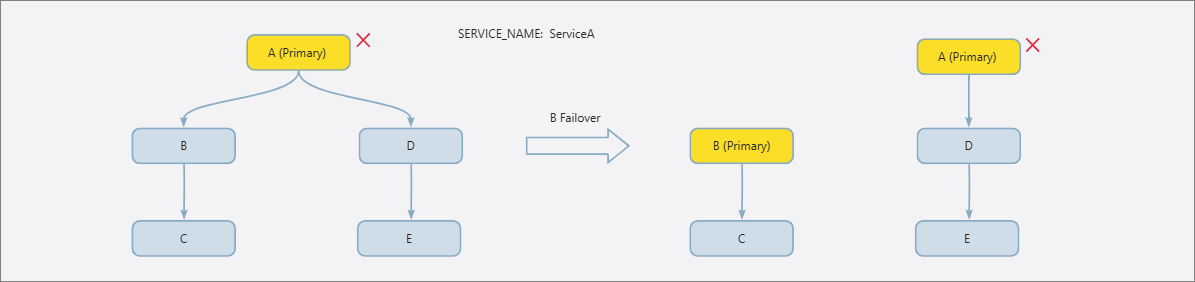
The following figure shows the technical mechanism of a failover without modifying the connection string. As shown in the figure, after a failover is performed on tenant B, the original primary/standby relationship is divided into two parts: (B and C) and (A, D, and E). The service names of tenants A, C, D, and E are still ServiceA, and the service name of tenant B is deleted. To allow business applications to access tenant B without modifying the connection string, OCP resets the service name of tenant B to ServiceA at the end of the failover process, and sets the service names of tenant A, D, and E to the INVALID state. The INVALID state is a concept in OCP. A service name in this state is masked from the OBProxy to prevent the OBProxy from accessing the original primary tenant. The config server of OCP returns only the tenant whose service name is not in the INVALID state.
Decouple a standby tenant from its primary tenant
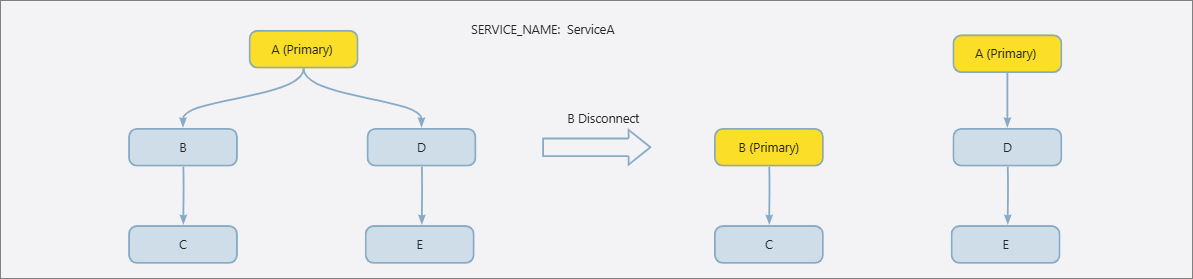
In OceanBase Database, you can use the same command to decouple a standby tenant from its primary tenant and perform a failover on the standby tenant. However, they require two different operations in OCP. In the primary/standby relationship shown in the following figure, the original primary tenant is in the normal state. After decoupling, OceanBase Database automatically deletes the service name of tenant B, and OCP deletes the service name of tenant C. This prevents tenants not in the primary/standby relationship from using the same service name. The following figure shows the technical mechanism of decoupling tenants.
Procedure
Step 1: Configure a service name
Configure a service name on the Create Tenant page.
- Go to the Create Tenant page.
- If the cluster to which the tenant belongs and the OBProxy meet the version requirements, specify a service name for the tenant in the Basic Settings section.
Configure a service name on the Tenant Overview page.
Go to the Overview page of the tenant.
If the cluster to which the tenant belongs and the OBProxy meet the version requirements, add a service name for the tenant in the Basic Information section.
- You can modify the service name for the primary and standby tenants at the same time.
- You can edit or delete the service name of a tenant.
Step 2: Associate the OceanBase clusters with an OBProxy cluster
Associate the OceanBase clusters to which the primary and standby tenants belong with the same OBProxy cluster.