







Before you run OBLOADER & OBDUMPER, make sure that you have the appropriate operating environment and privileges.
Operating environment requirements
Item |
Requirements |
|---|---|
| Operating system | Linux, macOS, and Windows 7 or later |
| Java environment | Install Oracle JDK 1.8.0_3xx and configure the JAVA_HOME environment variable. |
| Character set | We recommend that you use UTF-8 as the file character set. |
| Java Virtual Machine (JVM) parameters | Modify the JVM memory parameters in the obloader and obdumper scripts stored in the bin/ directory to avoid JVM memory insufficiency. |
Note
Some minor versions of OpenJDK 1.8 have serious garbage collection (GC) bugs. OBLOADER & OBDUMPER may run out of memory or hang. To avoid these bugs, we recommend that you install the latest minor version of OpenJDK 1.8.
If you are using an operating system from a Chinese manufacturer, such as Kylin, you must change the garbage collector (specified by `JAVA_OPTS`) from G1 to CMS. Otherwise, the JVM may crash.
If you are using OBLOADER & OBDUMPER of a version earlier than V4.3.0, change the value of `GC_OPTS` from -XX:+UseG1GC to -XX:+UseConcMarkSweepGC in the obloader or obdumper script stored in the `bin/` directory.
If you are using OBLOADER & OBDUMPER V4.3.0 or later, set the value of GC_OPTS to -XX:+UseG1GC or -XX:+UseConcMarkSweepGC in the obloader or obdumper script stored in the `bin/` directory, for example, GC_OPTS="-XX:+UseG1GC".
Configure the HDFS dependency
OBLOADER & OBDUMPER V4.3.0 and later depend on Hadoop. To use OBLOADER & OBDUMPER in Windows, you must configure the Hadoop Distributed File System (HDFS) dependency first. Otherwise, the error HADOOP_HOME and hadoop.home.dir are unset. will be returned.
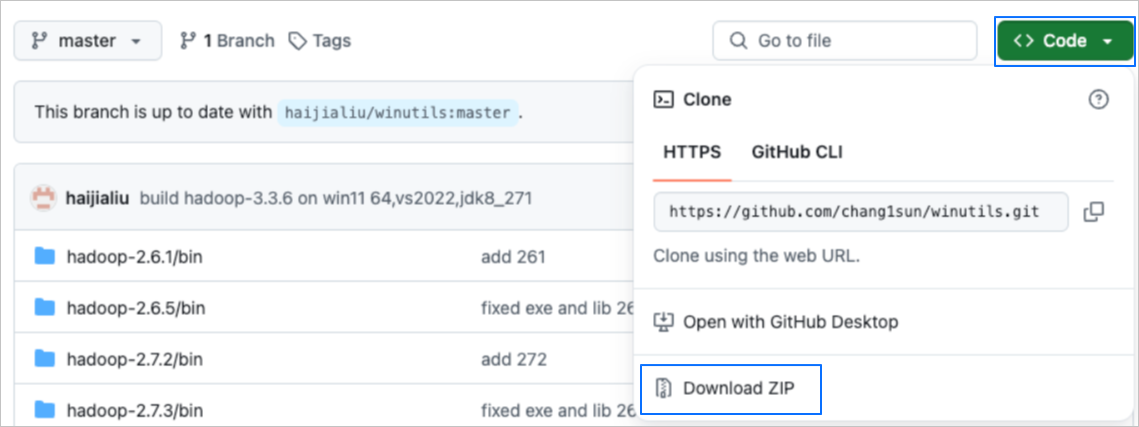
Go to the Code page. Choose Code > Download ZIP in the upper-right corner to download the .zip package.
Decompress the package and copy the current path.
Here takes the
C:\User\chang\winutilspath as an example. You must replace it with the actual path.Configure the settings by using either of the following methods:
Method 1: Directly set the system environment variable:
HADOOP_HOME = C:\User\chang\winutils\hadoop-3.3.6. Then, add%HADOOP_HOME%\binto the value of the user variablePath.Method 2: Use Notepad to open the
obdumper.batfile in the<Root directory of the tool>\bin\windows\directory and find the following line:SET PROGRAM_OPTS=%PROGRAM_OPTS% "-Dtool.base.dir=%PARENT_PATH%"Add the following command before or after this line, save the file, and then exit.
SET PROGRAM_OPTS=%PROGRAM_OPTS% "-Dhadoop.home.dir=C:\User\chang\winutils\hadoop-3.3.6"
Run OBLOADER & OBDUMPER again.
Privileges
OBLOADER
When you use OBLOADER to import data to an OceanBase database, the account used to connect to the database must have the privileges to execute the CREATE, SELECT, INSERT, and UPDATE statements. You can use the SHOW GRANTS statement to view the privileges granted to a user. Here is a sample statement:
obclient> SHOW GRANTS FOR user1;
+------------------------------------------+
| Grants for user1@%                       |
+------------------------------------------+
| GRANT CREATE ON *.* TO 'user1'           |
| GRANT SELECT ON `db1`.* TO 'user1'       |
| GRANT INSERT ON `db1`.* TO 'user1'       |
| GRANT UPDATE ON `db1`.* TO 'user1'       |
| GRANT SELECT ON `oceanbase`.* TO 'user1' |
+------------------------------------------+
2 rows in set
Note
To import data to a MySQL tenant of OceanBase Database, you must have the
SELECTprivilege on theoceanbasedatabase. Here is a sample statement for granting theSELECTprivilege on theoceanbasedatabase:GRANT SELECT ON `oceanbase`.* TO 'user1'.To import data to an Oracle tenant of OceanBase Database, you must have the
SELECTprivilege on the sys tenant. Here is a sample statement for granting theSELECTprivilege on the sys tenant:GRANT SELECT ON "SYS".* TO 'user1'.- To use OBLOADER to import database object definitions and data to an Oracle tenant of OceanBase Database, we recommend that you connect to the database by using the account of a database administrator (DBA).
OBDUMPER
When you use OBDUMPER to export data from an OceanBase database, the account used to connect to the database must have the privileges to execute the CREATE and SELECT statements. You can use the SHOW GRANTS statement to view the privileges granted to a user. Here is a sample statement:
obclient> SHOW GRANTS FOR user1;
+------------------------------------------+
| Grants for user1@%                       |
+------------------------------------------+
| GRANT CREATE ON *.* TO 'user1'           |
| GRANT SELECT ON `db1`.* TO 'user1'       |
| GRANT SELECT ON `oceanbase`.* TO 'user1' |
+------------------------------------------+
2 rows in set
Note
- You must have the privileges on system tables only when you use OBDUMPER to export non-table database objects.
To export data from a MySQL tenant of OceanBase Database, you must have the
SELECTprivilege on theoceanbasedatabase. Here is a sample statement for granting theSELECTprivilege on the `oceanbase` database:GRANT SELECT ON `oceanbase`.* TO 'user1'.To export data from an Oracle tenant of OceanBase Database, you must have the
SELECTprivilege on the sys tenant. Here is a sample statement for granting theSELECTprivilege on the sys tenant:GRANT SELECT ON "SYS".* TO 'user1'.
- To use OBDUMPER to export database object definitions from an Oracle tenant of OceanBase Database, we recommend that you connect to the database by using the account of a DBA. When you use OBDUMPER to export data from an Oracle tenant of OceanBase Database, no special requirement is imposed on the account used to connect to the database.
Considerations
For OceanBase Database of a version earlier than V4.0.0, the
--sys-userand--sys-passwordoptions must be specified on the command line of OBLOADER & OBDUMPER.For more information, see Command-line options of OBLOADER and Command-line options of OBDUMPER.
The
--sys-userand--sys-passwordoptions must be set to the username and password of a user with system table and view query privileges in the sys tenant.For more information, see View user privileges, Overview, and Modify user privileges.