







During the operation of a database, various exceptions may occur, such as application errors, database connection errors, database permission issues, database resource issues, and network problems. One such exception is an application exception where the error message does not contain an OceanBase error code. This makes it difficult to determine the relevance of the issue to OceanBase Database, leading to unclear troubleshooting directions.
To help you quickly identify the root cause of such issues and efficiently resolve them, this topic summarizes a clear and practical troubleshooting process for application exceptions where the error message does not contain an OceanBase error code. The process provides detailed steps to enhance troubleshooting efficiency and minimize business impact, thereby supporting your routine O&M work.
The troubleshooting process for an application exception where the error message does not contain an OceanBase error code is shown in the following figure.
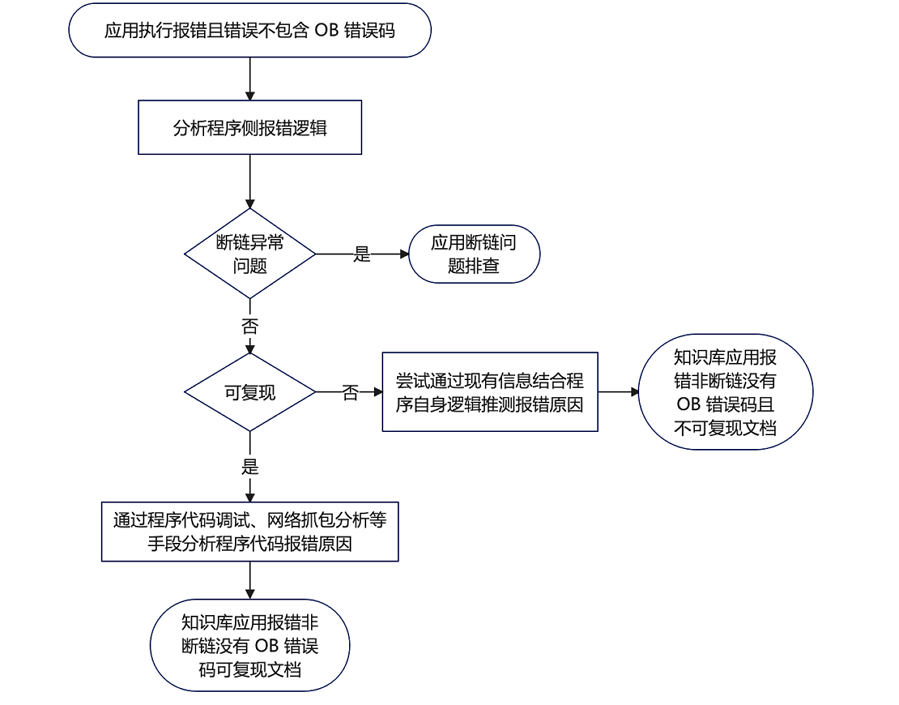
Process
If an application exception occurs and the error message does not contain an OceanBase Database error code, you can troubleshoot the issue by using the following process.
Analyze the error logic of the application to determine whether a disconnection exception has occurred:
If yes, search for relevant information in Document Center and troubleshoot the issue.
If no, determine whether the issue can be reproduced:
If yes, analyze the cause of the program code error by using methods such as debugging and network packet capture (for example, tcpdump) to confirm the direction for troubleshooting the issue.
If no, speculate on the cause of the error by combining existing information with the program logic to confirm the direction for troubleshooting the issue.
Examples
A database connection is disconnected.
Multiple IP addresses are configured for a user in a distributed cluster environment. The user wants to connect to the cluster by using multiple IP addresses.
OceanBase Database encounters the following exception when it performs a business
commit:Transaction resolution unknown.An application error is reported:
Connection is closed & Connection resetduring large-scale data import.In the test environment, the average SQL execution time is 2 ms. In the production environment, the SQL execution time increases to 30 to 40 ms. However, the SQL execution time in the database does not increase.
- During SQL execution, the client directly reports the error
Lost connection to MySQL server during query. Generally, this error is caused by an exception on the server side, which causes the connection to be interrupted.
- After the system switches from an Oracle database to an Oracle tenant of OceanBase Database, a JDBC application deployed by using JBoss encounters a problem of insufficient connections.