







A hierarchical query is a special type of query that displays hierarchical data in a hierarchical format.
Hierarchical data refers to data in a relational table that has a hierarchical relationship. This type of relationship is very common in real life. Here are some examples:
The relationship between a team leader and team members in an organization
The relationship between upper and lower-level departments in a company
The relationship between page transitions on a web page
Limitations and considerations
If a hierarchical query contains the FOR UPDATE clause, the following usage scenarios are not supported:
- If the subquery uses the
DISTINCTkeyword or an aggregate function, it cannot be used withFOR UPDATE. - Any scenario involving common table expressions (CTEs) is not supported. In other words, a
SELECTquery with theWITH ... AS ...clause cannot be used withFOR UPDATE. For more information about theWITH ... AS ...clause, see WITH CLAUSE. - If the hierarchical query contains
CONNECT BY, in scenarios with large amounts of data, you can use theUSE_HASHhint or theUSE_NLhint to optimize and select the best execution plan. For more information about theUSE_HASHandUSE_NLhints, see Hints related to join operations.
To ensure normal database operation and performance optimization, avoid using the FOR UPDATE clause in the first two scenarios mentioned above.
Syntax
The SELECT syntax for a simple hierarchical query is as follows:
SELECT [LEVEL], column, expr... FROM table [WHERE condition]
[ START WITH start_expression ] CONNECT BY [NOCYCLE] { PRIOR child_expr = parent_expr | parent_expr = PRIOR child_expr } [ ORDER SIBLINGS BY ...]
[ GROUP BY ... ] [ HAVING ... ] [ ORDER BY ... ]
[FOR UPDATE [OF column] [ {NOWAIT | WAIT integer | SKIP LOCKED } ] ]
For more information about the SELECT syntax, see SIMPLE SELECT.
Parameters
Parameter |
Description |
|---|---|
| LEVEL | Indicates the level, which is a pseudo-column representing the hierarchy of nodes. The level starts at 1, which is the starting point of the query. |
| CONNECT_BY_ISLEAF | Indicates whether the current data row is a leaf node in the hierarchy. This is a pseudo-column.
|
| CONNECT_BY_ISCYCLE | Indicates whether the current data row is in a cycle. This is a pseudo-column.
|
| CONNECT_BY_ROOT | CONNECT_BY_ROOT is a unary operator that indicates that the column in the parameter comes from the root node of the hierarchical query. It has the same precedence as the unary operators + and -. |
| condition | Specifies the condition. |
| CONNECT BY | Specifies how to determine the parent-child relationship. Typically, an equality expression is used, but other expressions are also supported. |
| START WITH | Specifies the root row (Root Row) in the hierarchical query. |
| PRIOR | PRIOR is a unary operator that indicates that the column in the parameter comes from the parent row (Parent Row). It has the same precedence as the unary operators + and -. |
| NOCYCLE | If you specify this keyword, the query will return results even if there are cycles in the result set. You can use the CONNECT_BY_ISCYCLE pseudo-column to identify where the cycles occur. Otherwise, an error will be returned to the client. |
| ORDER SIBLINGS BY | Specifies the order of rows at the same level. |
| FOR UPDATE | An optional clause that adds an exclusive lock to all rows of the query result set to prevent concurrent modifications by other transactions or concurrent reads at certain transaction isolation levels.
|
Execution process
Understanding the execution process is crucial for using and implementing hierarchical queries. The general execution process for hierarchical queries is as follows:
Execute the
SCANorJOINoperation specified afterFROM.Generate the hierarchical relationship results based on the content of
START WITHandCONNECT BY.The process of generating hierarchical relationships in step 2 can be understood as follows:
Use the expression in
START WITHto obtain the root rows (Root Rows).Use the expression in
CONNECT BYto select the child rows (Child Rows) for each root row (Root Row).
Use the child rows (Child Rows) generated in step 2 as new root rows (Root Rows) to generate further child rows (Child Rows). Repeat this process until no new rows are generated.
Execute the remaining clauses (such as
WHERE,GROUP,ORDER BY, etc.) according to the standard query execution process.
Examples
Create a table named
empand insert data into theemp_id,position, andmgr_idcolumns.CREATE TABLE emp(emp_id INT,position VARCHAR(50),mgr_id INT); INSERT INTO emp VALUES (1,'Global Manager',NULL); INSERT INTO emp VALUES (2,'Europe Manager',1); INSERT INTO emp VALUES (3,'Asia-Pacific Manager',1); INSERT INTO emp VALUES (4,'Americas Manager',1); INSERT INTO emp VALUES (5,'Italy Manager',2); INSERT INTO emp VALUES (6,'France Manager',2); INSERT INTO emp VALUES (7,'China Manager',3); INSERT INTO emp VALUES (8,'Korea Manager',3); INSERT INTO emp VALUES (9,'Japan Manager',3); INSERT INTO emp VALUES (10,'US Manager',4); INSERT INTO emp VALUES (11,'Canada Manager',4); INSERT INTO emp VALUES (12,'Beijing Manager',7);In the
emptable, thepositioncolumn has a clear hierarchical structure. The tree structure is as follows: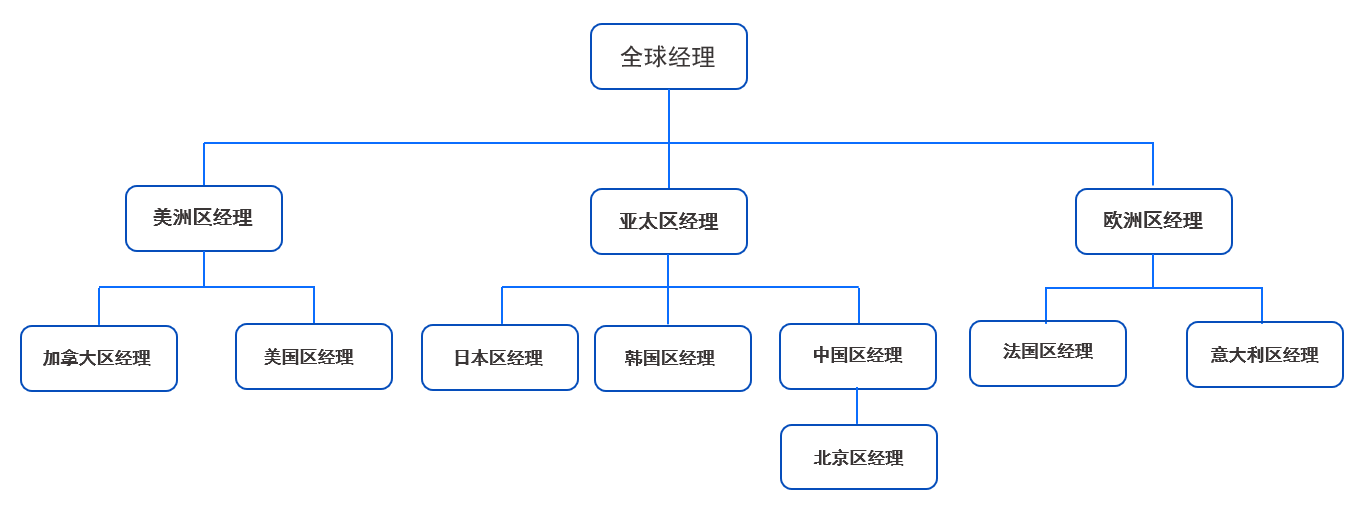
Execute the following statement to display the results in a hierarchical format.
obclient [SYS]> SELECT emp_id, mgr_id, position, LEVEL
FROM emp
START WITH mgr_id IS NULL
    CONNECT BY PRIOR emp_id = mgr_id;
The returned result is as follows:
+--------+--------+--------------------+-------+
| EMP_ID | MGR_ID | POSITION           | LEVEL |
+--------+--------+--------------------+-------+
|      1 |   NULL | Global Manager     |     1 |
|      2 |      1 | Europe Manager     |     2 |
|      5 |      2 | Italy Manager      |     3 |
|      6 |      2 | France Manager     |     3 |
|      3 |      1 | Asia-Pacific Manager |     2 |
|      7 |      3 | China Manager      |     3 |
|     12 |      7 | Beijing Manager    |     4 |
|      8 |      3 | Korea Manager      |     3 |
|      9 |      3 | Japan Manager      |     3 |
|      4 |      1 | Americas Manager   |     2 |
|     10 |      4 | US Manager         |     3 |
|     11 |      4 | Canada Manager     |     3 |
+--------+--------+--------------------+-------+
12 rows in set
Query only the hierarchy of the "Asia-Pacific" region and use the
FOR UPDATEclause to lock the query results.SELECT emp_id, mgr_id, position, LEVEL FROM emp START WITH position = 'Asia-Pacific Manager' CONNECT BY PRIOR emp_id = mgr_id FOR UPDATE;The returned result is as follows:
+--------+--------+-----------------+-------+
| EMP_ID | MGR_ID | POSITION        | LEVEL |
+--------+--------+-----------------+-------+
|      3 |      1 | Asia-Pacific Manager |     1 |
|      7 |      3 | China Manager   |     2 |
|     12 |      7 | Beijing Manager |     3 |
|      8 |      3 | Korea Manager   |     2 |
|      9 |      3 | Japan Manager   |     2 |
+--------+--------+-----------------+-------+
5 rows in set
Use the
CONNECT BYclause for recursive queries and theUSE_HASHhint to indicate that the optimizer should use the hash join algorithm.obclient> SELECT /*+ USE_HASH(emp) */ EMP_ID, POSITION, MGR_ID FROM emp START WITH EMP_ID = 1 CONNECT BY PRIOR EMP_ID = MGR_ID;The returned result is as follows:
+--------+--------------------+--------+
| EMP_ID | POSITION           | MGR_ID |
+--------+--------------------+--------+
|      1 | Global Manager     |   NULL |
|      2 | Europe Manager     |      1 |
|      5 | Italy Manager      |      2 |
|      6 | France Manager     |      2 |
|      3 | Asia-Pacific Manager |      1 |
|      7 | China Manager      |      3 |
|     12 | Beijing Manager    |      7 |
|      8 | Korea Manager      |      3 |
|      9 | Japan Manager      |      3 |
|      4 | Americas Manager   |      1 |
|     10 | US Manager         |      4 |
|     11 | Canada Manager     |      4 |
+--------+--------------------+--------+
12 rows in set (0.004 sec)
The execution plan is as follows:
obclient> EXPLAIN SELECT /*+ USE_HASH(emp) */ EMP_ID, POSITION, MGR_ID  FROM emp  START WITH EMP_ID = 1  CONNECT BY PRIOR EMP_ID = MGR_ID;
+--------------------------------------------------------------------------------------------------------------------------------+
| Query Plan                                                                                                                     |
+--------------------------------------------------------------------------------------------------------------------------------+
| ====================================================                                                                           |
| |ID|OPERATOR           |NAME |EST.ROWS|EST.TIME(us)|                                                                           |
| ----------------------------------------------------                                                                           |
| |0 |HASH CONNECT BY    |     |3       |11          |                                                                           |
| |1 |├─SUBPLAN SCAN     |VIEW1|1       |5           |                                                                           |
| |2 |│ └─TABLE FULL SCAN|EMP  |1       |5           |                                                                           |
| |3 |└─SUBPLAN SCAN     |VIEW2|12      |5           |                                                                           |
| |4 |  └─TABLE FULL SCAN|EMP  |12      |5           |                                                                           |
| ====================================================                                                                           |
| Outputs & filters:                                                                                                             |
| -------------------------------------                                                                                          |
|   0 - output([VIEW2.EMP.EMP_ID], [VIEW2.EMP.POSITION], [VIEW2.EMP.MGR_ID]), filter(nil)                                        |
|       equal_conds([VIEW1.EMP.EMP_ID = VIEW2.EMP.MGR_ID]), other_conds(nil)                                                     |
|   1 - output([VIEW1.EMP.__pk_increment], [VIEW1.EMP.EMP_ID], [VIEW1.EMP.MGR_ID], [VIEW1.EMP.POSITION]), filter(nil), rowset=16 |
|       access([VIEW1.EMP.__pk_increment], [VIEW1.EMP.EMP_ID], [VIEW1.EMP.MGR_ID], [VIEW1.EMP.POSITION])                         |
|   2 - output([EMP.__pk_increment], [EMP.EMP_ID], [EMP.MGR_ID], [EMP.POSITION]), filter([EMP.EMP_ID = 1]), rowset=16            |
|       access([EMP.__pk_increment], [EMP.EMP_ID], [EMP.MGR_ID], [EMP.POSITION]), partitions(p0)                                 |
|       is_index_back=false, is_global_index=false, filter_before_indexback[false],                                              |
|       range_key([EMP.__pk_increment]), range(MIN ; MAX)always true                                                             |
|   3 - output([VIEW2.EMP.__pk_increment], [VIEW2.EMP.EMP_ID], [VIEW2.EMP.MGR_ID], [VIEW2.EMP.POSITION]), filter(nil), rowset=16 |
|       access([VIEW2.EMP.__pk_increment], [VIEW2.EMP.EMP_ID], [VIEW2.EMP.MGR_ID], [VIEW2.EMP.POSITION])                         |
|   4 - output([EMP.__pk_increment], [EMP.EMP_ID], [EMP.MGR_ID], [EMP.POSITION]), filter(nil), rowset=16                         |
|       access([EMP.__pk_increment], [EMP.EMP_ID], [EMP.MGR_ID], [EMP.POSITION]), partitions(p0)                                 |
|       is_index_back=false, is_global_index=false,                                                                              |
|       range_key([EMP.__pk_increment]), range(MIN ; MAX)always true                                                             |
+--------------------------------------------------------------------------------------------------------------------------------+
25 rows in set (0.004 sec)