

OceanBase logo

OceanBase

A unified distributed database ready for your transactional, analytical, and AI workloads.

Product Overview
DEPLOY YOUR WAY

OceanBase Cloud

The best way to deploy and scale OceanBase

OceanBase Enterprise

Run and manage OceanBase on your infra

TRY OPEN SOURCE

OceanBase Community Edition

The free, open-source distributed database

OceanBase seekdb

Open source AI native search database

Customer Stories

Real-world success stories from enterprises across diverse industries.

View All
BY USE CASES

Mission-Critical Transactions

Global & Multicloud Application

Elastic Scaling for Peak Traffic

Real-time Analytics

Active Geo-redundancy

Database Consolidation

Resources

Comprehensive knowledge hub for OceanBase.

Blog

Live Demos

Training & Certification

Documentation

Official technical guides, tutorials, API references, and manuals for all OceanBase products.

View All
PRODUCTS

OceanBase Cloud

OceanBase Database

Tools

Connectors and Middleware

QUICK START

OceanBase Cloud

OceanBase Database

BEST PRACTICES

Practical guides for utilizing OceanBase more effectively and conveniently

Company

Learn more about OceanBase – our company, partnerships, and trust and security initiatives.

About OceanBase

Partner

Trust Center

Contact Us

International - English
中国站 - 简体中文
日本 - 日本語
Sign In
Start on Cloud

OceanBase

A unified distributed database ready for your transactional, analytical, and AI workloads.

Product Overview
DEPLOY YOUR WAY

OceanBase Cloud

The best way to deploy and scale OceanBase

OceanBase Enterprise

Run and manage OceanBase on your infra

TRY OPEN SOURCE

OceanBase Community Edition

The free, open-source distributed database

OceanBase seekdb

Open source AI native search database

Customer Stories

Real-world success stories from enterprises across diverse industries.

View All
BY USE CASES

Mission-Critical Transactions

Global & Multicloud Application

Elastic Scaling for Peak Traffic

Real-time Analytics

Active Geo-redundancy

Database Consolidation

Comprehensive knowledge hub for OceanBase.

Blog

Live Demos

Training & Certification

Documentation

Official technical guides, tutorials, API references, and manuals for all OceanBase products.

View All
PRODUCTS
OceanBase CloudOceanBase Database
ToolsConnectors and Middleware
QUICK START
OceanBase CloudOceanBase Database
BEST PRACTICES

Practical guides for utilizing OceanBase more effectively and conveniently

Learn more about OceanBase – our company, partnerships, and trust and security initiatives.

About OceanBase

Partner

Trust Center

Contact Us

Start on Cloud
编组
All Products
    • Databases
    • iconOceanBase Database
    • iconOceanBase Cloud
    • iconOceanBase Tugraph
    • iconInteractive Tutorials
    • iconOceanBase Best Practices
    • Tools
    • iconOceanBase Cloud Platform
    • iconOceanBase Migration Service
    • iconOceanBase Developer Center
    • iconOceanBase Migration Assessment
    • iconOceanBase Admin Tool
    • iconOceanBase Loader and Dumper
    • iconOceanBase Deployer
    • iconKubernetes operator for OceanBase
    • iconOceanBase Diagnostic Tool
    • iconOceanBase Binlog Service
    • Connectors and Middleware
    • iconOceanBase Database Proxy
    • iconEmbedded SQL in C for OceanBase
    • iconOceanBase Call Interface
    • iconOceanBase Connector/C
    • iconOceanBase Connector/J
    • iconOceanBase Connector/ODBC
    • iconOceanBase Connector/NET
icon

OceanBase Database

SQL - V4.2.1

    Download PDF

    OceanBase logo

    The Unified Distributed Database for the AI Era.

    Follow Us
    Products
    OceanBase CloudOceanBase EnterpriseOceanBase Community EditionOceanBase seekdb
    Resources
    DocsBlogLive DemosTraining & CertificationTicket
    Company
    About OceanBaseTrust CenterLegalPartnerContact Us
    Follow Us

    © OceanBase 2026. All rights reserved

    Cloud Service AgreementPrivacy PolicySecurity
    Contact Us
    Document Feedback
    1. Documentation Center
    2. OceanBase Database
    3. SQL
    4. V4.2.1
    iconOceanBase Database
    SQL - V 4.2.1
    Databases
    • OceanBase Database
    • OceanBase Cloud
    • OceanBase Tugraph
    • Interactive Tutorials
    • OceanBase Best Practices
    Tools
    • OceanBase Cloud Platform
    • OceanBase Migration Service
    • OceanBase Developer Center
    • OceanBase Migration Assessment
    • OceanBase Admin Tool
    • OceanBase Loader and Dumper
    • OceanBase Deployer
    • Kubernetes operator for OceanBase
    • OceanBase Diagnostic Tool
    • OceanBase Binlog Service
    Connectors and Middleware
    • OceanBase Database Proxy
    • Embedded SQL in C for OceanBase
    • OceanBase Call Interface
    • OceanBase Connector/C
    • OceanBase Connector/J
    • OceanBase Connector/ODBC
    • OceanBase Connector/NET
    SQL
    KV
    • V 4.6.0
    • V 4.4.2
    • V 4.3.5
    • V 4.3.3
    • V 4.3.1
    • V 4.3.0
    • V 4.2.5
    • V 4.2.2
    • V 4.2.1
    • V 4.2.0
    • V 4.1.0
    • V 4.0.0
    • V 3.1.4 and earlier

    Cluster scaling

    Last Updated:2026-04-28 09:23:26  Updated
    Share
    What is on this page
    Zone scaling
    OBServer scaling

    folded

    Share

    OceanBase Database provides flexible online scaling based on the distributed architecture. You can scale in or out an OceanBase cluster online while ensuring continuous availability of the cluster.

    OceanBase Database is a distributed database system that consists of multiple zones. Multiple OBServer nodes are deployed in each zone. The following figure shows the architecture of OceanBase Database.
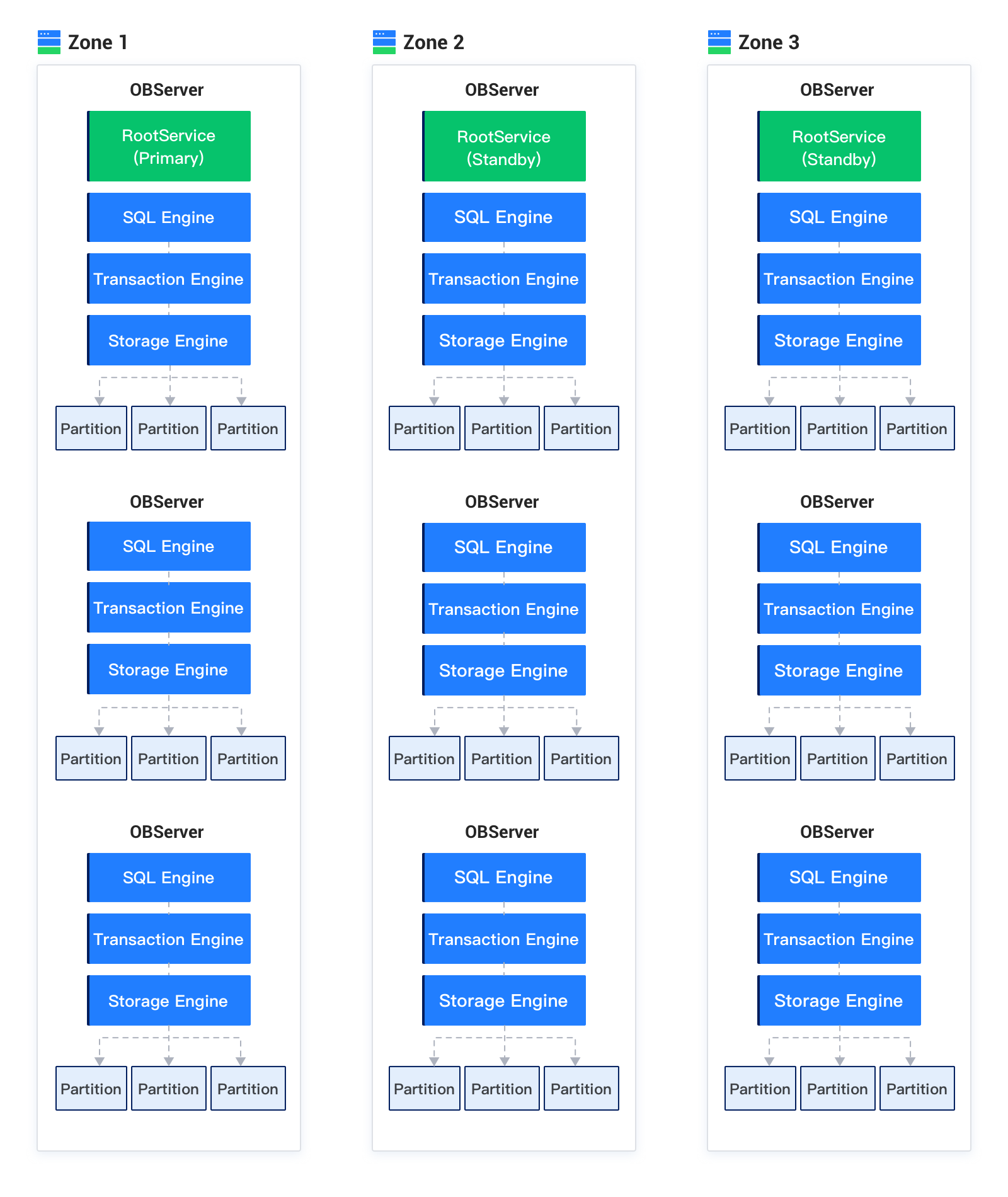
    Cluster scaling

    Compared with a conventional standalone database, OceanBase Database can provide flexible online scaling based on the distributed architecture. You can scale in or out an OceanBase cluster online while ensuring continuous availability of the cluster. When the disaster recovery requirement of a cluster changes, you can increase or decrease the number of zones to upgrade or downgrade the disaster recovery capability of the cluster. When the external loads of a cluster change, you can increase or decrease the number of OBServer nodes to change the load capacity of the cluster. The scaling capabilities of OceanBase Database are described in two aspects.

    Zone scaling

    An OceanBase cluster maintains multiple replicas for each data record. The multiple replicas constitute a basic high-availability unit based on the Paxos protocol. Usually, at most one data replica is deployed in each zone. When a minority of zones fail, replicas in other zones can still provide services while ensuring data integrity based on the Paxos protocol. You can increase the number of zones to increase the number of data replicas, so as to improve system availability. Here is an example:

    An OceanBase cluster contains three zones: Zone1, Zone2, and Zone3. Each data record in the cluster has three replicas, which are respectively deployed in these three zones. To improve system availability, you can increase the number of data replicas to 5. To achieve this goal, you can increase the number of zones. First, add Zone4 and Zone5 to the cluster. Then, add OBServer nodes to Zone4 and Zone5. Finally, deploy new data replicas in Zone4 and Zone5 based on your business requirements to complete dynamic zone scale-out. Similarly, you can decrease the number of zones to complete dynamic zone scale-in.

    OBServer scaling

    To linearly upgrade the database service capability, OceanBase Database supports dynamic scaling of OBServer nodes in each zone. You can adjust the number of OBServer nodes in each zone to upgrade the service capability. Here is an example:

    An OceanBase cluster contains three zones: Zone1, Zone2, and Zone3. N OBServer nodes are deployed in each zone. All the 3N OBServer nodes provide read and write services. When the service capability of the OceanBase cluster is insufficient for handling read and write requests, you can scale out the OceanBase cluster to upgrade its service capability. You can add three OBServer nodes to the cluster, with one OBServer node in each zone. After the scale-out, each zone contains N+1 OBServer nodes. Dynamic scale-out increases the number of OBServer nodes in the cluster. RootService distributes some of the original data and loads in the cluster to the newly added OBServer nodes based on the internal load balancing mechanism. For more information about load balancing mechanisms and strategies, see Resource unit balancing.

    Similarly, when the service capability of OBServer nodes in the cluster is redundant for the current load, you can remove OBServer nodes to reduce the costs of the cluster. The OBServer nodes to be removed are called to-be-deleted nodes. Specifically, you can run cluster management commands to migrate data and loads from to-be-deleted nodes to other OBServer nodes and then recycle the to-be-deleted nodes to complete OBServer node scale-in.

    Previous topic

    Multi-replica consensus protocols
    Last

    Next topic

    Overview
    Next
    What is on this page
    Zone scaling
    OBServer scaling