







This topic provides comprehensive instructions for installing and deploying OceanBase Database, creating business tenants, and maximizing performance when using Sysbench. It aims to assist OceanBase Database users in achieving high performance during Sysbench testing. Furthermore, it includes case studies on performance issues to serve as a reference and aid in resolving potential performance problems.
Quick troubleshooting procedure for Sysbench issues
TPS of Sysbench is lower than expected
Perform the following steps to locate the issue:
Analyze Sysbench parameters.
We recommend that you start with parameters in the Sysbench running command.
If
--rand-typeis not specified or its value is set tospecial, you can set or change its value touniformto reduce data lock contention.If the number of tables or the table size is too small, you can increase the size of the dataset. For example, set
tables=100andtable_size=1000000.In a
read_writeorwrite_onlyscenario, execute the following statement to check whether deadlocks exist:SELECT * FROM oceanbase.cdb_ob_deadlock_event_history ORDER BY create_time DESC LIMIT 10;
Check whether the connection meets the testing requirements.
- If the primary zone is a single zone and you are directly connected to an OBServer node, check whether this node is a leader.
- If the primary zone is set to
RANDOM, connect to an OceanBase Database Proxy (ODP) to perform the test.
Query the tenant information.
SELECT * FROM oceanbase.dba_ob_tenants;Query the tenant leader.
SELECT svr_ip, sql_port, count(1) FROM oceanbase.cdb_ob_ls_locations WHERE tenant_id=1 AND role='leader' GROUP BY svr_ip;
Check the CPU overhead.
If the Sysbench parameters and client connection method are correct, proceed to check the CPU utilization.
Check the CPU utilization of threads.
top -H -p pidof observerIf each business thread is nearly fully utilizing a CPU core, check whether the number of threads is approaching the number of CPU cores.
- If the number of business threads (such as T1002_L0_G2) is far smaller than the number of CPU cores and the overall CPU overhead is far from reaching the server's limit, the issue is probably caused by insufficient
cpu_countallocation. In this case, check the tenant creation command to check whether the value ofcpu_countis too small. - If the total CPU overhead approaches the server's limit, the server's performance is at its peak, and higher-performance servers are needed for better performance.
- If the number of business threads (such as T1002_L0_G2) is far smaller than the number of CPU cores and the overall CPU overhead is far from reaching the server's limit, the issue is probably caused by insufficient
Check the tenant specifications.
show create tenant xxx;
SELECT * FROM oceanbase.dba_ob_resource_pools;
SELECT * FROM oceanbase.dba_ob_units;
If no single business thread fully uses a CPU core, for example, if the CPU utilization is 20% to 50%, a bottleneck occurs somewhere else.
- If a network thread such as RpcIO is fully utilizing a CPU core, there might be too few network threads, making network communication a bottleneck. In this case, increase the value of
net_thread_count. - If none of the threads shows high CPU utilization, a hardware bottleneck may have occurred and further analysis is required.
- If a network thread such as RpcIO is fully utilizing a CPU core, there might be too few network threads, making network communication a bottleneck. In this case, increase the value of
Analyze the hardware causes.
If you confirm that the issue is not caused by CPU-related factors, perform the following steps to check the disk and network:
- Check the maximum bandwidth of the NIC and verify whether the network bandwidth has become a bottleneck during a test. You can deploy Sysbench on an OBServer node for testing.
- Check the network latency by using the
pingcommand. A high latency may lead to slow SQL execution. - Check the maximum bandwidth for 16 KB writes in the log disk by using a flexible I/O (FIO) tester. Verify that the disk I/O is a bottleneck during testing. You can replace the SSD or non-volatile memory (NVM) for testing.
To view the network I/O, run the following command:
sar -n DEV 1To view the maximum bandwidth of the NIC, run the following command:
## (eth0 is the NIC name.)
ethtool eth0
Analyze other possible causes.
Besides the factors mentioned above, there might be special cases, such as conflicts between the testing period and backend tasks of the OBServer node.
There was a case where a user reported that during business testing, two sets of data showed significantly lower performance than expected. After examining various configurations without uncovering any obvious issues, it was ultimately discovered that the user conducted the tests at 02:00, which is the default time for OceanBase Database's daily minor and major compactions. As a result, the database's performance was greatly affected.
TPS of Sysbench fluctuates and decreases to 0 sometimes
TPS occasionally decreases and the decrease is stable
Possible causes: OceanBase Database periodically performs minor and major compactions, which consumes CPU resources and affects business threads. A tenant that has more CPU cores suffers less impact. For a tenant with four CPU cores and eight GB of memory, the TPS may decrease by 80% during minor compactions. For a tenant with 32 CPU cores and 64 GB of memory, the TPS may decrease by 10% during minor compactions.
Solutions:
Increase the value of
max_cpuin the resource unit for the tenant.Increase the CPU concurrency for the tenant.
alter system set cpu_quota_concurrency=4 tenant = xxx;Reducing the number of minor compaction threads (
merge_thread_count) or lowering the thread priority (compaction_high_thread_score,compaction_mid_thread_score, orcompaction_low_thread_score) will decrease the overhead per unit of time for minor compaction, but it will take more time to complete. The overall overhead remains unchanged.
TPC decreases to 0 and occasionally increases to more than 0
- Possible causes: A deadlock occurs and
mysql-ignore-errors=1062,1213,6002;is set for Sysbench. - Solutions:
Check whether a deadlock exists.
SELECT * FROM oceanbase.cdb_ob_deadlock_event_history ORDER BY create_time DESC LIMIT 10;If yes, perform the following steps:
- Set
--rand-type=uniformfor Sysbench. - Increase the size of the dataset. For example, set
tables=100andtable_size=1000000. The default value oftable_sizeis10000.
- Set
TPS decreases to 0 and remains 0 afterward
- Possible causes: A deadlock occurs and is not detected. In addition, the timeout period is set to a large value. As a result, after the TPS decreases to 0, no error is returned, the thread does not exit, and the TPS does not return to normal.
- Solutions:
Check whether a deadlock exists.
SELECT * FROM oceanbase.cdb_ob_deadlock_event_history ORDER BY create_time DESC LIMIT 10;If yes, perform the following steps:
- Set
--rand-type=uniformfor Sysbench. - Increase the size of the dataset. For example, set
tables=100andtable_size=1000000. The default value oftable_sizeis10000.
- Set
TPS decreases to 0 and returns to normal after a couple of seconds
Possible causes: The clog disk is full and no more data can be written to the clog disk. As a result, the TPS decreases to 0 and returns to normal after the space on the clog disk is recycled.
Solutions: Check the disk usage of the tenant.
SELECT tenant_id, svr_ip, svr_port, log_disk_in_use, log_disk_size FROM oceanbase.gv$ob_units;Allocate more disk space to the tenant if the disk space is insufficient.
If the issue persists, contact OceanBase Technical Support.
Sysbench errors
TPS decreases to 0 and occasionally increases to more than 0, and the 6002 or 1213 error is returned sometimes
- Possible causes: A deadlock occurs, the size of the dataset is too small, or the
rand-typeparameter is not specified. The default valueSpecialis used when this parameter is not specified, which will cause centralized keys. The thread does not exit because most SQL requests are in a deadlock. In this case, the thread will wait for the SQL requests to complete execution. - Solutions:
Check whether a deadlock exists.
SELECT * FROM oceanbase.cdb_ob_deadlock_event_history ORDER BY create_time DESC LIMIT 10;If yes, perform the following steps:
- Set
--rand-type=uniformfor Sysbench. - Increase the size of the dataset. For example, set
tables=100andtable_size=1000000. The default value oftable_sizeis10000.
- Set
Error 1062 is returned
- Possible causes: The 1062 error indicates primary key or unique key conflicts. Primary key conflicts are possible because Sysbench generates data randomly.
- Solutions: Set
--mysql-ignore-errors=1062for Sysbench.
Error 1213 is returned
- Possible causes: A deadlock occurs and some transactions in the deadlock are killed.
- Solutions: A deadlock may still occur even if the dataset is very large and
--rand-type=uniformis specified. Therefore, you can set--mysql-ignore-errors=1062,1213to ignore deadlocks.
Error 6002 is returned
- Possible causes: The 6002 error may be caused by a deadlock.
- Solutions: Increase the size of the dataset and set
--rand-type=uniformto reduce lock contention. Set--mysql-ignore-errors=1062,1213,6002for Sysbench.
Error 4012 is returned
Possible causes: Lock contention is severe, a deadlock occurs, or the OBServer node has poor performance but the client has high stress.
Solutions: Increase the timeout period, in μs.
set global ob_query_timeout = 50000000000;
Error 5930 is returned
Possible causes:
--db-ps-mode=autois set to enable SQL precompilation but OceanBase Database does not fully support precompilation.Solutions:
- Increase the value of the
open_cursorsparameter. For example, executealter system set open_cursors=65535;. - Set
--db-ps-mode=disable;to disable SQL precompilation.
- Increase the value of the
Other errors
- Possible causes: OceanBase Database may have bugs.
- Solutions: Record the error logs and contact OceanBase Technical Support for assistance.
Comprehensive troubleshooting procedure
If you cannot locate the cause of an issue in the quick troubleshooting procedure, you can perform the complete troubleshooting procedure. If you have any questions, you can see other sections of this topic or the reference topics by clicking the corresponding links. If the issue persists, contact OceanBase Technical Support for assistance.
Here is the general analysis procedure:
- Check the hardware resources. If CPU, memory, or disk resources are insufficient, the performance will be directly affected, and the TPS may even decrease to 0.
- Check the tenant configurations. You cannot make full use of the hardware with insufficient resources.
- Check the Sysbench parameters. The TPS is directly affected by the number of threads. A small dataset size or centralized data distribution will cause lock contention and even deadlocks.
- Check whether OceanBase Database has bugs.
Note
You can use the commands provided below as needed. It is unnecessary to run through all of them systematically.
Check the hardware
Insufficient hardware resources, such as less than four CPU cores or eight GB of memory, will lead to poor performance. If the disk usage is close to 100%, the write speed will be affected. A high network latency will also affect the performance.
- CPU:
lscpu - Memory:
topandcat /proc/meminfo - Disk:
df -h - Network latency:
ping ip
Check OceanBase Database deployment configurations
If the deployment parameters of OceanBase Database are set to small values when hardware resources on the server are sufficient, resources cannot be fully used and the performance will deteriorate. Most parameters can be dynamically adjusted and only a few parameters must be specified during deployment.
Connect to the sys tenant and query the global view.
SELECT * FROM GV$OB_SERVERS;Check the number of network threads. The
net_thread_countparameter cannot be dynamically adjusted.show parameters where name = 'net_thread_count';View the deployed clusters.
obd cluster listView the configuration of a deployed cluster.
obd cluster edit-config [cluster name]
Check the startup parameters of the OBServer node on the server where it resides.
ps -ef | grep observer
Check tenant configurations
Check whether any resource bottleneck exists in the tenant when the OBServer node has sufficient resources.
View the basic information about the tenant.
SELECT * FROM oceanbase.dba_ob_tenants;View the tenant creation command.
show create tenant [tenant name];View the resource pool of the tenant. You can add the
tenant_idfilter condition in the command.SELECT * FROM oceanbase.dba_ob_resource_pools;View the specifications of the corresponding resource unit.
SELECT * FROM oceanbase.dba_ob_units;
Check Sysbench parameters
You can check the parameters one by one in Sysbench commands based on the parameter descriptions.
Locate a deadlock
View deadlock records.
SELECT * FROM oceanbase.cdb_ob_deadlock_event_history ORDER BY create_time DESC LIMIT 10;Here,
role=victimindicates that a transaction was killed.View transaction-related SQL statements.
SELECT usec_to_time(REQUEST_TIME), TRACE_ID, TX_ID, QUERY_SQL FROM gv$ob_sql_audit WHERE TX_ID=52635 ORDER BY REQUEST_TIME;If no related transaction is found, SQL audit is not enabled. You can verify this by checking whether the value of the
enable_sql_auditparameter isTrue.show parameters where name = 'enable_sql_audit';If the value is
False, you cannot view SQL statements related to the transaction. You can filter the logs by transaction ID to find some information.Query logs related to the problematic SQL statement.
After you obtain SQL statements related to the transaction, filter logs by the trace ID of the conflicting SQL statement.
grep '[trace id]' observer.log*You can view all logs related to this SQL statement. Generally, the last log contains the error code returned to the client.
sending error packet(err=-4101You can also search for related logs by the trace ID of the last
commitorbegincommand.sending error packet(err=-6002If no log is found, the log level is incorrect or log throttling is enabled. In this case, you must change the log level to
WDIAGor increase the bandwidth limit for logs.alter system set syslog_level='WDIAG'; alter system set syslog_io_bandwidth_limit='2G';Notice
Deadlock information that occurred before you modify these parameters cannot be retrieved.
Analyze minor and major compactions
View minor and major compaction tasks that take more than 5s to execute.
SELECT * FROM GV$OB_MERGE_INFO WHERE tenant_id=1002 AND (END_TIME-START_TIME)>5 LIMIT 10;View the major compaction records of a table.
SELECT * FROM GV$OB_TABLET_COMPACTION_HISTORY WHERE TABLET_ID IN (SELECT TABLET_ID FROM oceanbase.CDB_OB_TABLE_LOCATIONS WHERE TABLE_NAME = 'sbtest1') ORDER BY START_TIME DESC;Initiate a minor compaction.
alter system minor freeze tenant=xxx;
You can also run the top -H command on the OBServer node to view the overhead of MINI_MERGE and MINOR_EXE threads. Note that the overhead information is displayed only for a short period.
Query slow SQL statements
Query SQL statements that take more than 5s to execute and print all the information.
SELECT * FROM gv$ob_sql_audit WHERE elapsed_time > 5000000 LIMIT 10;Customize the key information to print.
SELECT SVR_IP, SVR_PORT, SQL_EXEC_ID, TRACE_ID, TENANT_ID, SQL_ID, QUERY_SQL, PLAN_ID, PARTITION_CNT, IS_INNER_SQL, ELAPSED_TIME, EXECUTE_TIME, APPLICATION_WAIT_TIME FROM gv$ob_sql_audit WHERE elapsed_time > 5000000 ORDER BY elapsed_time DESC LIMIT 10;If no data is found, SQL audit is not enabled.
show parameters where name = 'enable_sql_audit';
alter system set enable_sql_audit = true;
Troubleshoot log issues
View disk usage.
SELECT tenant_id, svr_ip, svr_port, LOG_DISK_IN_USE, LOG_DISK_SIZE FROM gv$ob_units;
Reproduce an issue
Clear earlier SQL audit records.
alter system set enable_sql_audit = false;
alter system flush sql audit global;
Enable SQL audit.
alter system set enable_sql_audit = true;Change the log level.
alter system set syslog_level='WDIAG';Lower the SQL recording threshold to record more SQL statements.
alter system set trace_log_slow_query_watermark = '10ms';Increase the bandwidth available for system logs to avoid losing key logs due to throttling.
alter system set syslog_io_bandwidth_limit='2G';Increase the transaction timeout period if you want to prevent transaction timeouts.
set global ob_query_timeout = 50000000000;
Afterwards, configure your environment with the same parameters that led to the issue originally, and then proceed to run Sysbench.
Configure OceanBase Database deployment parameters
Deployment process
OceanBase Database Community Edition:
For more information about how to use OceanBase Deployer (obd) to deploy OceanBase Database, see Deploy OceanBase Database in a production environment by using the CLI.
OceanBase Database Enterprise Edition:
For more information about how to deploy the OceanBase Database Enterprise Edition, see Deployment process.
Deployment parameters
You must manually modify the .yaml file unless you are using a quick installation process. OceanBase Database provides many parameters. This topic describes only performance-related parameters. For more information, see the deployment documentation.
- To query the parameters, run
show parameters where name = 'xxx';. - To query key server parameters, run
SELECT * FROM GV$OB_SERVERS;.
Take note of the following parameters:
memory_limit
- Description: the maximum memory for the OBServer node. This parameter has a higher priority than the
memory_limit_percentageparameter. - Default value:
0. - Recommended value: 80% to 90% of the total system memory.
- Dynamic modification statement:
alter system set memory_limit='32G';. - Query statement:
show parameters where name = 'memory_limit';. - Reference: memory_limit.
- Description: the maximum memory for the OBServer node. This parameter has a higher priority than the
memory_limit_percentage
- Description: the percentage of memory for the OBServer node to the total system memory. This parameter is valid only when the value of
memory_limitis0. - Default value:
80. - Recommended value: 80 to 90.
- Dynamic modification statement:
alter system set memory_limit_percentage=80;. - Query statement:
show parameters where name = 'memory_limit_percentage';. - Reference: memory_limit_percentage.
- Description: the percentage of memory for the OBServer node to the total system memory. This parameter is valid only when the value of
system_memory
- Description: the memory for the
systenant, which is part ofmemory_limit. If you do not specify this parameter, a value is automatically set. - Default value: 30 GB for the Enterprise Edition and 0 MB for the Community Edition.
- Recommended value: 10% of
memory_limit. - Dynamic modification statement:
alter system set system_memory='2G';. - Query statement:
show parameters where name = 'system_memory';. - Reference: system_memory.
- Description: the memory for the
cpu_count
- Description: the total number of CPU cores for the OBServer node.
- Default value:
0. The system will automatically detect the number of CPU cores. - Recommended value: the total number of CPU cores of the system. You can run
lscputo query the total number of CPU cores. - Dynamic modification statement:
alter system set cpu_count=24;. - Query statement:
show parameters where name = 'cpu_count';. - Reference: cpu_count.
net_thread_count
- Description: the number of network threads.
- Default value:
0. The number of network I/O threads ismax(6, CPU_NUM/8). - Recommended value: 1/8 of the total number of CPU cores. If the execution time of transactions is short and the network overhead is high, you can set the value of this parameter to 20% of the total number of CPU cores.
- This parameter can only be specified when you deploy an OBServer node, and it cannot be dynamically modified.
- Query statement:
show parameters where name = 'net_thread_count';. - Reference: net_thread_count.
sql_net_thread_count
- Reference: sql_net_thread_count.
datafile_size
- Description: the total size of data files. This parameter has a higher priority than the
datafile_disk_percentageparameter. - Default value:
0. - Recommended value: 60% of the disk space if data files are stored on the same disk as logs, and 90% of the disk space if data files are stored on an exclusive disk.
- Dynamic modification statement:
alter system set datafile_size='80G';. - Query statement:
show parameters where name = 'datafile_size';. - Reference: datafile_size.
- Description: the total size of data files. This parameter has a higher priority than the
datafile_disk_percentage
- Description: the percentage of disk space occupied by data files to the total space of the disk where data files are stored.
- Default value:
0. - Recommended value: 60% of the disk space if data files are stored on the same disk as logs, and 90% of the disk space if data files are stored on an exclusive disk.
- Dynamic modification statement:
alter system set datafile_disk_percentage=60;. - Query statement:
show parameters where name = 'datafile_disk_percentage';. - Reference: datafile_disk_percentage.
log_disk_size
Description: the total size of redo log files. This parameter has a higher priority than the
log_disk_percentageparameter.Default value:
0.Recommended value: 30 GB if redo log files are stored on the same disk as data files, and 90 GB if redo log files are stored on an exclusive disk.
Dynamic modification statement:
alter system set log_disk_size='40G';.Query statement:
show parameters where name = 'log_disk_size';.Reference: log_disk_size.
log_disk_percentage
Description: the percentage of the disk space occupied by redo log files to the total space of the disk where the redo log files are stored.
Default value:
0.Recommended value: 30% if redo log files are stored on the same disk as data files, and 90% if redo log files are stored on an exclusive disk.
Dynamic modification statement:
alter system set log_disk_percentage=30;.Query statement:
show parameters where name = 'log_disk_percentage';.Reference: log_disk_percentage.
Configuration file
This section shows the configuration file for the 32c128g specifications, in which the disk space is sufficient. Assume that three OBServer nodes and one ODP are deployed. Other components such as OceanBase Agent (OBAgent) are not considered. Each OBServer node and ODP are deployed on different servers to make full use of the hardware resources to achieve higher performance.
oceanbase:
  servers:
    * name: server1
      ip: xxx.xxx.1.1
    * name: server2
      ip: xxx.xxx.1.2
    * name: server3
      ip: xxx.xxx.1.3
  server1:
    mysql_port: 2881
    rpc_port: 2882
    home_path: /data/1/user_name/observer1
    zone: zone1
  server2:
    mysql_port: 2881
    rpc_port: 2882
    home_path: /data/1/user_name/observer2
    zone: zone2
  server3:
    mysql_port: 2881
    rpc_port: 2882
    home_path: /data/1/user_name/observer3
    zone: zone3
  include: obd/observer.include.yaml
  global:
    devname: eth0
    memory_limit: '100G'
    system_memory: '2G'
    datafile_size: '80G'
    cpu_count: '32'
    net_thread_count: 6
obproxy:
  servers:
    * xxx.xxx.1.5
  depends:
    * oceanbase
  include: obd/obproxy.include.yaml
  global:
    listen_port: 2891
    prometheus_listen_port: 2892
    home_path: /data/1/user_name/obproxy
Configure business tenant parameters
Create a tenant
OceanBase Database only supports creating user tenants. The system tenant (sys tenant) is automatically created when the cluster is set up. Creating a user tenant involves a series of steps: first, create a resource unit, then create a resource pool based on that unit, and finally create a tenant by specifying its resource pool. Therefore, the sequence for creating a tenant is: resource unit -> resource pool -> tenant.
For more information about how to create a tenant, see Create a tenant.
Commands to create a tenant
Note
If you use obd for automatic deployment, only the system tenant is created. You can create a dedicated tenant for performance testing to make full use of resources available on the OBServer node.
For example, on a server with 32 CPU cores and 128 GB of memory, the command to create a tenant is as follows:
sh create_perf_tenant.sh ip port
mysql -c -h $1 -P $2 -uroot -e "drop resource unit unit_1;"
mysql -c -h $1 -P $2 -uroot -e "create resource unit unit_1 max_cpu 24, min_cpu 16, memory_size 64000000000, log_disk_size 40000000000, max_iops 10000000;"
mysql -c -h $1 -P $2 -uroot -e "create resource pool pool_2 unit = 'unit_1', unit_num = 1, zone_list = ('zone1','zone2','zone3');"
mysql -c -h $1 -P $2 -uroot -e "create tenant perf replica_num = 3,primary_zone='zone1', resource_pool_list=('pool_2') set ob_tcp_invited_nodes='%';"
mysql -c -h $1 -P $2 -uroot@perf -e "set global ob_query_timeout = 50000000000;"
mysql -c -h $1 -P $2 -uroot@perf -e "set global ob_trx_timeout = 50000000000;"
mysql -c -h $1 -P $2 -uroot@perf -e "set global ob_plan_cache_percentage = 20;"
mysql -c -h $1 -P $2 -uroot@perf -e "set global binlog_row_image='MINIMAL';"
mysql -c -h $1 -P $2 -uroot -e "alter system set enable_early_lock_release=true tenant = perf;"
mysql -c -h $1 -P $2 -uroot -e "alter system set cpu_quota_concurrency=2 tenant = perf;"
If you do not specify the tenant mode in the tenant creation command, a MySQL tenant is automatically created. To create an Oracle tenant, specify the tenant mode to Oracle.
Execute the following statement in the sys tenant. The COMPATIBILITY_MODE field specifies the tenant mode.
SELECT * FROM DBA_OB_TENANTS;
Key tenant parameters
The following parameters are key to the performance of a tenant:
min_cpu
- Description: the minimum number of CPU cores available for the tenant (sum of
min_cpuvalues of all tenants <=cpu_count). - Recommended value:
cpu_count/2 - Reference: For more information about the
min_cpuparameter, see the parameter description in the Create a unit config section of the Create a tenant topic.
- Description: the minimum number of CPU cores available for the tenant (sum of
max_cpu
- Description: the maximum number of CPU cores available for the tenant (sum of
max_cpuvalues of all tenants <=cpu_count×resource_hard_limit/100). - Recommended value:
cpu_count/2 tocpu_count. You can also set this parameter to the same value asmin_cpu. - Reference: For more information about the
max_cpuparameter, see the parameter description in the Create a unit config section of the Create a tenant topic.
- Description: the maximum number of CPU cores available for the tenant (sum of
cpu_quota_concurrency
- Description: the number of concurrent threads for each CPU core (
max_cpu×cpu_quota_concurrency= maximum number of business threads). - Recommended value:
4. Generally, we recommend that you use the default value. You can change the value to2for CPU-intensive stress testing. - Reference: cpu_quota_concurrency.
- Description: the number of concurrent threads for each CPU core (
memory_size
- Description: the size of memory provided by the resource unit.
- Recommended value: 50% to 80% of the total memory. If you want to create multiple resource units, the memory is flexibly allocated.
log_disk_size
- Description: the size of the log disk.
- Recommended value: 40 GB to 80 GB. You can set a larger value, depending on the data amount.
primary_zone
Description: the priority for allocating the leader replica to zones. Zones separated by a comma have the same priority, while those on the left of a semicolon have higher priority than those on the right. For example,
zone1,zone2,zone3.Recommended value:
- If the three servers have the same specifications and similar network latency, you can set the value to
RANDOMto improve the performance. In this case, leaders are evenly distributed. - If a server has higher performance or if you want to facilitate statistics collection and data observation, you can set the primary zone to the zone where the server resides, such as
zone1.
- If the three servers have the same specifications and similar network latency, you can set the value to
Configure global parameters in the system tenant
You can connect to the system tenant and modify cluster-level configurations. For example, you can change the log level or disable features that affect the performance, such as SQL audit.
ALTER system SET enable_sql_audit=false;
select sleep(5);
ALTER system SET enable_perf_event=false;
ALTER system SET syslog_level='ERROR';
alter system set enable_record_trace_log=false;
Configure Sysbench parameters
Sysbench test process
Installation and deployment
For more information, see the Install Sysbench section in the Run the Sysbench benchmark on OceanBase Database topic.
Prepare data
cleanup:
sysbench oltp_read_write.lua --mysql-host=x.x.x.x --mysql-port=xxxx --mysql-db=test --mysql-user=test@xxx --mysql-password=xxx --table_size=1000000 --tables=30 --rand-type=uniform --threads=1000  --report-interval=1 --time=600 cleanup
prepare:
sysbench oltp_read_write.lua --mysql-host=x.x.x.x --mysql-port=xxxx --mysql-db=test --mysql-user=test@xxx --mysql-password=test --table_size=1000000 --tables=30 --rand-type=uniform --threads=1000  --report-interval=1 --time=600 prepare
Run the test
sysbench oltp_read_write.lua --mysql-host=x.x.x.x --mysql-port=xxxx --mysql-db=test --mysql-user=test@xxx --mysql-password=xxx --table_size=1000000 --tables=30 --rand-type=uniform --threads=1000 --report-interval=1 --time=600 --db-ps-mode=disable run
Key performance parameters
For more information, see Sysbench parameters.
table_size
- Description: the number of rows initiated for each table. The default value is
10000. - Recommended value:
100000or1000000.
- Description: the number of rows initiated for each table. The default value is
tables
- Description: the number of tables to be initialized.
- Recommended value: 30 to 100.
threads
- Description: the number of test threads.
- Recommended value: 500 to 2,000. More CPU cores on the test server support more threads.
rand-type
Description: the random type for test data generation. Valid values are
uniform,gaussian,special, andpareto. The default value isspecial.special: Keys are centralized, and lock contention easily occurs.uniform: Data is discretely and evenly distributed. All values within the range have an equal probability of occurrence and no lock contention occurs.gaussian: Data is centralized near medians. This is also known as normal distribution.pareto: Data is centralized near the smallest values. A larger value has a lower probability of occurrence.
Recommended value:
uniform.
mysql-ignore-errors
- Description: the error codes ignored during the test process. When Sysbench receives an error, it immediately stops sending new requests. After Sysbench receives responses to all requests, it exits the test. Therefore, you can choose to ignore error codes related to expected errors.
- Valid values:
1062,1213, and6002. Here,1062indicates a primary key or unique key conflict,1213indicates a deadlock, and6002indicates a transaction rollback.
db-ps-mode
- Description: specifies whether to enable SQL precompilation. Valid values are
autoanddisable. The default value isdisable. - Recommended value:
disable. - If you set the value to
auto, you must modify theopen_cursorsparameter. For example,alter system set open_cursors=65535;.
- Description: specifies whether to enable SQL precompilation. Valid values are
skip_trx
- Description: specifies whether to skip transactions in a read-only test. The default value is
OFF, which specifies not to skip transactions. - Recommended value:
ONfor read-only tests andOFFin other cases.
- Description: specifies whether to skip transactions in a read-only test. The default value is
auto-inc
- Description: specifies whether values in the ID column automatically increment. The default value is
ON. - Recommended value:
OFF(in write scenarios).
- Description: specifies whether values in the ID column automatically increment. The default value is
warmup-time
- Description: the warm-up period in seconds. Statistics collection begins after the warm-up period elapses. Default value:
0. - Recommended value: 10 to 30. You can specify a large value for a large dataset.
- Description: the warm-up period in seconds. Statistics collection begins after the warm-up period elapses. Default value:
Case study of Sysbench performance issues
TPS decreases to 0 and errors are occasionally returned
Symptom
The following command runs the Sysbench benchmark on OceanBase Database Community Edition V4.1.0. The TPS decreases to 0 and an error is returned.
sysbench --db-driver=mysql --threads=500 --time=300000 --mysql-host=xxxxxxx --mysql-port=2883 --mysql-user='tpcc@t1' --mysql-password='******' --report-interval=2 --tables=100 /usr/share/sysbench/oltp_read_write.lua --db-ps-mode=disable run
The figure below shows the server configurations.
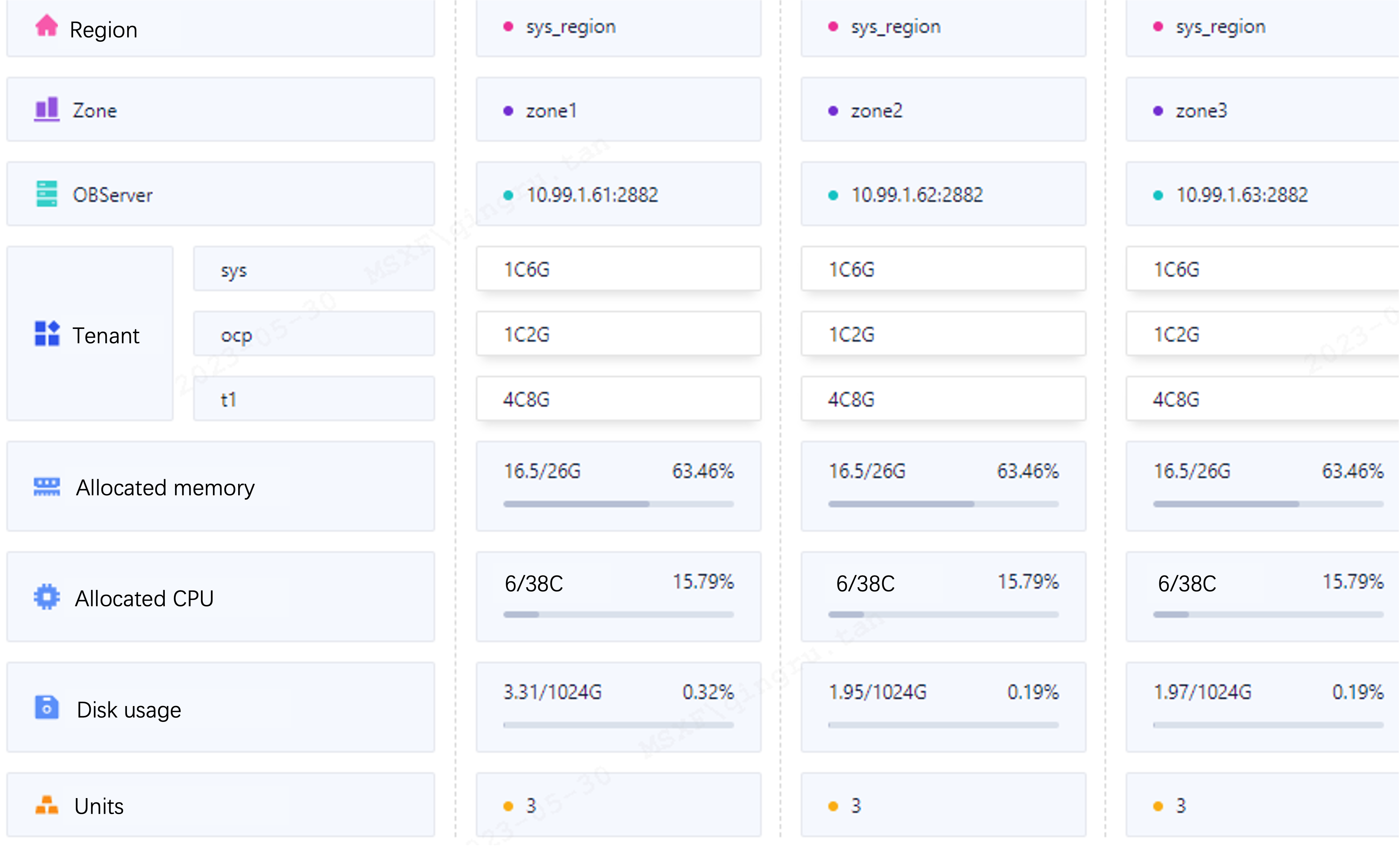
Cause analysis
The value of the table_size parameter is too small. The default value of rand-type is special. As a result, data is centralized and primary key conflicts occur. This causes a deadlock and the TPS decreases to 0.
Increase timeout periods for the test tenant.
set global ob_query_timeout = 50000000000;
set global ob_trx_timeout = 50000000000;
To reproduce the issue quickly, set
tablesto1and leave the values of other parameters unchanged.sysbench oltp_read_write.lua --mysql-host=[ip] --mysql-port=2881 --mysql-user=root@user --mysql-db=test --table_size=10000 --tables=1 --threads=500 --time=3600 --report-interval=1 --db-ps-mode=disable runThe TPS decreases to 0. However, the TPS and QPS sometimes can be greater than 0.
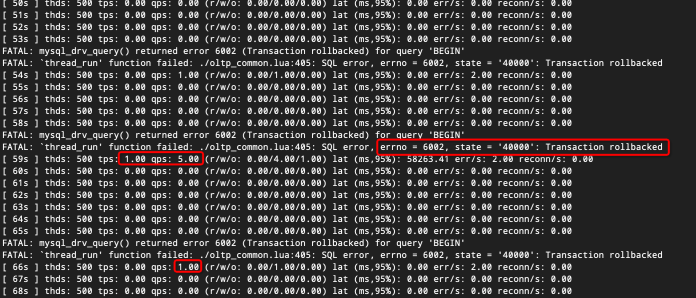
Check the deadlock view.
SELECT * FROM oceanbase.CDB_OB_DEADLOCK_EVENT_HISTORY ORDER BY create_time DESC LIMIT 10;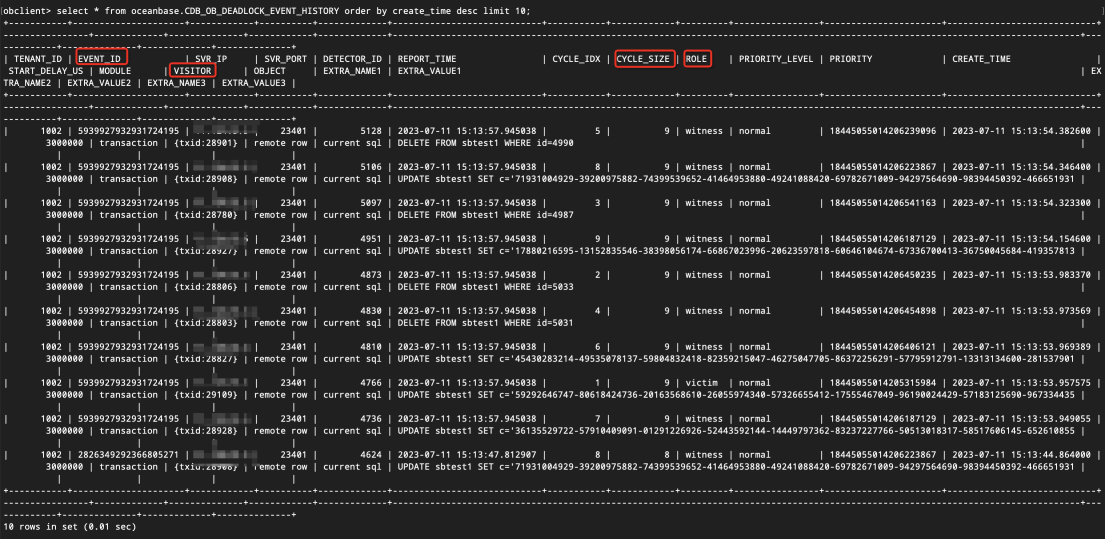
From the view, you can see the recent deadlock records. Here,
role=victimindicates the killed transaction,role=witnessindicates the transaction witnessing the conflict,cycle_size=2means only two transactions are in conflict, andcycle_size>2means multiple transactions are in conflict with one. For easier observation, we select an event withcycle_size=2and filter out the conflicting transactions usingevent_id.SELECT * FROM oceanbase.CDB_OB_DEADLOCK_EVENT_HISTORY WHERE cycle_size=2 ORDER BY create_time DESC LIMIT 10;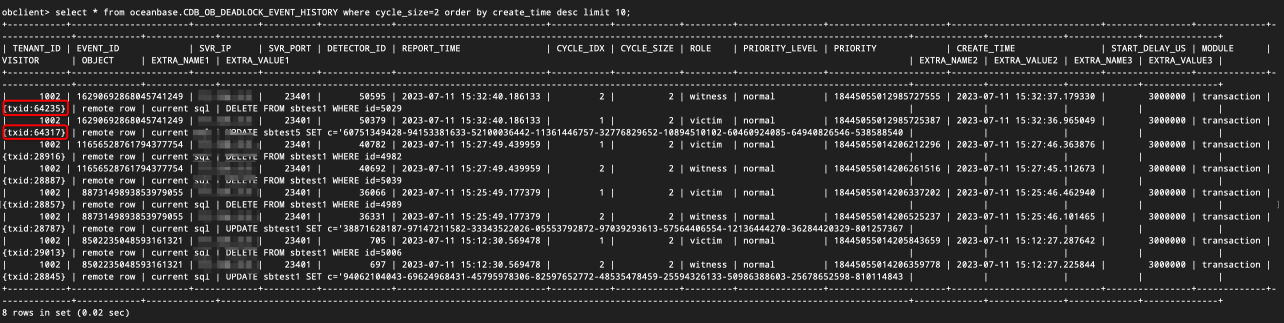
In the
VISITORfield, you can see the transaction ID. You can find all SQL commands related to that transaction:SELECT TRACE_ID, TX_ID, QUERY_SQL FROM gv$ob_sql_audit WHERE TX_ID=5042912 ORDER BY REQUEST_TIME; SELECT TRACE_ID, TX_ID, QUERY_SQL FROM gv$ob_sql_audit WHERE TX_ID=5042591 ORDER BY REQUEST_TIME;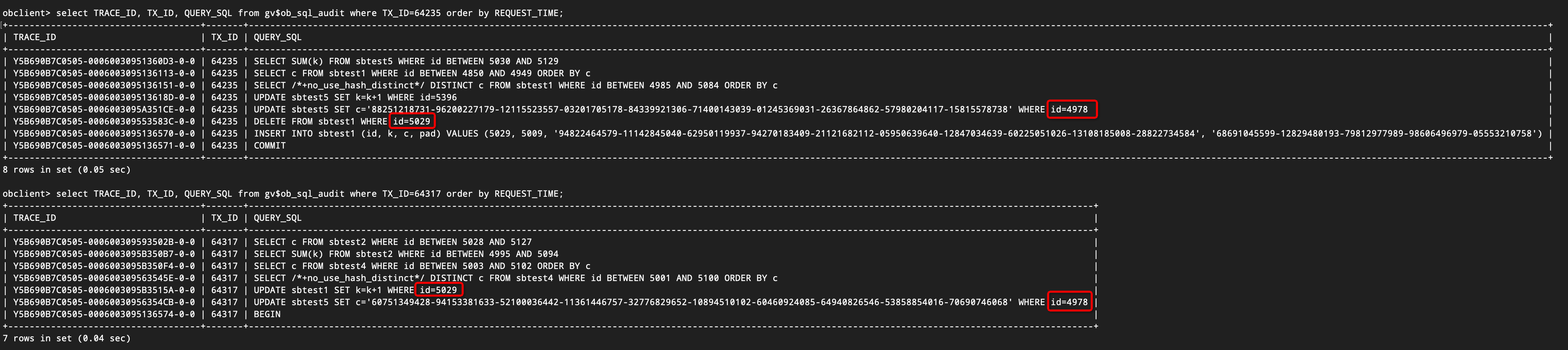
The figure shows that two transactions depend on each other as follows:
- Transaction 1 UPDATE id=4978
- Transaction 2 UPDATE id=5029
- Transaction 1 UPDATE id=4978
- Transaction 2 DELETE id=5029
After a deadlock occurs, Transaction 64317 is rolled back and Transaction 64235 is committed. This is because Transaction 64317 was created later than Transaction 64235. You can determine whether one transaction was created earlier or later than another one by comparing
request_timeof their first SQL statements.SELECT REQUEST_TIME, SVR_IP, SVR_PORT, SQL_EXEC_ID, TRACE_ID, TENANT_ID, TX_ID, SQL_ID, QUERY_SQL, PLAN_ID, PARTITION_CNT, IS_INNER_SQL, ELAPSED_TIME, EXECUTE_TIME, APPLICATION_WAIT_TIME FROM gv$ob_sql_audit WHERE TX_ID=64317 ORDER BY REQUEST_TIME;By querying logs with the trace ID, you can see the rollback transaction. The error code is 6002, which indicates a rollback error. The abort reason is 4101, which indicates a deadlock.
Find the SQL log that records a conflict of the killed transaction. The error code in the last log is 4101. However, Sysbench does not return a deadlock error. Instead, it returns a rollback error (error code 6002).
[2023-07-11 15:32:40.263794] INFO [SERVER] send_error_packet (obmp_packet_sender.cpp:317) [28473][T1002_L0_G0][T1002][Y5B690B7C0505-00060030956354CB-0-0] [lt=14] sending error packet(err=-4101, extra_err_info=NULL, lbt()="0x1029cb40 0x832fadc 0x82e32f7 0x5b65d4f 0x5960718 0x595c58f 0x595a25a 0x8075f6c 0x595964c 0x80754ea 0x595665a 0x8075b24 0x1061b777 0x10613e9f 0x7f0215489e25 0x7f0214f48f1d")You can find the 6002 rollback error in the log corresponding to the last
beginstatement of the transaction. Because thecommitstatement is not explicitly executed in the current transaction, thebeginstatement in the next transaction will cause the current transaction to be implicitly committed. Consequently,beginis the last SQL statement of the current transaction. Sysbench does not handle the deadlock error. Instead, it returns the 6002 error.[2023-07-11 15:32:40.305922] INFO [SERVER] send_error_packet (obmp_packet_sender.cpp:317) [28472][T1002_L0_G0][T1002][Y5B690B7C0505-0006003095136574-0-0] [lt=37] sending error packet(err=-6002, extra_err_info=NULL, lbt()="0x1029cb40 0x832fadc 0x82e32f7 0x5a55e57 0x5960c40 0x595c58f 0x595a25a 0x8075f6c 0x595964c 0x80754ea 0x595665a 0x8075b24 0x1061b777 0x10613e9f 0x7f0215489e25 0x7f0214f48f1d")If you cannot find the log, log throttling may have been enabled. We recommend that you increase the maximum bandwidth for system logs.
alter system set syslog_io_bandwidth_limit='2G';
Conclusions and solutions
Conclusions:
- In the scenario where
rand-type=special, deadlocks may occur due to excessive key conflicts. In this case, the Sysbench stress test might exit. - In the scenario where
rand-type=specialand iftablesandtable_sizeare also small, deadlocks occur more frequently, causing many transactions to hang. This can lead to TPS decreasing to 0 for several minutes, though TPS may occasionally be greater than 0. - Transactions involved in a deadlock will roll back with an error, possibly showing error code 6002 (instead of 1213).
- If
ob_query_timeoutis set to a large value and the deadlock detection does not work, transactions will not be killed and SQLs will remain blocked, causing TPS to remain at 0 without reporting errors.
Solutions:
Change the data distribution type. For example,
--rand-type=uniform.If you do not want to change the data distribution type, increase the size of the dataset. For example, set
tables=100andtable_size=1000000.If you do not want to change the data distribution type or the dataset size, try to ignore the specified errors. For example, set
--mysql-ignore-errors=1062,1213,6002. However, this cannot avoid deadlocks.