

OceanBase logo

OceanBase

A unified distributed database ready for your transactional, analytical, and AI workloads.

DEPLOY YOUR WAY

OceanBase Cloud

The best way to deploy and scale OceanBase

OceanBase Enterprise

Run and manage OceanBase on your infra

TRY OPEN SOURCE

OceanBase Community Edition

The free, open-source distributed database

OceanBase seekdb

Open source AI native search database

Customer Stories

Real-world success stories from enterprises across diverse industries.

View All
BY USE CASES

Mission-Critical Transactions

Global & Multicloud Application

Elastic Scaling for Peak Traffic

Real-time Analytics

Active Geo-redundancy

Database Consolidation

Resources

Comprehensive knowledge hub for OceanBase.

Blog

Live Demos

Training & Certification

Documentation

Official technical guides, tutorials, API references, and manuals for all OceanBase products.

View All
PRODUCTS

OceanBase Cloud

OceanBase Database

Tools

Connectors and Middleware

QUICK START

OceanBase Cloud

OceanBase Database

BEST PRACTICES

Practical guides for utilizing OceanBase more effectively and conveniently

Company

Learn more about OceanBase – our company, partnerships, and trust and security initiatives.

About OceanBase

Partner

Trust Center

Contact Us

International - English
中国站 - 简体中文
日本 - 日本語
Sign In
Start on Cloud

A unified distributed database ready for your transactional, analytical, and AI workloads.

DEPLOY YOUR WAY

OceanBase Cloud

The best way to deploy and scale OceanBase

OceanBase Enterprise

Run and manage OceanBase on your infra

TRY OPEN SOURCE

OceanBase Community Edition

The free, open-source distributed database

OceanBase seekdb

Open source AI native search database

Customer Stories

Real-world success stories from enterprises across diverse industries.

View All
BY USE CASES

Mission-Critical Transactions

Global & Multicloud Application

Elastic Scaling for Peak Traffic

Real-time Analytics

Active Geo-redundancy

Database Consolidation

Comprehensive knowledge hub for OceanBase.

Blog

Live Demos

Training & Certification

Documentation

Official technical guides, tutorials, API references, and manuals for all OceanBase products.

View All
PRODUCTS
OceanBase CloudOceanBase Database
ToolsConnectors and Middleware
QUICK START
OceanBase CloudOceanBase Database
BEST PRACTICES

Practical guides for utilizing OceanBase more effectively and conveniently

Learn more about OceanBase – our company, partnerships, and trust and security initiatives.

About OceanBase

Partner

Trust Center

Contact Us

Start on Cloud
编组
All Products
    • Databases
    • iconOceanBase Database
    • iconOceanBase Cloud
    • iconOceanBase Tugraph
    • iconInteractive Tutorials
    • iconOceanBase Best Practices
    • Tools
    • iconOceanBase Cloud Platform
    • iconOceanBase Migration Service
    • iconOceanBase Developer Center
    • iconOceanBase Migration Assessment
    • iconOceanBase Admin Tool
    • iconOceanBase Loader and Dumper
    • iconOceanBase Deployer
    • iconKubernetes operator for OceanBase
    • iconOceanBase Diagnostic Tool
    • iconOceanBase Binlog Service
    • Connectors and Middleware
    • iconOceanBase Database Proxy
    • iconEmbedded SQL in C for OceanBase
    • iconOceanBase Call Interface
    • iconOceanBase Connector/C
    • iconOceanBase Connector/J
    • iconOceanBase Connector/ODBC
    • iconOceanBase Connector/NET
icon

OceanBase Connector/J

V2.4.5

  • What is OceanBase Connector J?
    • Overview of OceanBase Connector/J
    • Compatibility requirements
  • Install Driver
    • Install and load the OceanBase Connector/J driver
  • Instructions
    • Quick start
      • Import packages
      • Create a database connection
      • Create a Statement object
      • Run queries and retrieve ResultSet objects
      • Process ResultSet objects
      • Close ResultSet and Statement objects
      • Manage tables and data
      • Commit changes
      • Close a database connection
      • Examples
    • Data sources and URL
      • Data source overview
      • Database URL
    • Java data streams
      • Overview of Java data streams
      • LONG and LONG RAW data types
      • Use LOBs
        • Overview of LOB data types
        • LOB data interface
        • LOB locator interface
      • CHAR, VARCHAR, and RAW data types
    • Statement caching
      • Overview of statement caching
      • Use statement caching
      • Reuse statement objects
    • Call a stored procedure
    • Handle SQL exceptions
    • Result set
      • Overview of result sets
      • Limitations
      • FetchSize
      • refreshRow
      • useCursorFetch
    • Batch processing
    • Failover and Load-Balancing
      • Failover and load balancing modes
      • LoadBalance strategies
      • Load balancing strategy configuration methods
    • Rich client
    • Logging
    • Network overheads
    • Show Trace
    • Security features
    • Troubleshooting
  • Reference
    • Features specific to the Oracle mode
      • Binary Protocol (Prepared Statements)
        • COM_STMT_PREPARE_EXECUTE
        • COM_STMT_SEND_PIECE_DATA
      • Call PL stored procedures
      • Scrollability of a result set
      • Use ARRAY and STRUCT classes
      • Distributed transactions
        • Overview
        • XA components
        • Distributed transaction examples
      • Obtain comments
      • Data types supported in Oracle mode
      • Error messages in Oracle mode
    • Supported SQL and PL data types
    • Common APIs
      • Overview
      • java.sql.Connection
      • java.sql.CallableStatement
      • java.sql.DatabaseMetaData
      • java.sql.Driver
      • java.sql.PreparedStatement
      • java.sql.ParameterMetaData
      • java.sql.ResultSet
      • java.sql.ResultSetMetaData
      • java.sql.Statement
      • javax.sql.ConnectionPoolDataSource
      • javax.naming.Context
      • javax.sql.PooledConnection
      • com.oceanbase.jdbc.ObPrepareStatement
  • Release Notes
    • V2.4
      • OceanBase Connector/J V2.4.5
      • OceanBase Connector/J V2.4.4
      • OceanBase Connector/J V2.4.3
      • OceanBase Connector/J V2.4.2
      • OceanBase Connector/J V2.4.1
      • OceanBase Connector/J V2.4.0
    • V2.2
      • OceanBase Connector/J V2.2.11
      • OceanBase Connector/J V2.2.10
      • OceanBase Connector/J V2.2.7
      • OceanBase Connector/J V2.2.6
      • OceanBase Connector/J V2.2.3
      • OceanBase Connector/J V2.2.0

Download PDF

Overview of OceanBase Connector/J Compatibility requirements Install and load the OceanBase Connector/J driver Import packages Create a database connection Create a Statement object Run queries and retrieve ResultSet objects Process ResultSet objects Close ResultSet and Statement objects Manage tables and data Commit changes Close a database connection Examples Data source overviewDatabase URL Overview of Java data streams LONG and LONG RAW data types CHAR, VARCHAR, and RAW data types Overview of statement caching Use statement caching Reuse statement objects Call a stored procedure Handle SQL exceptions Overview of result sets Limitations FetchSize refreshRow useCursorFetch Batch processing Failover and load balancing modes LoadBalance strategies Load balancing strategy configuration methods Rich client Logging Network overheads Show Trace Security features Troubleshooting Call PL stored procedures Scrollability of a result set Use ARRAY and STRUCT classes Obtain comments Data types supported in Oracle mode Error messages in Oracle mode Supported SQL and PL data types Overview java.sql.Connection java.sql.CallableStatement java.sql.DatabaseMetaData java.sql.Driver java.sql.PreparedStatement java.sql.ParameterMetaData java.sql.ResultSet java.sql.ResultSetMetaData java.sql.Statement javax.sql.ConnectionPoolDataSource javax.naming.Context javax.sql.PooledConnection com.oceanbase.jdbc.ObPrepareStatement OceanBase Connector/J V2.4.5 OceanBase Connector/J V2.4.4 OceanBase Connector/J V2.4.3 OceanBase Connector/J V2.4.2 OceanBase Connector/J V2.4.1 OceanBase Connector/J V2.4.0 OceanBase Connector/J V2.2.11 OceanBase Connector/J V2.2.10 OceanBase Connector/J V2.2.7 OceanBase Connector/J V2.2.6 OceanBase Connector/J V2.2.3 OceanBase Connector/J V2.2.0
OceanBase logo

The Unified Distributed Database for the AI Era.

Follow Us
Products
OceanBase CloudOceanBase EnterpriseOceanBase Community EditionOceanBase seekdb
Resources
DocsBlogLive DemosTraining & Certification
Company
About OceanBaseTrust CenterLegalPartnerContact Us
Follow Us

© OceanBase 2026. All rights reserved

Cloud Service AgreementPrivacy PolicySecurity
Contact Us
Document Feedback
  1. Documentation Center
  2. OceanBase Connector/J
  3. V2.4.5
iconOceanBase Connector/J
V 2.4.5
  • V 2.4.17
  • V 2.4.16
  • V 2.4.15
  • V 2.4.14
  • V 2.4.5
  • V 2.4.4
  • V 2.4.3
  • V 2.4.2
  • V 2.4.1
  • V 2.4.0
  • V 2.2.11
  • V 2.2.10
  • V 2.2.7
  • V 2.2.6
  • V 2.2.3
  • V 2.2.0

Rich client

Last Updated:2026-04-09 07:21:37  Updated
share
What is on this page
Workflow
Enable the rich client feature
Examples

folded

share

The rich client feature integrates the overall routing and forwarding capabilities of OceanBase Database Proxy (ODP) into OceanBase Connector/J. In this way, ODP nodes do not need to be separately deployed or managed for application systems. The rich client feature is applicable to scenarios in which the application server and the database server are interconnected over network, the application server has sufficient resources, and the customer does not use or want to use a load balancer, or the customer demands a lower access latency.

Workflow

The following figure shows how to use a rich client to access OceanBase Database. Rich client.png
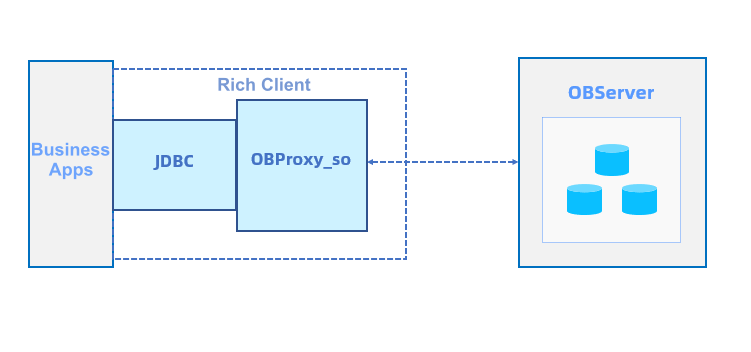
Rich client components of OceanBase Connector/J are as follows:

  • JDBC-ObProxySocket: the JDBC driver for the rich client feature. It implements multiple Java Native Interfaces (JNIs) and starts the backend worker threads of ODP for interactions with the backend database.
  • OBProxy_so: the dynamic library of overall capabilities of ODP. It provides interfaces for starting worker threads at the backend and processes and forwards all database requests.

You can use your ODP account to log on to a rich client and adjust related ODP parameters. However, to use this logon method, you must specify a domain name socket on the local server. The dynamic library of the rich client has all log capabilities of ODP. By default, a hidden directory named .obproxy is created in the current directory on the application server. This hidden directory contains a log directory where the files of ODP running logs are stored. The dynamic library logs generated by the rich client can be automatically cleared. The log_dir_size_threshold parameter specifies the maximum disk usage that triggers the automatic clearing of these logs. After the application system is restarted, the log clearing will resume.

Enable the rich client feature

Note

At present, the rich client feature can be used only on Linux systems and is not supported on Windows systems.

  1. Download the JAR installation package of OceanBase Connector/J and RPM installation package of ODP of the corresponding versions.

  2. Install ODP on Linux:

    rpm -ivh obproxy-x.x.x-x.x.x.rpm;
    

Note

At present, the rich client feature is supported in ODP V3.3.0, V3.3.1, V4.0.0, and later.

  1. Create a soft link to the dynamic library in the /u01/obproxy/lib/libobproxy_so.so directory. If this directory does not exist, search for the directory of libobproxy_so.so by using -Djava.library.path.

  2. Enable the rich client feature by using the URL connection setting attribute obProxySocket of OceanBase Connector/J. You can specify the log output level for ODP when you start the rich client or during the running of the client. Here is an example:

    # Start the rich client based on the RootService list:
    &obProxySocket={\"proxy_config\":\"rootservice_cluster_name=***,rootservice_list=10.XXX.XXX.XXX:2727,proxy_mem_limited=1G,work_thread_num=8,syslog_level=INFO,enable_client_ip_checkout=false,check_tenant_locality_change=false,enable_async_pull_location_cache=false,enable_compression_protocol=true,enable_async_log=true,syslog_level=INFO\"}
    
    # Start the rich client based on OCP_CONFIG_URL:
    &obProxySocket={\"proxy_config\":\"rootservice_cluster_name=***,obproxy_config_server_url=***,proxy_mem_limited=1G,work_thread_num=8,syslog_level=INFO,enable_client_ip_checkout=false,check_tenant_locality_change=false,enable_async_pull_location_cache=false,enable_compression_protocol=true,enable_async_log=true,syslog_level=INFO\"}
    

    The value of obProxySocket is in the JSON format. At present, only one key-value pair is supported, in which key is proxy_config, and value is an ODP parameter. For more information, see ODP parameters.

    To use the rich client feature, you must set the cluster information in either of the following ways:

    • Method 1: Set obproxy_config_server_url, which specifies the access URL of OceanBase Cloud Platform (OCP).
    • Method 2: Set the RootService list by using the rootservice_list and rootservice_cluster_name parameters.

    The following table describes the recommended parameter configurations for the rich client feature.

    Parameter Default value Recommended value Description
    automatic_match_work_thread true false If this parameter is set to true, the number of threads for the rich client is min(work_thread_num, number of CPU cores), where work_thread_num is a parameter.
    work_thread_num 128 8 The number of threads, which is affected by automatic_match_work_thread.
    proxy_mem_limited 2G 16G The maximum memory for the rich client. When the memory used by the rich client exceeds the value of proxy_mem_limited, the threads of the rich client automatically exit.
    enable_strict_kernel_release true false Specifies whether to check the kernel version. The rich client cannot be started if the check fails.
    log_dir_size_threshold 64G 1G The maximum disk space for log files. When this value is exceeded, logs are automatically cleared.
    syslog_level INFO INFO/ERROR The log output level. We recommend that you set the log output level to INFO in a production system. If logs do not need to be output, you can set the log level to ERROR.
  3. After the rich client feature is enabled, you can use OceanBase Connector/J to interact with the database.

Examples

The following example illustrates how to use a rich client in an environment in which OceanBase Connector/J V2.3.0 and ODP V3.3.0 are installed.

  1. Create a test case named TestOBClientVC.java.

    import java.io.*;
    import java.sql.*;
    import static java.lang.Thread.sleep;
    
    public class TestOBClientVC {
        public static int useVC = 0;
        public static final String obproxyConfig = "&obProxySocket={\"app_name\":\"mytest\",\"proxy_config\":\"rootservice_cluster_name=***,rootservice_list=10.XXX.XXX.XXX:2727,proxy_mem_limited=2G,work_thread_num=8,syslog_level=DEBUG\"}";
    
        public static Connection getObConnection() throws Exception {
           // Set the connection information.
            final String DRIVER_NAME = "com.alipay.oceanbase.jdbc.Driver";
            final String URL = "jdbc:oceanbase://10.XXX.XXX.XXX:20211/test?useSSL=false&useServerPrepStmts=true&log=true";
            final String USER_NAME = "root@***";
            final String PASSWORD = "";
    
            // Load the driver class of MySQL.
            Class.forName(DRIVER_NAME);
            // Obtain a database connection.
            if (useVC != 0) {
                return (Connection) DriverManager.getConnection(URL + obproxyConfig, USER_NAME, PASSWORD); // clientVC
            } else {
                return (Connection) DriverManager.getConnection(URL, USER_NAME, PASSWORD); // tcp socket
            }
        }
    
         public static void test_text_protocol() {
            Connection conn = null;
            try {
                conn = getObConnection();
                System.out.println("get connection succ");
                ResultSet rs = conn.createStatement().executeQuery("select 'hello obproxy!' from dual");
    
                if (rs.next()) {
                  System.out.println("text:" + rs.getString(1));
                }
             } catch (Exception e) {
                e.printStackTrace();
            }
        }
    
        public static void test_binary_protocol() {
           Connection conn = null;
           try {
               conn = getObConnection();
               PreparedStatement pstmt = conn.prepareStatement("select ? from dual");
               pstmt.setString(1, "hello obproxy!");
               pstmt.execute();
               ResultSet rs = pstmt.getResultSet();
    
               if (rs.next()) {
                 System.out.println("text:" + rs.getString(1));
               }
           } catch (Exception e) {
               e.printStackTrace();
           }
        }
    
    
        public static void main(String args[])  {
          try {
            // test_text_protocol();
            useVC = 1;
            test_text_protocol();
            test_binary_protocol();
            System.out.println("jdbc test pass");
            // sleep(600000);
          } catch (Exception e) {
            e.printStackTrace();
          }
        }
    }
    
  2. Compile TestOBClientVC.

    javac -cp ./oceanbase-client-2.4.1.jar TestOBClientVC.java
    
  3. Execute TestOBClientVC.

    java -cp $CLASSPATH:oceanbase-client-2.4.1.jar TestOBClientVC
    

Previous topic

Load balancing strategy configuration methods
Last

Next topic

Logging
Next
What is on this page
Workflow
Enable the rich client feature
Examples