







OceanBase supports both the open-source MySQL ecosystem and the commercial Oracle ecosystem. You can choose to create MySQL-compatible or Oracle-compatible tenants within a single instance. Compatibility covers SQL syntax, keywords, objects, and usage habits, supporting stored procedures, C language interfaces, precompilers, etc. Applications can be migrated to OceanBase with minimal or no changes, saving enterprises significant human and time costs. This tutorial uses a simple database example to demonstrate OceanBase Cloud's compatibility with MySQL through the Compatibility Assessment feature provided by OceanBase Cloud.
Limitations
It is not supported for users with the Project Member role to create offline assessment tasks.
Procedure
Download the sample SQL file.
Click to enter the Compatibility Assessment page.
Click Create to create a compatibility assessment.
Click Offline Assessment.
On the Create Offline Assessment page, fill in the following fields:
FieldDescriptionTask Name The system automatically creates an assessment task name for you. You can customize the name according to your needs. Cloud Vendor Select AWS. Source Database Type Select Aurora MySQL. Region Select ap-southeast-1. Data Source Select SQL. Upload File Upload the sample SQL file you downloaded in Step 1 here. Click Start Assessment. You can find the assessment task you just created on the compatibility assessment list page.
After the assessment task is completed, click View Report on the compatibility assessment list page to view the generated report.
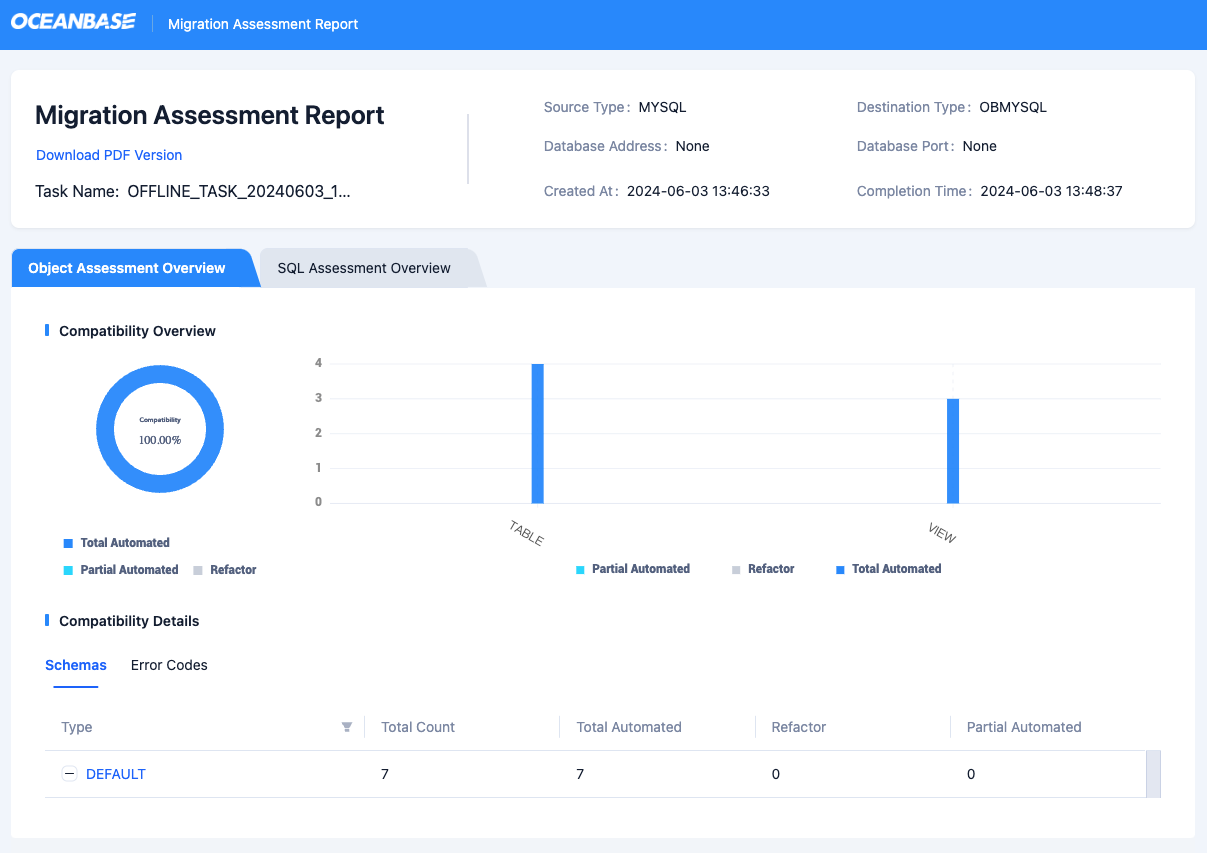
The compatibility assessment report displays all collected SQL statements and evaluates their compatibility. The report shows the compatibility of the uploaded file and lists all assessment objects. You can click on the assessment object type under Compatibility Details to view more details. For more detailed information about the report, refer to View and download a compatibility assessment report.
Overview of the Sample SQL File
The client-demo.sql file uses a course management system as an example, covering common database operations, including creating tables, indexes, views, data partitioning, etc.
Complete SQL Statements
Create the Students table
CREATE TABLE IF NOT EXISTS students (
    student_id INT AUTO_INCREMENT PRIMARY KEY,
    name VARCHAR(255) NOT NULL,
    registration_date DATE NOT NULL,
    INDEX idx_registration_date (registration_date)
) ENGINE=InnoDB
$$
Create the Courses table
CREATE TABLE IF NOT EXISTS courses (
    course_id INT AUTO_INCREMENT PRIMARY KEY,
    title VARCHAR(255) NOT NULL,
    credits INT NOT NULL
) ENGINE=InnoDB
$$
Create the Teachers table
CREATE TABLE IF NOT EXISTS teachers (
    teacher_id INT AUTO_INCREMENT PRIMARY KEY,
    name VARCHAR(255) NOT NULL
) ENGINE=InnoDB
$$
Create the Course Schedules table with partitioning
CREATE TABLE IF NOT EXISTS course_schedules (
    schedule_id INT AUTO_INCREMENT PRIMARY KEY,
    course_id INT NOT NULL,
    teacher_id INT,
    schedule_time DATETIME NOT NULL,
    INDEX idx_schedule_time (schedule_time)
) ENGINE=InnoDB
PARTITION BY RANGE(YEAR(schedule_time)) (
    PARTITION p2020 VALUES LESS THAN (2021),
    PARTITION p2021 VALUES LESS THAN (2022),
    PARTITION p2022 VALUES LESS THAN (2023),
    PARTITION p2023 VALUES LESS THAN (2024),
    PARTITION p_future VALUES LESS THAN MAXVALUE
)
$$
Create the view: Course and Teacher
CREATE VIEW `vw_course_teacher` AS
SELECT
    c.course_id,
    c.title AS course_title,
    c.credits,
    t.name AS teacher_name
FROM courses AS c
LEFT JOIN course_schedules AS cs ON c.course_id = cs.course_id
LEFT JOIN teachers AS t ON cs.teacher_id = t.teacher_id;
$$
Create the view: Upcoming Courses
CREATE VIEW `vw_upcoming_courses` AS
SELECT
    c.title AS course_title,
    t.name AS teacher_name,
    cs.schedule_time
FROM course_schedules AS cs
JOIN courses AS c ON cs.course_id = c.course_id
JOIN teachers AS t ON cs.teacher_id = t.teacher_id
WHERE cs.schedule_time BETWEEN NOW() AND DATE_ADD(NOW(), INTERVAL 1 WEEK);
$$
Create the view: Student Registration
CREATE VIEW `vw_student_registration` AS
SELECT
    student_id,
    name AS student_name,
    registration_date
FROM students;
$$