OceanBase Database uses a shared-nothing architecture with multiple replicas to ensure zero single point of failure (SPOF) and system continuity. OceanBase Database supports high availability (HA) and disaster recovery at the node, IDC, and region levels. OceanBase Database can be deployed in a single IDC, two IDCs, three IDCs across two regions, and five IDCs across three regions.
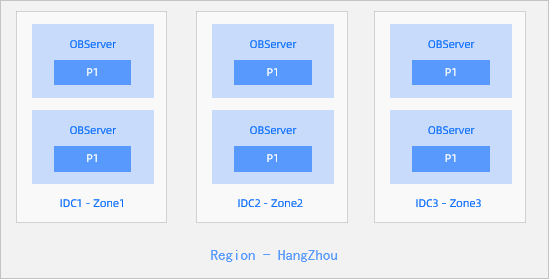
Three replicas in three IDCs of the same city
Features
- Three IDCs in the same city form a cluster. Each IDC is a zone. The network latency between the IDCs generally ranges from 0.5 ms to 2 ms.
- When an IDC fails, the remaining two replicas are still in the majority. They can enable redo log synchronization and guarantee a recovery point objective (RPO) of zero.
- However, this deployment mode cannot cope with city-wide disasters.
Deployment solution
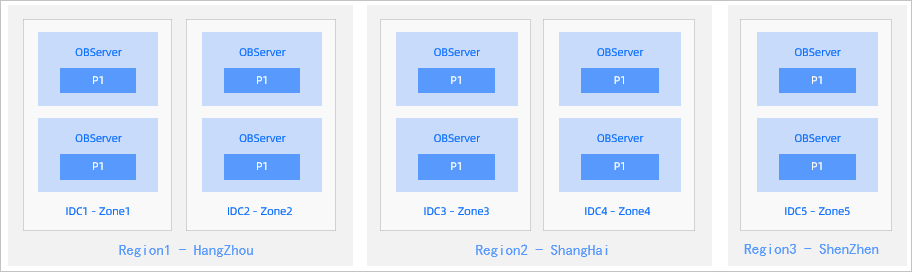
Five replicas in five IDCs across three regions
Features
- Five replicas in three cities form a cluster.
- In the case of an IDC or city-wide failure, the remaining replicas are still in the majority and can guarantee an RPO of zero.
- In this mode, the majority must contain at least three replicas. However, each city has at most two replicas. To reduce the latency for synchronizing redo logs, City 1 and City 2 must be close to each other.
- To reduce costs, you can deploy only log replicas in City 3.
Deployment solution
Note
The development of an OceanBase cluster in three IDCs in the same city or five IDCs across three regions imposes high requirements on infrastructure. To reuse the existing infrastructure of enterprise users, OceanBase Database provides two deployment modes: two IDCs in the same city and three IDCs across two regions.
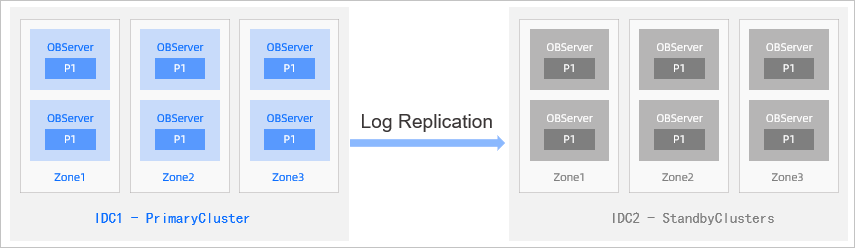
Primary/Standby deployment of two IDCs in the same city
Features
- One OceanBase cluster is deployed in each city. One acts as the primary cluster and the other as the standby cluster. Each cluster has its own Paxos group to ensure multi-replica consistency.
- Data is synchronized between clusters by using redo logs, which is similar to the leader-follower replication of conventional databases. Data can be synchronized in asynchronous synchronization and strong synchronization modes, which are similar to the maximum performance and maximum protection modes of Oracle Data Guard.
Deployment solution
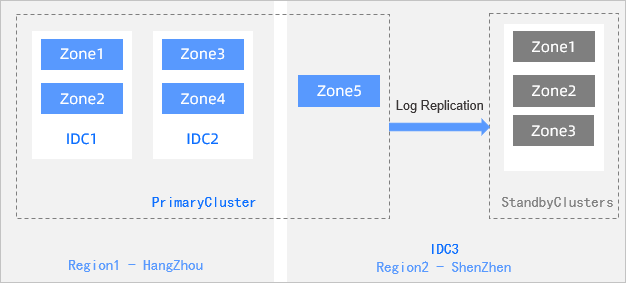
Primary/Standby deployment of three IDCs across two regions
Features
- Five replicas in the primary and standby cities form a cluster. When an IDC fails, at most two replicas are lost, and the remaining three replicas are still in the majority.
- A standby cluster with three replicas is independently deployed in the standby city. Data is synchronized from the primary cluster to the standby cluster in asynchronous synchronization or strong synchronization mode.
- When the primary city encounters a disaster, the standby city can take over its services.
Deployment solution