







Overview
Log on to OceanBase Developer Center (ODC) and click the name of the target connection to go to the corresponding connection management page. You can click Function in the left-side navigation pane to get a list of functions. To create a function, click + in the upper-right corner of the function list or click Create in the top navigation bar. The following table describes the parameters that you need to specify to create a function.
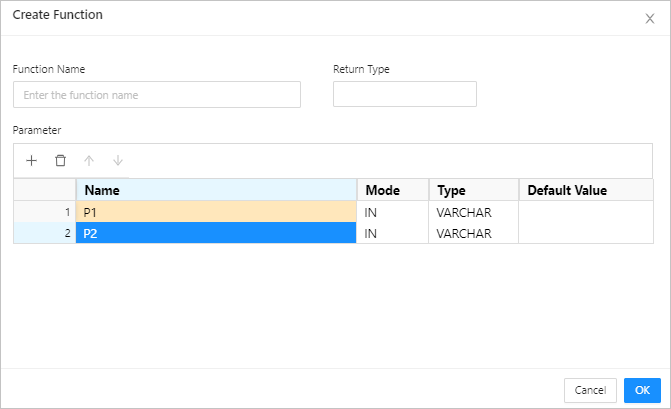
Parameters
Parameter |
Description |
|---|---|
| Function Name | Specifies the name of the function. |
| Return Type | Specifies the data type of the return value. |
| Parameter | Specifies the information passed to the function when the function is called. In Oracle mode, specify fields such as Name , Mode , Type , and Default Value . In MySQL mode, specify fields such as Name , Mode , Type , and Length . Note * In the quick access toolbar, you can add, delete, and move up and down the parameters. * You can click a row number to select a row and display the quick access toolbar that allows you to delete the entire row of parameters or move them upward or downward. * You can perform the following right-click operations: * Copy a row: Drag the pointer to select a row, right-click it, and then select Copy from the context menu that appears. * Copy a cell: Select a cell, right-click it, and then select Copy from the context menu that appears. * You can click a row number to select a row, and then drag the row to adjust the orders of the entire row of parameters. * Click OK to go to the Create Function page. |
Parameter modes
You need to specify the mode for the parameters. The parameter mode setting is unavailable in MySQL mode. The Oracle mode supports the following parameter modes: IN , OUT , and INOUT .
Mode |
Description |
|---|---|
| IN | Indicates an input parameter. When a function is called, the input parameter is passed to the function and used in the execution of the function. |
| OUT | Indicates an output parameter. When a function is called, the value of the output parameters is ignored and an empty value is passed to the function. The output parameter in the function body can be modified. The modified result is returned and passed to the argument that the output parameter represents. |
| INOUT | Indicates an inout parameter. An inout parameter is both an input parameter and an output parameter. |
Parameter settings
Property |
Required |
Default |
Mode |
|---|---|---|---|
| Name | Yes | Empty | Oracle/MySQL |
| Mode | Yes | IN | Oracle/MySQL |
| Type | Yes | VARCHAR | Oracle/MySQL |
| Length | Yes | 45 | Oracle/MySQL |
| Default Value | No | Empty | Oracle/MySQL |