

OceanBase logo

OceanBase

A unified distributed database ready for your transactional, analytical, and AI workloads.

DEPLOY YOUR WAY

OceanBase Cloud

The best way to deploy and scale OceanBase

OceanBase Enterprise

Run and manage OceanBase on your infra

TRY OPEN SOURCE

OceanBase Community Edition

The free, open-source distributed database

OceanBase seekdb

Open source AI native search database

Customer Stories

Real-world success stories from enterprises across diverse industries.

View All
BY USE CASES

Mission-Critical Transactions

Global & Multicloud Application

Elastic Scaling for Peak Traffic

Real-time Analytics

Active Geo-redundancy

Database Consolidation

Resources

Comprehensive knowledge hub for OceanBase.

Blog

Live Demos

Training & Certification

Documentation

Official technical guides, tutorials, API references, and manuals for all OceanBase products.

View All
PRODUCTS

OceanBase Cloud

OceanBase Database

Tools

Connectors and Middleware

QUICK START

OceanBase Cloud

OceanBase Database

BEST PRACTICES

Practical guides for utilizing OceanBase more effectively and conveniently

Company

Learn more about OceanBase – our company, partnerships, and trust and security initiatives.

About OceanBase

Partner

Trust Center

Contact Us

International - English
中国站 - 简体中文
日本 - 日本語
Sign In
Start on Cloud

A unified distributed database ready for your transactional, analytical, and AI workloads.

DEPLOY YOUR WAY

OceanBase Cloud

The best way to deploy and scale OceanBase

OceanBase Enterprise

Run and manage OceanBase on your infra

TRY OPEN SOURCE

OceanBase Community Edition

The free, open-source distributed database

OceanBase seekdb

Open source AI native search database

Customer Stories

Real-world success stories from enterprises across diverse industries.

View All
BY USE CASES

Mission-Critical Transactions

Global & Multicloud Application

Elastic Scaling for Peak Traffic

Real-time Analytics

Active Geo-redundancy

Database Consolidation

Comprehensive knowledge hub for OceanBase.

Blog

Live Demos

Training & Certification

Documentation

Official technical guides, tutorials, API references, and manuals for all OceanBase products.

View All
PRODUCTS
OceanBase CloudOceanBase Database
ToolsConnectors and Middleware
QUICK START
OceanBase CloudOceanBase Database
BEST PRACTICES

Practical guides for utilizing OceanBase more effectively and conveniently

Learn more about OceanBase – our company, partnerships, and trust and security initiatives.

About OceanBase

Partner

Trust Center

Contact Us

Start on Cloud
编组
All Products
    • Databases
    • iconOceanBase Database
    • iconOceanBase Cloud
    • iconOceanBase Tugraph
    • iconInteractive Tutorials
    • iconOceanBase Best Practices
    • Tools
    • iconOceanBase Cloud Platform
    • iconOceanBase Migration Service
    • iconOceanBase Developer Center
    • iconOceanBase Migration Assessment
    • iconOceanBase Admin Tool
    • iconOceanBase Loader and Dumper
    • iconOceanBase Deployer
    • iconKubernetes operator for OceanBase
    • iconOceanBase Diagnostic Tool
    • iconOceanBase Binlog Service
    • Connectors and Middleware
    • iconOceanBase Database Proxy
    • iconEmbedded SQL in C for OceanBase
    • iconOceanBase Call Interface
    • iconOceanBase Connector/C
    • iconOceanBase Connector/J
    • iconOceanBase Connector/ODBC
    • iconOceanBase Connector/NET
icon

OceanBase Developer Center

V4.4.0

  • Topics Overview
  • Overview
    • What is ODC?
    • Features
    • Architecture
    • Limitations
    • ODC console
  • Quick Start
    • Client ODC
      • Overview
      • Install Client ODC
      • Use Client ODC
    • Web ODC
      • Overview
      • Deploy Web ODC
      • Use Web ODC
  • Data Source Management
    • Create a data source
    • Data sources and project collaboration
    • Database O&M
      • Session management
      • Global variable management
      • Recycle bin management
  • SQL Development
    • Edit and execute SQL statements
    • Perform PL compilation and debugging
    • Use the command-line window
    • Edit and export the result set of an SQL statement
    • Execution analysis
    • Generate test data
    • System settings
    • Database objects
      • Table objects
        • Overview
        • Create a table
      • View objects
        • Overview
        • Create a view
        • Manage views
      • Materialized view objects
        • Overview
        • Create a materialized view
        • Manage materialized views
      • Function objects
        • Overview
        • Create a function
        • Manage functions
      • Stored procedure objects
        • Overview
        • Create a stored procedure
        • Manage stored procedures
      • Sequence objects
        • Overview
        • Create a sequence
        • Manage sequences
      • Package objects
        • Overview
        • Create a program package
        • Manage program packages
      • Trigger objects
        • Overview
        • Create a trigger
        • Manage triggers
      • Type objects
        • Overview
        • Create a type
        • Manage types
      • Synonym objects
        • Overview
        • Create a synonym
        • Manage synonyms
  • Import and Export
    • Import schemas and data
    • Export schemas and data
  • Database Change Management
    • Manage user permissions
      • Users and roles
      • Automatic authorization
      • User permission management
    • Project collaboration management
    • Risk levels, risk identification rules, and approval processes
    • SQL check specifications
    • SQL window specification
    • Database change management
    • Manage changes to logical databases
    • Batch database change management
    • Online schema changes
    • Synchronize shadow tables
    • Schema comparison
  • Data Lifecycle Management
    • Data archiving
    • Data cleanup
    • Manage partitioning plans
      • Manage partitioning plans
      • Set partitioning strategies
      • Examples of partitioning strategies
    • SQL plan task
  • Data Masking and Auditing
    • Desensitize data
    • Operation records
  • Notification Management
    • Overview
    • View notification records
    • Manage notification channels
      • Create a notification channel
      • View, edit, and delete a notification channel
      • Configure a custom channel
    • Manage notification rules
  • System Integration
    • Login integration
    • Approval integration
    • SQL approval integration
    • Bastion host integration
  • Deployment Guide
    • Deployment overview
    • Preparations before deployment
    • Deploy ODC in single-node mode
    • Deploy ODC in high-availability mode
    • Deployment verification
  • Upgrade Guide
    • Upgrade Overview
    • Preparations before upgrade
    • Update single-node ODC
    • Update high-avaliability ODC
    • Upgrade verification
    • Rollback after upgrade failed
  • Best Practices
    • Tips for SQL development
    • Explore ODC team workspaces
    • Understanding real-time SQL diagnostics for OceanBase AP
    • OceanBase historical database solutions
    • ODC SQL check for automatic identification of high-risk operations
    • Integration with ODC enterprise-level account system
    • Manage and modify sharded databases and tables via ODC
    • Data masking and control practices
    • Enterprise-level control and collaboration: Safeguard every database change
  • Troubleshooting
    • ODC troubleshooting process
    • Collect message
      • View the runtime environment and version information
      • View web ODC logs
      • View client ODC logs
      • View end-to-end ODC-related logs
      • View ODC MetaDB data
      • Query the index status in OceanBase Database V4.x
      • Query the index status in OceanBase Database V1.4.x to V3.2.x
      • Collect JVM runtime information
      • Use tcpdump to capture packets
    • FAQ
      • Installation of client ODC
      • Web ODC deployment and startup
      • Connection Information
      • Command-line window
      • DDL statement display
  • Common features
  • Release Notes
    • V4.4
      • ODC V4.4.0
    • V4.3
      • ODC V4.3.4
      • ODC V4.3.3
      • ODC V4.3.2
      • ODC V4.3.1
      • ODC V4.3.0
    • V4.2
      • ODC V4.2.4
      • ODC V4.2.3
      • ODC V4.2.2
      • ODC V4.2.1
      • ODC V4.2.0
    • V4.1
      • ODC V4.1.3
      • ODC V4.1.2
      • ODC V4.1.1
      • ODC V4.1.0
    • V4.0
      • ODC V4.0.2
      • ODC V4.0.0
    • V3.4
      • ODC V3.4.0
    • V3.3
      • ODC V3.3.3
      • ODC V3.3.2
      • ODC V3.3.1
      • ODC V3.3.0
    • V3.2
      • ODC V3.2.3
      • ODC V3.2.2
      • ODC V3.2.1
      • ODC V3.2.0

Download PDF

Topics Overview What is ODC? Features Architecture Limitations ODC console Overview Install Client ODC Use Client ODC Overview Deploy Web ODC Use Web ODC Create a data source Data sources and project collaboration Session management Global variable management Recycle bin management Edit and execute SQL statements Perform PL compilation and debugging Use the command-line window Edit and export the result set of an SQL statement Execution analysis Generate test data System settings Import schemas and data Export schemas and data Users and roles Automatic authorization User permission management Project collaboration management Risk levels, risk identification rules, and approval processes SQL check specifications SQL window specification Database change management Manage changes to logical databases Batch database change management Online schema changes Synchronize shadow tables Schema comparison Data archiving Data cleanup Manage partitioning plans Set partitioning strategies Examples of partitioning strategies SQL plan task Desensitize data Operation records Overview View notification records Create a notification channel View, edit, and delete a notification channel Configure a custom channel Manage notification rules Login integration Approval integration SQL approval integration Bastion host integration Deployment overview Preparations before deployment Deploy ODC in single-node mode Deploy ODC in high-availability mode Deployment verification Upgrade Overview Preparations before upgrade Update single-node ODC Update high-avaliability ODC Upgrade verification Rollback after upgrade failed Tips for SQL development Explore ODC team workspaces Understanding real-time SQL diagnostics for OceanBase AP OceanBase historical database solutions ODC SQL check for automatic identification of high-risk operations Integration with ODC enterprise-level account system Manage and modify sharded databases and tables via ODC Data masking and control practices Enterprise-level control and collaboration: Safeguard every database change ODC troubleshooting process View the runtime environment and version information View web ODC logs View client ODC logs View end-to-end ODC-related logs View ODC MetaDB data Query the index status in OceanBase Database V4.x Query the index status in OceanBase Database V1.4.x to V3.2.x Collect JVM runtime information Use tcpdump to capture packets Installation of client ODC Web ODC deployment and startup Connection Information Command-line window DDL statement display Common features ODC V4.4.0 ODC V4.3.4 ODC V4.3.3 ODC V4.3.2 ODC V4.3.1 ODC V4.3.0 ODC V4.2.4
OceanBase logo

The Unified Distributed Database for the AI Era.

Follow Us
Products
OceanBase CloudOceanBase EnterpriseOceanBase Community EditionOceanBase seekdb
Resources
DocsBlogLive DemosTraining & Certification
Company
About OceanBaseTrust CenterLegalPartnerContact Us
Follow Us

© OceanBase 2026. All rights reserved

Cloud Service AgreementPrivacy PolicySecurity
Contact Us
Document Feedback
  1. Documentation Center
  2. OceanBase Developer Center
  3. V4.4.0
iconOceanBase Developer Center
V 4.4.0
  • V 4.4.2
  • V 4.4.1
  • V 4.4.0
  • V 4.3.4
  • V 4.3.3
  • V 4.3.2
  • V 4.3.1
  • V 4.3.0
  • V 4.2.4
  • V 4.2.3
  • V 4.2.2
  • V 4.2.1
  • V 4.2.0
  • V 4.1.3 and earlier

Data masking and control practices

Last Updated:2026-04-07 10:00:35  Updated
share
What is on this page
Background information
Scenarios
Technical background
Technical architecture
Domain model
Masking algorithms
Sensitive data management
Business scenario examples
Prepare the verification data
Scenario verification

folded

share

Background information

In the field of collaborative database development, sensitive data management is crucial for both enterprises and users. In recent years, with the implementation of laws and regulations such as the Data Security Law and Personal Information Protection Law, national and societal emphasis on privacy data security has continuously increased. Operational auditing and privacy data protection have become increasingly important and are now key considerations when selecting database collaboration tools.

Privacy data typically includes sensitive information such as user ID numbers, phone numbers, and home addresses - essential data for normal business operations. To prevent data leakage, strict restrictions on business database access are necessary. However, overly restrictive access may also reduce collaboration efficiency. Therefore, for enterprise-level database development scenarios, we must carefully consider: how to proactively prevent internal data leakage risks in a secure and compliant manner to ensure the strictest protection of user privacy data? This article will share ODC's design philosophy and solutions for privacy data protection and security compliance.

Scenarios

During operations like maintenance, development, and data analysis, enterprises often need to perform database queries. These databases may contain sensitive data required for business operations that cannot be separated. Direct queries of such data may pose privacy leakage risks, while overly strict access restrictions may cause inefficiencies. Data masking technology addresses this by processing sensitive data during SQL queries, data exports, and other outbound scenarios, maintaining database accessibility while protecting privacy.

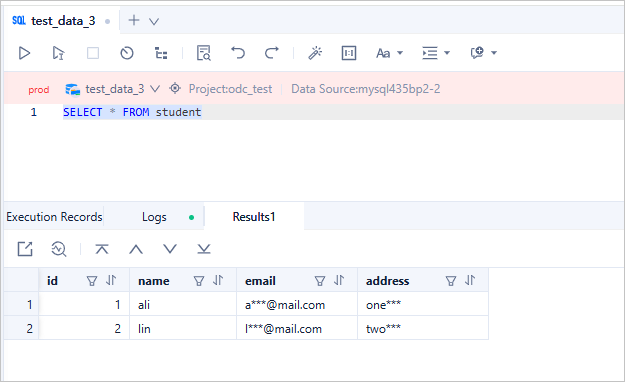
Consider this example: A database contains a "student" table recording basic student information. When needing to analyze student ages while protecting addresses and contact details, the query results should appear as follows after masking. This ensures both workflow efficiency and maximum privacy protection.
1

ODC prioritizes sensitive data protection, providing enterprises with comprehensive, trustworthy data security solutions. Database access is often the primary (sometimes only) way to obtain sensitive data. Masking at the query stage establishes the first line of defense for data security.

Security administrators can configure sensitive data rules and masking algorithms as needed. Even DBAs and developers cannot access raw sensitive data after configuration, significantly reducing leakage risks. This strict protection mechanism ensures maximum security for enterprise data.

In ODC's collaborative workflow, users cannot directly query databases. Data access is limited to:

  1. Viewing table data in the database object management page

  2. Submitting export tickets to view data in files

  3. Submitting change tickets with SELECT statements to view results

  4. Executing SELECT statements in the SQL window

Methods 1 and 2 are easier to mask since accessed columns are known. Methods 3 and 4 present greater challenges as users may input complex queries, making dynamic masking more difficult than static masking.

Notably, ODC's data masking covers all outbound scenarios and supports all SQL syntax types for OceanBase in both MySQL compatible and Oracle compatible modes.

Technical background

The following are key terms used in ODC for data masking:

  • Sensitive Column: Database columns storing sensitive data

  • Masking Algorithm: Algorithms for processing sensitive data

  • Identification Rule: Conditions for marking columns as sensitive

Technical architecture

ODC's data masking implementation focuses on two core problems:

  • Identifying sensitive columns in databases

  • Determining masking methods for sensitive data

For problem 1, we introduced the sensitive column concept - marking physical columns containing sensitive data as sensitive column, and all data in the sensitive columns will be considered as sensitive data. For problem 2, we provide 21 masking algorithms covering common data types like Chinese/English names, phone numbers, emails, IDs, addresses, license plates, and IPs.

If you are interested to learn more technical details, visit ODC's open source community.

Domain model

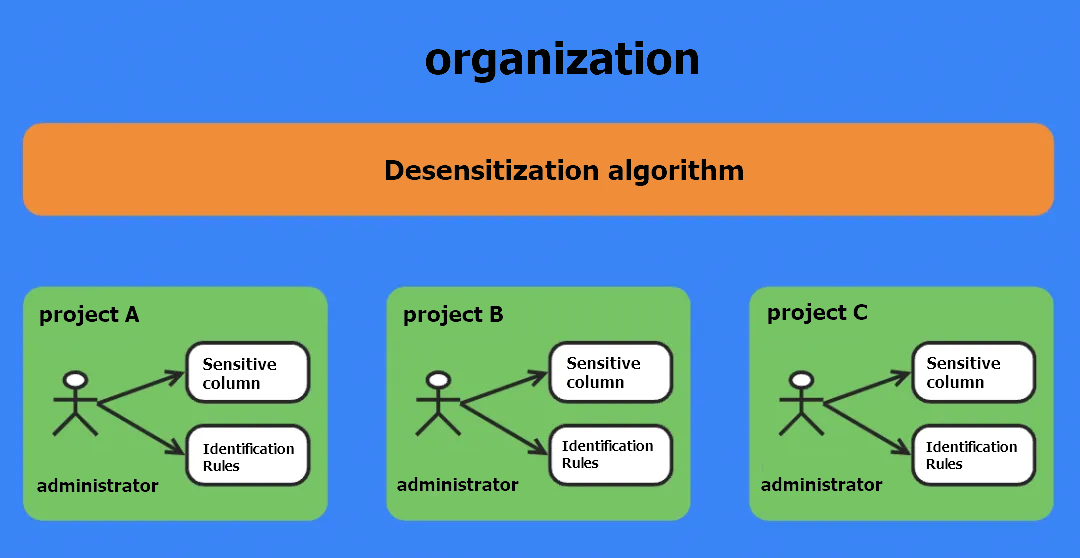
Since ODC V4.2.0 introduced project-based management with isolated resources across organizations but shared data sources within organizations, our design implements data masking as shown:
12

Masking algorithms

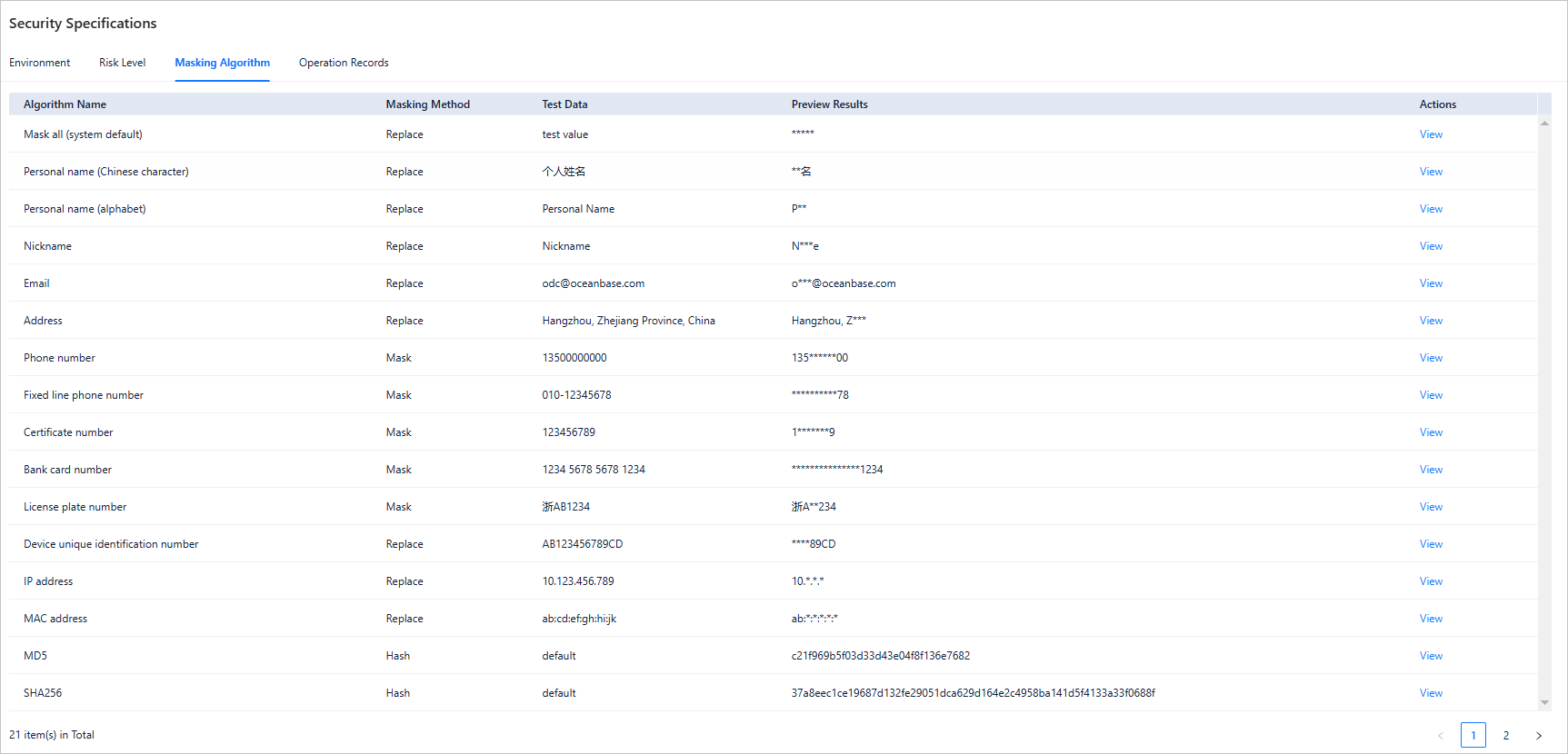
Each organization shares a set of masking algorithms. All members within the project are allowed to view and test the algorithms. We referenced Ant Group's standards to provide 21 algorithms covering most scenarios:
13

Sensitive data management

Since data sensitivity depends on content typically known only to project members, sensitive columns are managed at the project level by admins or DBAs. Users can manually add sensitive columns or use automated scanning with identification rules.

ODC supports three identification rule types:

  • Path: Matches by database/table/column location

  • Regex: Matches by names/comments using regular expressions

  • Script: Custom Groovy scripts for granular matching

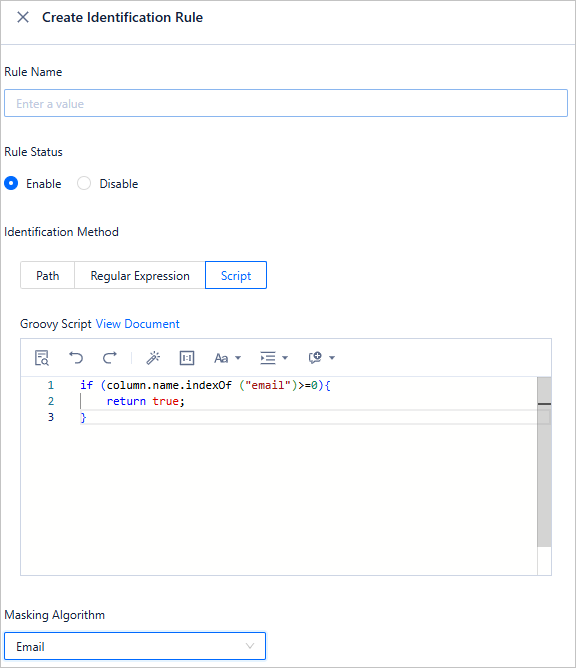
For example, to mark all "email" columns as sensitive, you can use a script as follows:
14

Then scan the data source based on this identification rule within just 3 steps:
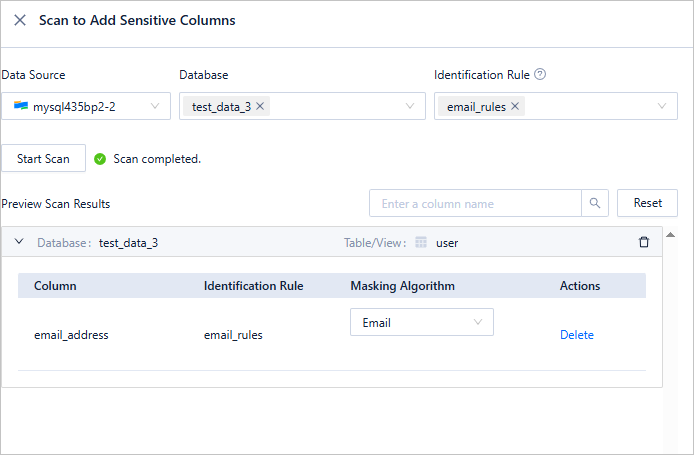
15

Business scenario examples

Prepare the verification data

  1. Before you start, use ODC to create two tables: employee_info and employee_salary.

    CREATE TABLE test.employee_info (
    id int NOT NULL COMMENT 'Employee ID',
    name varchar(32) NULL COMMENT 'Employee name',
    email varchar(64) NULL COMMENT 'Employee email',
    address varchar(128) NULL COMMENT 'Employee address',
    CONSTRAINT pk_id PRIMARY KEY (id)
    ) DEFAULT CHARSET = utf8mb4 COLLATE = utf8mb4_general_ci;
    
    CREATE TABLE test.employee_salary (
    id int NOT NULL COMMENT 'Employee ID',
    salary float(10) NULL COMMENT 'Employee salary',
    CONSTRAINT pk_id PRIMARY KEY (id)
    ) DEFAULT CHARSET = utf8mb4 COLLATE = utf8mb4_general_ci;
    
  2. Insert the simulated data. The following shows examples of the original table data.

    Note

    The data below is simulated and does not contain real user information.
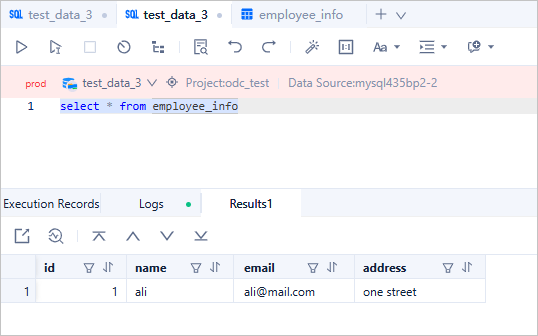
    2

  3. Add the columns that need to be masked to the sensitive column list. As only a few data columns are displayed, manually configure the sensitive column list:
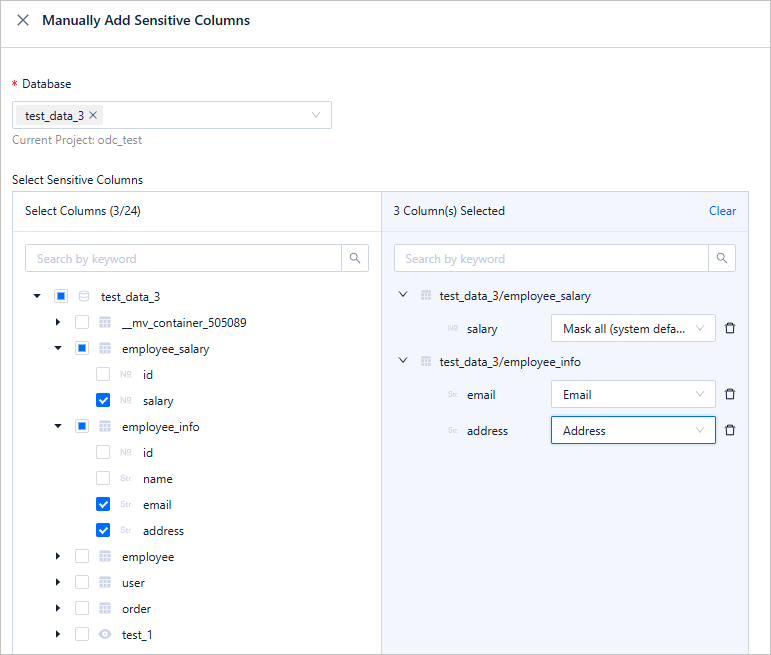
    3

Scenario verification

Next, let's explore how ODC can help you mask data in various data export scenarios.

Scenario 1: Viewing table data in GUI
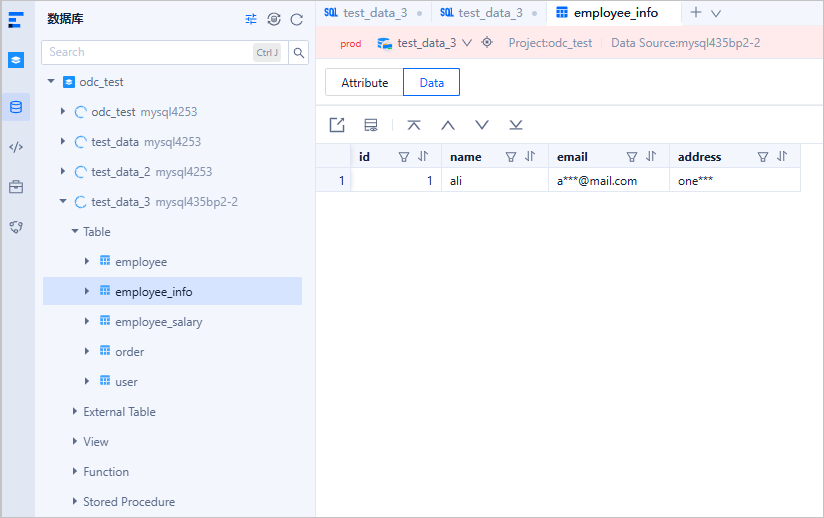
4

As you can see, when you view the data in the employee_info table, sensitive data in the columns has been masked.

Scenario 2: Exporting to CSV

Next, we export a table that contains sensitive columns as a CSV file.
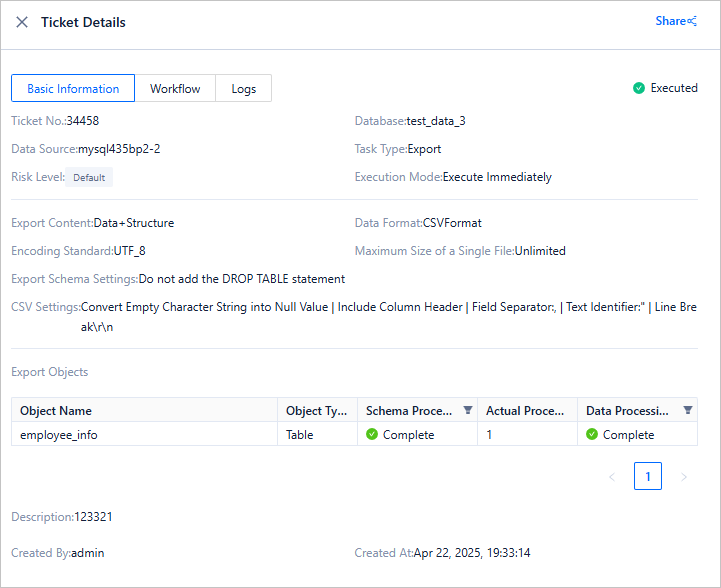
5

The sensitive columns are also masked in the exported CSV file:

6

Scenario 3: Executing SELECT queries

As mentioned earlier, the core challenge of dynamic masking lies in accurately identifying sensitive columns in various complex SQL syntaxes. The following sections describe the SQL syntaxes supported by ODC for dynamic masking.

First, a simple single-table query:
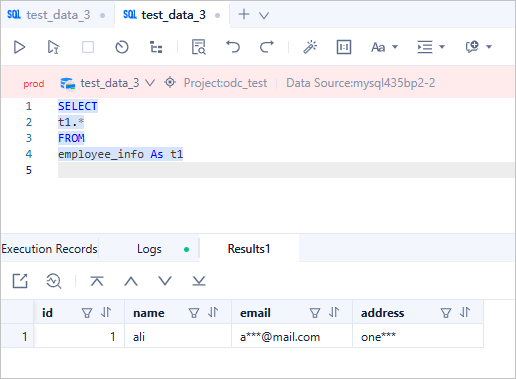
7

As you can see, the email and address columns have been successfully masked. Then, we tested some built-in functions, the CASE WHEN statement, and JOIN and UNION queries:
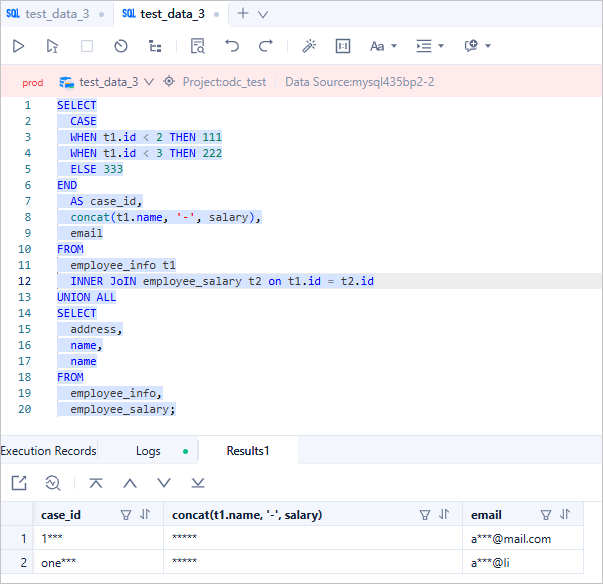
8

These queries are also covered by the dynamic data masking of ODC. All three columns in the result set have been properly masked. Let's analyze each case:

  1. The id column is not sensitive by itself, but because it is combined with the sensitive address column via UNION operation, the resulting case_id column requires masking.

  2. The name column is not marked as sensitive, but when concatenated with the salary column using CONCAT() function, the resulting concat(t1.name, '-', salary) column inherits sensitivity.

  3. The merged result of email and name columns naturally requires masking as well.

We further tested multi-level nested subqueries:
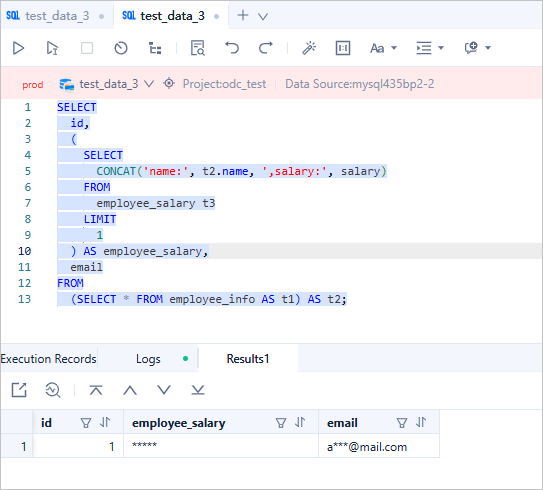
9

As shown, ODC correctly handles both correlated and non-correlated subqueries appearing in FROM and SELECT clauses.

While ODC already handles most SQL queries effectively, we have extended support to include both recursive and non-recursive Common Table Expressions (CTEs), including sensitive data propagation in recursive CTEs.

You might wonder why the cte_id column was masked in this example. This demonstrates the "sensitive data contagion" effect in Recursive CTEs. In the first recursion, the CONCAT(cte_email, cte_name) operation makes cte_name inherit sensitivity from cte_email, thus cte_name becomes a sensitive column. In the second recursion, the CONCAT(cte_name, cte_id) operation propagates sensitivity to cte_id. Consequently, all three columns in the final result set require masking.

Additional scenarios

Database changes and SQL window queries are fundamentally similar - both execute SQL statements and output results. Therefore, the dynamic masking capabilities available in SQL windows apply equally to database change tickets.

For stored procedures, packages, triggers, and custom functions, we currently lack an optimal solution for dynamically intercepting their sensitive data access. However, this does not compromise overall data protection, because these objects must first be created before they can access sensitive data, and in ODC V4.2.0, CREATE permissions for these objects and PL debugging/execution permissions are controlled, therefore, unauthorized users cannot perform these "risky" operations. This comprehensive permission management ensures ODC's sensitive data protection across all aspects.

Previous topic

Manage and modify sharded databases and tables via ODC
Last

Next topic

Enterprise-level control and collaboration: Safeguard every database change
Next
What is on this page
Background information
Scenarios
Technical background
Technical architecture
Domain model
Masking algorithms
Sensitive data management
Business scenario examples
Prepare the verification data
Scenario verification