







This topic describes how to bind a follower OCP cluster to the leader OCP cluster when you log on to the follower OCP cluster for the first time.
Applicability
This topic applies only to OceanBase Cloud Platform Enterprise Edition. OceanBase Cloud Platform Community Edition does not support the multi-cluster mode.
Prerequisites
You have created leader and follower OCP clusters in the multi-cluster mode.
You have deployed leader and follower OCP clusters. For more information, see Deploy OCP clusters in the multi-cluster mode.
To enable the multi-cluster mode for multiple common OCP clusters, configure one of them as the leader and the others as followers. For more information, see Enable or disable the multi-cluster mode.
Note
In this scenario, the primary OceanBase clusters of the leader and follower OCP clusters must have different names.
You have obtained the JDBC information for accessing the MetaDB of the leader OCP cluster.
Procedure
Go to the logon page of a follower OCP cluster, enter Username and Password , and click Log On .
The Welcome to Multi-cluster mode page appears.
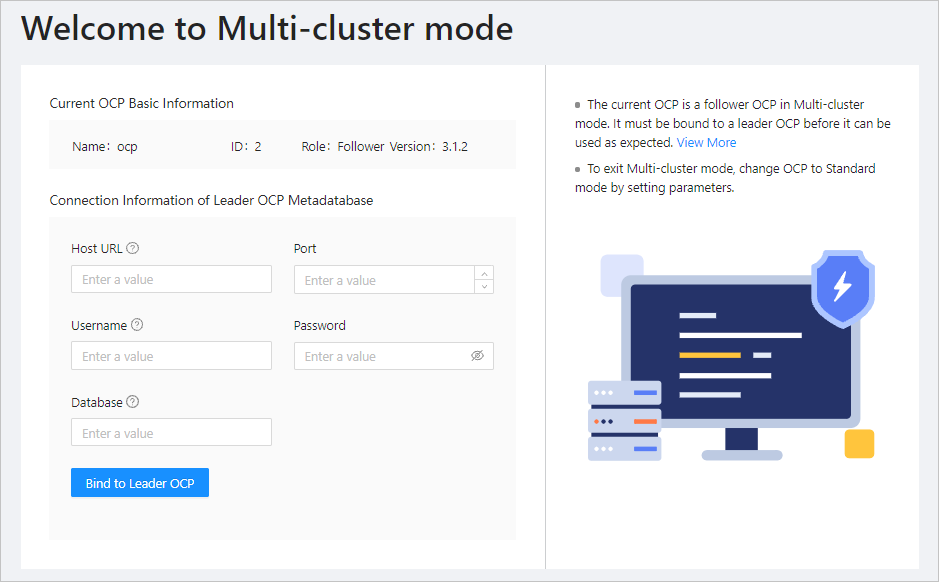
Specify the fields of Connection Information of Leader OCP Metadatabase.
ParameterDescriptionHost URL The IP address of the node where the MetaDB of the leader OCP cluster resides, for example, xxx.xxx.xxx.xxx. Port The number of the port for accessing the MetaDB of the leader OCP cluster, for example, 2883. Username The username for accessing the MetaDB of the leader OCP cluster, for example, ocp@ocp_meta#ocp321. Password The password for accessing the MetaDB of the leader OCP cluster, for example, aA******1j. Database The database name of the MetaDB of the leader OCP cluster, for example, meta_01. Note
The preceding parameters are required for accessing the MetaDB through JDBC. They can also be used to access the MetaDB in the background. If a follower OCP cluster fails to be bound to the leader OCP cluster, you can run the following command in the background to access the MetaDB for troubleshooting.
### Run the following command in OBClient to connect to the database server.
obclient -hxxx.xxx.xxx.xxx -P2881 -uocp@ocp_meta#ocp321 -paA******1j -Dmeta_01
Click Bind to Leader OCP .
If the system switches to the business mode, the follower OCP cluster is bound to the leader OCP cluster.
If the leader OCP cluster is also bound to other follower OCP clusters, the other follower OCP clusters may not be synchronously displayed in the OCPs list of the newly bound follower OCP cluster due to the setting of the
ocp.multi-cluster.replication.interval.secondsparameter. For more information, see the descriptions about OCPs in Leader & Follower Details.