







OceanBase Cloud Platform (OCP) supports two deployment modes: single-node deployment and high-availability deployment. This topic describes how to deploy OCP on a single node.
Overview
In single-node deployment, all OCP components are deployed on a single node. This node provides all OCP capabilities. The OCP components include OCP-Server, MetaDB, MonitorDB, and OBProxy.
This deployment mode has the following benefits:
All services are deployed on one host, which minimizes the required resources.
All requests are handled on one host without distributed processing, which facilitates log lookup and debugging.
OCP depends on fewer services and does not require server load balancing.
Note
Single-node deployment applies to scenarios with low availability and fast verification requirements.
Deployment process
This topic describes how to deploy OceanBase Cloud Platform (OCP) on a single node.
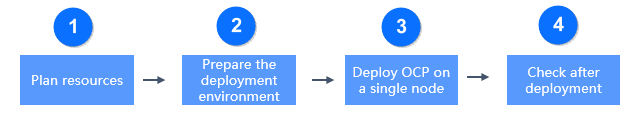
The deployment process is divided into four steps: planning resources, preparing the deployment environment, deploying OCP on a single node, and check after deployment, as shown in the following figure.
Sequence |
Step |
Description |
|---|---|---|
| 1 | Plan resources | For more information, see OCP-Server specifications, MetaDB resources, MonitorDB resources, and Host resources. |
| 2 | Prepare the deployment environment | The deployment environment requirements cover the installation media, host resources, and system requirements. For more information, seeInstall OAT, Add a server and Host resources. |
| 3 | Deploy OCP | For more information, see Prepare installation media, Deploy metadb, Deploy a OCP cluster in the Single-node, and Initialize system parameters. |
| 4 | Check after deployment | After you deploy OCP, you can verify the installation by checking the OCP features, log files, OCP version, time, and Docker container. |