







Q: How do I resolve an OOM error when using OBLOADER to import data?
A: First, modify the Java Virtual Machine memory parameters in the bin/obloader script. Then, exclude the OpenJDK GC bug.
Q: How do I run OBLOADER in debug mode to troubleshoot issues?
A: Simply run bin/obloader-debug to import data.
Q: How do I use OBLOADER to import data files with names different from the tables?
A: Specify the -f option in the command line to indicate the absolute path of the data file. Example: --table 'test' -f '/output/hello.csv'.
Q: Why doesn't the imported data take effect when a control file is configured for the table?
A: The control file name must be the same as the table name, with the same capitalization. In MySQL, table names are stored in lowercase by default, whereas in Oracle, they are stored in uppercase.
Q: What causes the command-line options to be incorrectly parsed when running the OBLOADER script?
A: This is likely due to special characters in the command-line parameter values. For example, when running the OBLOADER tool on Linux, if the password contains a greater-than sign (>, which is used for redirection), it can cause the logs to be lost. Therefore, use the correct type of quotation marks based on the operating system. (Refer to the next question for details.)
Q: When using OBLOADER, when should I enclose parameters in single or double quotation marks?
A: It is recommended to add corresponding quotation marks to the parameter values.
- Use double quotation marks on Windows. Example:
--table "*". - Use single quotation marks on Linux-based systems. Example:
--table '*'.
Q: What should I do when the external file format does not meet the requirements?
A: When importing external files, observe the following format requirements:
- If the external file is an SQL file, ensure that it contains no comments or SET statements, and that it only includes INSERT statements, with each statement on a separate line. If the file contains DDL or DML statements, it is recommended to use the MySQL source command for import.
- If the external file is a CSV file, ensure that it conforms to the standard definition, including escape characters, delimiters, column separators, and line separators. If the data contains delimiters, specify the escape character.
Q: How do I customize the name of the import job log file?
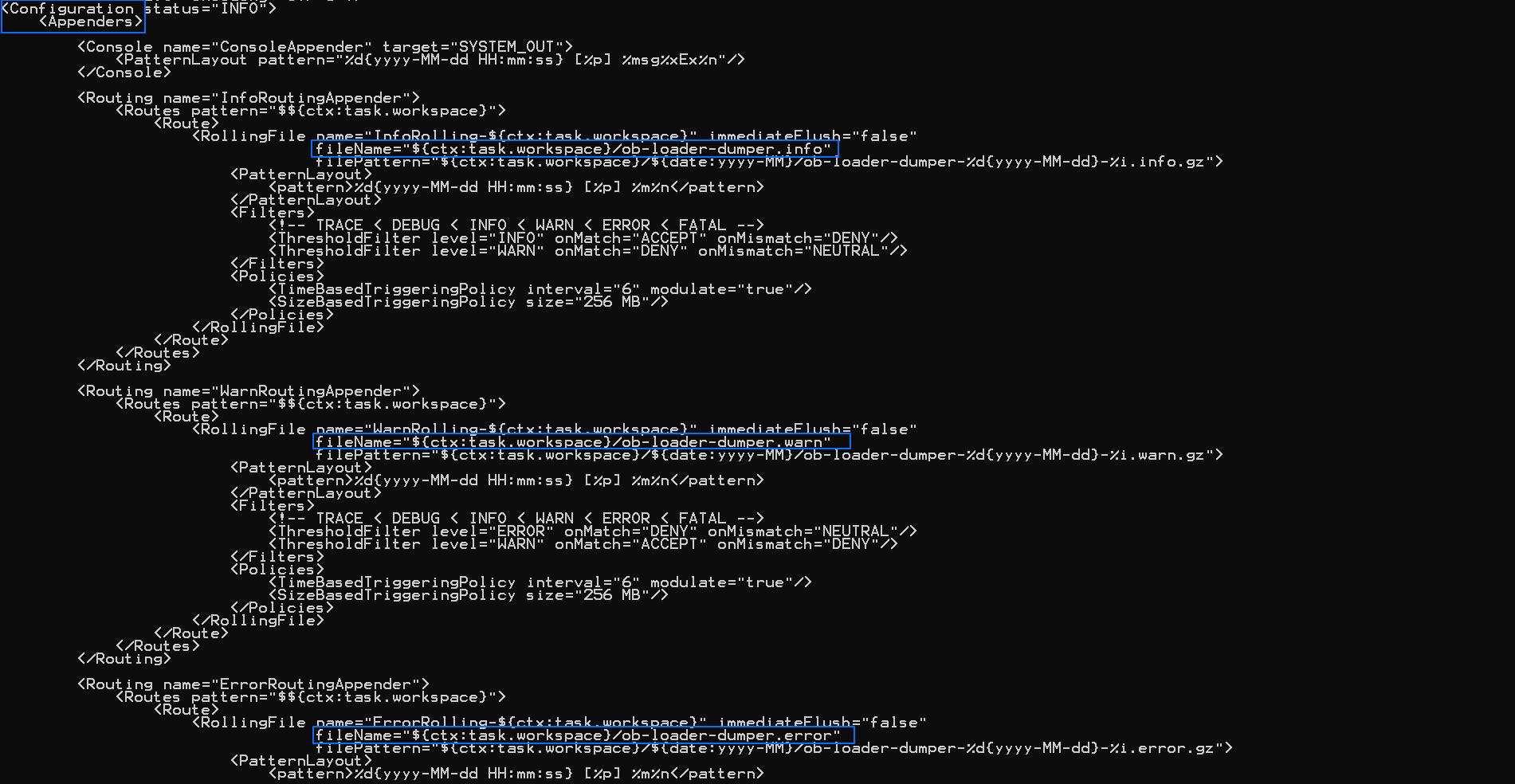
A: You can customize the log file name in {ob-loader-dumper}/conf/log4j2.xml. Below is an example of how to do this under the Routing tag:
- Change
ob-loader-dumper.infoinInfoRoutingAppenderto a custom name for info-level logs. - Change
ob-loader-dumper.warninWarnRoutingAppenderto a custom name for warn-level logs. - Change
ob-loader-dumper.errorinErrorRoutingAppenderto a custom name for error-level logs.
Note
If you use the same name for ob-loader-dumper.info, ob-loader-dumper.warn, and ob-loader-dumper.error, all log information will be generated in the same file.
Q: What do I do when there is no response when logs are output to the console?
A: It's possible that console output is paused or terminated, blocking log output. To resolve this, follow these steps:
Open the log configuration file
{ob-loader-dumper}/conf/log4j2.xmland find the following configuration:<Logger name="com.oceanbase.tools.loaddump" additivity="false" level="INFO"> <AppenderRef ref="ConsoleAppender"/> <AppenderRef ref="InfoRoutingAppender"/> <AppenderRef ref="WarnRoutingAppender"/> <AppenderRef ref="ErrorRoutingAppender"/> </Logger>Remove
<AppenderRef ref="ConsoleAppender"/>and try running the program again.
Q: Why does OBLOADER return an error: Access denied for user 'root'@'xxx.xxx.xxx.xxx'?
A: By default, the OBLOADER tool relies on the root@sys user and password. If a password has been set for the root@sys user in the cluster, specify it as the value of the --sys-password option.
Q: Why does OBLOADER return an error: Over tenant memory limits or No memory or reach tenant memory limit?
A: Increase the memory proportion for global SQL workspace or decrease the value of --thread.
set global ob_sql_work_area_percentage=30; -- Default 5
Q: Why does OBLOADER return an error: Bad Record when importing a CSV file with line breaks?
A: OBLOADER may have used the UNSAFE mode to split the file by default. Modify the JVM environment variables in the script. Open the obloader file in the {ob-loader-dumper}/bin/ directory, find the keyword PROG_OPTS, and change -Dfile.split=UNSAFE to -Dfile.split=SAFE.
Q: Why does OBLOADER return an error: No tables are exists in the schema: "xxx"?
A: The table names specified with the --table 't1,t2' option must be defined in the database, with the same capitalization. In MySQL mode of OceanBase Database, table names are stored in lowercase by default, whereas in Oracle mode of OceanBase Database, table names are stored in uppercase. If the table name defined in Oracle is in lowercase, enclose it in square brackets. Example: --table '[t1]' indicates a lowercase table name.
Q: Why does OBLOADER return an error: The xxx files are not found in the path: "xxx"?
A: The data file name specified with the -f option must be the same as the table name, with the same capitalization. In MySQL mode of OceanBase Database, table names are stored in lowercase by default, whereas in Oracle mode of OceanBase Database, table names are stored in uppercase. Example: If the table name specified with --table 't1', the data file in the specified directory must be named t1.csv or t1.sql, not T1.csv or other names.
Q: Why does OBLOADER return an error: The manifest file: "xxx" is missing?
A: The metadata file MANIFEST.bin is generated by OBDUMPER during export. When using other tools for export, no metadata file is generated. If you specify the --external-data option, OBLOADER will skip the check for the metadata file.
Q: Why does OBLOADER return an error: Index:0, Size:0 when importing data in the delimited text format?
A: This error is caused by carriage returns or line breaks in the data. Please use the script to remove these characters before importing the data.
Q: Why does OBLOADER return an error: socket was closed by server when importing KEY partitioned table data to the logical database of OceanBase Database in MySQL mode?
A: Set the proxy_mem_limited parameter and check if there are external dependencies. By default, ODP has a memory limit of 2 GB. When importing data to ODP (Sharding) logical database using OBLOADER, use the root@proxysys account. The statement to modify the logical database memory limit is as follows:
ALTER proxyconfig SET proxy_mem_limited = xxg
Q: Why does OBLOADER return an error: Not supported feature or function?
A: OBLOADER does not support some features in OBServer of a version earlier than V2.2. If you are using OBServer V2.2 or earlier, set the useServerPrepStmt parameter in the {ob-loader-dumper}/conf/session.config.json file to false, and delete the set session sql_mode = xxx statement under the init_sql.mysql tag.