






Q: How do I solve an out of memory (OOM) error when I use OBDUMPER to export data?
A: First, modify the memory parameter for the Java virtual machine (JVM) in the bin/obdumper script. Then, check whether an OpenJDK garbage collection (GC) bug occurs.
Q: How do I run OBDUMPER in debugging mode for troubleshooting?
A: Run the debugging script in the bin directory.
For example, run obdumper-debug.
Q: Why does the control file configured for a table fail to take effect when I import data to or export data from the table?
A: The name of the control file must be identical to the table name. By default, table names are in lowercase in MySQL mode and in uppercase in Oracle mode.
Q: Why does OBDUMPER not generate an empty data file when it exports an empty table?
A: By default, OBDUMPER does not generate an empty data file for an empty table. You can specify the --retain-empty-files option to generate an empty data file for an empty table.
Q: Why are command-line options not parsed as expected when I run the OBDUMPER script?
A: This issue may occur if command-line option values contain special characters. If you run OBDUMPER on Linux OS, a greater-than sign (>) in the password may cause the loss of all operational logs. This is because the greater-than sign (>) is a redirection operator. Therefore, you must use appropriate quotation marks to resolve this issue on different OS platforms.
Q: When I use OBDUMPER to export data, why do sec.avg and min.avg indicate similar export speeds?
A: sec.avg indicates the global average speed in seconds, and min.avg indicates the average speed in the last minute in seconds.
Q: In Oracle mode of OceanBase Database, OBDUMPER exports duplicate data when the primary key name and index name of a table are the same. What can I do?
A: Do not create multiple constraints with the same name on a table. If a table contains a unique index with the same name as the primary key, you can delete the unique index and create another one with a different name. For more information, see Overview.
Q: How do I customize log file names for an export job?
A: You can customize log file names in {ob-loader-dumper}/conf/log4j2.xml. As shown in the following figure, you can modify the following names in the Routing tag:
ob-loader-dumper.infofor INFO logs inInfoRoutingAppenderob-loader-dumper.warnfor WARN logs inWarnRoutingAppenderob-loader-dumper.errorfor ERROR logs inErrorRoutingAppenderNote
If you modify
ob-loader-dumper.info,ob-loader-dumper.warn, andob-loader-dumper.errorto the same name, all logs are generated in the same file.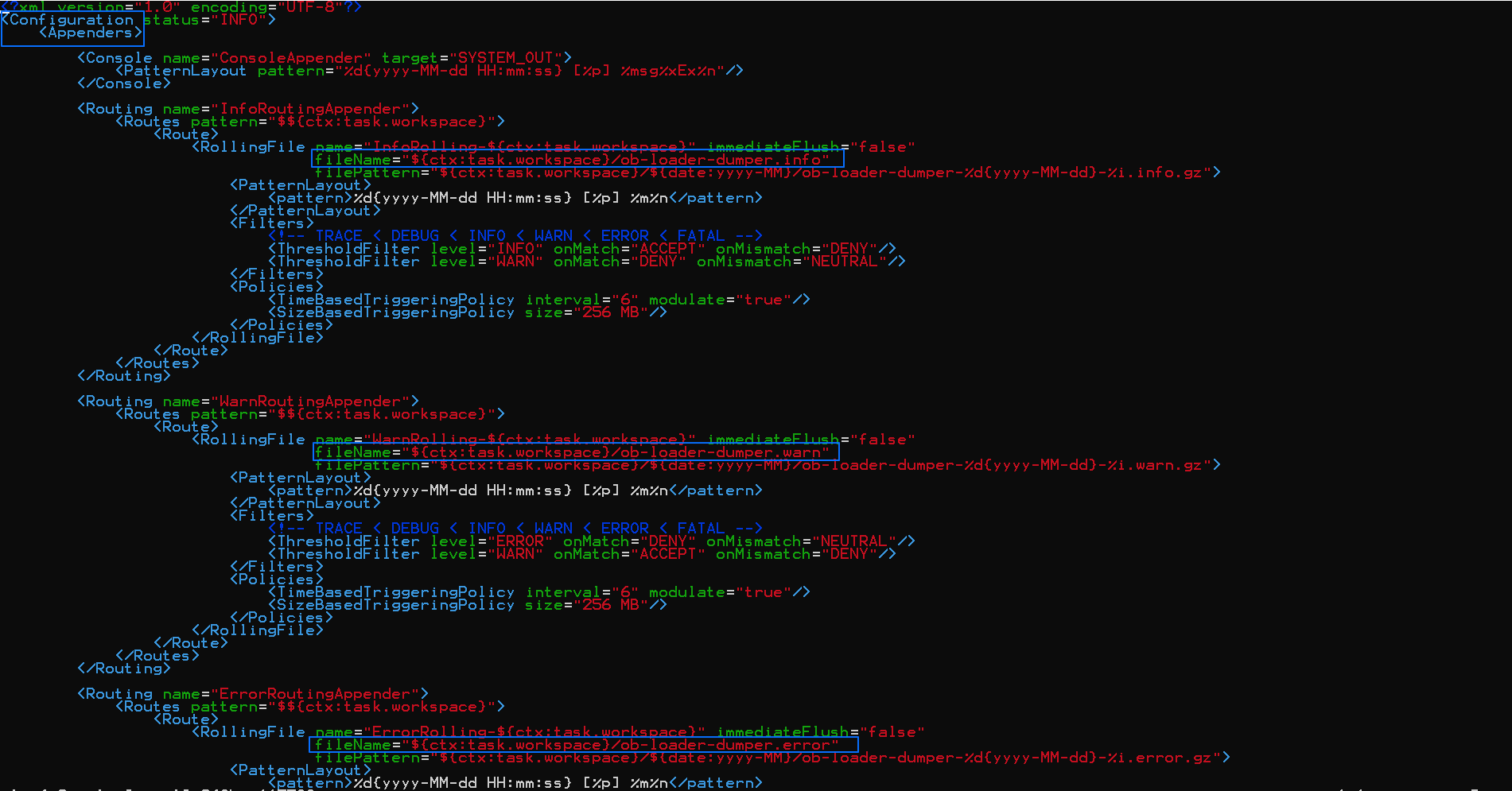
Q: What do I do when no response is given during log output in the console?
A: This issue may occur if log output is suspended or terminated in the console. Perform the following steps to resolve the issue:
Open the log configuration file
{ob-loader-dumper}/conf/log4j2.xmland find the following configurations:<Logger name="com.oceanbase.tools.loaddump" additivity="false" level="INFO"> <AppenderRef ref="ConsoleAppender"/> <AppenderRef ref="InfoRoutingAppender"/> <AppenderRef ref="WarnRoutingAppender"/> <AppenderRef ref="ErrorRoutingAppender"/> </Logger>Delete
<AppenderRef ref="ConsoleAppender"/>and try again.
Q: What do I do if the Connection reset error is reported after I use the --query-sql option to specify large query statements for OBDUMPER?
A: Log on to the sys tenant and set ODP parameters client_tcp_user_timeout and server_tcp_user_timeout to 0.
Q: What do I do if the following error is reported when I start OBDUMPER: Access denied for user 'root'@'xxx.xxx.xxx.xxx'?
A: By default, OBDUMPER requires the privileges of the root@sys user. If a password has been specified in the cluster for the root@sys user, set the value of the --sys-password command-line option to the specified password.
Q: What do I do if the following error is reported when OBDUMPER is running: The target directory: "xxx" is not empty?
A: To avoid overwriting data, OBDUMPER checks whether the output directory is empty before it exports data. You can specify the --skip-check-dir option to skip the check.
Q: What do I do if the following error is reported when OBDUMPER is running: Request to read too old versioned data?
A: The data version that the current query depends on has been recycled. You need to set an UNDO retention period based on the query.
For example, you can execute set global undo_retention=xxx. The default unit is seconds.
Q: What do I do if OBDUMPER reports the ChunkServer out of disk space error?
A: This issue is caused by a small value of the _temporary_file_io_area_size parameter. You can modify the parameter to resolve this issue.
For example, execute the SELECT * FROM oceanbase.__all_virtual_sys_parameter_stat WHERE name='_temporary_file_io_area_size'; statement to query the value of the _temporary_file_io_area_size parameter, and execute the ALTER SYSTEM SET _temporary_file_io_area_size = 20; statement to modify the value of this parameter.
Q: What do I do if the following error is reported when I query a view on OBDUMPER: SELECT command denied to user 'xxx'@'%' for table SYS.XXX?
A: The account you used does not have the privilege to query internal tables or views. Execute the GRANT SELECT SYS.XXX TO xxx; statement to grant the privilege to this account.
Q: What do I do when OBDUMPER returns the error Not supported feature or function?
A: Some features are not supported for an OBServer node of earlier versions. When you use OBServer V2.2 or earlier, set the JDBC parameter useServerPrepStmt to false in the configuration file {ob-loader-dumper}/conf/session.config.json, and delete the set session sql_mode = xxx statement in the init_sql.mysql tag of the configuration file.