







During database operation, various exceptions may occur, such as application errors, database connection errors, database privilege issues, database resource limitations, and network problems. One such exception is an application exception where the error message does not contain an OceanBase error code. This makes it difficult to determine the relevance to OceanBase Database, leading to unclear troubleshooting directions.
To help you quickly identify the root cause and efficiently resolve this issue, we have summarized a clear and practical troubleshooting process for application exceptions where the error message does not contain an OceanBase error code. This process provides step-by-step guidance to enhance troubleshooting efficiency and minimize business impact, supporting your daily O&M work.
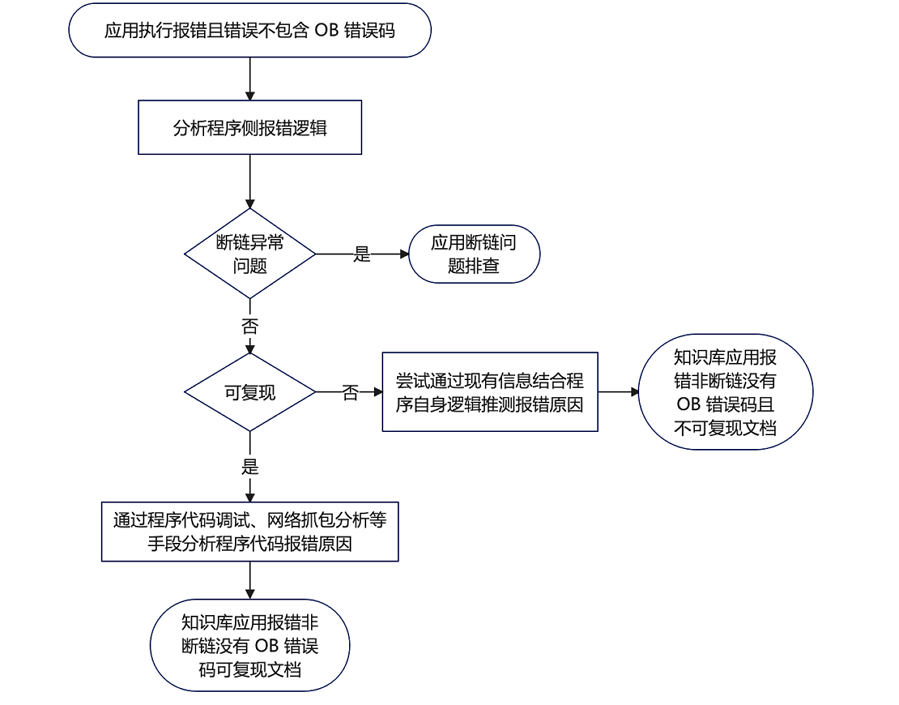
The following figure shows the troubleshooting process for an application that reports an exception but the error message does not contain an OceanBase error code.
Process
When an application reports an exception but the error message does not contain an OceanBase error code, you can troubleshoot the issue using the following process.
Analyze the error logic on the application side to determine if it is a disconnection exception:
If yes, refer to the knowledge base for troubleshooting.
If no, check if the exception can be reproduced:
If yes, use methods such as debugging the program code and network packet capture (e.g., tcpdump) to analyze the cause of the program code error and thus identify the analysis direction.
If no, use existing information and the program's logic to speculate on the cause of the error, thereby identifying the analysis direction.
Case studies
Application feedback: During large-scale data import, the application logs reported the error
Connection is closed & Connection reset. For more information, see OBProxy returns Connection reset due to high memory usage.In the test environment, the SQL execution time was observed to be 2 ms on the application side. However, in the production environment, the execution time increased to 30-40 ms, while the SQL execution time within the database remained unchanged. For more information, see SQL execution time on application side far exceeds that within the database.
- After the system switched from an Oracle database to an Oracle tenant of OceanBase Database, a JDBC application deployed by using JBoss encountered a shortage of connections. For more information, see Connection shortage in a JDBC application deployed by using JBoss.