







The syntax of SELECT is complex. This topic describes the syntax of general SELECT statements and aggregate SELECT statements.
Purpose
You can use this statement to query data from a table.
Syntax
SELECT
        [/*+ hint statement */]
        [ALL | DISTINCT | UNIQUE | SQL_CALC_FOUND_ROWS]
        [STRAIGHT_JOIN]
        select_expr_list
        [FROM from_list [WHERE condition]]
        [GROUP BY group_expression_list [WITH ROLLUP] [HAVING condition]]
        [ORDER BY order_expression_list]
        [limit_clause]
        [FOR UPDATE [opt_for_update_wait]]
        [LOCK IN SHARE MODE];
select_expr:
 table_name.*
  | table_alias_name.*
  | expr [[AS] column_alias_name]

from_list:
      DUAL
    | table_reference [, table_reference ...]

table_reference:
      simple_table
    | joined_table
    | table_name@dblink_name

simple_table:
    table_factor [partition_option]
        [sample_clause [opt_seed]]
        [[AS] table_alias_name][index_hint]
    | (select_stmt [sample_clause [opt_seed])
        [AS] table_alias_name [index_hint]
    | (table_reference_list) [index_hint]

joined_table:
      table_reference [NATURAL][INNER] JOIN simple_table [join_condition]
    | table_reference outer_join_type JOIN simple_table join_condition

partition_option:
    PARTITION (partition_name_list)

sample_clause:
    SAMPLE [BLOCK] [ ALL | BASE | INCR] (sample_percent)

opt_seed:
    SEED(integer)

index_hint:
    {USE | FORCE | IGNORE} {KEY | INDEX}
       [FOR {JOIN | ORDER BY | GROUP BY}] (index_list)

index_list:
    index_name [, index_name ...]

partition_name_list:
    partition_name [, partition_name ...]

outer_join_type:
    [NATURAL]{LEFT | RIGHT | FULL} [OUTER]

join_condition:
    ON expression

condition:
    expression

group_expression_list:
    group_expression [, group_expression ...]

group_expression:
    expression [ASC | DESC]

order_expression_list:
    order_expression [, order_expression ...]

order_expression:
    expression [ASC | DESC]

limit_clause:
  LIMIT {[offset,] row_count |row_count OFFSET offset}

opt_for_update_wait:
    WAIT { DECIMAL | INTNUM }
  | NOWAIT | NO_WAIT
Parameters
Parameter |
Description |
|---|---|
| ALL | DISTINCT | UNIQUE | SQL_CALC_FOUND_ROWS | A database table may contain duplicate values.
|
| STRAIGHT_JOIN | Optional. Forces the optimizer to join tables based on the order in the FROM clause. This parameter is only for optimization and does not affect the execution result.
NoticeOceanBase Database is not fully compatible with the |
| select_expr | The expressions or columns that you want to query. Multiple values must be separated with commas (,). You can also use an asterisk (*) to represent all columns. |
| AS othername | Renames an output field. |
| FROM table_references | The table or tables from which data is to be retrieved (multi-table query is supported). |
| WHERE where_conditions | A filter condition, which is optional. Only the data that meets the condition is included in the query result. where_conditions is an expression. |
| GROUP BY group_by_list | Summarizes data by class. |
| WITH ROLLUP | Summarizes groups to produce higher-level aggregations, also known as hyper-aggregations, and additional rows. |
| HAVING search_confitions | The HAVING clause is similar to the WHERE clause, but the HAVINGclause can use an accumulation function such as SUM or AVG. |
| SAMPLE [BLOCK] [ ALL | BASE | INCR] (sample_percent) | Scans only part of the records.
|
| SEED integer | The sampling seed. Value range: [0, 4294967295]. The same result is always returned for the same seed. |
| {USE | FORCE | IGNORE} {KEY | INDEX} [FOR {JOIN | ORDER BY | GROUP BY}] (index_list) | Specifies whether to use the specified index for the query.
|
| SQL_CALC_FOUND_ROWS | Displays the query results in ascending (ASC) or descending (DESC) order. The default value is ASC. |
| [LIMIT {[offset,] row_count |row_count OFFSET offset}] | Forces the SELECT statement to return the specified number of records. LIMIT supports one or two numeric arguments. The arguments must be integer constants.
|
| FOR UPDATE | Imposes an exclusive lock on all the rows in the query result to prevent other concurrent transactions from changing or reading the rows in some transaction isolation levels.
|
| PARTITION(partition_list) | The partitions of the table from which data is selected, for example, partition(p0,p1...). |
| dblink_name | The DBLink used to query data from tables in a remote database.
NoteThis parameter applies only to OceanBase Database Enterprise Edition. OceanBase Database Community Edition does not support the |
| LOCK IN SHARE MODE | Specifies to lock the query result. |
Examples
Simple table queries
Take Table a as an example.
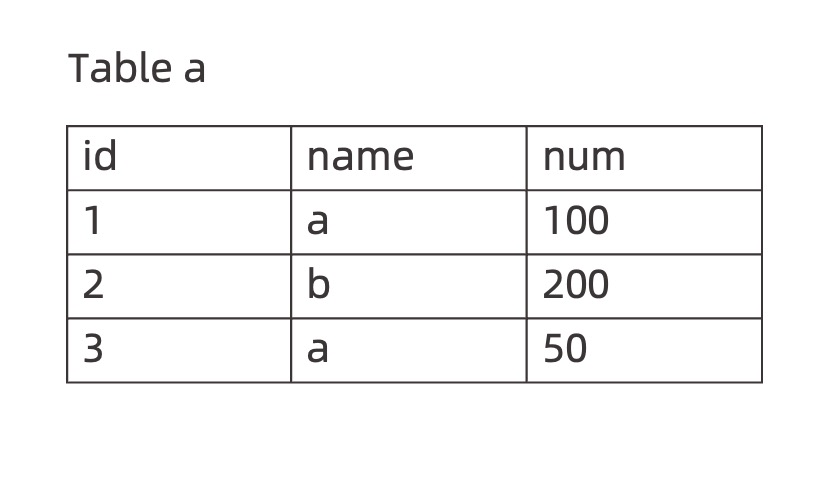
Query the data in the
namecolumn from Tablea.obclient> SELECT name FROM a; +------+ | name | +------+ | a | | b | | a | +------+Deduplicate the query result of the
namecolumn.obclient> SELECT DISTINCT name FROM a; +------+ | name | +------+ | a | | b | +------+Query the
id,name, andnumcolumns in Tablea, divide values in thenumcolumn by 2, and rename the output column asavg.obclient> SELECT id, name, num/2 AS avg FROM a; +------+------+----------+ | id | name | avg | +------+------+----------+ | 1 | a | 50.0000 | | 2 | b | 100.0000 | | 3 | a | 25.0000 | +------+------+----------+Return the values of the corresponding
id,name, andnumcolumns of Tableabased on the filtering conditionname = 'a'.obclient> SELECT id, name, num FROM a WHERE name = 'a'; +------+------+------+ | id | name | num | +------+------+------+ | 1 | a | 100 | | 3 | a | 50 | +------+------+------+Query the
idandnamevalues from Tablea, calculate the sum of thenumvalues byname, and return the calculation results.obclient> SELECT id, name, SUM(num) FROM a GROUP BY name; +------+------+----------+ | id | name | SUM(num) | +------+------+----------+ | 1 | a | 150 | | 2 | b | 200 | +------+------+----------+Query the
id,name, andnumvalues from Tablea, calculate the sum of thenumvalues byname, and return the rows with a sum less than160.obclient> SELECT id, name, SUM(num) as sum FROM a GROUP BY name HAVING SUM(num) < 160; +------+------+------+ | id | name | sum | +------+------+------+ | 1 | a | 150 | +------+------+------+Query the
id,name, andnumvalues from Tablea, and sort the result by thenumcolumn in ascending order.obclient> SELECT * FROM a ORDER BY num ASC; +------+------+------+ | id | name | num | +------+------+------+ | 3 | a | 50 | | 1 | a | 100 | | 2 | b | 200 | +------+------+------+Query the
id,name, andnumvalues from Tablea, and sort the result by thenumcolumn in descending order.obclient> SELECT * FROM a ORDER BY num DESC; +------+------+------+ | id | name | num | +------+------+------+ | 2 | b | 200 | | 1 | a | 100 | | 3 | a | 50 | +------+------+------+Query the
id,name, andnumvalues from Tablea, and useLIMITto forcibly return two result rows starting from the second row.obclient> SELECT * FROM a LIMIT 1,2; +------+------+------+ | id | name | num | +------+------+------+ | 2 | b | 200 | | 3 | a | 50 | +------+------+------+You can use the
SELECT ... FOR UPDATEstatement to apply a row lock to a table. If you use theLIMIT 1clause, the operator is pushed down to the table scan step during query optimization, and only the rows returned byLIMITare locked.obclient> SELECT * FROM a LIMIT 1 FOR UPDATE;If you use the
ORDER BYclause, the query result is sorted first, and then theLIMIT 1clause is executed. In this case, all the selected rows are locked.obclient> SELECT * FROM a ORDER BY id LIMIT 1 FOR UPDATE;Use the
LOCK IN SHARE MODEoption to lock the query result of Tablea.obclient> SELECT * FROM a LOCK IN SHARE MODE; +------+------+------+ | id | name | num | +------+------+------+ | 1 | a | 100 | | 2 | b | 200 | | 3 | a | 50 | +------+------+------+ 3 row in set
Queries by using a DBLink
Read the
number_ttable in the remotetestdatabase.obclient> SELECT * FROM number_t@ob_dblink; +--------+-------------+---------+---------------------+--------------------------------+ | c_int | c_bigint | c_float | c_double | c_decimal | +--------+-------------+---------+---------------------+--------------------------------+ | 214748 | 92233720368 | 3.40282 | 1.7976931348623157 | 123456789123456789.1234567890 | +--------+-------------+---------+---------------------+--------------------------------+ 1 row in setRead the
number_ttable in the remotetestdatabase and join the table with the localnumber_ttable.obclient> SELECT a.c_decimal, b.c_double FROM number_t a, number_t@ob_dblink b where a.c_int = b.c_int; +--------------------------------+---------------------+ | c_decimal | c_double | +---------------------+--------------------------------+ | 123456789123456789.1234567890 | 1.7976931348623157 | +---------------------+--------------------------------+ 1 row in setRead the
datetime_ttable in the remotemysqldatabase.obclient> SELECT * FROM mysql.datetime_t@ob_dblink; +-------------+------------+---------+----------------------+----------------------+ | c_date | c_time | c_year | c_datetime | c_timestamp | +-------------+------------+---------+-----------------------+---------------------+ | 2023-04-13 | 12:12:12 | 2078 | 2100-11-01 12:12:13 | 2100-12-01 21:14:15 | +-------------+------------+---------+----------------------+----------------------+ 1 row in set