







When the primary tenant is available, you can switch the roles of the primary tenant and a standby tenant without data loss.
Background
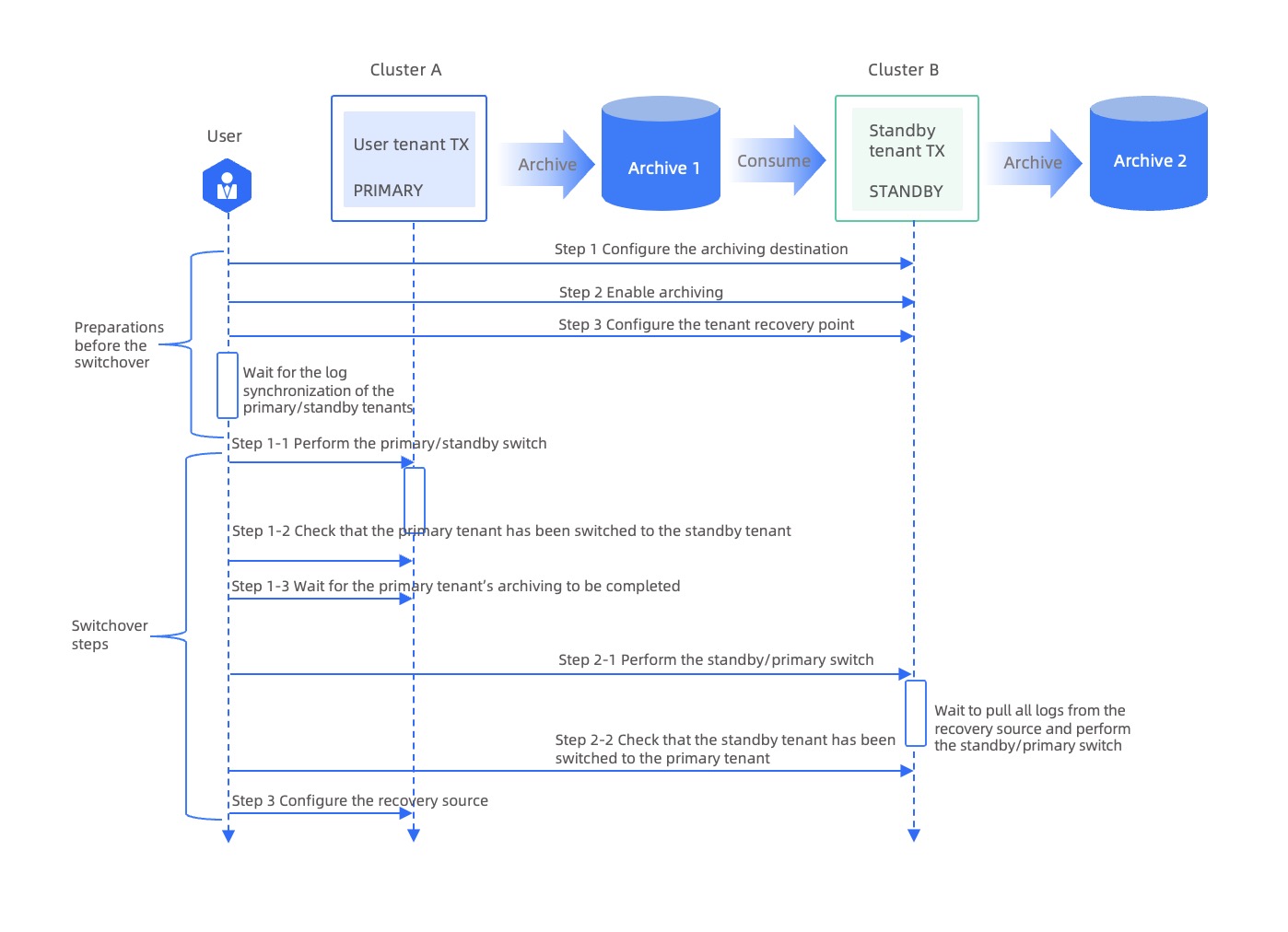
A switchover is completed in the following three steps: preparing for the switchover, switching the primary tenant to the STANDBY role, and switching a standby tenant to the PRIMARY role.
The following figure shows the switchover process.
Prepare for the switchover
Before you switch a standby tenant to the PRIMARY role, you must specify the log archiving destination and enable archivelog for the standby tenant. To ensure data consistency between the primary and standby tenants, which is required for a successful switchover, you must also set the synchronization mode of the standby tenant to continuous synchronization.
Log on to the database as the administrator of the standby tenant or the
systenant of the cluster where the standby tenant resides.Specify the log archiving destination of the standby tenant.
To do so, specify the following attributes:
LOCATION,PIECE_SWITCH_INTERVAL, andBINDING.Execute the following statement in the
systenant of the cluster where the standby tenant resides to specify the log archiving destination of the standby tenant:ALTER SYSTEM SET LOG_ARCHIVE_DEST='LOCATION = archive_path [PIECE_SWITCH_INTERVAL = piece_switch_interval] [BINDING = archive_mode]' TENANT = tenant_name;Execute the following statement in the standby tenant to specify the log archiving destination of the current tenant:
ALTER SYSTEM SET LOG_ARCHIVE_DEST='LOCATION = archive_path [PIECE_SWITCH_INTERVAL = piece_switch_interval] [BINDING = archive_mode]';
Attributes:
The
LOCATIONattribute specifies the archiving destination. OceanBase Database supports two types of media as the archiving destination: Network File System (NFS) and Alibaba Cloud Object Storage Service (OSS).The
BINDINGattribute specifies the prioritizing mode for archiving and businesses. TheBINDINGattribute has two values:OptionalandMandatory. If you do not specify this attribute, the default valueOptionaltakes effect.The
Optionalmode prioritizes user businesses. In this mode, when log archiving falls behind log generation, logs may be recycled before being archived. This causes interruption.The
Mandatorymode prioritizes archiving. In this mode, you may be unable to write more data before existing data is archived.
The
PIECE_SWITCH_INTERVALattribute specifies the switching interval for pieces. The value range is[1d, 7d]. If you do not specify this attribute, the default value1dtakes effect.
For example, to set NFS as the archiving destination, execute the following statement to set the log archiving path of the standby tenant to
file:///data/1/nfs/backup//ob_oracle_standby/archiveand setBINDINGtoOptional:obclient [ORACLE]> ALTER SYSTEM SET LOG_ARCHIVE_DEST='LOCATION = file:///data/1/nfs/backup//ob_oracle_standby/archive BINDING = optional' TENANT = oracle_standby; obclient [ORACLE]> ALTER SYSTEM SET LOG_ARCHIVE_DEST='LOCATION = file:///data/1/nfs/backup//ob_oracle_standby/archive BINDING = optional';Enable archivelog for the standby tenant.
Execute the following statement in the
systenant of the cluster where the standby tenant resides to enable archivelog for the standby tenant.Sample statement:
obclient [(none)]> ALTER SYSTEM ARCHIVELOG TENANT = oracle_standby;oracle_standbyindicates the name of the standby tenant. Replace it with the actual name of your standby tenant.Execute the following statement in the standby tenant to enable archivelog for the current tenant.
obclient [xx]> ALTER SYSTEM ARCHIVELOG;
Check whether the standby tenant is in continuous synchronization mode.
You can query the
DBA_OB_TENANTSview and check the value of theRECOVERY_UNTIL_SCNcolumn. The value of theRECOVERY_UNTIL_SCNcolumn indicates the maximum recovery system change number (SCN).Sample statement:
SELECT TENANT_NAME, TENANT_ROLE, SWITCHOVER_STATUS, RECOVERY_UNTIL_SCN
FROM oceanbase.DBA_OB_TENANTS WHERE TENANT_NAME = 'oracle_standby';
+------------------+-------------+-------------------+------------------------+
| TENANT_NAME      | TENANT_ROLE | SWITCHOVER_STATUS | RECOVERY_UNTIL_SCN     |
+------------------+-------------+-------------------+------------------------+
| oracle_standby   | STANDBY     | NORMAL            | 4611686018427387903    |
+------------------+-------------+-------------------+------------------------+
1 row in set
In the query result, if the value of the
RECOVERY_UNTIL_SCNcolumn is equal to the value of the maximum SCN, which is4611686018427387903, the standby tenant is in continuous log synchronization mode.For more information about the
DBA_OB_TENANTSview, see oceanbase.DBA_OB_TENANTS (MySQL Mode) or DBA_OB_TENANTS (Oracle Mode).(Optional) If the standby tenant is not in continuous log synchronization mode, execute the following statement:
ALTER SYSTEM RECOVER STANDBY UNTIL UNLIMITED;To execute the statement in the
systenant, you must use theTENANT = tenant_nameparameter to specify the name of the standby tenant in the statement, for example,ALTER SYSTEM RECOVER STANDBY TENANT = oracle_standby UNTIL UNLIMITED;.After the standby tenant enters the continuous log synchronization mode, wait for the standby tenant to synchronize logs from the primary tenant. For more information about how to view the log synchronization progress of a standby tenant, see Monitor the log synchronization status of a standby tenant.
Switchover
The switchover step includes switching the primary tenant to the STANDBY role and switching a standby tenant to the PRIMARY role.
Switch the primary tenant to the STANDBY role.
Log on to the database as the administrator of the primary tenant or the
systenant of the cluster where the primary tenant resides.Execute the SWITCHOVER statement to switch the primary tenant to the STANDBY role.
Execute the following statement in the
systenant of the cluster where the primary tenant resides to switch the primary tenant to the STANDBY role:ALTER SYSTEM SWITCHOVER TO STANDBY TENANT = tenant_name;Execute the following statement in the primary tenant to switch it to the STANDBY role:
ALTER SYSTEM SWITCHOVER TO STANDBY;
Check whether the primary tenant is switched to the STANDBY role.
Sample statement:
SELECT TENANT_ID, TENANT_NAME,TENANT_TYPE,TENANT_ROLE,SWITCHOVER_STATUS
FROM DBA_OB_TENANTS
WHERE TENANT_NAME='oracle';
+-----------+-------------+-------------+-------------+-------------------+
| TENANT_ID | TENANT_NAME | TENANT_TYPE | TENANT_ROLE | SWITCHOVER_STATUS |
+-----------+-------------+-------------+-------------+-------------------+
|      1004 | oracle      | USER        | STANDBY     | NORMAL            |
+-----------+-------------+-------------+-------------+-------------------+
1 row in set
The query result shows that the value of the
TENANT_ROLEparameter of the original primary tenant has changed toSTANDBY. If the value of theSWITCHOVER_STATUSparameter isNORMAL, the original primary tenant is switched to the STANDBY role.Query the
V$OB_ARCHIVE_DEST_STATUSview and check theSYNCHRONIZEDcolumn to verify whether the log archiving of the original primary tenant is completed.Sample statement:
SELECT * FROM V$OB_ARCHIVE_DEST_STATUS WHERE TENANT_ID = 1004;If the value of the
SYNCHRONIZEDfield in the query result isYES, the log archiving of the original primary tenant is completed.
Switch a standby tenant to the PRIMARY role.
Log on to the database as the administrator of the standby tenant or the
systenant of the cluster where the standby tenant resides.Execute the SWITCHOVER statement to switch the standby tenant to the PRIMARY role.
Notice
Before the SWITCHOVER statement is executed, the system checks whether all logs are synchronized from the recovery source to the standby tenant. Therefore, the execution time of the SWITCHOVER statement depends on the progress of the progress of synchronization between the standby tenant and the original primary tenant.
Execute the following statement in the
systenant of the cluster where the standby tenant resides to switch the standby tenant to the PRIMARY role:ALTER SYSTEM SWITCHOVER TO PRIMARY TENANT = tenant_name;Execute the following statement in the standby tenant to switch it to the PRIMARY role:
ALTER SYSTEM SWITCHOVER TO PRIMARY;
Check whether the standby tenant is switched to the PRIMARY role.
Sample statement:
SELECT TENANT_ID, TENANT_NAME,TENANT_TYPE,TENANT_ROLE,SWITCHOVER_STATUS
FROM DBA_OB_TENANTS
WHERE TENANT_NAME='oracle_standby';
+-----------+----------------------------+-------------+-------------+-------------------+
| TENANT_ID | TENANT_NAME                | TENANT_TYPE | TENANT_ROLE | SWITCHOVER_STATUS |
+-----------+----------------------------+-------------+-------------+-------------------+
|      1006 | oracle_standby             | USER        | PRIMARY     | NORMAL            |
+-----------+----------------------------+-------------+-------------+-------------------+
1 row in set
The query result shows that the value of the
TENANT_ROLEparameter of the original standby tenant has changed toPRIMARY. If the value of theSWITCHOVER_STATUSparameter isNORMAL, the standby tenant is switched to the PRIMARY role.For more information about the
DBA_OB_TENANTSview, see oceanbase.DBA_OB_TENANTS (MySQL Mode) or DBA_OB_TENANTS (Oracle Mode).
Specify the recovery source of the new standby tenant, namely the original primary tenant, to receive archive logs from the new primary tenant.
Log on to the database as the administrator of the new standby tenant or the
systenant of the cluster where the new standby tenant resides.Execute the following statement to specify the recovery source of the new standby tenant.
Execute the following statement in the
systenant of the cluster where the new standby tenant resides to specify the recovery source of the new standby tenant:ALTER SYSTEM SET LOG_RESTORE_SOURCE ='LOCATION = archive_path' TENANT = tenant_name;Execute the following statement in the new standby tenant to specify its recovery source:
ALTER SYSTEM SET LOG_RESTORE_SOURCE ='LOCATION = archive_path';
The
LOCATIONattribute specifies the log archiving destination of the new primary tenant.Sample statement:
obclient [SYS]> ALTER SYSTEM SET LOG_RESTORE_SOURCE ='LOCATION = file:///data/1/nfs/backup//ob_oracle_standby/archive' TENANT = oracle;

obclient [SYS]> ALTER SYSTEM SET LOG_RESTORE_SOURCE ='LOCATION = file:///data/1/nfs/backup//ob_oracle_standby/archive';
After you specify the recovery source, you do not need to execute the
RECOVERstatement to set the recovery endpoint of the original primary tenant. This is because the recovery endpoint of the original primary tenant is set toUNLIMITEDby default.