







TableAPI of OceanBase Database enables you to access an OBServer node in NoSQL mode. This topic briefly describes how to use ob_table_client_java, the TableAPI client, to call operations.
Introduction to the client
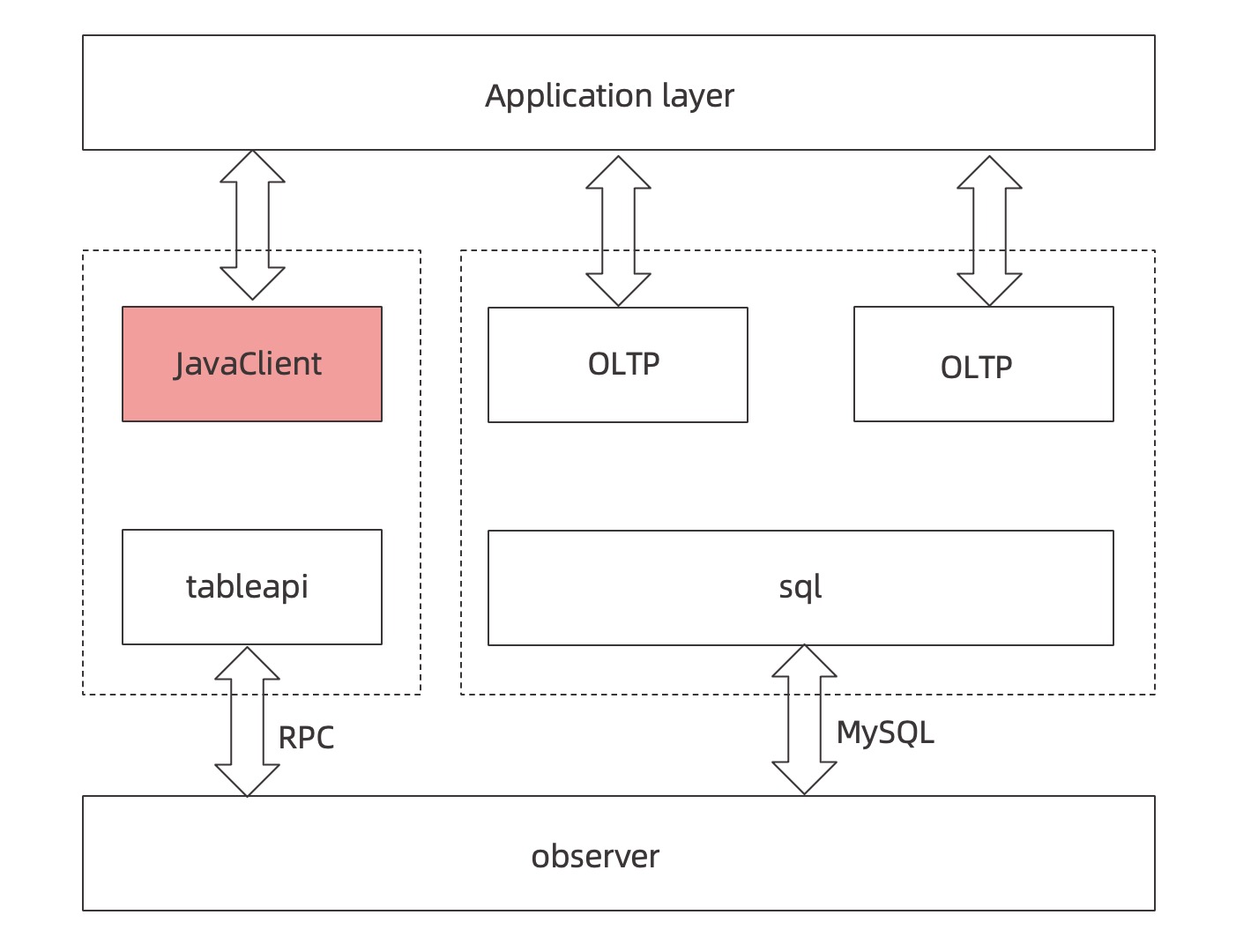
Generally, applications access an OBServer node by using TableAPI in NoSQL mode or by sending SQL statements.
In NoSQL mode, ob_table_client_java communicates with the OBServer node over the RPC protocol and supports a variety of operations to meet the requirements in most scenarios.
SQL queries involve complicated processes such as the parsing of SQL syntax and semantics and the generation of execution plans. In comparison, TableAPI provides nearly the same transaction handling and data storage capabilities and is easier to use.
The following flowchart shows the overall working process of the client:
Instructions for use
This section describes how to use the ob_table_client_java client to call operations.
Create an OceanBase database
You can log on to OceanBase Database by using OBClient or a MySQL client. For more information, see Connect to an OceanBase Database tenant by using OBClient and Connect to an OceanBase database by using a MySQL client.
Run the CREATE TABLE command to create a table:
CREATE TABLE IF NOT EXISTS `test_varchar_table_00` (
    `c1` varchar(20) NOT NULL,
    `c2` varchar(20) DEFAULT NULL,
    `c3` varchar(20) DEFAULT NULL,
    PRIMARY KEY (`c1`)
);
Import maven obkv-table-client dependencies
Log on to the obkv-table-client-java repository, download the latest client, and add it to the pom.xml file.
init
You can call this operation to initialize the ObTableClient.
Sample code:
final ObTableClient client = new ObTableClient();  // Create a client instance.
client.setFullUserName("your user name");
client.setParamURL("your OCP addr url");
client.setPassword("your password");
obTableClient.setSysUserName("your sys user name");
obTableClient.setSysPassword("your sys password");
client.init();
Parameters:
- setFullUserName: the username for logging on to the database.
- setParamURL: the URL of the server on which OceanBase Cloud Platform (OCP) is deployed, if the client is deployed by using OCP.
- setPassword: the password for logging on to the database. You can leave this field unspecified.
- setSysUserName: the username of the sys tenant, such as proxyro@sys. It is required for obtaining the internal table of routing information when you request routing.
- setSysPassword: the user password of the sys tenant.
insert
You can call this operation to insert a row. If a primary key conflict occurs, which means that the target row already exists, the insertion fails.
Sample code:
long insert(String tableName, Object rowkey, String[] columns, Object[] values);
long insert(String tableName, Object[] rowkeys, String[] columns, Object[] values);

// The rowkey in the sample code corresponds to the primary key of the table.
client.insert( "testHash",
     new Object[] { 1L, "partition".getBytes(), timeStamp },
     new String[] { "V" },
     new Object[] { "value".getBytes() }
);
Parameters:
- tableName: the name of the table.
- rowkey: the value of the primary key.
- columns: the names of the columns to be inserted. You can insert one or more columns.
- values: the column values to be inserted.
- long: the return value that indicates the number of inserted columns. In this sample, 1 row is inserted.
get
You can call this operation to retrieve a row. If the target row exists, the row is retrieved. Otherwise, an empty value is returned.
Sample code:
Map<String, Object> get(String tableName, Object rowkey, String[] columns);
Map<String, Object> get(String tableName, Object[] rowkeys, String[] columns);

// rowkey is the primary key.
Map<String, Object> res = client.get("testHash",
           new Object[] { 1L, "partition".getBytes(), timestamp },
           new String[] { "K", "Q", "T","V" }
);

// If the returned value is an object, you can perform an explicit type conversion, such as Long k = (Long) res.get("K");
Parameters:
- tableName: the name of the table.
- rowkey: the value of the primary key.
- columns: the name of the column to be retrieved. You can retrieve one or more columns.
- Map<String, Object>: the return value. If the target column exists, the column is retrieved. Otherwise, an empty value is returned.
delete
You can call this operation to delete a row. If the target row does not exist, affectrows = 0 is returned. Otherwise, the number of deleted rows, 1 row in this case, is returned.
Sample code:
long delete(String tableName, Object rowkey);
long delete(String tableName, Object[] rowkeys);

// The rowkey in the sample code corresponds to the primary key of the table.
client.delete("testHash", new Object[] { 1L, "partition".getBytes(), timeStamp });

// The return value indicates the number of affected rows. In this sample, the return value is 1L, which indicates one row.
Parameters:
- tableName: the name of the table.
- rowkey: the primary key to be deleted.
- long: the return value that indicates the number of deleted rows. In this sample, 1 row is deleted.
update
You can call this operation to update a row. If the target row does not exist, affectrows = 0 is returned. Otherwise, the number of updated rows,1 row in this case, is returned.
Sample code:
long update(String tableName, Object rowkey, String[] columns, Object[] values);
long update(String tableName, Object[] rowkeys, String[] columns, Object[] values);

// The rowkey in the sample code corresponds to the primary key of the table.
client.update("testHash",
              new Object[] { 1L, "partition".getBytes(), timeStamp },
              new String[] { "V" },
              new Object[] { "value1L".getBytes() }
);

// The return value indicates the number of affected rows. In this sample, the return value is 1L, which indicates one row.
Parameters:
- tableName: the name of the table.
- rowkey: the name of the updated primary key.
- columns: the name of the column to be updated. You can update one or more columns.
- values: the column values to be updated. You can specify the values of one or more columns.
- long: the return value, which indicates the number of deleted rows. In this sample, 1 row is deleted.
replace
You can call this operation to replace a row. The following three cases may exist:
- If the target row does not exist, the new row is inserted.
- If the target row already exists, which means a primary key conflict, the original row is deleted and the new row is inserted.
- If a unique index conflict takes place, the conflicting rows are deleted and the new row is inserted.
Sample code:
long replace(String tableName, Object rowkey, String[] columns, Object[] values);
long replace(String tableName, Object[] rowkeys, String[] columns, Object[] values);

// The rowkey in the sample code corresponds to the primary key of the table.
client.replace("testHash",
            new Object[] { 1L, "partition".getBytes(), timeStamp },
            new String[] { "V" },
            new Object[] { "value1L".getBytes() }
);

// The return value indicates the number of affected rows. In this sample, the return value is 1L, which indicates one row.
Parameters:
- tableName: the name of the table.
- rowkey: the name of the primary key.
- columns: the name of the column to be replaced. You can replace one or more columns.
- values: the column values to be replaced. You can specify the values of one or more columns.
- long: the return value that indicates the number of replaced rows. In this sample, 1 row is replaced, which indicates one row.
insertOrupdate
You can call this operation to insert or update a row. The following three cases may exist:
- If the target row does not exist, the new row is inserted.
- If the target row already exists, which means a primary key conflict, the target row is updated.
- If the insertion encounters a unique index conflict, the target row is also updated.
Sample code:
long insertOrUpdate(String tableName, Object rowkey, String[] columns, Object[] values);
long insertOrUpdate(String tableName, Object[] rowkeys, String[] columns, Object[] values);

// The rowkey in the sample code corresponds to the primary key of the table.
client.insertOrUpdate("testHash",
            new Object[] { 1L, "partition".getBytes(), timestamp },
            new String[] { "V" },
            new Object[] { "bb".getBytes() }
);

// The return value indicates the number of affected rows. In this sample, the return value is 1L, which indicates one row.
Parameters:
- tableName: the name of the table.
- rowkey: the name of the primary key.
- columns: the name of the column to be operated. You can specify one or more columns.
- values: the column values to be inserted or updated. You can specify the values of one or more columns.
- long: the return value that indicates the number of inserted or updated rows. In this sample, 1 row is operated.
increment
You can call this operation to atomically increment the value of the specified column by an increment value. The increment value can be negative. The following three cases may exist:
- If the calculation result overflows the value range of the column type, an error is returned.
- If the target row does not exist, the new row is inserted and the increment value is set as the initial value, which is equivalent to having an original value of 0.
- If the target row exists but the specified column value is NULL, the increment value is set as the initial value, which is equivalent to having an original value of 0.
Note
This operation is supported since OceanBase Database V1.4.75. It supports columns of integer data types: TINYINT, SMALLINT, MEDIUMINT, INT, and BIGINT, and their unsigned versions. Errors are returned for columns of other data types.
Sample code:
Map<String, Object> increment(String tableName, Object rowkey, String[] columns,Object[] values, boolean withResult);

Map<String, Object> increment(String tableName, Object[] rowkeys, String[] columns, Object[] values, boolean withResult);

// The rowkey in the sample code corresponds to the primary key of the table. The default value is null. So, the final results are c2=1, c3=2.
Client.increment("test_increment",
"test_null",
         new String[] { "c2", "c3" },
         new Object[] { 1, 2 }, true );
Parameters:
- tableName: the name of the table.
- rowkey: the value of the primary key.
- columns: the name of the column whose value is to be incremented. You can specify one or more columns.
- values: the value to be incremented. You can specify the values of one or more columns.
- withResult: specifies whether to return the auto-increment result set.
- Map<String, Object>: the return value. If the withResult parameter was set to false, the return value is Map.empty.
append
You can call this operation to atomically append a string to the value of the specified column. The following three cases may exist:
- If the calculation result overflows the value range of the column type, an error is returned.
- If the target row does not exist, the new row is inserted and the appended string is set as the initial value, which is equivalent to having an original value of an empty string.
- If the target row exists but the specified column value is NULL, the appended string is set as the initial value, which is equivalent to having an original value of an empty string.
Note
This operation is supported since OceanBase Database V1.4.75. It supports columns of VARCHAR and VARBINARY data types. Errors are returned for columns of other data types.
Sample code:
Map<String, Object> append(String tableName, Object rowkey, String[] columns, Object[] values,boolean withResult);

Map<String, Object> append(String tableName, Object[] rowkeys, String[] columns, Object[] values, boolean withResult);

// Insert the data: c2 = {1}, c3 = {"P"}.
client.insert("test_append", "test_normal", new String[] { "c2", "c3" }, new Object[] { new byte[] { 1 }, "P" });
// After the append operation, c2 = {1, 2}, c3 = {"PY"}.
Map<String, Object> res = client.append("test_append", "test_normal", new String[] { "c2", "c3" }, new Object[] { new byte[] { 2 }, "Y" }, true);
Parameters:
- tableName: the name of the table.
- rowkey: the value of the primary key.
- columns: the name of the column to which the string is to be appended. You can specify one or more columns.
- values: the string to be appended. You can specify the strings for one or more columns.
- withResult: specifies whether to return the result set of the appended string.
- Map<String, Object>: the return value. If the withResult parameter was set to false, the return value is Map.empty.
scan
You can call this operation to perform a multi-range scan or reverse scan. TableAPI supports range scan based on the primary key or the prefix of the primary key. When the primary key is not specified, TableAPI also supports range scan based on the index or index prefix.
Sample code:
// Example
TableQuery tableQuery = client.query("table_name"); // Create an object to be scanned based on the table name.
re"sultSet = tableQuery.select("column2").primaryIndex().addScanRange("min1", "max1).addScanRange("min2", "max2").setBatchSize(batch_size).execute();

while(resultSet.next()) {
 Map<String, Object> value = resultSet.getRow();
}
Parameters:
- table_name: the name of the table to be scanned.
- primaryIndex: specifies to scan based on the primary key.
- column2: the column from which the results are retrieved. For example, a table contains columns 1 to 4, and the value column2 indicates that only the data of column2 is returned.
- addScanRange: the range of the scan. min and max respectively indicate the minimum and maximum value of the range.
- batch_size: the number of rows to be returned in each batch. Only the rows that meet the scan conditions are returned.
batch
You can call this operation to collectively perform multiple operations.
Sample code:
TableBatchOps batchOps = client.batch("test_varchar_table");
batchOps.insert("foo", new String[] { "c2" }, new String[] { "bar" });
batchOps.get("foo", new String[] { "c2" });
batchOps.delete("foo");

List<Object> results = batchOps.execute();
// In the list of results, the insert operation returns affectedRows, the get operation returns map, and the delete operation returns affectedRows.
Parameters:
- TableBatchOps: the object to be operated on, which is created by using the ObTableClient. In the preceding example, it is client.batch(table_name).
- List<Object>: the return values. The result set includes the results of all called operations, such as insert, get, and delete.
Note
For more information about how to use the client, see An example of client use.