






OceanBase Connector/J introduces the Simple Logging Facade for Java (SLF4J) logging framework and provides abundant log output features based on logback.
OceanBase Connector/J supports not only general logs, but also I/O logs and time consumption logs. It allows you to analyze whether the JDBC driver takes excessive time and whether errors occur during operation.
Enable logging
To enable logging, perform the following operations:
Configure URL parameters: Add the
log=trueconnection attribute to the connection URL of OceanBase Connector/J. Here is an example:jdbc:oceanbase://xxx.xxx.xxx.xxx:xxxx/db_name?user=your_username&password=your_password&option1=value1[&option2=value2...]Add dependencies to the
pom.xmlfile: Add logback dependencies to thepom.xmlfile. Here is an example:<dependency> <groupId>org.slf4j</groupId> <artifactId>slf4j-api</artifactId> <version>[1.4.0,1.7.25]</version> </dependency> <dependency> <groupId>ch.qos.logback</groupId> <artifactId>logback-classic</artifactId> <version>1.2.3</version> </dependency>Configure the
logback.xmlfile: Create alogback.xmlfile in theresourcesdirectory of the project. For more information, see Log configuration.After logback is enabled, it searches for the configuration file in the following steps:
- Search for the
logback-test.xmlfile in theclasspathdirectory. - If the
logback-test.xmlfile is not found, search for thelogback.groovyfile in theclasspathdirectory. - If the
logback.groovyfile is not found, search for thelogback.xmlfile in theclasspathdirectory. - If none of the preceding files is found, use the Service Provider Interface (SPI) mechanism of Java Development Kit (JDK) to search for the logback configuration implementation class declared in the
META-INF/services/ch.qos.logback.classic.spi.Configuratorfile. This implementation class must implement the configuration API and use it for configuration. - If all the preceding operations fail, use the built-in BasicConfigurator for configuration and output logs to the console.
- Search for the
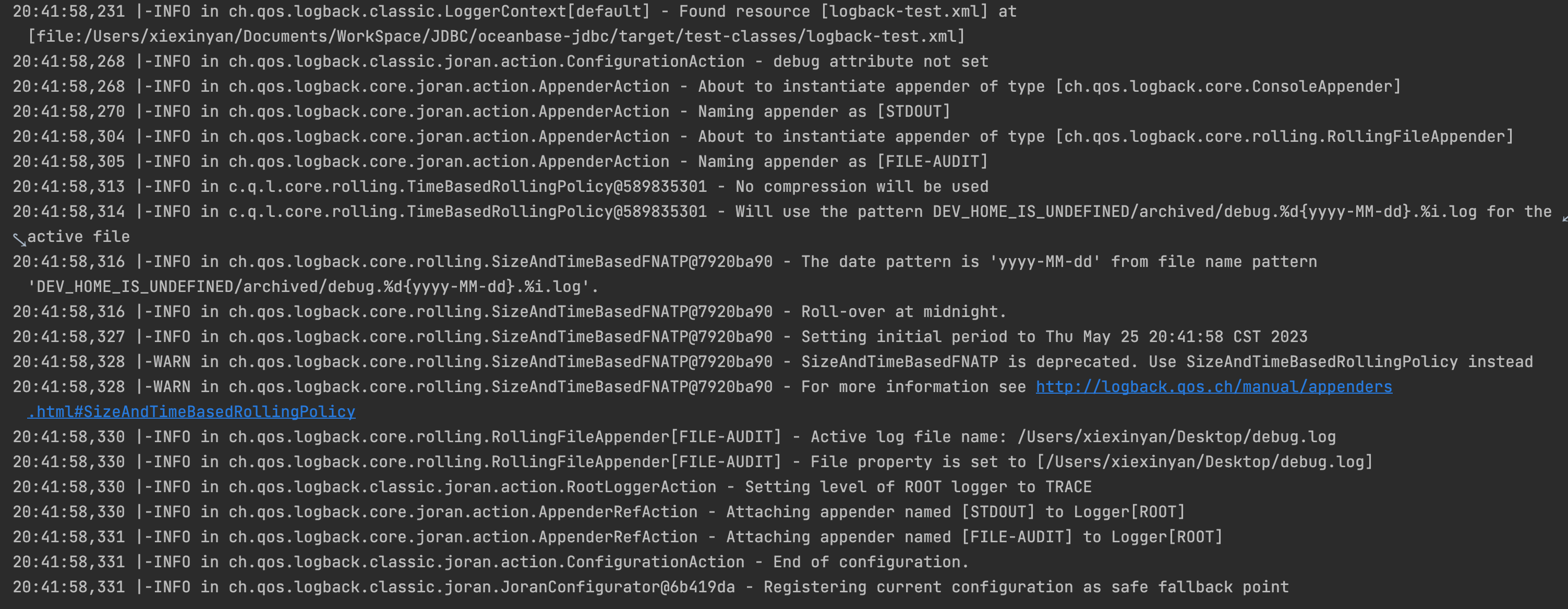
When logging is enabled, the console generates the following output:
Log configuration
General logs, I/O logs, and time consumption logs of OceanBase Connector/J record different information. Therefore, the logback.xml files for these three types of logs are configured in different ways.
General logs
General logs record the key information of corresponding log levels during operation. Log levels include DEBUG, TRACE, INFO, WARN, USER_ERR, and ERROR, which are arranged in ascending order of severity. Logs of the DEBUG level record debugging information for locating faults.
The following example shows how to configure the logback.xml file for general logs:
<?xml version="1.0" encoding="UTF-8"?>

<configuration>

    <appender name="STDOUT" class="ch.qos.logback.core.ConsoleAppender">
        <filter class="ch.qos.logback.classic.filter.ThresholdFilter">
            <level>warn</level>
        </filter>
        <encoder class="ch.qos.logback.classic.encoder.PatternLayoutEncoder">
            <pattern>%d{yyyy-MM-dd HH:mm:ss.SSS} [%thread] %-5level %logger{36} - %msg%n</pattern>
        </encoder>
    </appender>

    <property name="LOG_HOME" value="/Users/xiexinyan/Desktop"/>
    <appender name="FILE-AUDIT" class="ch.qos.logback.core.rolling.RollingFileAppender">
        <file>${LOG_HOME}/jdbc.log</file>
        <! -- ThresholdFilter: The threshold filter for filtering out TRACE and DEBUG logs. -->
        <! -- The threshold must be greater than the level of the root node. -->
        <filter class="ch.qos.logback.classic.filter.ThresholdFilter">
            <level>info</level>
        </filter>
        <encoder class="ch.qos.logback.classic.encoder.PatternLayoutEncoder">
            <pattern>%d{yyyy-MM-dd HH:mm:ss.SSS} [%thread] %-5level %logger{36} - %msg%n</pattern>
        </encoder>
        <rollingPolicy class="ch.qos.logback.core.rolling.TimeBasedRollingPolicy">
            <fileNamePattern>${DEV_HOME}/archived/debug.%d{yyyy-MM-dd}.%i.log</fileNamePattern>
            <!--Number of days that the log file is retained for-->
            <MaxHistory>30</MaxHistory>
            <timeBasedFileNamingAndTriggeringPolicy class="ch.qos.logback.core.rolling.SizeAndTimeBasedFNATP">
                <maxFileSize>100MB</maxFileSize>
            </timeBasedFileNamingAndTriggeringPolicy>
        </rollingPolicy>
    </appender>

    <! -- The root node is the ancestor of all loggers. If no level is specified for a user-defined logger, the user-defined logger searches for the parent logger for which a level is specified. The search stops when the parent logger is found. Otherwise, the root node is used as the parent logger. -->
    <root level="info">
        <appender-ref ref="STDOUT"/>
        <appender-ref ref="FILE-AUDIT"/>
    </root>

</configuration>
The following example shows some general logs:
2023-08-11 11:42:31.042 [main] ERROR c.oceanbase.jdbc.OceanBaseStatement - error executing query
java.sql.SQLSyntaxErrorException: (conn=196725) ORA-00942: table or view 'TEST.CLOBTEST1' does not exist
[xx.xxx.xxx.xxx:65000] [2023-08-11 11:42:31.182716] [YFDE80BA2DA8D-0006029ACDC86636-0-0]
    at com.oceanbase.jdbc.internal.util.exceptions.ExceptionFactory.createException(ExceptionFactory.java:110)
    at com.oceanbase.jdbc.internal.util.exceptions.ExceptionFactory.create(ExceptionFactory.java:202)
    at com.oceanbase.jdbc.OceanBaseStatement.executeExceptionEpilogue(OceanBaseStatement.java:317)
    at com.oceanbase.jdbc.OceanBaseStatement.executeInternal(OceanBaseStatement.java:491)
    at com.oceanbase.jdbc.OceanBaseStatement.execute(OceanBaseStatement.java:670)
    at com.oceanbase.jdbc.OceanBaseStatement.execute(OceanBaseStatement.java:637)
    at com.oceanbase.jdbc.BaseOracleTest.createTable(BaseOracleTest.java:430)
    at com.oceanbase.jdbc.BaseOracleTest.createTable(BaseOracleTest.java:399)
    at com.oceanbase.jdbc.ClobOracleTest.aone50824294(ClobOracleTest.java:884)
    at sun.reflect.NativeMethodAccessorImpl.invoke0(Native Method)
    at sun.reflect.NativeMethodAccessorImpl.invoke(NativeMethodAccessorImpl.java:62)
    at sun.reflect.DelegatingMethodAccessorImpl.invoke(DelegatingMethodAccessorImpl.java:43)
    at java.lang.reflect.Method.invoke(Method.java:498)
    at org.junit.runners.model.FrameworkMethod$1.runReflectiveCall(FrameworkMethod.java:59)
    at org.junit.internal.runners.model.ReflectiveCallable.run(ReflectiveCallable.java:12)
    at org.junit.runners.model.FrameworkMethod.invokeExplosively(FrameworkMethod.java:56)
    at org.junit.internal.runners.statements.InvokeMethod.evaluate(InvokeMethod.java:17)
    at org.junit.internal.runners.statements.RunBefores.evaluate(RunBefores.java:26)
    at org.junit.rules.TestWatcher$1.evaluate(TestWatcher.java:61)
    at org.junit.runners.ParentRunner$3.evaluate(ParentRunner.java:306)
    at org.junit.runners.BlockJUnit4ClassRunner$1.evaluate(BlockJUnit4ClassRunner.java:100)
    at org.junit.runners.ParentRunner.runLeaf(ParentRunner.java:366)
    at org.junit.runners.BlockJUnit4ClassRunner.runChild(BlockJUnit4ClassRunner.java:103)
    at org.junit.runners.BlockJUnit4ClassRunner.runChild(BlockJUnit4ClassRunner.java:63)
    at org.junit.runners.ParentRunner$4.run(ParentRunner.java:331)
    at org.junit.runners.ParentRunner$1.schedule(ParentRunner.java:79)
    at org.junit.runners.ParentRunner.runChildren(ParentRunner.java:329)
    at org.junit.runners.ParentRunner.access$100(ParentRunner.java:66)
    at org.junit.runners.ParentRunner$2.evaluate(ParentRunner.java:293)
    at org.junit.internal.runners.statements.RunBefores.evaluate(RunBefores.java:26)
    at org.junit.internal.runners.statements.RunAfters.evaluate(RunAfters.java:27)
    at org.junit.runners.ParentRunner$3.evaluate(ParentRunner.java:306)
    at org.junit.runners.ParentRunner.run(ParentRunner.java:413)
    at org.junit.runner.JUnitCore.run(JUnitCore.java:137)
    at com.intellij.junit4.JUnit4IdeaTestRunner.startRunnerWithArgs(JUnit4IdeaTestRunner.java:69)
    at com.intellij.rt.junit.IdeaTestRunner$Repeater$1.execute(IdeaTestRunner.java:38)
    at com.intellij.rt.execution.junit.TestsRepeater.repeat(TestsRepeater.java:11)
    at com.intellij.rt.junit.IdeaTestRunner$Repeater.startRunnerWithArgs(IdeaTestRunner.java:35)
    at com.intellij.rt.junit.JUnitStarter.prepareStreamsAndStart(JUnitStarter.java:235)
    at com.intellij.rt.junit.JUnitStarter.main(JUnitStarter.java:54)
Caused by: com.oceanbase.jdbc.internal.util.exceptions.OceanBaseSqlException: ORA-00942: table or view 'TEST.CLOBTEST1' does not exist
I/O logs
I/O logs help you diagnose communication issues on links and contain the following log levels:
DEBUGlevel: records the send and receive actions of the JDBC driver and the OB2.0 protocol packet header information.TRACElevel: records the information (hexadecimal content of packets) sent and received by the JDBC driver.
Notice
When a large number of business requests are initiated, a large number of I/O logs occupy large memory space. Therefore, we recommend that you enable I/O logging only when you diagnose communication issues on links.
To enable I/O logging, add the following code to the <configuration>...</configuration> section of the logback.xml file:
<property name="LOG_HOME" value="/Users/xxxxx/Desktop"/>
<appender name="FILE-IO-TRACE" class="ch.qos.logback.core.rolling.RollingFileAppender">
    <file>${LOG_HOME}/jdbc-io.log</file>
    <filter class="ch.qos.logback.classic.filter.ThresholdFilter">
        <!-- Do not modify the level "trace". ! -->
        <level>trace</level>
    </filter>
    <encoder class="ch.qos.logback.classic.encoder.PatternLayoutEncoder">
        <pattern>%d{yyyy-MM-dd HH:mm:ss.SSS} [%thread] %-5level %logger{36} - %msg%n</pattern>
    </encoder>
    <rollingPolicy class="ch.qos.logback.core.rolling.TimeBasedRollingPolicy">
        <fileNamePattern>${DEV_HOME}/archived/debug.%d{yyyy-MM-dd}.%i.io.log</fileNamePattern>
        <timeBasedFileNamingAndTriggeringPolicy class="ch.qos.logback.core.rolling.SizeAndTimeBasedFNATP">
            <maxFileSize>100MB</maxFileSize>
        </timeBasedFileNamingAndTriggeringPolicy>
    </rollingPolicy>
</appender>

<!-- You can set the level to "TRACE" or "DEBUG". -->
<logger additivity="false" level="debug" name="com.oceanbase.jdbc.internal.io">
    <appender-ref ref="FILE-IO-TRACE"/>
</logger>
The following example shows some I/O logs:
2023-08-11 11:42:27.506 [main] DEBUG c.o.j.i.i.i.StandardPacketInputStream - read: , packetLength = 74, packetNumber = 0
2023-08-11 11:42:27.529 [main] DEBUG c.o.j.i.i.o.StandardPacketOutputStream - prepare to send: conn=196725, packetLength = 414, packetNumber = 1
2023-08-11 11:42:27.800 [main] DEBUG c.o.j.i.i.i.StandardPacketInputStream - read: conn=196725, packetLength = 169, packetNumber = 2
2023-08-11 11:42:27.811 [main] DEBUG c.o.j.i.i.o.Ob20PacketOutputStream - prepare to send: connectionId = 196725, requestId = 13380722, obSeqNo = 0, payloadLength = 32, headerChecksum = 30977
2023-08-11 11:42:27.854 [main] DEBUG c.o.j.i.i.i.Ob20PacketInputStream - read: connectionId = 196725, requestId = 13380722, obSeqNo = 1, payloadLength = 121, headerChecksum = 50158
2023-08-11 11:42:27.855 [main] DEBUG c.o.j.i.i.i.StandardPacketInputStream - read: conn=196725(S), packetLength = 1, packetNumber = 1
2023-08-11 11:42:27.857 [main] DEBUG c.o.j.i.i.i.StandardPacketInputStream - read: conn=196725(S), packetLength = 32, packetNumber = 2
2023-08-11 11:42:27.862 [main] DEBUG c.o.j.i.i.i.StandardPacketInputStream - read: conn=196725(S), packetLength = 5, packetNumber = 3
2023-08-11 11:42:27.887 [main] DEBUG c.o.j.i.i.i.StandardPacketInputStream - read: conn=196725(S), packetLength = 58, packetNumber = 4
2023-08-11 11:42:27.888 [main] DEBUG c.o.j.i.i.i.StandardPacketInputStream - read: conn=196725(S), packetLength = 5, packetNumber = 5
2023-08-11 11:42:27.889 [main] DEBUG c.o.j.i.i.i.Ob20PacketInputStream - read: tailChecksum = 430865222
2023-08-11 11:42:27.895 [main] DEBUG c.o.j.i.i.o.Ob20PacketOutputStream - prepare to send: connectionId = 196725, requestId = 13380723, obSeqNo = 0, payloadLength = 76, headerChecksum = 21186
2023-08-11 11:42:27.942 [main] DEBUG c.o.j.i.i.i.Ob20PacketInputStream - read: connectionId = 196725, requestId = 13380723, obSeqNo = 1, payloadLength = 17, headerChecksum = 40044
...
2023-08-11 11:42:32.940 [main] DEBUG c.o.j.i.i.i.Ob20PacketInputStream - read: connectionId = 196725, requestId = 13380731, obSeqNo = 1, payloadLength = 17, headerChecksum = 21605
2023-08-11 11:42:32.942 [main] DEBUG c.o.j.i.i.i.StandardPacketInputStream - read: conn=196725(S), packetLength = 13, packetNumber = 1
2023-08-11 11:42:32.942 [main] DEBUG c.o.j.i.i.i.Ob20PacketInputStream - read: tailChecksum = 402685576
2023-08-11 11:42:32.948 [main] DEBUG c.o.j.i.i.o.Ob20PacketOutputStream - prepare to send: connectionId = 196725, requestId = 13380732, obSeqNo = 0, payloadLength = 5, headerChecksum = 55775
2023-08-11 11:42:32.957 [main] DEBUG c.o.j.i.i.o.Ob20PacketOutputStream - prepare to send: connectionId = 229404, requestId = 2876536, obSeqNo = 0, payloadLength = 5, headerChecksum = 2335
Time consumption logs
Time consumption logs record the time consumed in JDBC API calls and request execution. The log level is INFO.
To enable time consumption logging, add the following code to the <configuration>...</configuration> section of the logback.xml file:
<appender name="FILE-ELAPSED-TIME" class="ch.qos.logback.core.rolling.RollingFileAppender">
    <file>${LOG_HOME}/jdbc-cost.log</file>
    <filter class="ch.qos.logback.classic.filter.ThresholdFilter">
        <!-- Do not modify the level "info". ! -->
        <level>info</level>
    </filter>
    <encoder class="ch.qos.logback.classic.encoder.PatternLayoutEncoder">
        <pattern>%d{yyyy-MM-dd HH:mm:ss.SSS} [%thread] %-5level %logger{36} - %msg%n</pattern>
    </encoder>
    <rollingPolicy class="ch.qos.logback.core.rolling.TimeBasedRollingPolicy">
        <fileNamePattern>${DEV_HOME}/archived/debug.%d{yyyy-MM-dd}.%i.cost.log</fileNamePattern>
        <timeBasedFileNamingAndTriggeringPolicy class="ch.qos.logback.core.rolling.SizeAndTimeBasedFNATP">
            <maxFileSize>100MB</maxFileSize>
        </timeBasedFileNamingAndTriggeringPolicy>
    </rollingPolicy>
</appender>

<!-- Do not modify the level "info". ! The log level of all time consumption logs is info. -->
<logger name="JDBC-COST-LOGGER" level="info" additivity="false">
    <appender-ref ref="FILE-ELAPSED-TIME"/>
</logger>
The following example shows some time consumption logs:
2023-08-11 11:42:27.889 [main] INFO  JDBC-COST-LOGGER - ob20: SendRequest costs 1086us, ReceiveResponse costs 76647us.
2023-08-11 11:42:27.894 [main] INFO  JDBC-COST-LOGGER - JDBC4ResultSet.realClose(live for 259499us): CallInterface costs 29us.
2023-08-11 11:42:27.942 [main] INFO  JDBC-COST-LOGGER - ob20: SendRequest costs 162us, ReceiveResponse costs 47043us.
2023-08-11 11:42:28.270 [main] INFO  JDBC-COST-LOGGER - ob20: SendRequest costs 904us, ReceiveResponse costs 326589us.
2023-08-11 11:42:28.317 [main] INFO  JDBC-COST-LOGGER - ob20: SendRequest costs 86us, ReceiveResponse costs 46699us.
2023-08-11 11:42:28.362 [main] INFO  JDBC-COST-LOGGER - ob20: SendRequest costs 78us, ReceiveResponse costs 45160us.
2023-08-11 11:42:28.411 [main] INFO  JDBC-COST-LOGGER - ob20: SendRequest costs 324us, ReceiveResponse costs 41709us.
2023-08-11 11:42:28.411 [main] INFO  JDBC-COST-LOGGER - JDBC4ResultSet.realClose(live for 2764us): CallInterface costs 8us.
2023-08-11 11:42:28.561 [main] INFO  JDBC-COST-LOGGER - ob20: SendRequest costs 109us, ReceiveResponse costs 39809us.
2023-08-11 11:42:28.561 [main] INFO  JDBC-COST-LOGGER - JDBC4ResultSet.realClose(live for 7429us): CallInterface costs 6us.
2023-08-11 11:42:28.747 [main] INFO  JDBC-COST-LOGGER - ob20: SendRequest costs 134us, ReceiveResponse costs 185586us.
2023-08-11 11:42:28.785 [main] INFO  JDBC-COST-LOGGER - ob20: SendRequest costs 393us, ReceiveResponse costs 37535us.
2023-08-11 11:42:28.825 [main] INFO  JDBC-COST-LOGGER - ob20: SendRequest costs 267us, ReceiveResponse costs 38956us.
2023-08-11 11:42:28.870 [main] INFO  JDBC-COST-LOGGER - ob20: SendRequest costs 1070us, ReceiveResponse costs 43100us.
2023-08-11 11:42:28.916 [main] INFO  JDBC-COST-LOGGER - ob20: SendRequest costs 555us, ReceiveResponse costs 45157us.
2023-08-11 11:42:28.917 [main] INFO  JDBC-COST-LOGGER - JDBC4ResultSet.realClose(live for 8467us): CallInterface costs 22us.
2023-08-11 11:42:29.314 [main] INFO  JDBC-COST-LOGGER - ob20: SendRequest costs 452us, ReceiveResponse costs 45398us.
2023-08-11 11:42:29.314 [main] INFO  JDBC-COST-LOGGER - JDBC4ResultSet.realClose(live for 20197us): CallInterface costs 13us.
2023-08-11 11:42:29.357 [main] INFO  JDBC-COST-LOGGER - ob20: SendRequest costs 250us, ReceiveResponse costs 42573us.
2023-08-11 11:42:29.411 [main] INFO  JDBC-COST-LOGGER - ob20: SendRequest costs 2059us, ReceiveResponse costs 50931us.