






You can log in to the homepage of OceanBase Migration Service (OMS) Community Edition by using an external account service of the OAuth 2.0 or OpenID Connect (OIDC) type.
Background information
Single sign-on (SSO) is an authentication method that allows you to securely authenticate to OMS Community Edition. OMS Community Edition supports SSO integration with OAuth 2.0 and OIDC.
OAuth (Open Authorization) is an open standard for authorization. It allows you to authorize a third-party application to access protected information stored on a resource server without providing your username and password to the third-party application. This decouples authentication from authorization. OAuth is an international standard that is widely adopted and continuously used. OAuth 2.0 is an updated version of OAuth that is more secure and easier to implement, but it is not compatible with OAuth 1.0. OAuth defines a secure, open, and simple standard for authorizing user resources. Third-party applications can obtain user authorization information without needing the user's account and password.
OAuth 2.0 is a delegated authorization framework for REST/APIs.
OAuth 2.0 is a token-based authorization method. It allows an application to obtain limited access to user data without exposing the user's password.
OAuth 2.0 decouples authentication from authorization.
OIDC (OpenID Connect) is a secure authentication mechanism. A third-party application connects to an identity provider to obtain user information and returns this information reliably to the third-party application. OIDC extends the OAuth 2.0 protocol by adding an ID Token field that provides basic user information. ID Tokens are encapsulated in JSON Web Token (JWT) format, providing self-containment and tamper-proofing, making them safe to pass to third-party applications and easy to verify.
Principles
OAuth 2.0
OMS Community Edition is compatible with standard OAuth 2.0 authentication centers and currently only supports the authorization code (authorization-code) mode. In this mode, an application uses an authorization code to request an access token or refresh token from the authorization server.
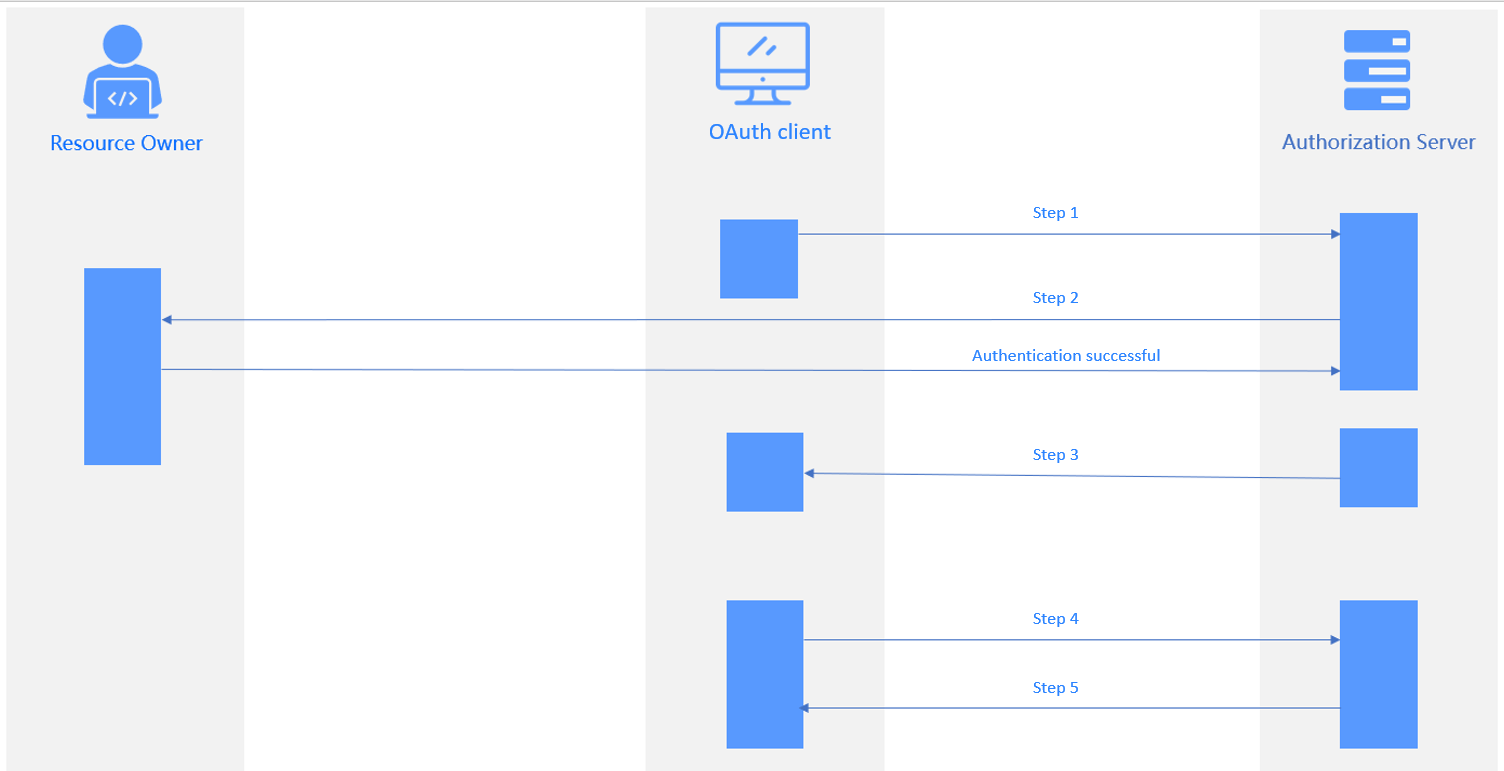
The authorization process involves the following steps:
The user logs in to the application system and requests a redirect to the authentication server, which returns a 302 response to the login authentication page.
The user enters their authentication information. The authentication server verifies the information and returns a code to the application system.
The application system uses the code to request an access token from the authentication server. The authentication server verifies the client ID and code and sends an access token to the application system.
The application system uses the access token to query the user's login information. The authentication server returns the user's information, such as the username.
The application system verifies the username and creates a session, then redirects to the
redirect_uri.
Step |
Parameter Description |
|---|---|
| Step 1 | Authorization Request
|
| Step 2 | Verify the parameters passed in Step 1. Display the login page to allow the user to authenticate. The user authorizes the client to access the resources. |
| Step 3 | Authorization Response Redirect to the redirect_uri specified in Step 1 and return the following parameters:
|
| Step 4 | Access Token Request
|
| Step 5 | Access Token Response
|
OIDC

The client sends an authentication request to the authentication service.
The user authorizes the client on the authentication page.
The authentication service verifies the authentication request and returns a code to the client.
The client requests the callback interface from the business service, including the code.
The business service requests the authentication service to issue a token, including the code, client ID, and client secret.
The authentication service verifies the request and returns an ID token.
The authentication is successful, and the business service returns the ID token to the client.
The client requests the business service, including the ID token.
The business service verifies the ID token and returns the business response.
Login scenarios
When SSO mode and local login mode are enabled, users can log in using their local account credentials or third-party account credentials.
When SSO mode is enabled and local login mode is not, users can directly log in to OMS Community Edition using third-party account credentials. During the first login, they are redirected to the third-party authorization login page. After authorization, subsequent logins are direct.
When SSO mode is not enabled, only local account credentials can be used for login.
View the SSO list
If you are logged in to OMS Community Edition as an ADMIN or ADMIN_VIEWER role, you can view the details of SSO integrations on the SSO Management page. This includes the configuration name, type, creator, creation time, last modified time, and whether local login mode is enabled. You can also perform common O&M operations. For more information, see Create an SSO integration, Enable or disable an SSO integration, Edit an SSO integration, and Delete an SSO integration.