OBLOADER & OBDUMPER V4.2.7 was released in November 2023. It allows you to write all data of a single table into one file or evenly distribute the data in multiple files based on the number of rows or the physical data size, export database object definitions and table data to Hadoop Distributed File System (HDFS), and upload database object definitions and table data to an Alibaba Cloud Object Storage Service (OSS) bucket specified by the --storage-uri option without first exporting the data to the path specified by the -f option. It also allows you to import MySQL schema definitions in a compatible mode. You can import data to an OBServer node in bypass mode and declare anonymous columns when you import data files in the POS format. Several known issues are fixed.
Version information
Current version: V4.2.7
Previous version: V4.2.6
Release date: November 28, 2023
Supported OceanBase Database versions
The following table lists the OceanBase Database versions supported by OBLOADER & OBDUMPER V4.2.7.
OceanBase Database mode |
Supported versions |
|---|---|
| Oracle mode | V2.0.x, V2.1.x, V2.2.20, V2.2.30, V2.2.50, V2.2.70, V2.2.71, V2.2.72, V2.2.76, V2.2.77, V3.1.x, V3.2.x, V4.0.0, V4.1.0, V4.2.0, and V4.2.1 |
| MySQL mode | V1.4.70, V1.4.72, V1.4.75, V1.4.78, V1.4.79, V2.2.30, V2.2.50, V2.2.70, V2.2.71, V2.2.72, V2.2.76, V2.2.77, V3.1.x, V3.2.x, V4.0.0, V4.1.0, V4.2.0, and V4.2.1 |
Considerations
The
--file-nameoption is deprecated. You can set the--block-sizeoption to0, which means that the maximum file size is not limited. This way, you no longer need to merge several sub-files exported from a single table into one file.Notice
Although OBLOADER & OBDUMPER V4.2.7 does not limit the size of individual files, some file systems or object storage services may do. For example, Alibaba Cloud OSS allows you to upload a single file of not greater than 5 GB in append mode, and an Ext2, Ext3, or Ext4 file system allows you to upload a single file of not greater than 2 TB. By default, OBDUMPER generates nested directories. You can use the
--no-nested-diroption to disable this feature.The
--upload-behavioroption is deprecated. OBDUMPER exports data to different data storage services based on the following policies:OBDUMPER directly uploads data to an HDFS storage space specified by the
--storage-urioption without first exporting the data to the path specified by the-foption.OBDUMPER directly uploads data to an OSS bucket in append mode without first exporting the data to the path specified by the
-foption.OBDUMPER exports data to the path specified by the
-foption and then uploads the data from the specified path to an Amazon Simple Storage Service (S3) bucket specified by the--storage-urioption.
When you export the data of a single schema or table, if the value of the
-for--file-pathoption is a file path, all data is exported to one file.OBDUMPER allows you to enable concurrent data writes to export the data of each table to multiple files with higher export performance. However, you cannot merge the files into one. Perform the following steps to enable concurrent data writes:
Use a text editor to open the
obdumperfile in the{ob-loader-dumper}/bin/directory.Find the Java startup parameter
-Denable.parallel.write=false, and changefalsetotrue.
Feature updates
OBLOADER:
The
_FILLERkeyword is supported for the syntax of the control file. This keyword is case-insensitive and allows you to declare anonymous columns when you import data files in the POS format. You can use the_FILLERkeyword in the control file to replace the column name and exclude a segment of bytes that you do not want to import to the target database. For example,_FILLER POSITION(5:10)specifies to skip the fifth to tenth bytes.Note
You can use this keyword to skip line breaks.
The
--compat-modeoption is supported, which allows you to import MySQL table schema definitions in a compatible mode. If you have specified this option when you import MySQL table schema definitions, OBLOADER converts the original CREATE TABLE statement to a synonymous statement that is supported by OceanBase Database in MySQL mode. Only table definitions of the MySQL database are converted. For more information, see Command-line options of OBLOADER.When you use the
--escape-characteroption to specify separators, you can use the hexadecimal characters of the separators, so that OBLOADER takes the separators as special (invisible) characters.
OBDUMPER:
Supports exporting database object structures and table data to HDFS.
The
--no-nested-diroption is supported, which allows you to export data to a non-nested directory. For more information, see Command-line options of OBDUMPER.When you use the
--escape-characteroption to specify separators, you can use the hexadecimal characters of the separators, so that OBDUMPER takes the separators as special (invisible) characters.
Bug fixes
Fixed the issue where OBLOADER reports errors if you specify the
--file-regular-expressionoption to match multiple data files and import files in the ORA or PAR format in bypass import mode.Fixed the issue where the specified
--exclude-tableoption does not take effect when you use OBLOADER to import DDL definition files from an Amazon S3 bucket.Fixed the issue where OBLOADER reports that the object name already exists if you specify the
--replace-objectoption to restore a database object.Fixed the issue where OBLOADER reports the
[WARN] Refresh observer load status failederror when you import data in bypass import mode.Fixed the issue where the Apache ORC memory leaks in the third-party database cause a null pointer when you use OBDUMPER to export data files in the ORC format.
Fixed the issue where OBDUMPER reports the
Unable to calculate MD5 hasherror when you export data to an Amazon S3 bucket.Fixed the issue where the
-fpath specified for OBLOADER or OBDUMPER does not exist, which causes a null pointer.
Known issues
The exported database object definitions may contain the name of the database to which the object belongs.
OBDUMPER cannot export PL object definitions from OceanBase Database of versions earlier than V2.2.30 in MySQL mode.
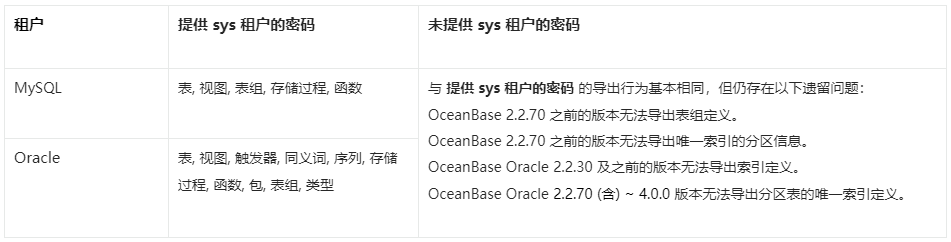
If you do not specify the password of the
systenant on the command line, OBDUMPER cannot export table group definitions from OceanBase Database of versions earlier than V2.2.70.If you do not specify the password of the
systenant on the command line, OBDUMPER cannot export index definitions from OceanBase Database of versions earlier than V2.2.50 in Oracle mode.If you do not specify the password of the
systenant on the command line, OBDUMPER cannot export partition information of unique indexes from OceanBase Database of versions earlier than V2.2.70 in Oracle mode.If you do not specify the password of the
systenant on the command line, OBDUMPER cannot export unique index definitions of partitioned tables from OceanBase Database V2.2.70 and later versions in Oracle mode.When you use OBLOADER to import data, if the specified file format, such as
--sqland--csv, does not match the actual file format, an error occurs.In MySQL mode of OceanBase Database, when you explicitly specify object names, such as the names of tables and views, in a case-sensitive manner to import or export only objects of the case-sensitive names, objects are imported or exported in a case-insensitive manner.
The JDBC high-availability mode "sequential" is unavailable for now. You can use the "loadbalance" mode instead.
If you specify the
--remove-newlineoption to remove line breaks, unexpected escape characters are generated. We recommend that you do not use this option.
Considerations
In a CUT file, each data record is stored in an entire line. When you specify the
--cutoption on the OBDUMPER command line, if the exported data contains a single-character field separator, OBDUMPER escapes special characters in the data, such as separators, carriage returns, and line breaks. For example, if the data isabc|defand the separator is|, the exported data isabc\|def.When you specify the
--cutoption on the OBLOADER command line, do not use the--trail-delimiteroption if no field separator or separator string exists at the end of the data line in the file. Otherwise, a serious error occurs on OBLOADER.If you specify the
--logical-databaseoption on the command line, the definition of a random physical database shard is exported and the shard cannot be directly imported into the database. You need to manually convert the exported physical shard to a logical one before you import it to the database for business use.When you specify the
--partitionoption on the command line to export data in a partition, you need to specify the name of the subpartition for a composite partitioned table. OBDUMPER cannot export data in a partition of a composite partitioned table. If the specified partition name does not exist, OBDUMPER returns an error.If you specify the
--add-extra-messageoption on the command line to export table definitions, OBDUMPER exports the name of the table group to which each table belongs. This option depends on privileges of thesystenant. If OBDUMPER does not have privileges of thesystenant, do not specify this option.Before you use OBDUMPER & OBLOADER on OceanBase Database V3.2.4 or later, set the system parameter
open_cursorsto a large value. Otherwise, an error may occur during the import or export. After the data is imported or exported, reset the system parameter to the initial value, such asALTER SYSTEM SET open_cursors = 65535;.If the schema of a table has been changed in OceanBase Database V4.0.0 or later, you cannot use OBDUMPER to export the baseline data obtained after the last major compaction. The baseline data is also known as the consistent snapshot data. You can manually initiate a major compaction and then export the most recent baseline data.
When you use OBDUMPER of a version earlier than V4.2.0 to export data from a MySQL tenant of OceanBase Database, the Java Database Connectivity (JDBC) driver converts the zero date and time values in the database into NULL. If a column has a NOT NULL constraint, an error is reported during the export. OBDUMPER V4.2.0 can export zero date and time values, but cannot identify whether the original data is NULL or zero values during export and forcibly converts the data into zero values by default. In addition, exported zero values of the DATETIME and TIMESTAMP data types may be distorted into non-zero approximate values. If the
sql_modevariable in the database is specified with the NO_ZERO_DATE or NO_ZERO_IN_DATE constraint, an error is reported when zero-value data is exported. In a MySQL tenant of OceanBase Database, data types that involve the preceding zero-value issues include DATE, DATETIME, TIME, YEAR, and TIMESTAMP.Feature differences in schema export, which are shown in the following figure.