OBLOADER & OBDUMPER V4.2.8 released in January 2024 supports preprocessing functions related to SM4-based encryption and decryption, date and time, and data export in fixed-length formats. This version further allows you to export table schema definitions by using the SHOW CREATE TABLE statement in OceanBase Database V4.x and export files with fixed-length fields by using the --pos option. This version improves the metadata query efficiency in Oracle tenants of OceanBase database as well as the user experience of various command-line options.
Version information
Current version: V4.2.8
Previous version: V4.2.7
Release date: January 18, 2024
Supported OceanBase Database versions
The following table lists the OceanBase Database versions supported by OBLOADER & OBDUMPER V4.2.8.
OceanBase Database mode |
Supported version |
|---|---|
| Oracle mode | V2.0.x, V2.1.x, V2.2.20, V2.2.30, V2.2.50, V2.2.70, V2.2.71, V2.2.72, V2.2.76, V2.2.77, V3.1.x, V3.2.x, V4.0.0, V4.1.0, V4.2.0, and V4.2.1 |
| MySQL mode | V1.4.70, V1.4.72, V1.4.75, V1.4.78, V1.4.79, V2.2.30, V2.2.50, V2.2.70, V2.2.71, V2.2.72, V2.2.76, V2.2.77, V3.1.x, V3.2.x, V4.0.0, V4.1.0, V4.2.0, and V4.2.1 |
Considerations
OBLOADER & OBDUMPER V4.2.8 allows you to specify the value of
-u/--userin the three-segment format of<user\>@<tenant\>#<cluster\>. For backward compatibility, you can still use the-t/--tenantand-c/--clusteroptions.When you use the
--storage-urioption in a data import/export scenario involving Alibaba Cloud Object Storage Service (OSS) or Hadoop Distributed File System (HDFS), the-f/--file-pathoption is no longer a must. OBLOADER & OBDUMPER will automatically create a temporary directory<root directory of the tool>/tmpfor storing logs and checkpoint files.Notice
This modification applies only in a debugging environment. In a production environment, we recommend that you use the
-for--log-pathoption to specify the log storage directory.The behavior for parsing POS files is changed. The parser processes a whole line. In other words, in addition to the byte length defined in the control file, the parser will further read a line break for each line. You may need to modify the control file to adapt to this change. You can run the following command to calculate the number of bytes in the first line of the
example.datfile:expr $(head -n 1 example.dat | wc -c) - 1.Schema export performance optimization is supported for OceanBase Database in Oracle mode in the following scenarios:
The
--no-sysoption is used in Oracle mode of OceanBase Database of a version earlier than V4.0.0.The
--compact-schemaoption is used in Oracle mode of OceanBase Database V4.0.0 and later.
Feature updates
OBLOADER:
Control files support the constant declaration syntax. You can declare a relative offset by using the POSITION keyword, for example,
position(3).The following preprocessing functions are supported:
sm4_encrypt: encrypts given data by using the SM4 algorithm.sm4_decrypt: decrypts encrypted data by using the SM4 algorithm.TIMESTAMP_ADD: increases or decreases values of the TIMESTAMP type. For example, you can use this function to increase the hour, minute, or day for values of a specific column.DATE_ADD: increases or decreases values of the DATE type. For example, you can use this function to increase the day, week, or month of values of a specific column.DATE_TRUNC: truncates values of the DATE type to a specific field. For example, you can use this function to truncate values of a specific column to the week, month, or year.TIMESTAMP_TRUNC: truncates values of the TIMESTAMP type to a specific field. For example, you can use this function to truncate values of a specific column to the hour, day, or month.DAY_OF_MONTH: returns the day (1 to 31) in the month for values of the TIMESTAMP type.DAY_OF_WEEK: returns the day (1 to 7) in the week for values of the TIMESTAMP type.DAY_OF_YEAR: returns the day (1 to 366) in the year for values of the TIMESTAMP type.HOUR: returns the hour (0 to 23) for values of the TIMESTAMP type.MNUTE: returns the minute (1-59) for values of the TIMESTAMP type.MONTH: returns the month (1-12) for values of the TIMESTAMP type.WEEK: returns the week (1-53) for values of the TIMESTAMP type.YEAR: returns the year for values of the TIMESTAMP type.
For more information about the new syntax and functions, see Preprocessing functions.
The
-u/--useroption supports a three-segment string value in the format of <user>@<tenant>#<cluster>. The-t/--tenantand-c/--clusteroptions are retained for backward compatibility. For more information, see Command-line options.
OBDUMPER:
Control files support the constant declaration syntax. You can declare a relative offset by using the POSITION keyword, for example,
position(3).The following preprocessing functions are supported:
sm4_encrypt: encrypts given data by using the SM4 algorithm.sm4_decrypt: decrypts encrypted data by using the SM4 algorithm.TIMESTAMP_ADD: increases or decreases values of the TIMESTAMP type. For example, you can use this function to increase the hour, minute, or day for values of a specific column.DATE_ADD: increases or decreases values of the DATE type. For example, you can use this function to increase the day, week, or month of values of a specific column.DATE_TRUNC: truncates values of the DATE type to a specific field. For example, you can use this function to truncate values of a specific column to the week, month, or year.TIMESTAMP_TRUNC: truncates values of the TIMESTAMP type to a specific field. For example, you can use this function to truncate values of a specific column to the hour, day, or month.DAY_OF_MONTH: returns the day (1 to 31) in the month for values of the TIMESTAMP type.DAY_OF_WEEK: returns the day (1 to 7) in the week for values of the TIMESTAMP type.DAY_OF_YEAR: returns the day (1 to 366) in the year for values of the TIMESTAMP type.HOUR: returns the hour (0 to 23) for values of the TIMESTAMP type.MNUTE: returns the minute (1-59) for values of the TIMESTAMP type.MONTH: returns the month (1-12) for values of the TIMESTAMP type.WEEK: returns the week (1-53) for values of the TIMESTAMP type.YEAR: returns the year for values of the TIMESTAMP type.
For more information about the new syntax and functions, see Preprocessing functions.
The
-u/--useroption supports a three-segment string value in the format of <user>@<tenant>#<cluster>. The-t/--tenantand-c/--clusteroptions are retained for backward compatibility.The
--compact-schemaoption is supported for schema export. Table definitions can be directly exported based on the return result of theSHOW CREATE TABLEstatement. This way, you do not need to query system views for the statement. You can use this option to improve the system view query performance. For more information, see Command-line options.
Note
Some table information, such as the primary zone, may be missing in the data exported by specifying this option. We recommend that you use this option only when a performance issue occurs.
Bug fixes
Fixed the issue where the
--null-stringoption does not take effect in OBLOADER when no escape character is specified.Fixed the issue where a task fails because the parser exception thrown by the OBLOADER druid process is not captured.
Fixed the issue where errors occur when the
--null-stringand--empty-stringoptions are used in OBLOADER.Fixed the issue where a syntax error is returned when a table that contains special characters is exported by using OBDUMPER in Windows.
Fixed the issue where the index information is incorrect when the schema of a temporary table is exported by using OBDUMPER.
Fixed the issue where case errors occur in the data exported by using OBDUMPER with the
--partitionoption specified.
Known issues
The exported database object definitions may contain the name of the database to which the object belongs.
OBDUMPER cannot export PL object definitions from OceanBase Database of versions earlier than V2.2.30 in MySQL mode.
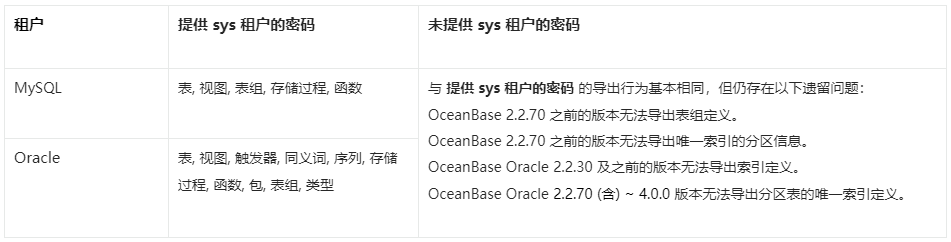
If you do not specify the password of the sys tenant on the command line, OBDUMPER cannot export table group definitions from OceanBase Database of versions earlier than V2.2.70.
If you do not specify the password of the sys tenant on the command line, OBDUMPER cannot export index definitions from OceanBase Database of versions earlier than V2.2.50 in Oracle mode.
If you do not specify the password of the sys tenant on the command line, OBDUMPER cannot export partition information of unique indexes from OceanBase Database of versions earlier than V2.2.70 in Oracle mode.
If you do not specify the password of the sys tenant on the command line, OBDUMPER cannot export unique index definitions of partitioned tables from OceanBase Database V2.2.70 and later in Oracle mode.
When you use OBLOADER to import data, if the specified file format, such as
--sqlor--csv, does not match the actual file format, an error occurs.In MySQL mode of OceanBase Database, when you explicitly specify object names, such as the names of tables and views, in a case-sensitive manner to import or export only objects of the case-sensitive names, objects are imported or exported in a case-insensitive manner.
The JDBC high-availability mode "sequential" is unavailable for now. You can use the "loadbalance" mode instead.
If you specify the
--remove-newlineoption to remove line breaks, unexpected escape characters are generated. We recommend that you do not use this option.
Considerations
In a CUT file, each data record is stored in an entire line. When you specify the
--cutoption on the OBDUMPER command line, if the exported data contains a single-character field separator, OBDUMPER escapes special characters in the data, such as separators, carriage returns, and line breaks. For example, if the data isabc|defand the separator is|, the exported data isabc\|def.When you specify the
--cutoption on the OBLOADER command line, do not use the--trail-delimiteroption if no field separator or separator string exists at the end of each data line in the file. Otherwise, a serious error occurs on OBLOADER.If you specify the
--logical-databaseoption on the command line, the definition of a random physical database shard is exported and the shard cannot be directly imported into the database. You need to manually convert the exported physical shard to a logical one before you import it to the database for business use.When you specify the
--partitionoption on the command line to export data in a partition, you need to specify the name of the subpartition for a composite partitioned table. OBDUMPER cannot export data in a partition of a composite partitioned table. If the specified partition name does not exist, OBDUMPER returns an error.When you specify the
--add-extra-messageoption on the command line to export table definitions, OBDUMPER exports the name of the table group to which each table belongs. This option depends on privileges of the sys tenant. If OBDUMPER does not have privileges of the sys tenant, do not specify this option.Before you use OBDUMPER & OBLOADER on OceanBase Database V3.2.4 or later, set the system parameter
open_cursorsto a large value. Otherwise, an error may occur during the import or export. After the data is imported or exported, reset the system parameter to the initial value, for example,ALTER SYSTEM SET open_cursors = 65535;.If the schema of a table has been changed in OceanBase Database V4.0.0 or later, you cannot use OBDUMPER to export the baseline data, namely the consistent snapshot data, obtained after the last major compaction. You can manually initiate a major compaction and then re-export the most recent baseline data.
When you use OBDUMPER of a version earlier than V4.2.0 to export data from a MySQL tenant of OceanBase Database, the Java Database Connectivity (JDBC) driver converts the zero date and time values in the database to
NULL. If a column has aNOT NULLconstraint, an error is reported during the export. OBDUMPER V4.2.0 can export zero date and time values, but cannot identify whether the original data isNULLor zero values during export and forcibly converts the data to zero values by default. In addition, exported zero values of the DATETIME and TIMESTAMP data types may be distorted into non-zero approximate values. If thesql_modevariable in the database is specified with the NO_ZERO_DATE or NO_ZERO_IN_DATE constraint, an error is reported when zero-value data is exported. In a MySQL tenant of OceanBase Database, data types that involve the preceding zero-value issues include DATE, DATETIME, TIME, YEAR, and TIMESTAMP.The following figure shows the feature differences in schema export in Oracle and MySQL tenants.