OBLOADER & OBDUMPER V4.2.4 released in July 2023 optimizes the import and export of Parquet and ORC files, the parsing mechanism for CUT files, the mechanism for handling import errors, and the processing logic for zero values of the TIME type.
Version information
Current version: V4.2.4
Previous version: V4.2.1
Release date: July 13, 2023
Supported OceanBase Database versions
The following table lists the OceanBase Database versions supported by OBLOADER & OBDUMPER V4.2.4.
OceanBase Database mode |
Supported versions |
|---|---|
| Oracle mode | V2.0.x, V2.1.x, V2.2.20, V2.2.30, V2.2.50, V2.2.70, V2.2.71, V2.2.72, V2.2.76, V2.2.77, V3.1.x, V3.2.x, V4.0.0, and V4.1.0 |
| MySQL mode | V1.4.70, V1.4.72, V1.4.75, V1.4.78, V1.4.79, V2.2.30, V2.2.50, V2.2.70, V2.2.71, V2.2.72, V2.2.76, V2.2.77, V3.1.x, V3.2.x, V4.0.0, and V4.1.0 |
Feature updates
OBLOADER:
The
--strictoption is added for you to control the impact of dirty data on the exit status of the tool. For more information, see OBLOADER error handling.The
--max-erroroption is optimized for you to specify the maximum number of errors (bad records) allowed for a single table during the import.
OBDUMPER:
The
--preserve-zero-datetimeoption is added for you to reserve the original format of zero values of the TIME type during the export. For more information, see Command-line options of OBDUMPER.The schema information is removed from the exported SQL files.
OBLOADER and OBDUMPER:
The
--character-setoption is added for you to specify the character set when you create a database connection.The file name extension of Parquet data files is changed from
.parto.parquet.
Bug fixes
Fixed an issue that when you use OBLOADER to import data, the import progress (in percentage) is not displayed.
Fixed an issue that when you use OBLOADER to import data, if the value of a NOT NULL field is NULL, the entire import task fails.
Fixed an issue that when you use OBLOADER to import DDL statements in the MIX format, if comments exist at the end of lines, the import fails.
Fixed an issue that when you fail to use OBLOADER to import dirty data, the failure is repeatedly recorded in the
ob-loader-dumper.badfile.Fixed an issue that when you use OBDUMPER to export data, comments are missing.
Fixed an issue that OBDUMPER cannot export geospatial information tables.
Fixed an issue that when you use OBDUMPER to export data from OceanBase Database in MySQL mode, an error is returned if zero values of DATETIME or TIME fields are exported.
Fixed an issue that OBDUMPER cannot export public synonyms from OceanBase Database in Oracle mode.
Fixed an issue that when you use OBDUMPER to export data, OBDUMPER fails to correctly escape the backslash () and the escape character specified by the
--escape-characteroption.Fixed an issue that when you use OBLOADER & OBDUMPER V4.0.0 or later to import or export data, the binary protocol (prepared statements) is enabled by default and cannot be disabled.
Known issues
The exported database object definitions may contain the name of the database to which the object belongs.
OBDUMPER cannot export PL object definitions from OceanBase Database of versions earlier than V2.2.30 in MySQL mode.
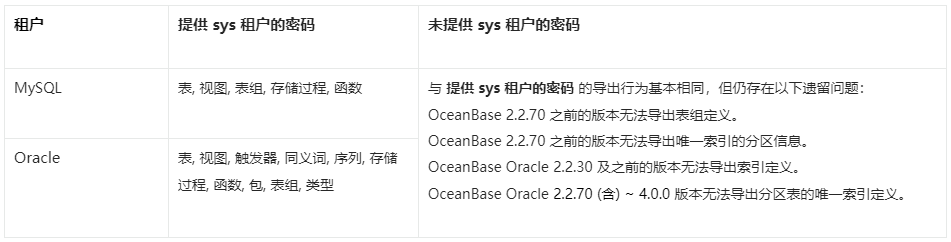
If you do not specify the password of the sys tenant on the command line, OBDUMPER cannot export table group definitions from OceanBase Database of versions earlier than V2.2.70.
If you do not specify the password of the sys tenant on the command line, OBDUMPER cannot export index definitions from OceanBase Database of versions earlier than V2.2.50 in Oracle mode.
If you do not specify the password of the sys tenant on the command line, OBDUMPER cannot export partition information of unique indexes from OceanBase Database of versions earlier than V2.2.70 in Oracle mode.
If you do not specify the password of the sys tenant on the command line, OBDUMPER cannot export unique index definitions of partitioned tables from OceanBase Database V2.2.70 and later versions in Oracle mode.
When you use OBLOADER to import data, if the specified file format, such as
--sqland--csv, does not match the actual file format, an error occurs.In MySQL mode of OceanBase Database, when you explicitly specify object names, such as the names of tables and views, in a case-sensitive manner to import or export only objects of the case-sensitive names, objects are imported or exported in a case-insensitive manner.
Considerations
In a CUT file, each data record is stored in an entire line. When you specify the
--cutoption on the OBDUMPER command line, if the exported data contains a single-character field separator, OBDUMPER escapes special characters in the data, such as separators, carriage returns, and line breaks. For example, if the data isabc|defand the separator is|, the exported data isabc\|def.When you specify the
--cutoption on the OBLOADER command line, do not use the--trail-delimiteroption if no field separator or separator string exists at the end of the data line in the file. Otherwise, a serious error occurs on OBLOADER.When you specify the
--logical-databaseoption on the command line, the definition of a random physical database shard is exported and the shard cannot be directly imported into the database. You need to manually convert the exported physical shard to a logical one before you import it to the database for business use.When you specify the
--partitionoption on the command line to export data in a partition, you need to specify the name of the subpartition for a composite partitioned table. OBDUMPER cannot export data in a partition of a composite partitioned table. If the specified partition name does not exist, OBDUMPER returns an error.When you specify the
--add-extra-messageoption on the command line to export table definitions, OBDUMPER exports the name of the table group to which each table belongs. This option depends on privileges of the sys tenant. If OBDUMPER does not have privileges of the sys tenant, do not specify this option.Before you use OBDUMPER & OBLOADER on OceanBase Database V3.2.4 or later, set the system parameter
open_cursorsto a large value. Otherwise, an error may occur during the import or export. After the data is imported or exported, reset the system parameter to the initial value, for example,ALTER SYSTEM SET open_cursors = 65535;.If the schema of a table has been changed in OceanBase Database V4.0.0 or later, you cannot use OBDUMPER to export the baseline data, namely the consistent snapshot data, obtained after the last major compaction. You can manually initiate a major compaction and then re-export the most recent baseline data.
When you use OBDUMPER of a version earlier than V4.2.0 to export data from a MySQL tenant of OceanBase Database, the Java Database Connectivity (JDBC) driver converts the zero date and time values in the database to NULL. If a column has a NOT NULL constraint, an error is reported during the export. OBDUMPER V4.2.0 can export zero date and time values, but cannot identify whether the original data is NULL or zero values during export and forcibly converts the data to zero values by default. In addition, exported zero values of the DATETIME and TIMESTAMP data types may be distorted into non-zero approximate values. If the
sql_modevariable in the database is specified with the NO_ZERO_DATE or NO_ZERO_IN_DATE constraint, an error is reported when zero-value data is exported. In a MySQL tenant of OceanBase Database, data types that involve the preceding zero-value issues include DATE, DATETIME, TIME, YEAR, and TIMESTAMP.Feature differences in schema export