







When you import data to OceanBase Database, you must use different data import strategies based on different data import requirements, such as immediate import and delayed import. This topic describes how to import data to OceanBase Database in the T+0 and T+1 scenarios, and provides examples of best practices.
Background information
In the T+0 scenario, data is processed and imported immediately after it is generated. In this scenario, the system must support highly concurrent data write operations and ensure real-time performance and immediate availability of data.
In the T+1 scenario, data is processed and imported on the next business day after it is generated. T+1 indicates one day after the transaction day. The T+1 scenario requires lower real-time performance than the T+0 scenario.
Import baseline data
Baseline data is initial datasets generated for a system or project at a specific point in time or under a specific condition. It indicates the initial status or performance of the system and provides reference for comparison with future changes. OceanBase Database provides the following baseline data import solutions:
Online data migration between databases
If OceanBase Migration Service (OMS) supports your data source, we recommend that you use OMS to import data. If OMS does not support your data source, you can use DataX to import data, or import data offline.
For more information about OMS, see OMS documentation.
For more information about DataX, see DataX documentation.
Offline data migration from files to databases
If OMS does not support your data source, you can export the data as an offline file and then import it by using :obloader, DataX, or the
LOAD DATAstatement. :obloader supports direct load, which can improve data import efficiency.- For more information about :obloader, see :obloader documentation.
- For more information about DataX, see DataX documentation.
- For more information about the
LOAD DATA LOCALstatement, see LOAD DATA (Oracle mode) and LOAD DATA (MySQL mode).
Import incremental data
T+0 scenario
In this scenario, data is processed and imported immediately after it is generated. You can use the incremental migration feature of OMS to import data to OceanBase Database in real time, or use a third-party integrated tool such as Flink or DataX to import data. DataX and OMS support only data import. Flink supports real-time data processing such as data widening and aggregation, as well as downstream storage, analytics, and servicing.
T+1 scenario
In this scenario, data is processed and imported on the next business day after it is generated. You can improve data import efficiency through batch processing:
Offline data processing
You can batch process data generated within one day and batch import it to OceanBase Database during off-peak hours to reduce impact on your business. You can use the incremental migration feature of OMS to import data to OceanBase Database on the next business day, or use a third-party integrated tool such as Flink or DataX to import data. For example, you can use DataX to synchronize full data from your business database on a daily basis as scheduled.
Exchange partitions
Assume that the destination table is a partitioned table that contains data. For example, the destination table is partitioned by using the date as the partitioning key. In this case, create a non-partitioned table that has the same schema as the destination table, insert data into the table, and execute the partition exchange statement to exchange data between the two tables.
Efficiency of directly importing new data to a partitioned table that contains data can be low. To improve data import efficiency, you can use the partition exchange feature. The partition exchange procedure is as follows:
- Create a non-partitioned temporary table that has the same schema as the destination partitioned table.
- Insert the to-be-imported data into the temporary table.
- Execute the partition exchange statement to exchange data between the temporary table and a specific partition of the destination partitioned table.
For more information, see Exchange partitions (MySQL mode) and Exchange partitions (Oracle mode).
Best practices
Build a real-time data warehouse based on DataX and Flink SQL
You can migrate data in the following ways:
Historical data
Use DataX to export historical data as a CSV file and then import it to OceanBase Database. When you use DataX to export a CSV file, we recommend that you use port 2881 in the configuration file to directly connect to OceanBase Database. If you use port 2883, namely, OceanBase Database Proxy (ODP), commands may be distributed to another server. If DataX is not deployed on the another server and the server does not store CSV files, the file cannot be found.
Real-time data
Use Flink SQL to extract real-time data and write the extracted data to OceanBase Database to achieve milliseconds-level response. Tests show that data can be loaded to OceanBase Database within 1s after it is generated.
Build a real-time data warehouse based on Flink CDC and OceanBase Database
This section describes how to build a real-time data warehouse in OceanBase Database by using the streaming online analytical processing (OLAP) solution. The hybrid transactional and analytical processing (HTAP) feature of OceanBase Database supports hybrid row-column storage. Therefore, OceanBase Database supports transaction processing and complex analytics in one system.
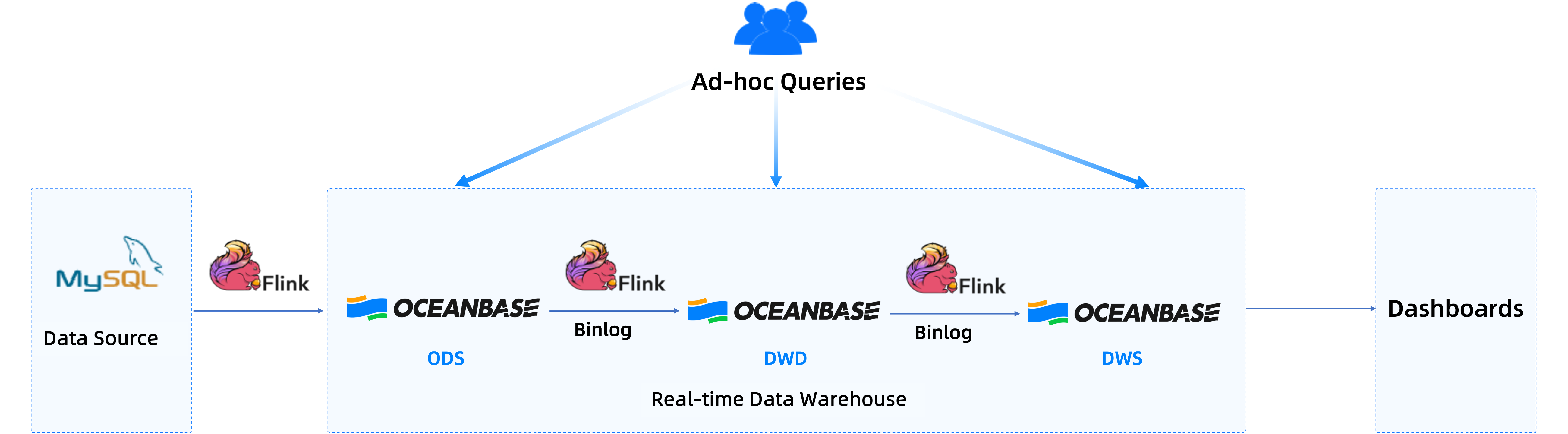
Flink Change Data Capture (CDC) can synchronize full data and incremental data from a MySQL database to OceanBase Database to generate an operational data store (ODS) layer for downstream subscription. In addition, Flink CDC reads data for processing and widening and writes the processed data to OceanBase Database to generate a data warehouse detail (DWD) layer. Then the data is aggregated to generate a data warehouse service (DWS) layer. This way, OceanBase Database can provide query services and support data consumption. In this solution, OceanBase Database substitutes the key-value (KV) service, analytics service, and Kafka. Each layer of OceanBase Database is queryable, updatable, and correctable. Therefore, when data errors occur at a specific layer, you can directly check the table data at the layer and correct the data, achieving efficient troubleshooting.
The following example aggregates order details, writes them to the statistics table at the DWS layer, and then queries the daily sales volume of each shop.
Define a table named
dwd_ordersas the data source for OceanBase CDC.CREATE TABLE dwd_orders ( order_id BIGINT, order_user_id BIGINT, order_shop_id BIGINT, order_product_id VARCHAR, order_fee DECIMAL(20,2), order_updated_time TIMESTAMP(3), pay_id BIGINT, pay_create_time TIMESTAMP(3), PRIMARY KEY (order id) NOT ENFORCED ) WITH ( 'connector' = 'oceanbase-cdc', 'scan.startup.mode' = 'initial', 'username' = 'user@test_tenant', 'password' = 'pmsd', 'tenant-name' = 'test_tenant', 'database-name' = 'test_db', 'table-name' = 'orders', 'hostname' = '127.0.0.1', 'port' = '2881', 'rootserver-list' = '127.0.0.1:2882:2881', 'logproxy.host' = '127.0.0.1', 'logproxy.port' = '2983' );Use Flink CDC to count the sales volumes of shops and write data from a Java Database Connectivity (JDBC) table to a table in OceanBase Database to generate a shop metric statistics layer.
CREATE TABLE dws_shops (
shop_id BIGINT,
ds STRING,
-- Total amount paid on the day
paid_buy_fee_sum DECIMAL(20, 2),
PRIMARY KEY(shop_id,ds) NOT ENFORCED
) WITH (
'connector' = 'jdbc',
'url' = 'jdbc:mysql://localhost:3306/mydatabase',
'table-name' = 'shops',
'username' = 'user@test_tenant',
'password' = 'pswd'
);
Read full data and incremental data from the
dwd_orderstable in real time, and aggregate and process the data in real time. Then write the data to thedws_shopstable in OceanBase Database. Thedws_shopstable can be read and processed by another Flink process to generate a results table for the next layer. This way, layers of the entire streaming data warehouse are built.INSERT INTO dws_shops SELECT order_shop_id, date_format(pay_create_time, 'yyyyMMdd') AS ds, -- Change the date format. SUM(order_fee) AS paid_buy_fee_sum FROM dwd_orders WHERE pay_id IS NOT NULL AND order_fee IS NOT NULL GROUP BY order_shop_id, date_format(pay_create_time, 'yyyyMMdd');
Considerations
We recommend that you initiate a full major compaction after you import data, to improve query performance.
Batch import
Initiate a major compaction after the import is completed.
Real-time import
Initiate a major compaction each time the import is completed. If real-time import is performed continuously without occasions for human intervention, the system will automatically schedule major compactions.