







Hints are special comments in SQL statements to convey specific information to the database. OceanBase Database allows you use hints to affect optimizer behavior so that the optimizer generates execution plans in the formats specified by the hints.
Usually, the optimizer automatically selects the optimal execution plan for your query. In this case, you do not need to specify a hint. However, if the execution plan automatically generated by the optimizer does not meet your needs, you can use a hint to specify to generate a special execution plan.
We recommend that you do not use hints during query optimization. We recommend that you use hints with caution only after you collect statistics on related tables and execute the EXPLAIN PLAN statement without hints to assess the plan generated by the optimizer. Note that the hints only forcibly affect the normal optimization logic of the optimizer. You must manually assess the query performance after the hints take effect. Improper use of hints has significant impact on performance.
Common hints
USE_PLAN_CACHE
Description
The USE_PLAN_CACHE hint specifies the strategy for using the plan cache.
Scenario
In an analytical processing (AP) system, some SQL statements contain parameters with different cardinalities, and these parameters cannot share an optimal plan. In this case, you can use the USE_PLAN_CACHE hint to specify not to use shared execution plans in the plan cache for such statements, but to generate an execution plan each time based on specific parameters.
Example
The hint in the following statement specifies not to apply the plans in the plan cache to the current SQL statement or store the generated plan to the plan cache.
SELECT /*+USE_PLAN_CACHE(NONE)*/ *
FROM T1
WHERE user_id = 123456
  and create_time > date(date_sub(now(), interval 1 day)));
PARALLEL
Description
The PARALLEL hint specifies the degree of parallelism (DOP) at the query level.
Scenario
You can specify a DOP for an SQL query so that the query is executed by multiple threads in parallel to improve query performance.
Example
The hint in the following statement specifies to enable parallel execution for the current SQL query with a DOP of 8.
SELECT /*+PARALLEL(8)*/ *
FROM T1
WHERE user_id = 123456
  and create_time > date(date_sub(now(), interval 1 day)));
INDEX
Description
The INDEX hint specifies an index to be used for a table in a query.
Scenario
You can use the INDEX hint to specify an index to be used for a table in a query when you are certain that a specific index has excellent filtering performance and the optimizer will not select this index by default or when you are certain that a specific index has poor filtering performance and the optimizer will select this index by default.
Example
The hint in the following statement specifies to use the IDX_USER_ID index when the current SQL query reads data from the T1 table.
SELECT /*+INDEX(T1 IDX_USER_ID)*/ *
FROM T1
WHERE user_id = 123456
  and create_time > date(date_sub(now(), interval 1 day)));
LEADING
Description
The LEADING hint specifies the join order of tables.
Scenario
The optimizer may generate a non-optimal join order due to expiration of statistics, relevance between join predicates, or uneven distribution of data. For example, a join result of two tables will contain a few rows, but the optimizer does not join the two tables first; or a join result of two tables will contain many rows, but the optimizer chooses to join the two tables first. In this case, you can use the LEADING hint to specify the join order of tables so that joins with higher filtering performance are executed first.
Example
The hint in the following statement specifies to first join the T1 table with the join result of the T4 and T2 tables and then join the join result with the T3 table. The join tree generated by this hint is shown below.
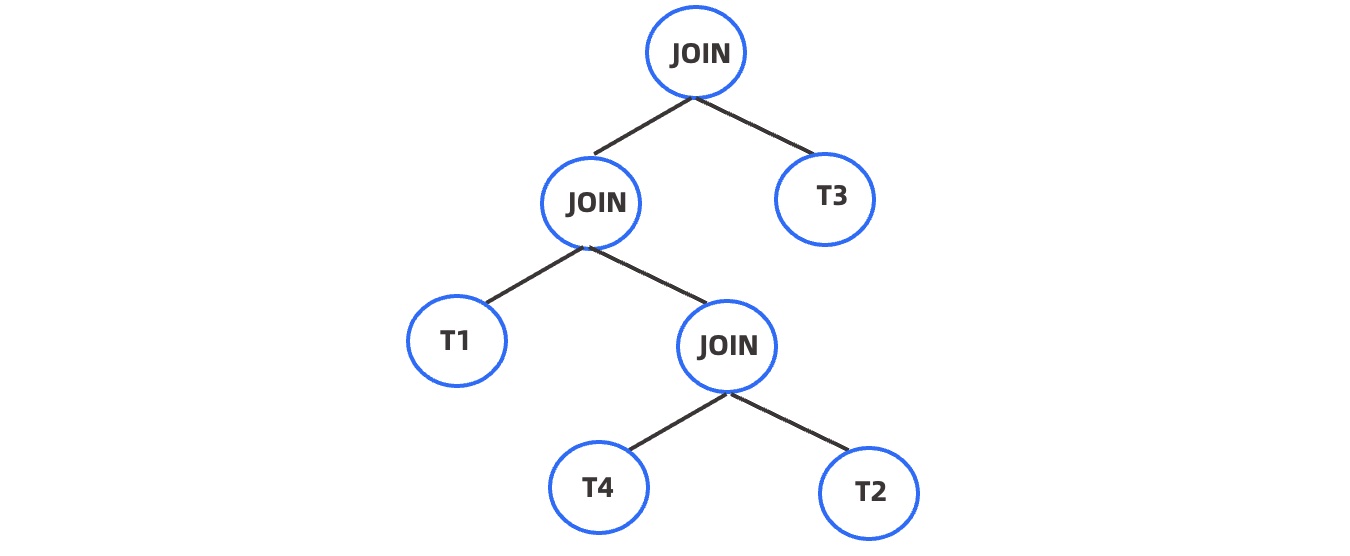
SELECT /*+leading(T1 (T4 T2) T3)*/ *
FROM T1, T2, T3, T4
WHERE T1.id = T2.id
  and T2.id = T3.id
  and T3.id = T4.id;
USE_MERGE/USE_HASH/USE_NL
Description
The USE_MERGE, USE_HASH, and USE_NL hints specify to use the merge, hash, and nested loop join algorithms respectively when the specified table is a right-side table.
Scenario
The optimizer may select a wrong join algorithm if it incorrectly estimates the number of rows in the join driving table, which seriously affects the join performance. In this case, you can use the USE_MERGE, USE_HASH, or USE_NL hint to specify a join algorithm. Note that these hints specify the join algorithm to be used when the specified table is a right-side table and therefore must be used with the LEADING hint.
Example
The hint in the following example specifies to use the hash join algorithm to join the T1 and T2 tables with the T1 table as the driving table and the T2 table as the right-side table.
SELECT /*+leading(T1 T2) USE_HASH(T2)*/ *
FROM T1, T2
WHERE T1.id = T2.id;
PX_JOIN_FILTER
Description
The PX_JOIN_FILTER hint specifies to use a join filter in the hash join algorithm.
Scenario
You can use join filters to reduce the amount of data transmitted for joined tables in AP queries to improve the execution performance. You can use the PX_JOIN_FILTER hint to specify to use a join filter when the specified table is a right-side table in a hash join.
Example
The hint in the following statement specifies to use the hash join algorithm to join two tables and allocate a join filter to the T2 table.
SELECT /*+leading(T1 T2) USE_HASH(T2) PX_JOIN_FILTER(T2)*/ *
FROM T1, T2
WHERE T1.id = T2.id;